
The Best Budget Laser Engraver in 2025: Precision, Affordability, and Versatility for Every Creator
Unlocking Creativity: Affordable Laser Engraving Solutions for Every Maker in 2025

Laser engraving has transformed from an industrial niche into a creative powerhouse accessible to hobbyists, small business owners, and DIY enthusiasts worldwide. In 2025, the market is buzzing with options, but for those seeking quality without breaking the bank, budget laser engravers offer an enticing entry point. Whether you're etching personalized gifts, prototyping designs, or launching a side hustle, finding the right machine can feel overwhelming. This article dives deep into the world of budget laser engravers, spotlighting top models, comparing their specs, and guiding you toward the perfect pick—all while keeping your wallet happy.
With the global laser engraving market projected to grow from $2.9 billion in 2024 to $5.86 billion by 2031 (Verified Market Research), affordability doesn’t mean compromising on capability. Let’s explore the best budget laser engravers of 2025, blending precise data, practical insights, and a global perspective to empower creators everywhere.
Why Budget Laser Engravers Matter in 2025

The appeal of budget laser engravers lies in their democratization of creativity. Once reserved for well-funded workshops, these machines now bring precision and versatility to home studios across continents. In 2025, advancements in diode laser technology—coupled with competitive pricing—mean you can engrave wood, leather, acrylic, and even some metals for under $500. For global consumers, this affordability aligns with diverse needs: from crafting holiday ornaments in North America to customizing leather goods in Southeast Asia.
Consider the numbers: entry-level laser engravers now average $280, down from $510 five years ago (STYLECNC, 2025). This price drop reflects increased demand and manufacturing efficiency, making 2025 an ideal year to invest. But affordability isn’t the only factor—performance, ease of use, and safety are equally critical, especially for beginners or small-scale entrepreneurs.
Top Budget Laser Engravers: A Detailed Comparison
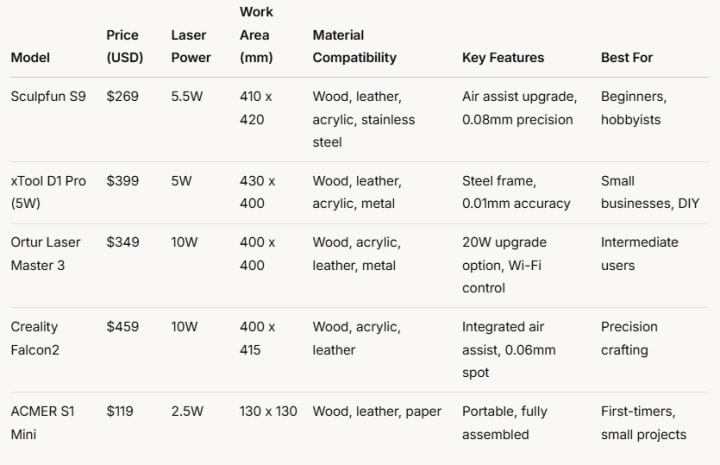
To cut through the noise, we’ve evaluated five standout budget laser engravers based on power, work area, material compatibility, and value for money. Below is a structured comparison table followed by in-depth analysis.
Sculpfun S9: The Beginner’s Champion
At $269, the Sculpfun S9 delivers a 5.5W diode laser capable of engraving wood up to 15mm thick and even stainless steel with multiple passes. Its 410 x 420mm work area is generous for the price, and the optional air assist enhances cutting efficiency. With a laser spot size of 0.08mm, it excels at detailed designs—think intricate coasters or custom keychains. It’s a top pick for newcomers seeking value, though it lacks the raw power for thicker cuts.
xTool D1 Pro (5W): Durability Meets Precision
Priced at $399, the xTool D1 Pro stands out with its steel frame and 0.01mm precision—ideal for consistent results across wood, leather, and thin metals. The 5W laser cuts 6mm basswood in one pass, while its 430 x 400mm workspace suits medium-sized projects like signage. Its user-friendly XCS software appeals to global users, from European crafters to American Etsy sellers. For a deeper dive, check out this comprehensive review of budget laser engravers.
Ortur Laser Master 3: Scalable Power
The Ortur Laser Master 3 ($349) offers a 10W laser with a 400 x 400mm area, plus the option to upgrade to 20W. It’s versatile—engraving metal and cutting 10mm plywood—while Wi-Fi connectivity adds convenience for tech-savvy users worldwide. Assembly takes patience, but the payoff is a machine that grows with your skills, perfect for intermediate creators in Asia or Africa launching micro-businesses.
Creality Falcon2: High Precision, Higher Potential
At $459, the Creality Falcon2 boasts a 10W laser with a 0.06mm spot size and integrated air assist, ensuring clean cuts through 12mm wood or 8mm acrylic. Its 400 x 415mm workspace suits detailed work like jewelry or home décor. While pricier, its build quality and precision make it a favorite for precision-driven crafters globally.
ACMER S1 Mini: Pocket-Sized Power
For just $119, the ACMER S1 Mini (2.5W) targets beginners with a compact 130 x 130mm work area. Fully assembled and lightweight at 1.5kg, it’s portable enough for travel or small apartments—ideal for engraving leather wallets or wooden tags. Its limitations? Power and size restrict it to thin materials and small projects.
How These Engravers Tie Into the Budget Theme
Each of these machines aligns with the “best budget laser engraver” ethos by balancing cost and capability. The Sculpfun S9 and ACMER S1 Mini prioritize affordability for entry-level users, offering enough power for basic tasks like gift personalization. The xTool D1 Pro and Ortur Laser Master 3 cater to those willing to spend slightly more for durability and scalability—key for turning hobbies into income streams. The Creality Falcon2, while pushing the budget ceiling, delivers professional-grade precision for creators worldwide who need reliability without a $1,000+ investment. Together, they prove that budget doesn’t mean basic.
Real-World Use Cases: Bringing Ideas to Life

Imagine you’re a small business owner in Brazil crafting wooden coasters for a local café. The Sculpfun S9’s affordability and large work area let you produce dozens in a day, keeping costs low. Or picture a teacher in India engraving educational tools on acrylic—the xTool D1 Pro’s precision ensures clarity, while its sturdy frame withstands classroom use. For a UK Etsy seller, the Ortur Laser Master 3’s metal-engraving capability opens up jewelry sales, scalable with the 20W upgrade. These scenarios highlight how budget engravers adapt to diverse global needs, from profit to passion.
Maintenance and Care: Keeping Your Engraver in Top Shape
A budget laser engraver is an investment, and proper care extends its life. Here’s how to maintain these machines:
Lens Cleaning: Use a microfiber cloth and 99% isopropyl alcohol to wipe the laser lens weekly, removing dust and residue that blur focus. For the xTool D1 Pro, this takes five minutes.
Ventilation: Ensure proper airflow to avoid overheating. The Creality Falcon2’s air assist doubles as a debris clearer—run it during cuts.
Frame Check: Tighten screws monthly, especially on the Ortur Laser Master 3 after assembly, to prevent wobble.
Cooling: Keep diode lasers below 30°C (86°F). In humid climates like Southeast Asia, a small fan helps.
Software Updates: Regularly update firmware (e.g., Sculpfun S9 via LaserGRBL) for optimal performance.
Neglect these, and you risk faded engravings or motor strain—costly fixes for a budget buy.
Factors for Global Consumers
Budget laser engravers must resonate with a worldwide audience. Voltage compatibility (110-240V) ensures use from Japan to Germany. Compact designs like the ACMER S1 Mini suit urban dwellers in cramped Hong Kong flats, while larger models like the xTool D1 Pro fit suburban garages in Australia. Software in multiple languages (e.g., xTool’s XCS) bridges cultural gaps, and affordable shipping—often free on platforms like AliExpress—makes these accessible to remote regions in South America or Africa. Safety certifications (CE, FCC) also reassure users globally.

Comprehensive FAQ: Your Questions Answered
1. What’s the best budget laser engraver for beginners?
The Sculpfun S9 ($269) is ideal, with a low price, large 410 x 420mm work area, and simple setup. Its 5.5W laser handles wood and leather easily, perfect for learning.
2. Can budget laser engravers cut metal?
Not directly—most diode lasers (e.g., 5-10W) engrave metals like stainless steel but lack the power to cut. The Ortur Laser Master 3’s 10W option marks metal well after multiple passes.
3. How long do budget laser engravers last?
With proper care, expect 10,000-20,000 hours of laser life. The xTool D1 Pro’s diode, for instance, lasts years with occasional use, though heavy daily operation may shorten this.
4. Are these machines safe for home use?
Yes, if ventilated and used with safety glasses (included with most models). The Creality Falcon2’s enclosed air assist reduces fumes, a plus for indoor settings.
5. What software do I need?
Most support free options like LaserGRBL or LightBurn ($60 lifetime). The xTool D1 Pro includes XCS, a beginner-friendly choice. Check compatibility—e.g., Sculpfun S9 works with both.
Conclusion: Your Path to Precision on a Budget
In 2025, budget laser engravers are more than tools—they’re gateways to creativity and entrepreneurship. The Sculpfun S9 offers unbeatable value for beginners, while the xTool D1 Pro and Ortur Laser Master 3 cater to growing ambitions. The Creality Falcon2 brings precision to the table, and the ACMER S1 Mini proves small can be mighty. For more insights, explore this detailed budget laser engraver review.
Whether you’re in Toronto, Tokyo, or Timbuktu, these machines deliver quality without the cost. Pick one, maintain it well, and let your ideas shine—because great craftsmanship shouldn’t come with a hefty price tag.
About the Creator
21 Freelancing Tips to Build a Successful Career (From Someone Who Actually Did It)
TL;DR version (60 seconds read time) + Paypal receipt at the end of the blog. I’ve made thousands of dollars with freelancing. See screenshots at the end of the post. Everything I say to you, I’ve tested it first on myself.
By Dena Falken Esq4 days ago in Art
A Dummies Guide to UX Basics
Designing a website that incorporates UX design elements is becoming more in demand as businesses begin to understand the importance of UX. Having useless bells and whistles on your website, no longer makes it a good design. Creating the right balance between an excellent user experience and the functionality of the site for your business goals is paramount.
By Dena Falken Esq4 days ago in Art


Comments
There are no comments for this story
Be the first to respond and start the conversation.