
Mastering Exposure Times: How a Screen Printing Exposure Calculator Saves Your Screens
A simple tool that eliminates guesswork, saves money, and helps you achieve sharper, professional-quality screen prints.

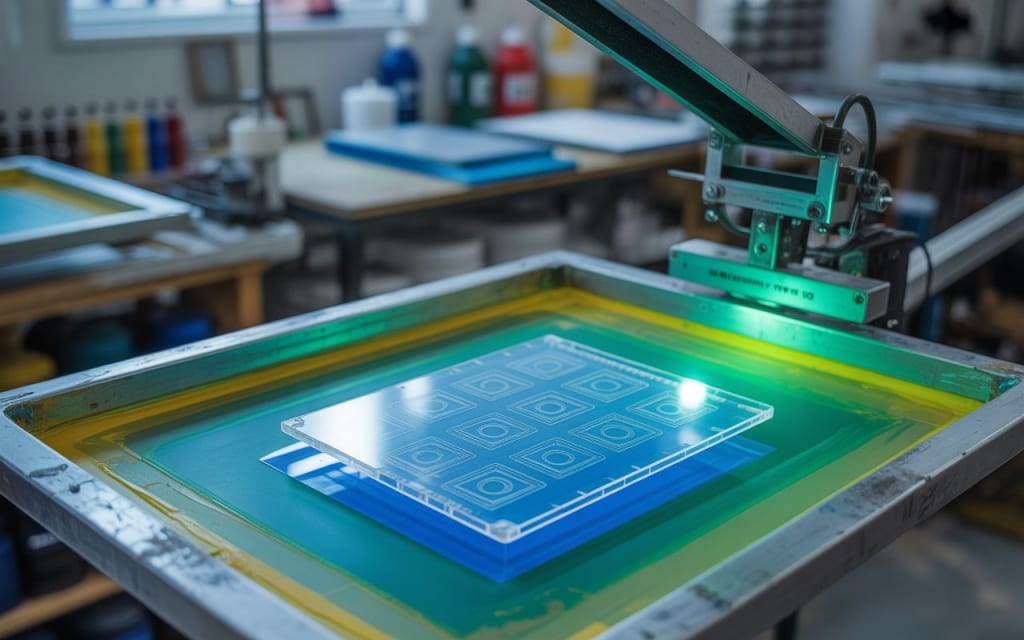
If you’ve spent any time in screen printing, you know one thing for sure: getting your exposure times right can make or break your print. Too little exposure, and your stencil washes away. Too much, and your details get lost. For many printers, figuring out exposure times can feel like a frustrating guessing game that wastes screens, emulsion, ink, and—most importantly—your time.
That’s where the screen printing exposure calculator comes in. It’s a small, inexpensive tool that has the power to save you from countless headaches and wasted materials. In this article, we’ll break down why exposure times matter, how the calculator works, and how it can help you level up your printing game.
Why Exposure Times Are So Important
At its core, screen printing is all about transferring your design onto a screen coated with emulsion. That emulsion needs to be exposed to UV light so it hardens and forms the stencil. If your exposure time is wrong, the emulsion doesn’t behave as it should.
Underexposed screens: These haven’t gotten enough light. When you wash them out, the emulsion continues to dissolve. The result? Your image might blow out, fine details disappear, or worse—you lose the whole stencil.
Overexposed screens: These have been hit with too much light. The emulsion hardens so much that it’s nearly impossible to wash out the image areas. You end up with a clogged screen that won’t print.
Neither scenario is ideal. And if you’re running a shop, every ruined screen means money lost.
The Old Way: Guesswork and Waste
Without a calculator, many printers test exposure times through trial and error. You might expose a screen at five minutes, wash it out, see what happens, and adjust up or down on the next one.
But here’s the problem—different emulsions, mesh counts, and light sources all affect the ideal exposure time. What works for one setup may fail miserably for another. If you change anything in your shop—bulbs, emulsion type, or even the distance between your light source and screen—you need to recalibrate.
Trial and error might get you there eventually, but you’ll go through screens, emulsion, and plenty of frustration before you find the sweet spot.
Enter the Exposure Calculator
The screen printing exposure calculator takes the guesswork out of the equation. It’s a thin, transparent sheet printed with a test design and a filter. When you expose it on your screen, the calculator divides the exposure time into different segments. Each section of the design receives a slightly different amount of light.
After washing out the screen, you can compare the results. One section will look just right: the details are crisp, the emulsion is durable, and the stencil washes out perfectly. That’s your ideal exposure time.
Instead of burning through five or six test screens, you only need one. The calculator shows you the exact settings you need for your unique setup.
How to Use a Screen Printing Exposure Calculator
Here’s a quick step-by-step guide:
Coat your screen with emulsion as you normally would and let it dry completely.
Place the exposure calculator on the coated screen, usually in the center.
Expose the screen under your light source for a set time—often longer than your estimated guess since the calculator will break it down into shorter intervals.
Wash out the screen and take a look.
Examine the results: The calculator will show you multiple “versions” of exposure on one screen. The section that reveals sharp detail without over- or underexposure tells you your perfect exposure time.
It’s that simple.
The Benefits of Using a Calculator
1. Save Money on Materials
Every ruined screen costs you emulsion, mesh, and time. By dialing in exposure times quickly, you avoid wasting supplies.
2. Consistency Across Jobs
Once you’ve found your perfect time, you can replicate it across multiple screens and jobs. No more surprises halfway through production.
3. Sharper Prints with More Detail
Exposure calculators help you capture fine lines, halftones, and small text that might otherwise get lost. If you’re pushing for high-quality, professional prints, this tool is a must.
4. Less Frustration, More Productivity
Instead of standing at the washout booth wondering what went wrong, you’ll know your exposure is dialed in. That peace of mind frees you to focus on creativity and production.
When Should You Use It?
Even if you’ve been printing for years, there are moments when recalculating exposure is smart:
When switching emulsions
When changing your light source or bulbs
When moving your exposure unit
When printing on a new mesh count
Basically, anytime your setup changes, it’s a good idea to run a test with the calculator. Think of it as a tune-up for your shop.
Pro Tips for Best Results
Follow emulsion manufacturer recommendations: Each brand usually gives a starting exposure time. Use that as your baseline with the calculator.
Keep your distance consistent: The distance from your light source to your screen matters a lot. Once you’ve set it, stick with it.
Store your calculator carefully: Since it’s reusable, keep it clean and flat so it lasts for years.
Take notes: Keep a log of your exposure times for different emulsions and mesh counts. Future you will thank you.
Why Every Printer Should Own One
Whether you’re a hobbyist printing in your garage or a professional running a busy shop, the screen printing exposure calculator is one of the most cost-effective tools you can own. For less than the price of a few ruined screens, you can save yourself hours of troubleshooting and produce higher-quality prints every single time.
Think of it like this: if screen printing is part art and part science, the exposure calculator is your scientific measuring stick. It removes the uncertainty and lets your creativity shine through without technical setbacks.
Final Thoughts
Exposure is one of the trickiest parts of screen printing, but it doesn’t have to be. With a screen printing exposure calculator, you can eliminate guesswork, save money, and achieve professional-quality prints with confidence.
So, if you’re tired of overexposed screens, washed-out stencils, and wasted supplies, it’s time to grab this small but mighty tool. Master your exposure times, and you’ll spend less time troubleshooting—and more time doing what you love: creating amazing prints.
About the Creator
Alisa cristine
I’m a fashion & lifestyle enthusiast sharing the latest trends, styling tips, and creative T-shirt printing ideas to make everyday fashion fun, bold, and uniquely you.
Keep reading
More stories from Alisa cristine and writers in Art and other communities.
What Is the Difference Between Gel Ink and Water-Based Ink?
Whether you're jotting notes, creating art, or running a print-based business, the type of ink you choose plays a major role in the quality and outcome of your work. Two of the most common ink types—gel ink and water-based ink—may appear similar, but their differences in composition, performance, and environmental impact can significantly affect your experience and results. Understanding these differences can help writers, artists, and professionals make better, more informed choices.
By Alisa cristine7 months ago in Lifehack
How Tattoo Parlours in Cape Town Help Clients Feel Comfortable and Informed
Walking into a tattoo parlour in cape town for the first time can feel strange. You are trusting someone with your skin, your story, and a design you might wear for life. It is normal to feel excited and scared at the same time.
By Tools of Trade Studiosa day ago in Art


Comments
There are no comments for this story
Be the first to respond and start the conversation.