
Instructions for using the Whisper OpenAI speech-to-text tool
Whisper is a natural speech-to-text converter, developed by OpenAI. Whisper uses state-of-the-art technology in natural language processing and deep learning to recognize and process natural speech.

Introduce
OpenAI's Whisper will make it easy for you to convert voice to text accurately and naturally. Trained on large amounts of speech data, Whisper delivers good speech recognition and context understanding to provide reliable and high-quality text conversion results. With support for multiple languages and easy API integration, Whisper is an important tool for developers, businesses, and individuals looking to efficiently and conveniently convert speech to text. Despite some limitations, such as large training data requirements and limited interoperability, Whisper is still an indispensable solution for many applications, making speech-to-text conversion efficient and convenient.
What is Whisper OpenAI?
Whisper is the name of an advanced voice technology developed by OpenAI. It is an automatic speech recognition system (ASR) trained on 680,000 hours of multi-language and multi-tasking monitored data collected from the web.
Whisper uses a large and diverse dataset that improves certainty for accents, background noise, and technical language. Moreover, it allows transcription in many languages, as well as translation from those languages into English. It is the open source model and logic code that underpins building useful applications and for further research into powerful speech processing.
Whisper is also part of the underlying technology of OpenAI, which includes various components such as ChatGPT (Generative Pre-trained Transformer) for language synthesis, DALL-E for image synthesis, and many others, which aim to enhance the ability to create natural and creative content using artificial intelligence.
Main features of Whisper OpenAI
Whisper is a speech-to-text converter developed by OpenAI. Here are some key features of the Whisper tool:
1.Speech to Text Conversion: Whisper has the ability to convert audio from audio files or speech streams to text respectively. This is useful when you want to quickly convert audio files or when you want to use voice input to input applications or the system.
2.Multiple Language Support: Whisper supports many different languages, including English, Spanish, French, German, Italian, Portuguese and many more. This allows you to convert voices from different languages into text.
3.High Accuracy: Whisper is trained on large amounts of speech data to provide high accuracy in speech-to-text conversion. However, accuracy can still be affected by factors such as the quality of the input audio and the context of the language.
4.Contextual support: Whisper has the ability to understand and process the context of speech. This means it can solve complex queries, use information from previous sentences to understand general meaning, and convert it to suitable text.
5.Real-time application support: Whisper can be integrated into real-time applications and systems to provide instant speech-to-text conversion. This is useful in cases like live chat chatbots, voice notes, and many other applications that require immediate interaction.
6.Adjust Input and Output: Whisper allows you to customize input and output parameters to meet specific requirements. You can set parameters such as input audio format (wav, mp3, ogg), audio sample rate, microphone sensitivity, and other parameters to optimize speech to text conversion.
7.Reliability and Confidentiality: Whisper guarantees reliability and security in processing voice data. OpenAI has implemented security measures to protect user data and comply with security and privacy regulations.
8.API Support: Whisper provides APIs for integration into your applications and services. This allows you to take advantage of Whisper's speech-to-text capabilities in your own applications.
How Whisper OpenAI Works
Transformer's sequence-based operation model is trained on various speech processing tasks, including multilingual speech recognition, speech translation, speech language recognition, and speech activity detection. All of these tasks are collectively represented as a sequence of tokens predicted by the decoder, allowing a single model to replace the various stages of traditional speech processing. The multitasking training format uses a special set of tokens that act as a classifier of the task or goal.

Who is Whisper OpenAI suitable for?
Whisper OpenAI speech-to-text tool is suitable for many different audiences and fields. Here are some of the subjects and areas where Whisper can be useful:
1.App developers: Whisper provides an API that allows developers to integrate speech-to-text conversion into their apps. This can be useful for creating applications such as virtual assistants, chatbots, voice notes, or applications that require voice interaction.
2.Businesses and organizations: Whisper can be used in businesses and organizations to convert presentations, meetings, recordings or other audio files into text. This saves time and effort compared to typing or taking notes manually.
3.Personal users: Whisper can be useful for individual users in converting audio recordings, podcasts, or audio files to text for work, note taking, or content creation.
4.Medical industry: Whisper can be applied in the medical field, allowing to convert patient-doctor conversations or recordings during healthcare into text, and support the storage, analysis and search of relevant information.
5.Education: Whisper can assist in education, helping to convert lectures, discussions, or speech materials into text, and providing handwritten materials for people with hearing disabilities.
These are just a few examples, and the Whisper tool could fit many other use cases as well. Determining who this tool is suitable for depends on the specific needs and goals of each individual or organization.
Pros and cons of Whisper OpenAI

Like any other technology, Whisper OpenAI has its advantages and disadvantages. Here is a list of some of the pros and cons:
Advantage
High Accuracy: Whisper is trained on large amounts of speech data, allowing it to convert speech to text with great accuracy. This improves user experience and increases tool availability.
Multi-language support: Whisper supports many different languages, allowing users to convert voices from different languages into text. This makes the tool suitable for a global audience.
Context support: Whisper has the ability to understand and process the context of the voice, which improves the accuracy and understanding of the conversion results. It can understand general meaning and use information from previous sentences to come up with suitable text.
API Support: Whisper provides an API that allows developers to integrate tools into their applications and services. This opens up many application and customization possibilities for users.
Defect
Accuracy limitations: Although Whisper is highly accurate, errors can still be encountered during speech-to-text conversion. Accuracy can be affected by input audio quality and language context.
Language and domain limitations: Despite supporting many languages, Whisper can still have trouble dealing with specific or specialized languages. If your language or domain is not well supported, accuracy may decrease.
Large training data requirements: Whisper requires a large amount of speech data to train and achieve high accuracy. Collecting and processing this data can be time and resource consuming.
Limited Interoperability: Whisper is a speech-to-text converter, meaning it focuses on a specific task. It does not provide complex interoperability such as natural language recognition or complex request handling. This means that Whisper is limited in handling complex situations or requiring advanced interaction.
Depends on input sound quality: Whisper requires good input sound quality for best accuracy. If the input audio is not clear, noisy or low quality, the accuracy of the conversion result may be affected.
Requires technical knowledge to operate and high cost if used heavily.
Note that these advantages and disadvantages may change over time and with the development of technology. It is important to consider your specific requirements and goals when using the Whisper tool to determine if it is a good fit for your needs.
Detailed instructions on using the speech-to-text tool Whisper OpenAI
Online speech-to-text testing tool.

Assemblyai.com is the right website if you just want to try out the free speech-to-text feature. In addition, it also provides an API that you can use to integrate into your tools conveniently.
To try Assemblyai's API for free, follow these steps:
Go to the Assemblyai.com website and go to the Playground menu .
Enter the youtube link or upload the dialogue you want to convert to text, click Next .
At the next interface, choose a model to execute, there are many things to choose from here such as text conversion, summary, topic detection, etc. you can select multiple items at once.
Click Next , wait for the analysis system to process and return the results to you.
* Note: The system is only accurate with English language voiceovers.
Instructions for installing and using Whisper OpenAI on computers
If you need to use it with full functionality, install the Whisper OpenAI tool on your computer according to the detailed instructions below:
Step 1: Install support software
1. Install Python

Whisper requires Python version 3.7 or later. Visit the Python home page and download the latest version to install if you don't have it on your computer.
2. Install PyTorch
Whisper also needs to have the latest version of PyTorch installed. Go to PyTorch to set the configuration and copy the code and paste it into the command to download the installation. See detailed instructions in the video below.
3. Install the command management package
Install one of two tools: Chocolatey on Windows or Homebrew on MacOS. Just visit the homepage and copy the code and paste it into the command window to run the installation.
4. Install FFmpeg
Whisper also requires FFmpeg , an audio processing library. Use one of the commands below to install it.
# Linux
sudo apt update && sudo apt install ffmpeg
# MacOS
brew install ffmpeg
# Windows
chco install ffmpeg
5. Enable Developer Mode on Windows
Finally, if using Windows, make sure that Developer Mode is enabled. In your system settings, navigate to Privacy & security > For Developers and press the toggle at the top to enable Developer Mode if it's not already on.

Step 2: Install Whisper AI
Now we are ready to install Whisper. Open a command line window and execute the command below to install Whisper:
pip install git+https://github.com/openai/whisper.git
Step 3: Run Whisper OpenAI
Run from Command Line:
The simple way to run Whisper OpenAI is through the command window. First, access the folder containing your audio files using Windows' File Explorer. Next, in the address bar type the command cmdand type enter. The command line window will appear, you need to type the command line as below (Audio.wav is the name of your audio file)
whisper Audio.wav
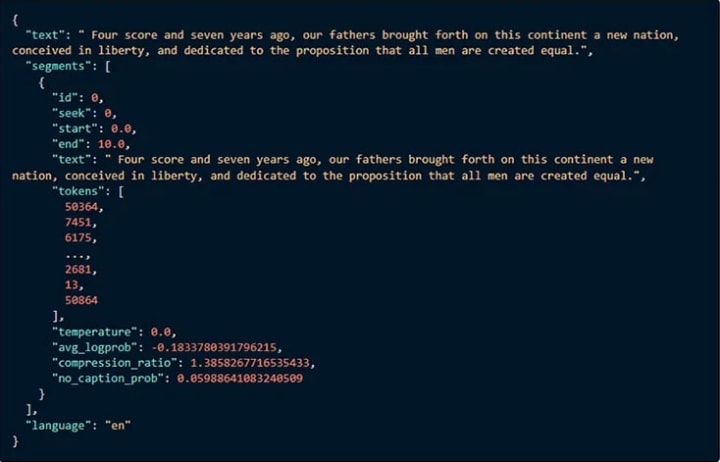
The output will be displayed in the command window as shown below:
The transcribed text file will be saved to a file named audio.wav.txt , along with an audio.wav.vtt file used for closed captioning.
To convert multiple audio files to text at the same time you use the command line:
whisper Audio1.wav Audio2.wav
Run from Phython:
Using Whisper to convert audio to text in Python is very easy. Just enter the command line import whisper, specify a model and the resulting file as shown below:
import whisper
model = whisper.load_model("base")
result = model.transcribe("audio.wav")
The phonetic text can be accessed with the result["text"]. The same results returned contain useful information such as:
Using Whisper OpenAI online on Google Colab
If you are inexperienced with Python and find it too complicated to install Whisper on your computer, or your computer is not powerful enough. You should consider the following how to run Whisper OpenAI online on Google Colab:
Step 1: Create Google Colab Notebook
To create a Google Colab Notebook window you just need to visit this link https://colab.research.google.com/#create=true and log in with your gmail account.
Alternatively, you can create it in Google Drive > Right-click (on any empty space in the Drive interface) > More > Google Colaboratory . A new tab will open with your new Colab Notebook. It has a name Untitled.ipynbbut you can change it.

Step 2: Turn on the GPU
Next, we need to make sure the Colab Notebook is using the GPU. Google usually grants one GPU by default, but not always.
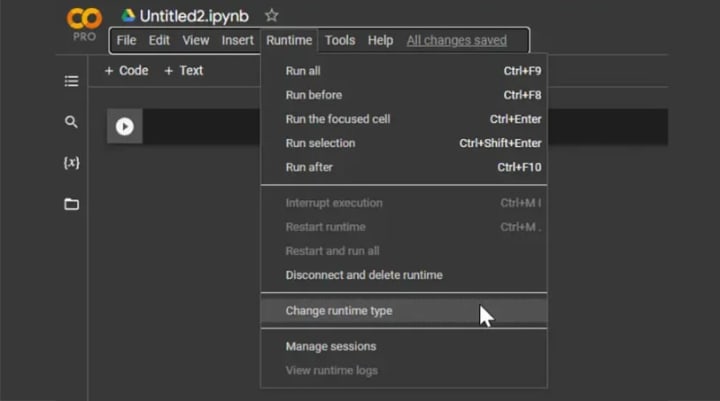
To do this, in the Google Colab menu go to Runtime > Change runtime type . Then select the GPU in the Hardware accelerator drop-down and click Save again.
Step 3: Install Whisper OpenAI
Now we proceed to install Whisper OpenAI simply, just paste the following lines into a cell. To run commands, click the Play button to the left of the tile or press Ctrl + Enter. The installation will take 1-2 minutes.
!pip install git+https://github.com/openai/whisper.git
!sudo apt update && sudo apt install ffmpeg

Step 4: Run Whisper OpenAI
Upload audio files:
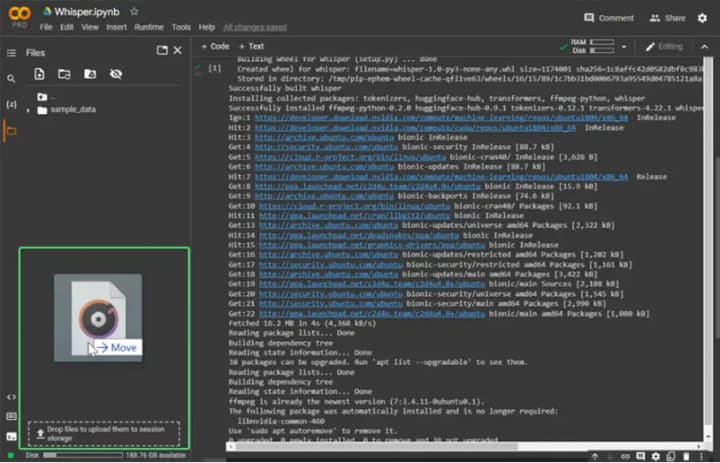
Before using Whisper you need to upload an audio file that will convert to text. To do this, click the folder icon button on the left side of the command line window. Then you either upload the file from your computer or just drag and drop the file from your computer into the window and wait for the file upload to complete.
Run Whisper to convert speech to text:
Next, we just need to run Whisper to transcribe the audio file using the following command. If this is your first time running Whisper, it will first download some dependencies (where Audio.wav is the name of the audio file you uploaded)
!whisper "Audio.wav"
Wait a moment for the system to process the audio to text. When done, you can find the transcription files in that same folder, in the file browser pane.
Types of models using Whisper OpenAI
Whisper comes with many different database models . You can see more about the Whisper models here .
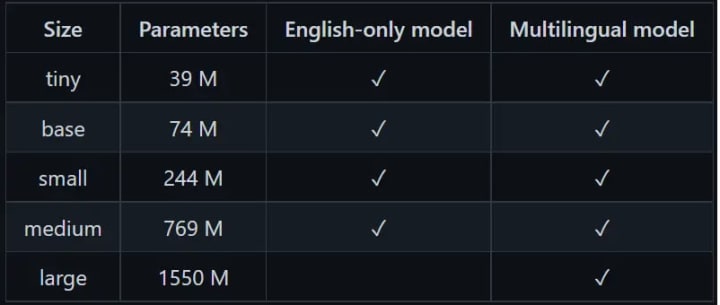
By default, it uses the models model smallfor implementation. Its advantage is faster processing, but not as accurate as the larger model. To use other models such as medium , run the command line with the following syntax:
!whisper Audio.wav --model medium
The results returned will be more accurate when using the model medium than the model small, but the execution time will be slightly slower.
Effective Whisper OpenAI use cases
Create product description
Create social media posts
Write emails and newsletters
Conduct online survey
Automate customer support
Answers to common questions
Create chatbots
Some frequently asked questions when using Whisper OpenAI
Here are some frequently asked questions when using OpenAI's speech-to-text Whisper tool:
1. Is there a cost to use Whisper OpenAI?
Yes, the cost of using Whisper OpenAI depends on the API plan you choose. You can find more information about pricing on the official website.
2. What languages does Whisper support?
Whisper supports many different languages, but the highest accuracy is in the English language.
3. Can I use Whisper for my application?
Yes, Whisper provides an API for integration into your apps and services that convert speech to text.
4. How accurate is Whisper?
Whisper is trained on large amounts of speech data and is highly accurate. However, accuracy can be affected by the quality of the input audio and the context of the language.
5. Can Whisper do voice processing in specialized fields?
Whisper is capable of handling some specialized areas, however, performance may vary depending on context and training data.
6. Can I use Whisper to convert unlimited long audio files?
Whisper has a limit on input length, and this limit may vary depending on your subscription and usage plan.
Bonus: Similar tools can replace Whisper OpenAI
Although Whisper OpenAI is a powerful tool for creating text, if you feel it is not suitable, you can choose some other AI processing tools such as:
ChatGPT OpenAI
Fpt.ai
Speechtext.ai
Alrite.io
DeepAI
Hugging Face
Google AI Platform
Amazon SageMaker
Conclude
OpenAI's speech-to-text Whisper engine is an advanced and reliable solution for speech-to-text conversion. With high accuracy, multi-language support, and contextual understanding, Whisper provides a better text conversion experience for users. The API integration also makes Whisper flexible and easy to integrate into other applications and services. Despite some limitations such as large training data requirements and interoperability limitations, Whisper is still a useful tool for convenient and efficient speech-to-text conversion needs. With continuous development and improvement, Whisper is working hard to bring further improvements and enhance the user experience.
About the Creator
Keep reading
More stories from writers in Art and other communities.
MUSIC
Why Music Is Way More Important Than Most People Think Honestly, music is one of those things we all use every single day, but we don’t really stop to think about how deep it actually goes. Like yeah, we play songs in the car, in the shower, while studying, or just when we’re bored. But music is doing way more than just filling up silence. It’s shaping how we feel, how we remember things, and even how we see the world, which is kinda crazy when you think about it.
By Beshoy Zayerabout 15 hours ago in Art




Comments
There are no comments for this story
Be the first to respond and start the conversation.