
How to Make Poster Mockup
How to Make Poster Mockup: A Step-by-Step Guide

Creating a poster mockup is an essential skill for designers and marketers looking to showcase their artwork or advertising designs in a realistic and professional manner. Whether you’re working on a branding project, an event poster, or a personal artwork, mastering how to make a poster mockup can elevate your presentation and impress your audience. With the right tools and techniques, you can transform flat designs into visually engaging mockups that stand out.
In this guide, we’ll walk you through the entire process of making a poster mockup, from understanding the basics to exploring advanced techniques.
What Is a Poster Mockup?
A poster mockup is a realistic representation of a poster design applied to a digital template. Instead of presenting flat designs, mockups let you showcase how the poster would look in real-life scenarios, such as on a wall, in a frame, or even on a billboard.
Mockups are widely used by graphic designers, marketers, and advertisers to:
Present designs to clients.
Create portfolio samples.
Visualize branding concepts in real-world settings.
Why Use Poster Mockups?
Using a poster mockup offers several advantages:
Enhanced Presentation: Mockups make designs more appealing by placing them in realistic contexts.
Client Approval: They help clients visualize the final product, making approvals faster and easier.
Marketing Materials: High-quality mockups can be used for marketing campaigns, social media posts, or promotional assets.
Testing Design Concepts: Mockups let you experiment with different color schemes, layouts, and styles before printing.
Tools You’ll Need to Make a Poster Mockup
Creating a poster mockup requires the right tools. Here are some popular options:
1. Graphic Design Software
Adobe Photoshop: A professional tool for creating high-quality mockups with advanced features.
Canva: A beginner-friendly tool with mockup templates.
Figma: Great for collaborative design projects.
2. Mockup Generators
Mockey.ai: One of the best tools for creating free poster mockups online.
Placeit: Offers customizable templates for various mockup needs.
Artboard Studio: Ideal for creating photorealistic mockups with ease.
3. High-Quality Images
You’ll need high-resolution images of poster frames, walls, or display boards for creating realistic mockups. Many websites like Freepik and Unsplash offer free or premium mockup images.
Step-by-Step Guide on How to Make a Poster Mockup
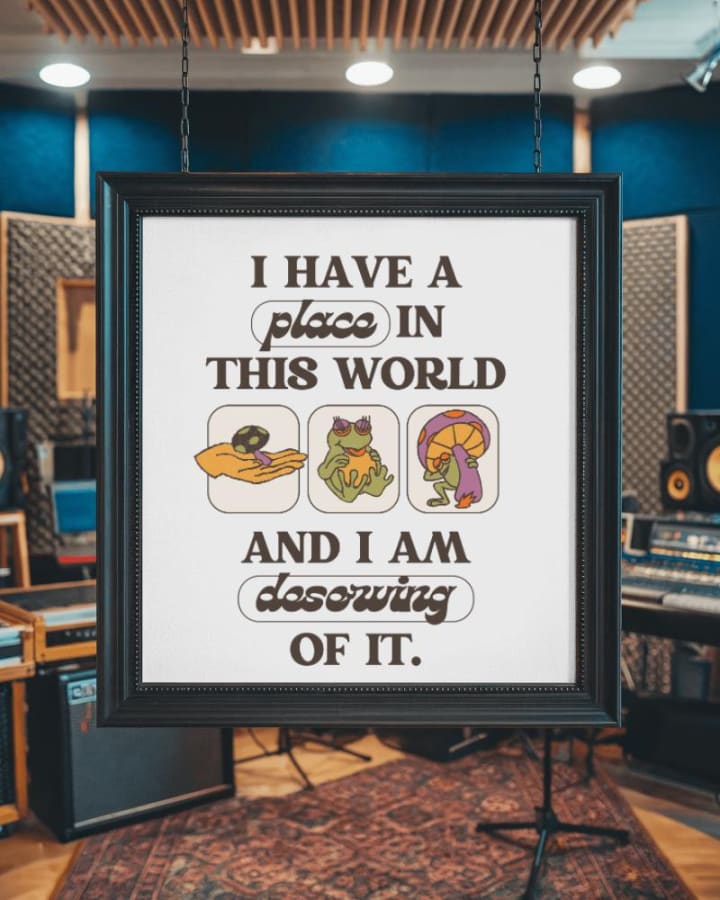
Now that we’ve covered the basics, let’s dive into the step-by-step process:
Step 1: Prepare Your Poster Design
Before creating a mockup, ensure your poster design is finalized. Use graphic design software like Adobe Illustrator or Photoshop to create the artwork. Save the file in a high-resolution format (e.g., PNG or JPEG) to maintain quality.
Step 2: Choose a Mockup Template
Select a suitable mockup template that matches your vision. For example:
Minimalistic Display: For clean, modern designs.
Outdoor Wall: To showcase event posters or advertisements.
Framed Mockup: For artistic or professional settings.
Step 3: Open the Mockup Template in Software
If you’re using Photoshop, open the mockup file. Most mockups come with a smart object layer, which makes customization easy.
Step 4: Insert Your Design
Double-click the smart object layer in the template. This will open a new window where you can paste your poster design. Resize and align it properly, then save the changes. Your design will automatically update in the mockup.
Step 5: Adjust Lighting and Shadows
To make the mockup look realistic, tweak the lighting, shadows, and perspective. Most templates have editable layers that allow you to adjust these elements.
Step 6: Customize the Background
If your mockup template allows, customize the background to match your brand’s aesthetic. You can add textures, colors, or real-world elements to enhance the overall presentation.
Step 7: Export the Final Mockup
Once satisfied with the result, save your mockup in a high-resolution format. Export it as a PNG or JPEG for sharing or uploading.
Pro Tips for Creating Stunning Poster Mockups

1. Maintain Realism
Always ensure that the design aligns with the mockup’s perspective and proportions. Misaligned or stretched designs can ruin the effect.
2. Experiment with Styles
Don’t limit yourself to one type of mockup. Try different settings like gallery walls, street posters, or creative frames to add variety to your presentation.
3. Use Free Mockup Generators
If you’re short on time or lack advanced design skills, use tools like Mockey.ai or Placeit to quickly create professional-looking mockups.
4. Optimize for Digital Platforms
If you’re sharing the mockup online, optimize the file size for web use without compromising quality.
Common Mistakes to Avoid
Ignoring File Quality: Always use high-resolution images and designs to avoid pixelation.
Overloading the Background: A cluttered background can distract from your poster design.
Skipping Shadows: Proper shadows and lighting are essential for creating a realistic effect.
Relying Only on Free Templates: While free templates are great, investing in premium options can offer more customization and quality.
FAQs
How can I create a poster mockup without Photoshop?
You can use online tools like Mockey.ai or Canva, which offer user-friendly interfaces and ready-to-use templates.
What is the best resolution for a poster mockup?
Aim for at least 300 DPI to ensure sharp and clear visuals, especially if you plan to print or showcase your mockup on high-resolution screens.
Can I create a poster mockup on my phone?
Yes, many mobile apps like Canva and Artboard Studio offer mockup creation features that are easy to use.
Where can I find free mockup templates?
Websites like Freepik, Unsplash, and Mockey.ai provide a variety of free and premium mockup templates.
Conclusion
Learning how to make a poster mockup is a valuable skill that can elevate your design presentations and branding efforts. Whether you’re a seasoned designer or a beginner, the process is straightforward with the right tools and techniques. By following the steps outlined in this guide and exploring tools like Mockey.ai, you can create professional and stunning poster mockups that leave a lasting impression.
About the Creator
Keep reading
More stories from Backlink Wizard and writers in Art and other communities.
How to Make a Book Mockup
Creating a book mockup is the perfect way to visualize your cover design or present your work professionally. Whether you're a self-published author, designer, or marketer, book mockups can help bring your ideas to life. In this guide, we’ll walk you through the process step by step.
By Backlink Wizardabout a year ago in Art
How to Find reliable sculpture supplier?
When sourcing fiberglass sculptures, buyers often discover that the term “supplier” can refer to different types of businesses. Understanding these categories helps clarify expectations regarding production capacity, quality control, and project management.
By Shenzhen Ruiheng Craftsa day ago in Art



Comments
There are no comments for this story
Be the first to respond and start the conversation.