
Elevate Your Visuals: Upscale AI Images to 4K Resolution with PicLumen's Advanced AI
Upscale AI Images to 4K Resolution with PicLumen's Advanced AI
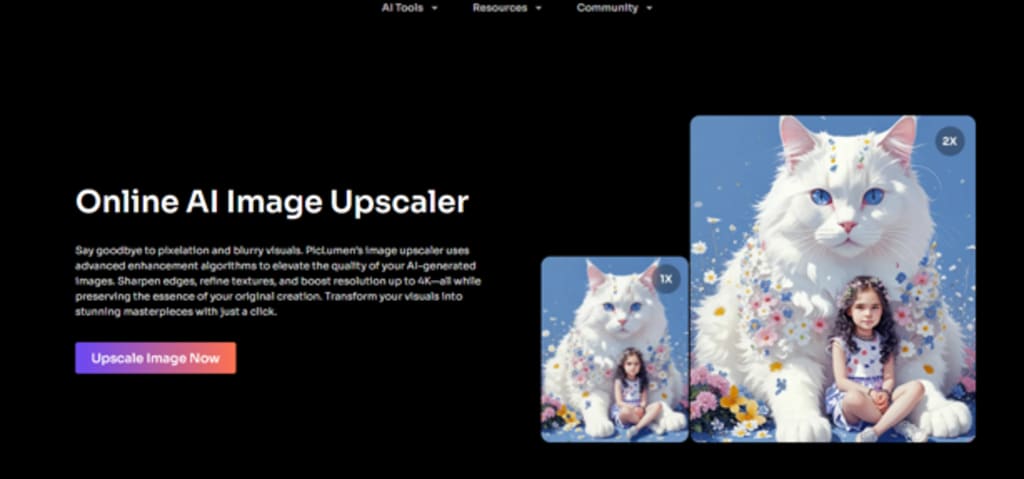
FElevate Your Visuals: Upscale AI Images to 4K Resolution with PicLumen's Advanced AI
Using AI-produced graphics is enjoyable, yet you need well-defined pictures for your work. Good picture quality is essential for every digital art, product image and social media graphic project. Our AI Image Upscaler tool, PicLumen, offers this service to users.
This AI service improves the resolution of AI-generated images to make them display as clear 4K visuals. AI Upscaler employs AI systems to improve image definition, sharpen borders, and normalise usual problems in areas such as faces and hands before making your visual content look professional.
The PicLumen improves output quality through enlargement technology. You can use the enhanced images for multiple purposes because the size increase keeps the image quality sharp and detailed.
Free AI Upscaler provides the solution you need to reach superior AI output results. PicLumen works efficiently to deliver high-quality results that stand apart from others. You can view the results in 4K picture quality right now. Let’s get started!
PicLumen’s Features for Flawless Image Quality
PicLumen contains multiple tools that enhance AI-produced images and create 4 K-quality results. The following features present how PicLumen performs:
Instant Image Upscaling
Need a high-resolution image fast? PicLumen has you covered. Thanks to built-in upscaling technology, PicLumen makes low-quality images look stunning in 4K within a few seconds.
● Quick and Efficient: No more waiting around. The system completes image quality improvement with speed.
● High-Quality Resolution: You can transform your normal-resolution pictures into 4K quality while keeping their initial image details intact.
AI Imperfection Fixing
AI systems produce flaws mainly in the facial and hand areas of their rendered images. The system PicLumen detects and repairs typical detectable picture imperfections to make your images more appealing.
● Facial Refinement: PicLumen automatically improves face appearance by fixing irregular shapes and unrealistic features.
● Hand and Object Fixing: The system fixes problems with hand and object details to create better, more realistic outcomes in rendered content.
● Flawless Enhancements: Enhance AI creations for a professional, polished finish.
Customisable Scaling
You can adjust the PicLumen tool to fit any desired size increase you require. You can specify precise size increases through PicLumen scaling options since customisation lets you adjust the enlargement perfectly for your project.
● Precise Scaling Options: Scale your image between 1.25x, 1.5x or 2x at exact increments to match your design needs.
● Maintain Image Clarity: Keep images clear during scaling to avoid distorted or pixelated textures while making them look their best.
● Flexibility: The tool works for all applications because you can increase image resolution for printing, digital displays or sharing on social media.
These capabilities not just enlarge your images but also boost their quality by delivering superb results with each operation. PicLumen turns AI-generated images into unparalleled quality versions while enhancing their visual appeal automatically.
From Start to Finish: How PicLumen Instantly Enhances Your Images
PicLumen simplifies the process of improving both the resolution and appearance of AI-generated images. New users and experienced customers can both transform their images into top-quality 4K output using our simple directions. Follow these basic procedures to make your images better now.
1. Select Your Image
Begin by picking the image you want to improve for your project. PicLumen can improve all images made by both design tools and AI algorithms. To get started:
● Click on Upload Image to choose the photo you want to improve.
● Choose an image that is either grainy or shows pixelation as your input material.
● Keep Files in JPEG, PNG, or Any Standard Image Types.
2. Adjust Preferences
After uploading your image, you should decide how to improve it. Through PicLumen, you can adjust upscaling methods and precisely define the finished image size. You can change these settings by following these steps.
● Select your image scaling percentage from small to significant improvements. Options include:
a. 1.25x: A moderate increase for a slight enhancement.
b. 1.5x: 1.5x lets you achieve additional resolution between the basic and maximum options.
c. 2x: A 2x multiplier enhances images best for big resolutions or display setups.
● The AI enhancement tool detects and sharpens details, particularly around the face and hand areas.
● Choose either 4K resolution or smaller scaling based on which outcome you prefer (social media or print purposes).
● The AI tool detects and repairs image problems that occurred during AI generation.
3. Download & Enjoy
When you complete all your image customisations and press Apply, PicLumen creates the result for you. Through this tool, your image will get instant improvement, and you will receive a high-quality output. Here’s what to do next:
● When refinement is finished, you can press the Download button to save your high-definition picture in 4K format.
● Examine the downloaded image to verify that details have been sharpened correctly and flaws were effectively repaired. When finished, the upgraded photo should show better detail and stronger colours than its original look.
● Your improved image can serve its purpose on multiple platforms, ranging from online to print projects.
Start Transforming Your Visuals Today
Through PicLumen, you can enhance AI-generated pictures by upgrading their visual quality. The advanced AI tools in PicLumen enhance details and edges before fixing image flaws to create larger and improved visuals. PicLumen uses artificial intelligence to enhance specific facial features and fix hand distortion until you receive the perfect pixel-perfect visual results.
Your creative tasks will no longer suffer from poor image quality because PicLumen solves this problem. PicLumen allows you to enlarge images correctly so you can decide the final appearance of your work. The software lets you select 1.25x, 1.5x or 2x scaling factors to pick the best resolution for your project. Through PicLumen, you can create images that appear crystal clear on all platforms, regardless of specific needs.
Your professional images will benefit when using PicLumen instead of dealing with poor image quality. Use PicLumen to see the immediate outcome on your images right now. You can begin scaling up your visuals now through this link to transform AI artwork into 4K colour versions for all your needs.
About the Creator
Keep reading
More stories from jenniferr leo and writers in Art and other communities.
How Tattoo Parlours in Cape Town Help Clients Feel Comfortable and Informed
Walking into a tattoo parlour in cape town for the first time can feel strange. You are trusting someone with your skin, your story, and a design you might wear for life. It is normal to feel excited and scared at the same time.
By Tools of Trade Studios2 days ago in Art
What Voice Cloning Technology Means for Creators and Digital Identity
The rise of artificial intelligence has reshaped the creative landscape in countless ways, from AI-generated visual art to automated music composition, and one of the most intriguing frontiers today is voice cloning. With tools that let users clone your voice using only a short sample of speech, creators and digital communicators are discovering new ways to produce audio content that feels natural and expressive.
By aliyashahzadi7 days ago in Art
Miss Persephone's Manual to a Seemingly Ordinary Life
Miss Persephone was found at the dining table, her blue eyes swollen, her tears arriving and retreating like the tides of the ocean. Earlier that day, her family had visited her in the retirement home where she had lived for eight years. It was her eightieth birthday.
By Imola Tóth3 days ago in Fiction



Comments
There are no comments for this story
Be the first to respond and start the conversation.