
CapCut: The Ultimate Free Video Editor and Maker with Music for TikTok
CapCut: Free Video Editor & Maker with Music – Pro Download
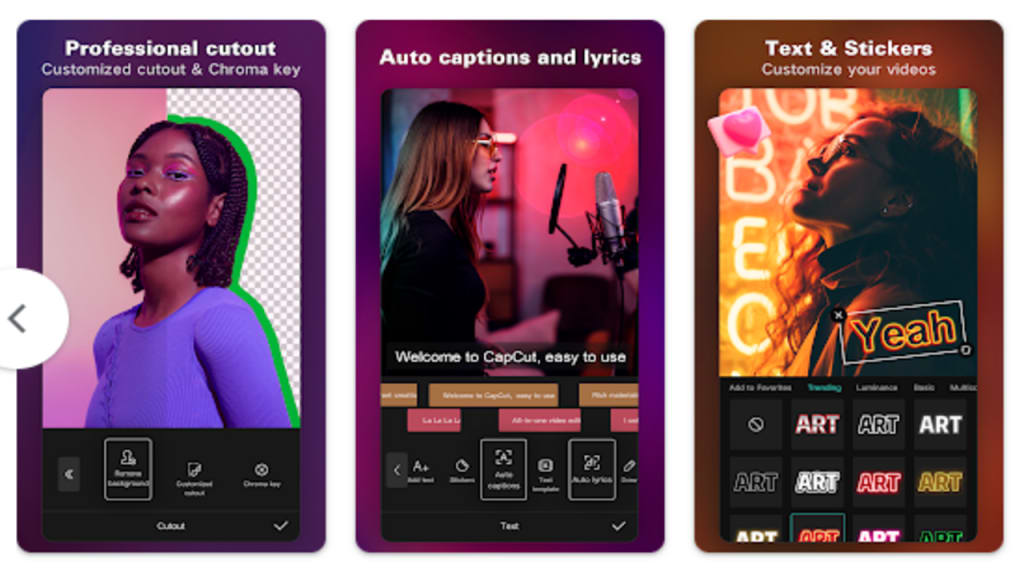
If you're looking for a versatile, free, and easy-to-use video editing app for TikTok, CapCut is your go-to solution. With a wide range of basic and advanced features, it allows you to create stunning, professional-quality videos effortlessly. Whether you're a beginner or an advanced user, CapCut is packed with everything you need to capture, edit, and share your creativity with the world.
This article will take you through all that CapCut has to offer, highlighting its key features, how it helps you create viral content, and why it's the best choice for editing videos on social media platforms like TikTok, Instagram, and YouTube.
Table of Contents
1 Introduction
2 Basic Video Editing Features
3 Advanced Features for Pro-Level Editing
4 Special Features to Elevate Your Videos
5 Text & Stickers to Enhance Your Story
6 Trending Effects and Filters
7 Music and Sound Effects
8 CapCut’s Easy Sharing Options
9 Why CapCut is Ideal for Beginners and Pros
10 How CapCut Helps You Go Viral on TikTok
11 How to Download CapCut Pro
12 CapCut for Different Platforms (TikTok, Instagram, YouTube)
13 CapCut’s Free vs Pro Features
14 Conclusion: Why CapCut Stands Out
15 Frequently Asked Questions (FAQs)
Introduction
CapCut is more than just a free video editing app—it’s a powerful tool designed to help you create engaging content effortlessly. Whether you’re editing a short clip for TikTok or producing a full-length YouTube video, CapCut gives you a range of tools to trim, merge, and enhance your clips. Its seamless interface and free advanced features, like keyframe animation, motion tracking, and chroma key, make it a must-have for content creators.
Now, let’s dive deeper into what makes CapCut such an essential app for your video editing needs.
Basic Video Editing Features
CapCut provides all the essential tools you need for simple video editing. These basic features allow even beginners to jump right in and start creating content. Here's what you get:
Trimming and Splitting Clips: Easily cut out unnecessary parts of your video or split it into multiple segments.
Merging Videos: Combine multiple video clips into one seamless video.
Speed Control: Adjust the speed of your videos from 0.1x to 100x, allowing for slow-motion or time-lapse effects.
Freeze Frames: Highlight specific moments by freezing the frame for added emphasis.
With these tools, you can shape your raw footage into a polished video that stands out.
Advanced Features for Pro-Level Editing
For those looking to take their video editing to the next level, CapCut offers a suite of advanced features that set it apart from other free apps:
Keyframe Animation: Add precision to your edits by controlling movement frame by frame.
Chroma Key: Remove specific colors from your video (like green screen effects) to superimpose different backgrounds or layers.
Picture-in-Picture (PIP): Insert an additional video or image over your existing clip for added depth.
Stabilization: Ensure smooth, steady footage even when the original clip is shaky.
These tools make CapCut a great choice for creators looking to create dynamic, professional-looking videos.
Special Features to Elevate Your Videos
CapCut goes beyond typical editing tools by offering some incredibly unique features:
Auto Captions: Automatically generate subtitles for your video, making it accessible to more viewers.
Background Removal: Effortlessly remove people or backgrounds from your clips, creating a cleaner, more professional look.
Trending Styles: Use cutting-edge effects like 3D zoom, auto-velocity, and more to keep your videos fresh and modern.
These special features allow you to create content that resonates with your audience and stands out in a crowded social media landscape.
Text & Stickers to Enhance Your Story
Visual storytelling is made even more impactful with CapCut's variety of text and sticker options. You can:
Add Captions and Subtitles: Select from a variety of fonts and styles or import your own to add personality to your text.
Stickers and Emojis: Use fun, engaging stickers to keep your audience entertained throughout your video.
These customizable options give you the freedom to express yourself fully in your videos.
Trending Effects and Filters
CapCut’s effects and filters are constantly updated to reflect the latest trends. Some highlights include:
Glitch and 3D Effects: Add cutting-edge effects to give your videos a modern, cinematic feel.
Color Adjustments: Fine-tune brightness, contrast, and other settings to get the perfect look.
Movie-Style Filters: Give your videos a professional polish with filters that mimic big-screen productions.
With these trendy effects, your content will always look fresh and appealing.
Music and Sound Effects
No video is complete without music, and CapCut has you covered with millions of sound options:
Sync with TikTok: Easily sign in to sync your favorite TikTok songs directly to your video.
Extract Audio: Pull sound from any video, allowing you to use it in your own projects.
Whether you're creating a lip-sync video or adding a soundtrack to your vlog, CapCut's music options help set the perfect tone.
CapCut’s Easy Sharing Options
Once your masterpiece is ready, CapCut makes it incredibly easy to share:
Export in 4K: High-quality exports up to 4K resolution at 60fps ensure that your videos look crisp and clear.
Smart HDR: Get dynamic color contrast and details with smart HDR options.
One-Click Sharing: Share your videos to TikTok, YouTube, Instagram, WhatsApp, or Facebook with just one click.
CapCut ensures that your creative efforts get the attention they deserve across all social platforms.
Why CapCut is Ideal for Beginners and Pros
CapCut strikes a perfect balance between being user-friendly for beginners and offering advanced tools for seasoned video editors. Whether you're just getting started or you're already comfortable with editing software, CapCut’s intuitive layout makes it easy to navigate and use all its features.
How CapCut Helps You Go Viral on TikTok
CapCut’s unique combination of effects, filters, and music syncing is designed with social media virality in mind. By offering:
Trending Styles: Keep your content fresh by using the latest trending effects and filters.
Auto Captions: Increase accessibility and engagement with auto-generated captions.
These tools help you create content that has the potential to go viral and garner more likes, comments, and shares.
How to Download CapCut Pro
Although CapCut is free, users looking for additional features or enhancements may want to download CapCut Pro for more advanced capabilities. Here's how:
Visit your app store (Google Play or Apple Store).
Search for "CapCut" or "CapCut Pro".
Download and install the app.
The Pro version offers enhanced editing tools and additional styles that can further elevate your videos.
CapCut for Different Platforms (TikTok, Instagram, YouTube)
CapCut is optimized for social media platforms. Whether you’re posting on TikTok, Instagram, or YouTube, the app’s formatting and export options ensure that your videos look perfect on each platform.
CapCut’s Free vs Pro Features
While CapCut offers a wide range of free features, the Pro version takes things up a notch with more advanced options. Here’s a quick comparison:
Free Version: Includes all essential and some advanced tools like keyframes, PIP, and chroma key.
Pro Version: Unlocks additional effects, styles, and enhanced export options.
The free version is sufficient for most users, but professionals might appreciate the extra flexibility of CapCut Pro.
Conclusion: Why CapCut Stands Out
CapCut is a game-changer for anyone looking to create high-quality, engaging videos for social media. Its blend of basic and advanced features makes it accessible for beginners and valuable for pros. Whether you're making TikToks, YouTube vlogs, or Instagram reels, CapCut provides all the tools you need to create eye-catching content that will impress your audience.
Frequently Asked Questions (FAQs)
1. Is CapCut really free to use?
Yes, CapCut offers a full suite of features at no cost, with optional upgrades to CapCut Pro for additional benefits.
2. Can I use CapCut on my PC?
Currently, CapCut is primarily a mobile app, but you can use emulators to run it on a PC.
Explore more exciting HTML5 games, coding tutorials, and game development tips at HTML Game Hub—your go-to resource for everything related to web-based gaming!"
About the Creator
Keep reading
More stories from Muhammad Ishaq Khan and writers in Art and other communities.
Comprehensive Guide to Enhancing Your Creativity with PicsArt
In today’s world of digital content creation, PicsArt stands out as a versatile platform designed to empower creativity. Whether you're an artist, social media enthusiast, or a casual editor, this app offers a vast array of features to suit every creative need. From professional-grade tools to simple, user-friendly features, PicsArt has grown into one of the most popular design platforms available today.
By Muhammad Ishaq Khanabout a year ago in Art
The Best Philosophy in the World Is the One You Can Live
Ask ten philosophers what the best philosophy in the world is, and you will receive at least ten different answers—possibly delivered with footnotes, counterarguments, and mild contempt for the other nine. This disagreement is not a flaw of philosophy; it is its essence. Philosophy was never meant to be a universal prescription handed down like a rulebook. It exists to help human beings live better lives. By that standard, the best philosophy in the world is not the most elegant or complex—it is the one that can be lived.
By Fred Bradford7 days ago in Art
When the Artist Becomes the Art
We like to think we can separate the art from the artist, but can we, really? Art is born from the same place as sin. It mainly emerges from conflict: between what is felt and what is permitted, between the self that is lived and the self that must be hidden. No figure embodies this tension more vividly than Oscar Wilde: a man who transformed his own contradictions into style, wit, and devastating clarity. His novel The Picture of Dorian Gray is not merely a tale of aesthetic decadence but the battleground on which this question is fought.
By Yasmine Lagras2 days ago in Art



Comments
There are no comments for this story
Be the first to respond and start the conversation.