
A Beginner's Guide to Creating Videos from Text Using AI Voices
A Beginner's Guide to Creating Videos from Text Using AI Voices

The landscape of content creation is evolving rapidly, thanks to advancements in artificial intelligence (AI). One of the most exciting developments is the ability to convert text into videos using AI voices. This technology opens up new possibilities for marketers, educators, content creators, and anyone looking to produce engaging videos without needing professional voice actors or extensive video editing skills. In this guide, we will explore the basics of creating videos from text using AI voices, providing a step-by-step tutorial, tool recommendations, and tips for beginners.
Why Use AI Voices for Video Creation?
Before diving into the how-to, it's important to understand the benefits of using AI voices for video creation:
Cost-Effective: Hiring voice actors and video editors can be expensive. AI tools can significantly reduce these costs by automating voiceovers and simplifying video production.
Time-Saving: AI voice and video tools streamline the production process, allowing you to create content much faster than traditional methods.
Accessibility: AI-generated voices can be customized for different languages and accents, making your content accessible to a broader audience.
Consistency: AI voices ensure consistent tone and quality across all your videos, which can be challenging to achieve with human voice actors.
Step-by-Step Guide to Creating Videos from Text Using AI Voices
Step 1: Choose the Right AI Tool
The first step in creating videos from text is selecting the right AI tool. There are several options available, each with its own features and pricing. Some popular tools include:
Lumen5: This tool allows you to create videos from blog posts and other text content. It offers a range of AI voices and customizable video templates.
Synthesia: Synthesia specializes in AI-generated videos with realistic AI avatars and voices. It's great for creating professional-looking videos.
Animaker: Animaker provides a user-friendly platform for creating animated videos with AI voiceovers. It offers a variety of templates and customization options.
Murf.ai: Murf focuses on generating natural-sounding AI voices and allows you to synchronize them with your video content easily.
Step 2: Prepare Your Text Content
Once you've chosen an AI tool, the next step is to prepare your text content. This can be a blog post, article, script, or any other written material you want to convert into a video. Here are some tips for preparing your text:
Keep it concise: Shorter text segments work better for video content. Aim for clear and concise sentences.
Use conversational language: Write in a conversational tone to make the AI voiceover sound more natural.
Break it into sections: Divide your text into sections or slides to make it easier to match with corresponding video visuals.
Step 3: Convert Text to Speech
With your text content ready, it's time to convert it into speech using your chosen AI tool. Here’s how you can do it:
Upload or paste your text: Most AI tools allow you to upload a text file or paste your text directly into the platform.
Select a voice: Choose an AI voice that suits the tone and style of your video. Many tools offer a range of voices, including different genders, accents, and languages.
Customize the voice: Some tools allow you to adjust the speed, pitch, and emotion of the AI voice. Experiment with these settings to achieve the desired effect.
Generate the voiceover: Once you’re satisfied with the settings, generate the AI voiceover. This will create an audio file of your text read by the AI voice.
Step 4: Create the Video
Now that you have your AI-generated voiceover, it’s time to create the video. This process varies slightly depending on the tool you’re using, but the general steps are:
Choose a template: Select a video template that matches the style and format of your content. Templates can include various backgrounds, animations, and text placements.
Upload visuals: Upload images, video clips, and other visual elements to complement your text. Many AI tools offer libraries of stock images and videos you can use.
Synchronize audio and visuals: Match your AI-generated voiceover with the visual elements. Ensure that the timing of the audio aligns with the corresponding visuals on each slide or section.
Add text overlays: If desired, add text overlays to your video to highlight key points or provide additional information.
Preview and edit: Preview your video to see how everything fits together. Make any necessary adjustments to the timing, visuals, or audio.
Step 5: Export and Share
Once you’re satisfied with your video, it’s time to export and share it. Most AI tools offer multiple export options, including different resolutions and formats. Choose the settings that best suit your needs and download your video. You can then upload it to your preferred platforms, such as YouTube, social media, or your website.
Tips for Beginners
Creating videos from text using AI voices can be a straightforward process, but here are some additional tips to help you get started:
Start simple: Begin with short, simple videos to get a feel for the process. As you become more comfortable, you can experiment with longer and more complex projects.
Experiment with voices: Don’t be afraid to try different AI voices and customization settings. Finding the right voice can make a big difference in the overall quality of your video.
Focus on quality: While AI tools can save time, it’s important to focus on producing high-quality content. Ensure that your text is well-written, your visuals are engaging, and your voiceover sounds natural.
Seek feedback: Share your videos with colleagues, friends, or your audience and ask for feedback. Use their input to improve your future videos.
Stay updated: AI technology is constantly evolving. Stay updated on the latest tools and features to take advantage of new capabilities and improvements.
Conclusion
Creating videos from text using AI voices is an exciting and accessible way to produce engaging content. By following this beginner’s guide, you can start leveraging AI technology to transform your written material into dynamic videos. Whether you’re a marketer looking to enhance your content strategy, an educator aiming to create more engaging lessons, or a content creator exploring new formats, AI tools offer a powerful solution to streamline your video production process. Embrace this technology, experiment with different tools and techniques, and unlock the potential of AI-driven video creation.
About the Creator
Keep reading
More stories from Dominic Toretto and writers in Art and other communities.
How to Create an Effective Online English Study Plan
Learning English online has become increasingly popular due to its flexibility, accessibility, and the vast array of resources available. However, to make the most of these opportunities, it's essential to create an effective study plan. Here’s a step-by-step guide to help you design a successful online English learning strategy.
By Dominic Toretto2 years ago in Education
Bone Carvings
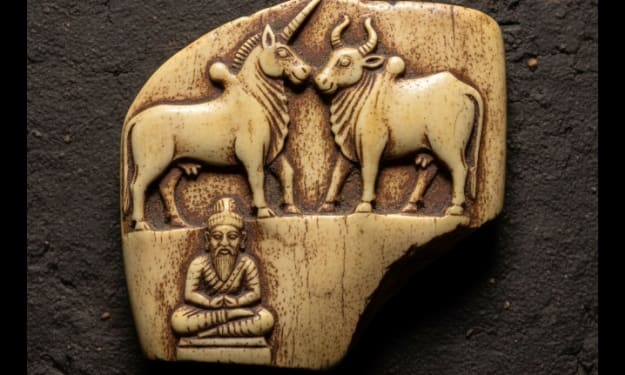
Long before marble statues, bronze sculptures, or digital art, humans carved meaning into what they had closest at hand—stone, wood, and bone. Among these, bone carvings stand as one of the most intimate and haunting art forms ever created. Made from the remains of animals hunted for survival, bone carvings blur the boundary between necessity and creativity, life and death, utility and beauty. Bone carving is not merely an ancient craft; it is a universal language that spans continents, cultures, and centuries. From prehistoric tools etched with symbolic patterns to sacred amulets and intricate modern artworks, bone carvings reveal how humans have always sought to transform mortality into meaning. The Origins of Bone Carving Bone carving dates back tens of thousands of years. Archaeological discoveries show that early humans carved bones to create tools, ornaments, and ritual objects. Unlike stone, bone was easier to shape and carried symbolic value—it came from living beings that sustained human life. Some of the earliest bone carvings include needles, fishhooks, flutes, and figurines found in Ice Age settlements. These objects prove that even in harsh survival conditions, humans made time for art. The act of carving itself became a quiet rebellion against impermanence. Bone was not chosen randomly. It represented strength, continuity, and the transfer of life from one being to another. In many cultures, carving bone was an act of respect rather than destruction. Bone as a Medium: Fragile Yet Powerful Bone is both fragile and resilient. It can crack under pressure, yet it can last thousands of years when preserved. This paradox makes bone a compelling artistic medium. Artists working with bone must understand its natural curves, density, and grain. Unlike wood or stone, bone demands patience and precision. Every mistake is permanent. This difficulty is part of the art’s appeal. Bone carving forces the artist to collaborate with nature rather than dominate it. The result is often intimate, organic, and deeply personal. Cultural Significance Across the World Bone carvings appear in nearly every ancient civilization, each with unique meanings and styles. Indigenous Arctic cultures carved bone and ivory into tools, masks, and spiritual figures, often depicting animals that guided their survival. African societies used bone carvings in ritual objects, symbolizing ancestry, protection, and communication with spirits. Asian traditions, particularly in Tibet and China, carved bone into prayer beads, amulets, and symbolic ornaments associated with impermanence and enlightenment. Polynesian and Maori cultures created intricate bone pendants that represented identity, lineage, and spiritual power. In many societies, bone carvings were never considered “decorative.” They were sacred objects, carrying energy, memory, and purpose. Symbolism: Life, Death, and Transformation At the heart of bone carving lies symbolism. Bone represents what remains after life has passed, making it a powerful metaphor for endurance and transformation. Carving bone is often interpreted as: Turning death into beauty Honoring the spirit of an animal Preserving memory beyond mortality Accepting impermanence while creating permanence Many spiritual traditions view bone carvings as reminders that life and death are not opposites, but parts of the same cycle. Bone Carvings as Functional Art Historically, bone carvings were not displayed in galleries. They were worn, held, used, and trusted. Combs, buttons, weapon handles, musical instruments, and tools were often decorated with carvings. This fusion of function and art challenges modern ideas about creativity. Bone carvings prove that art does not need a frame or a pedestal—it can live in the hands of everyday people. The Ethics of Bone Carving In the modern world, bone carving raises ethical questions. Conservation laws and animal rights concerns have reshaped how artists source materials. Today, responsible bone carving relies on: Naturally deceased animals Recycled or archaeological bone (where legal) Agricultural byproducts Many contemporary artists emphasize respect and sustainability, ensuring that the craft does not exploit wildlife. This ethical shift has given bone carving a renewed moral dimension, aligning ancient traditions with modern values. Modern Bone Carving: A Revival Despite being ancient, bone carving has not disappeared. In fact, it is experiencing a quiet revival. Contemporary artists use bone to explore themes such as: Identity and ancestry Environmental loss Mortality and memory Human connection to nature Modern bone carvings often combine traditional techniques with abstract forms, transforming the medium into a bridge between past and present. Social media and independent art platforms have also helped bring this hidden art form into public view, allowing global audiences to appreciate its depth. Bone Carvings in Museums and Galleries Major museums around the world preserve bone carvings as historical treasures. These artifacts offer rare insight into how early humans thought, believed, and expressed themselves. However, bone carvings still exist on the margins of the art world. They challenge conventional ideas of beauty and comfort, forcing viewers to confront mortality and material truth. This discomfort is precisely what gives bone carvings their power. Why Bone Carvings Still Matter In an age dominated by digital art and mass production, bone carvings remind us of something essential: art is born from touch, time, and intention. They tell stories without words. They connect us to ancestors we will never meet. They remind us that creativity existed long before comfort. Bone carvings are not relics of the past—they are mirrors reflecting humanity’s oldest questions. Conclusion: Art That Refuses to Fade Bone carvings stand at the intersection of survival and spirituality, art and memory. They are carved from what remains, yet they endure. In every groove and pattern lies a silent message: humans have always created meaning, even from loss. Bone carvings are not just art. They are proof that creativity survives—even after life has passed.
By Zahid Hussainabout 12 hours ago in Art



Comments
There are no comments for this story
Be the first to respond and start the conversation.