
The Art and Science of User Interface Design: Crafting Seamless Digital Experiences
User Interface (UI) Design is more than just the aesthetics of a digital product; it's about creating an experience that feels intuitive, engaging, and efficient. In a world where users have countless options at their fingertips, the design of your interface can be the difference between a loyal customer and a lost one. This article delves into the key principles of UI design, exploring how to craft interfaces that not only look good but also function flawlessly.

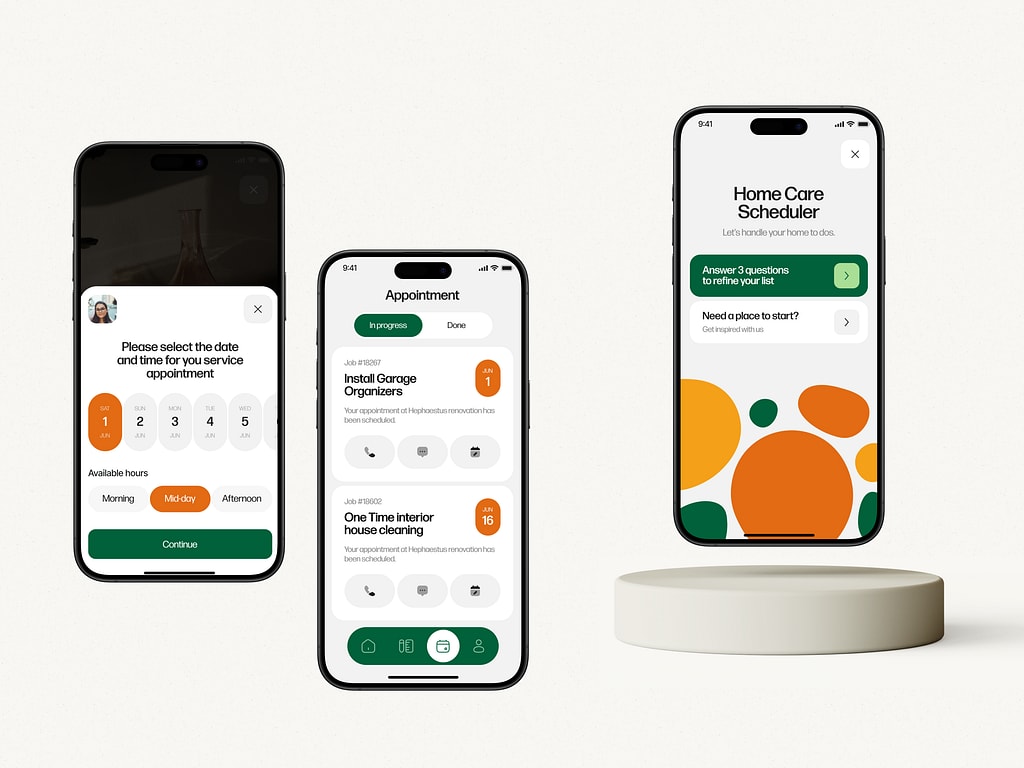
Why User Interface Design Matters
User Interface Design is the first impression users have of your digital product. It’s where function meets form, and where user interaction becomes an experience. A well-designed UI guides users effortlessly through tasks, making their journey enjoyable and frustration-free. On the flip side, a poorly designed interface can lead to confusion, errors, and ultimately, abandonment.
Key Principles of User Interface Design
Simplicity
Keep it Clear: Users should be able to navigate your interface without needing a manual. Clear labels, straightforward navigation, and a clean layout are essential.
Less is More: Avoid clutter. Every element should have a purpose. If it doesn’t contribute to the user’s goal, it’s just noise.
Consistency
Uniformity Across the Board: Consistent design elements—like buttons, fonts, and color schemes—help users feel familiar with the interface, reducing the learning curve.
Predictable Interactions: Users should know what to expect when they interact with your design. Consistency breeds confidence in navigating the interface.
Responsiveness
Adapt to All Screens: In a multi-device world, your design must work seamlessly across desktops, tablets, and smartphones. Responsive design ensures that your interface is accessible and functional on any screen size.
Fast and Efficient: Users expect quick responses. Laggy or unresponsive interfaces can frustrate users and lead to abandonment. Prioritize speed and efficiency in your design.
Feedback:
Interactive Cues: Users need to know that their actions have been registered. Whether it’s a button click, a form submission, or a drag-and-drop action, providing immediate feedback keeps users informed and engaged.
Error Prevention and Recovery: Anticipate potential user errors and guide them gently back on track. If an error occurs, offer clear instructions on how to fix it, rather than leaving users in the dark.
Accessibility
Design for All Users: Inclusivity is key. Your interface should be accessible to users of all abilities, including those with visual, auditory, or motor impairments. Consider using larger fonts, high-contrast colors, and keyboard navigation options.
Test and Refine: Regularly test your design with diverse user groups to ensure it meets accessibility standards and provides a positive experience for everyone.
Visual Hierarchy
Guide the Eye: Use size, color, and spacing to create a visual hierarchy that guides users through your interface. The most important elements should stand out, while secondary information should be less prominent.
Balance and Harmony: A well-balanced layout helps users process information more easily. Pay attention to alignment, spacing, and grouping of elements to create a harmonious design.
User-Centered Design
Know Your Audience: Design with the end-user in mind. Understanding their needs, preferences, and pain points allows you to create an interface that resonates with them.
Iterate and Improve: UI design is an ongoing process. Gather user feedback, analyze behavior patterns, and continuously refine your design to better meet user needs.
The Role of Aesthetics in UI Design: While functionality is paramount, aesthetics play a crucial role in making your interface appealing and enjoyable to use. A visually pleasing design can enhance the user experience by making the interface more engaging and emotionally satisfying. However, aesthetics should never compromise usability—always strike a balance between beauty and function.
Conclusion
User Interface Design is a delicate blend of art and science. It requires a deep understanding of user behavior, a keen eye for detail, and a commitment to continuous improvement. By adhering to the core principles of simplicity, consistency, responsiveness, feedback, accessibility, visual hierarchy, and user-centered design, you can create interfaces that are not only functional but also delightful to use. In a competitive digital landscape, mastering UI design is essential for building products that stand out and keep users coming back for more.
About the Creator
Nithin Sethu
Hello, I'm Nithin from Synclovis. Here, I work as a Software Engineer. I would like to share my knowledge of the latest trends and features.
Visit: https://www.synclovis.com
Keep reading
More stories from Nithin Sethu and writers in 01 and other communities.
Why Your 2025 Presentations Fail: The “Quiet Luxury” Hack Powered by PopAi & Morandi Aesthetics
Description Are you still pulling all-nighters fixing alignment and color palettes? The era of "ugly productivity" is over. As we approach the end of 2025, we analyzed why most corporate decks get ignored and uncovered a workflow shift top creatives are already using. This article explains how PopAi’s Morandi Color Scheme Minimalist Magazine slides transform complex data into refined visual narratives—and why this approach is becoming essential for modern presentations.
By charliesamuel7 days ago in 01




Comments
There are no comments for this story
Be the first to respond and start the conversation.