
Mastering JavaScript in 2023: A Comprehensive Guide
A comprehensive guide for beginners to start with Javascript


JavaScript is a high-level, interpreted programming language that is widely used to create dynamic and interactive web pages. It is one of the essential technologies for modern web development, and it's relevance today stems from its usage in front-end development, back-end development, and mobile app development.
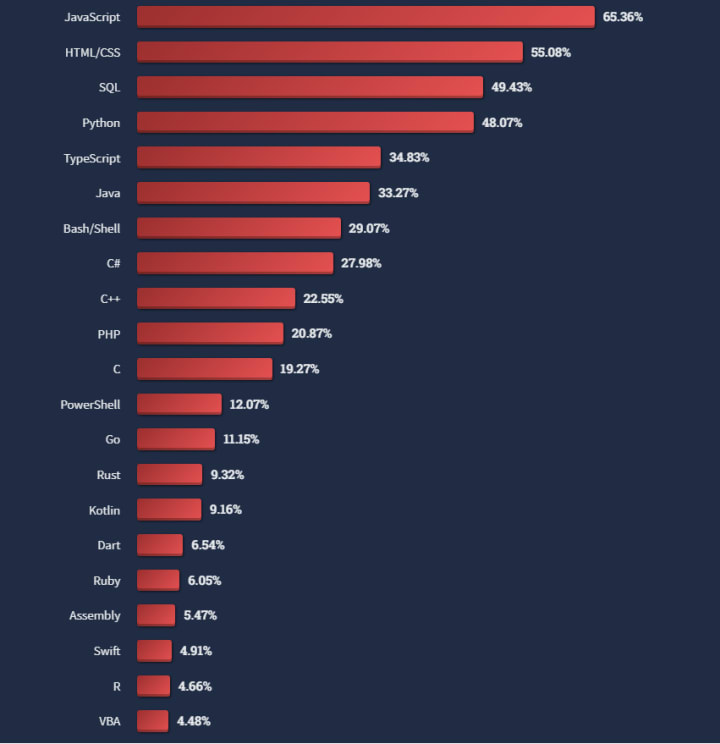
JavaScript has seen explosive growth in recent years and its usage is widespread across the tech industry. According to the 2022 Stack Overflow Developer Survey, JavaScript is the most commonly used programming language, with over 65% of developers using it. In addition, JavaScript-based frameworks such as React and Angular have become increasingly popular and are widely used in the development of modern web applications.
Learning JavaScript in 2023 could be important for several reasons:
- Wide Usage: As mentioned, JavaScript is widely used in the development of web pages and applications, making it an essential skill for web developers.
- Job Opportunities: The demand for JavaScript developers is consistently high, making it a valuable skill to have in the job market.
- Open-source Ecosystem: JavaScript has a rich open-source ecosystem, with numerous libraries and frameworks available, making it easier to develop complex applications.
- Cross-platform Development: JavaScript can be used for both front-end and back-end development, allowing for full-stack development with a single language.
- Continual Evolution: The JavaScript language is constantly evolving and improving, with new features and improvements being added regularly, making it a dynamic and exciting language to learn.
keywords: JavaScript, web development, dynamic, high-level, in-demand, Stack Overflow, survey, React, Angular, Open-source, Cross-platform
Understanding the Basics
JavaScript was created in 1995 by Brendan Eich while he was working at Netscape Communications Corporation. It was initially designed to provide simple interaction and dynamic effects for web pages. JavaScript quickly became popular and was standardized in 1997 by ECMA International as ECMAScript.
JavaScript syntax is a set of rules and structures that define how to write valid JavaScript code. The syntax is heavily influenced by other programming languages such as C and Java, and is designed to be straightforward and easy to learn.
Variables in JavaScript are used to store values, such as numbers, strings, and arrays. Variables are declared using the "var", "let", or "const" keywords and are assigned values using the equal sign (=).
JavaScript has several data types, including numbers, strings, Booleans, objects, and arrays. These data types define the type of values that can be stored in a variable. For example, a variable declared as a string can only store string values.
JavaScript operators are used to perform operations such as arithmetic, comparison, and assignment. Common operators include mathematical operators (+, -, *, /), comparison operators (==, ===, !=, !==), and assignment operators (=, +=, -=, *=, /=).
Functions in JavaScript are blocks of code that can be executed when they are called. They are useful for organizing and reusing code, and allow for the encapsulation of complex logic. Functions are declared using the "function" keyword, and can accept arguments and return values.
Loops are control structures that repeat a block of code a specified number of times or until a condition is met. JavaScript has two main loop structures: "for" loops and "while" loops. "For" loops are used to repeat a block of code a set number of times, while "while" loops repeat a block of code as long as a specified condition is true.
Conditional statements allow for the execution of different blocks of code based on specified conditions. The most commonly used conditional statements in JavaScript are "if" statements and "switch" statements. "If" statements execute a block of code if a specified condition is true, while "switch" statements provide a way to execute one of many blocks of code based on multiple conditions.
To reinforce the concepts of JavaScript syntax, variables, data types, functions, loops, and conditional statements, here are some hands-on exercises you could do:
- Create a simple JavaScript program that declares and assigns values to variables, performs arithmetic operations, and outputs the results.
- Write a JavaScript function that takes two numbers as arguments and returns the sum, difference, product, and quotient.
- Use a "for" loop to output the first 10 positive numbers.
- Use a "while" loop to find the sum of the first 10 positive numbers.
- Write a JavaScript program that uses an "if" statement to determine if a number is positive, negative, or zero.
- Write a "switch" statement to convert a number grade to its corresponding letter grade (e.g. 90-100 = A, 80-89 = B, etc.).
The next example should help you with exercise number 3 :)
keywords: conditional, ECMA, Brendan Eich, variables, functions, loops, var, let, foor, while
"VPNs, or virtual private networks, are a secure and private way to access the internet and protect your online activity from prying eyes."
NordVPN is a great example
DOM Manipulation
The Document Object Model (DOM) is a programming interface for HTML and XML documents. It represents the structure of a document as a tree-like structure, where each element in the document (such as an HTML tag) is represented as a node in the tree. The DOM allows programs to access and manipulate the contents of a document, including adding, removing, and modifying elements and their attributes.
JavaScript works with the DOM by providing an API for accessing and manipulating nodes in the tree. This allows JavaScript to dynamically update the contents of a web page based on user input or other events.
For example, a JavaScript program can use the DOM API to select an element on a web page and change its innerHTML property, which would update the contents of the element. This can be useful for creating dynamic user interfaces, such as hiding and showing elements based on user interaction.
There are several techniques for manipulating and changing the DOM using JavaScript, including:
- Accessing elements using selectors: You can use document.querySelector() or document.querySelectorAll() to select elements by CSS selector and access their properties and methods.
- Modifying element properties: You can change the properties of elements, such as their innerHTML, textContent, style, and attributes, using the dot notation.
- Creating and inserting elements: You can create new elements using the document.createElement() method and insert them into the DOM using the appendChild() or insertBefore() methods.
- Removing elements: You can remove elements from the DOM using the removeChild() or remove() methods.
- Using events: You can use events, such as click, hover, and load, to trigger JavaScript functions that manipulate the DOM in response to user interactions.
The result of the previous code will be:
My new special content!
The text above has been created dynamically.
keywords: DOM, HTML, XML, dynamic, API
Understanding and implementing event handling
Event handling is an essential part of JavaScript and allows you to respond to user interactions and other events on a web page.
To handle events in JavaScript, you need to attach event listeners to elements using the addEventListener() method. The first argument to this method is the type of event you want to handle (e.g. "click", "load", "hover", etc.), and the second argument is a callback function that will be executed when the event occurs.
For example, the following code attaches a "click" event listener to a button element, which will display an alert message when the button is clicked:
In addition to adding event listeners to individual elements, you can also use the event object to access information about the event, such as the target element, the type of event, and the state of the keyboard or mouse when the event occurred.
keywords: event, handling, click, elements, object
Building Applications with JavaScript
There are several approaches to building applications with JavaScript, including:
- Vanilla JavaScript: This approach uses only plain JavaScript without any additional libraries or frameworks. This is the simplest and most direct approach, and is well suited for small to medium-sized projects and for learning the basics of JavaScript.
- Libraries: Libraries like jQuery, Prototype, and MooTools provide a set of pre-written functions and tools that make it easier to build complex applications with JavaScript. Libraries are often smaller and faster than frameworks, and provide a high-level API for performing common tasks.
- Frameworks: Frameworks like Angular, React, and Vue provide a complete set of tools for building web applications, including a set of components, a router, and a state management system. Frameworks are often more complex than libraries, and can be more difficult to learn, but provide a more structured approach to building applications.
- Single Page Applications (SPAs): SPAs are web applications that use JavaScript to update the contents of a single page, without reloading the entire page. This provides a seamless user experience and is well suited for building complex applications, such as online stores, social networks, and real-time apps.
The best approach depends on the specific needs of your project and your experience with JavaScript and web development. For small projects, using vanilla JavaScript or a simple library may be sufficient, while for larger projects, using a framework or building an SPA may be more appropriate.
If you are a beginner, I advise you to start with plain Javascript and evolve to a Library and/or Framework.
When building scalable and maintainable applications with JavaScript, it is important to follow best practices and design patterns to ensure that your code is efficient, organized, and easy to maintain over time. Here are some tips and best practices to follow:
- Modular design: Break your code into small, reusable modules that can be easily maintained and updated. This makes it easier to manage complex applications and ensure that changes to one part of the code do not affect other parts.
- Use modern syntax: Take advantage of the latest features of JavaScript, such as arrow functions, destructuring, and template literals, to write cleaner, more concise code.
- Use version control: Use a version control system, such as Git, to track changes to your code and collaborate with others. This makes it easier to revert to an earlier version of your code if you encounter bugs or make mistakes.
- Write descriptive comments.
- Test your code: Test your code thoroughly to catch bugs and ensure that it works as intended.
- Use a linter: Use a linter, such as ESLint, to enforce coding standards and catch common errors in your code. This helps ensure that your code is consistent and maintainable over time.
- Keep it simple stupid!: Avoid over-engineering your code. Write simple, elegant code that is easy to understand and maintain, rather than complex, convoluted code that is difficult to understand and debug.
keywords: JavaScript, scalable, maintainable, applications, best practices, design patterns, modular design, modern syntax, version control, descriptive comments, testing, linter, simple.
Continuous Learning and Practice
Continuous learning and practice are essential for staying current and improving your skills as a JavaScript developer. Here are some reasons why:
- Keeping up with updates: JavaScript is an ever-evolving language, with new updates and features being added regularly. Continuous learning and practicing JavaScript ensures that you are up-to-date with the latest developments in the language.
- Improving skills: Regular practice helps reinforce the concepts you have learned and improves your skills over time. This allows you to tackle more complex projects and improve the quality of your code.
- Staying motivated: Learning and practicing JavaScript on a regular basis helps keep you motivated and engaged with the language. This helps you stay interested in the language and avoid burnout.
- Networking opportunities: Engaging in the JavaScript community through forums, meetups, and other events provides opportunities to connect with other developers and learn from them. This can help you improve your skills, stay up-to-date with the latest developments in the language, and find new job opportunities.
Important Links, Resouces and Other Stuff
Some literature I recommend:
"VPNs, or virtual private networks, are a secure and private way to access the internet and protect your online activity from prying eyes."
NordVPN is a great example
About the Creator
Adriano Maia
Hello, I'm a tech enthusiast and blogger with a passion for exploring the latest trends and advancements in the tech industry. With 7 years of experience in the field, I will try to share my knowledge and my likes with you!
Hope you like!
Keep reading
More stories from Adriano Maia and writers in 01 and other communities.
Exploring the Role of AI Assistants like ChatGPT in Learning to Code
The use of AI assistants like ChatGPT in the field of education is becoming increasingly popular, particularly in the realm of learning to code. With the rise of technology and the increasing demand for coding skills in the job market, learning to code has become a crucial skill for many individuals. However, the process of learning to code can be challenging, especially for beginners. This is where AI assistants like ChatGPT come in. By utilizing natural language processing and machine learning algorithms, ChatGPT is able to provide instant feedback, explanations, and suggestions to help learners understand and improve their code. In addition, ChatGPT can also provide coding challenges, exercises, and guidance on real-world projects to enhance the learning experience.
By Adriano Maia3 years ago in 01
Jeff Bezos' head-turning then-and-now photos from high schooler to Amazon billionaire
The businessman and entrepreneur has undergone a huge transformation over the years Looking at Jeff Bezos today, with his $252 billion fortune and life of luxury, it's difficult to imagine him as a regular child, let alone as a short-order cook at McDonald's.
By Dena Falken Esq4 days ago in 01
Winter Clothing: Purpose, Materials, and Modern Use
Winter clothing plays an essential role in human adaptation to cold environments. Across history, people have relied on specialized garments to protect themselves from low temperatures, wind, and moisture. While early winter clothing focused almost entirely on survival, modern cold-weather wear has developed into a balance of function, comfort, and everyday practicality. Today, winter clothing is shaped by advances in materials, changes in lifestyle, and evolving expectations of durability and versatility.
By charliesamuel4 days ago in 01
Silver Screen Magic with Mae West
American actress and singer Mae West became a popular film actress during the Great Depression. She started entertaining in vaudeville, then performed on Broadway, and finally went to Hollywood. She signed up with Paramount Pictures and made her debut in the 1932 film “Night After Night.” She also starred in musicals, comedies, and crime dramas. The American Film Institute named her one of the best classic Hollywood actresses.
By Rasma Raisters3 days ago in Geeks




Comments
There are no comments for this story
Be the first to respond and start the conversation.