Latest Stories
Most recently published stories in 01.
Best Udemy Courses for New Programmers
For the most part, web development, coding, and computer science as a whole require some of the most sought-after skillsets in today's rapidly evolving tech climate. But while demand might be higher than ever before, there is still a deficit of talented coders and computer technicians out there. This goes for both full time employees and freelancers looking to make some extra cash.
By Timothy Kohut7 years ago in 01
What You Need to Know About the Internet of Things (IoT)
The Internet of Things (otherwise known as IoT) is on the rise with the development of 5G networks spanning the globe. In case you were wondering, IoT is basically the linking up of all devices in the home to form one consistent network that, these days, is meant to work similarly to the human brain. Everything in the home (or even the workplace) is able to access information via the internet, and connect to all other devices in its vicinity. Some in the tech industry praise this relatively new development, as it has produced major advancements in connectivity speeds, and it has even helped pave the way towards advancements in artificial intelligence (AI).
By Jackie Barrows7 years ago in 01
Keywords and SEO
Keywords are of great importance to the longevity of any content strategy; the point is to be found, isn't it? You want people to look up your blog or website, have their questions answered, and see you as a go-to person for whatever they need. Therefore, using the right sort of keywords is crucial to the growth of your business.
By Jackie Barrows7 years ago in 01
How Artificial Intelligence Leads to Smarter Diamond Grading
We're in an age where artificial intelligence and machine learning are reshaping how many industries conduct their business. This technology is now poised to disrupt the diamond grading process, which could eventually lead to other great innovations in the resale diamond supply chain. This article covers how artificial intelligence is leading to smarter diamond grading, as well as a smoother sorting process in the near future.
By Andrea Dawson7 years ago in 01
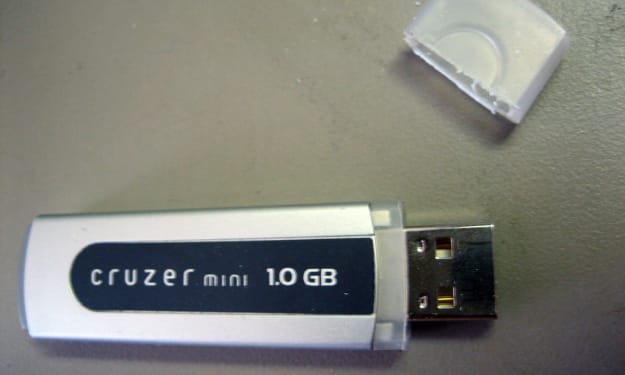
Using USB Flash Drives
What do we know about flash drives? The main feature of the flash drives is the transfer and storage of any files. Often flash drives are used to update the BIOS or UEFI motherboards. Most modern PCs support not only the installation of the operating system using a bootable USB flash drive but the ability to boot from a USB device, which allows the operating system to boot from a USB flash drive. This configuration is often called Live USB among users. This feature will help not only in the cloning of the operating system and its further transfer to a similar computer, to perform file manipulations without loading the main OS and to combat malware. The USB storage device supports encryption, which is not unimportant for the secure storage of information and does not lose its relevance even during a backup. Flash drives can be used as a key to activate (USB Keys) applications.
By catlyntech7 years ago in 01
Web Design: When to DIY and When to Hire Out. Top Story - December 2018.
A good website design wields a lot of power in drawing people to any business. Everything from poignant images and video content to thought-provoking blog posts and a solid merchandise shop provide customers with a happy website experience that keeps them entertained and buying your work.
By Jackie Barrows7 years ago in 01
Why Learn Java?
There's no denying that learning a new language can be daunting; and software programming languages are just that, languages that you have to put the time in to learn. Luckily the benefits easily outweigh the difficulties for a popular programming language such as Java, as money and opportunity just seem to roll in when you learn Java. In fact, Java programming is a requirement for many job positions, whether they be for Fortune 500 companies or any of the jobs you can find on a simple Indeed search. That's because Java is a mature programming language that is responsible for a lot of the systems you see today.
By Salvador Lorenz7 years ago in 01
The Purpose of Data Analysis and How to Use It in Today's Markets
Real data analysis of the market is defined as the research, condensing, illustration, and interpretation of hard data gathered from numerous sources. The data that is gathered and analyzed offers businesses insight into what is currently driving the markets, thus allowing companies to better determine their next step.
By Jackie Barrows7 years ago in 01
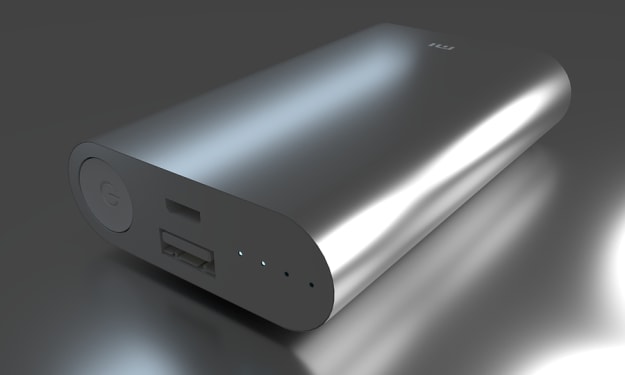
Useful Facts About Power Banks
The concept of a “power bank” was developed against the background of the rapid growth of the market of mobile digital devices and their popularization, and was embodied in a portable self-contained power source with a large capacity and compact size.
By roboticworld here7 years ago in 01
Will the Future of Retail Be Augmented?
How many times have we seen it happen in just the span of our own lives? How many times have we seen the stuff of science fiction come to life? How many times have we seen characters in a movie from two decades ago, a decade ago, or heck, even two to three years before do something that was futuristic then but is commonplace today? How many times have we been watching a TV show from a decade or two ago and get frustrated at the plot and yell out, "Why doesn't he just send her a text already!"
By David Wyld7 years ago in 01
Flash Drive Features and Design
Flash Drive Features The waterproof case—will help to protect flash drive from spilled coffee or other damage. Write protection is a small switch on the flash drive body that blocks data recording. You can not be afraid of viruses when using on someone else's computer or accidentally erasing important information. Password protection is implemented using the program supplied with the USB flash drive. Fingerprint scanner—access to data on a flash drive is possible only if it coincides with the owner's fingerprint. Verification is done every time you connect a flash drive to any device. Data backup—used to restore lost information. This function works automatically (after installing the USB flash drive in the PC) or according to the schedule. In this case, the user independently determines the folder or drive to which files will be recorded from the drive. Copying is carried out by the program that comes bundled with a flash drive. Data compression—significantly reduces the size of files (by 20-80 percent), intended for copying to a USB flash drive. This option saves drive memory. Compression is implemented using a program installed on a flash drive. Hardware data encryption—reliably protects information from unauthorized access by unauthorized persons in case of loss or theft of a flash drive. Data transfer indicator—signals (blinks) about data exchange between a flash drive and a PC. Before removing the drive, you should make sure that the transfer of information is completed—in this case, the LED will simply light up. If the flash drive is removed when the indicator light is flashing, data loss is not excluded. U3 Smart Drive support—saves user work settings (settings, passwords, programs, and other data). This makes it possible to turn any computer into a full-fledged workplace and continue working independently of the “main” computer. This option is useful for people who are often traveling or working on multiple computers. Support Ready Bust—provides high-speed read and write flash drives. OTG support—allows you to connect a USB flash drive to mobile devices, such as a smartphone or tablet, which do not have a full-sized USB-port without an adapter. The connection is realized through the interface provided in the drive—micro USB, Lighting or USB Type-C. A flash drive that does not support OTG needs a special adapter to work with mobile devices. Built-in card reader—allows you to record, store and read data from memory cards that are used in iPods, mobile phones and other devices. The card reader makes it easier to work with information stored in the memory of such gadgets. Wi-fi-module—provides wireless communication between the USB flash drive and mobile devices (smartphone, laptop, tablet). The module works in different ways: Some solutions require connecting a USB flash drive to a PC, other devices have their own power sources and operate independently of the computer. Non-detachable cap—Attached to the body of the flash drive, which minimizes the likelihood of its loss. Neutralizes the only minus of the classic performance of a flash drive (with a cap). Shockproof case—Protects against accidental impacts and other mechanical effects.
By techbabe stories7 years ago in 01