
JavaScript Daily Tips #78: The Power of JavaScript’s WebAssembly Integration
WebAssembly allows developers to run code written in other languages (like C, C++, Rust, and more) at near-native speed in web browsers.

In the world of modern web development, performance and speed are key. As the demand for complex web applications and interactive experiences increases, developers are constantly looking for ways to enhance the efficiency of their code. One powerful tool that has emerged in recent years to help developers meet these demands is WebAssembly (Wasm).
WebAssembly allows developers to run code written in other languages (like C, C++, Rust, and more) at near-native speed in web browsers. This is an exciting possibility because, traditionally, JavaScript has been the go-to language for web development. However, JavaScript can sometimes fall short in terms of performance, especially for computation-heavy tasks. WebAssembly opens up new opportunities for high-performance applications on the web.
In this article, we’ll explore the power of JavaScript’s WebAssembly integration, dive into how WebAssembly works, and show you how to use it alongside JavaScript for maximum performance.
What is WebAssembly (Wasm)?
WebAssembly, or Wasm, is a binary instruction format designed to run code in modern web browsers. It provides a way to execute code written in low-level languages like C, C++, Rust, and others in a safe, portable, and efficient manner. WebAssembly is designed to run alongside JavaScript and be executed at near-native speeds, making it perfect for computationally intensive tasks that JavaScript might struggle with.
Key Features of WebAssembly:
- Performance: WebAssembly is compiled to binary format, allowing it to execute much faster than JavaScript. This is particularly beneficial for tasks like gaming, image processing, cryptography, or complex data manipulation.
- Language Agnostic: WebAssembly supports multiple programming languages, such as C, C++, Rust, and others. Developers can write code in their preferred language, compile it to Wasm, and run it in the browser.
- Portable: WebAssembly code is platform-independent, which means it can run on any platform with a compliant WebAssembly engine, including browsers, mobile devices, and even servers.
- Security: WebAssembly runs in a sandboxed environment, meaning it cannot directly access the system’s underlying resources, making it secure for web usage.
How Does WebAssembly Work?
WebAssembly operates by compiling code written in languages like C, C++, or Rust into a binary format that the browser can execute. The browser then runs the WebAssembly code in a secure, isolated environment, alongside JavaScript. This allows you to combine the power of low-level languages with the flexibility and ease of JavaScript.
Here’s how WebAssembly works in a typical browser environment:
- Compilation: You write your code in a language like C, C++, or Rust.
- Compilation to Wasm: Using a WebAssembly compiler (e.g., Emscripten for C/C++ or Rust’s built-in support), you convert the code into a .wasm file.
- Loading in the Browser: JavaScript loads the .wasm file into the browser and interacts with it using the WebAssembly JavaScript API.
- Execution: The browser executes the WebAssembly code at near-native speed and allows JavaScript to interface with it.
The real power of WebAssembly comes from how seamlessly it integrates with JavaScript. You can use JavaScript to load, call, and communicate with WebAssembly modules, making it easy to incorporate WebAssembly into existing JavaScript projects.
Why Integrate WebAssembly with JavaScript?
While JavaScript is incredibly versatile, it has its limitations. For computationally expensive tasks, such as rendering complex graphics, scientific computations, or video encoding/decoding, JavaScript may not provide the necessary performance. This is where WebAssembly integration comes in, offering a way to accelerate these types of operations.
Benefits of Integrating WebAssembly with JavaScript
- Improved Performance: By moving CPU-intensive tasks into WebAssembly, you can achieve significant performance gains. WebAssembly is closer to machine code and executes much faster than JavaScript.
- Language Flexibility: With WebAssembly, you can write performance-critical parts of your application in other languages (like C, C++, or Rust), without being limited to JavaScript. This gives developers more freedom to choose the best tools for each task.
- Faster Execution of Heavy Operations: If you’re building an app that needs to handle large amounts of data or complex algorithms (like a game engine, image processing, or cryptographic operations), WebAssembly allows you to run those operations more efficiently than with JavaScript alone.
- Portable Code: Since WebAssembly is platform-independent, you can write once and run anywhere — whether it’s in a browser, on a server, or in mobile apps.
- Complementary to JavaScript: WebAssembly doesn’t replace JavaScript — it works alongside it. You can use JavaScript for UI, DOM manipulation, and other high-level operations, while offloading the heavy computational tasks to WebAssembly for better performance.
How to Use WebAssembly with JavaScript
Now that we understand the power and potential of WebAssembly, let’s dive into how to use it within a JavaScript project. Here’s a step-by-step guide on how to compile code into WebAssembly and interact with it in JavaScript.
Step 1: Write the Code in C (or Another Language)
To get started, you need to write your code in a language that can be compiled to WebAssembly. For this example, let’s use C.

This simple C function add takes two integers and returns their sum.
Step 2: Compile the Code to WebAssembly
Now, you’ll need to compile this C code into a WebAssembly module using a compiler like Emscripten. Emscripten is a popular toolchain that can compile C/C++ code to WebAssembly.
You can install Emscripten and then run the following command to compile the C code:

This generates a add.wasm file that contains the WebAssembly binary.
Step 3: Load the WebAssembly Module in JavaScript
Once you have the WebAssembly module, you can load it in your JavaScript code and interact with it. Here’s how you can do it:
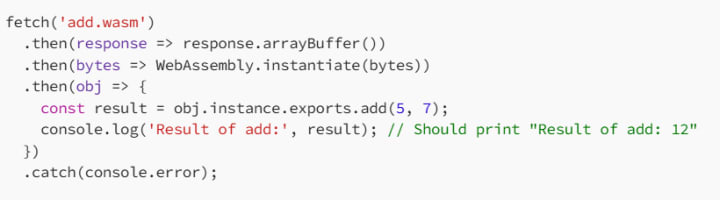
Explanation:
Fetch the Wasm File: We use the fetch API to load the .wasm file from the server.
Instantiate the Wasm Module: The WebAssembly.instantiate() method compiles and instantiates the WebAssembly binary. It returns an object that contains the exported functions.
Call the WebAssembly Function: We can now call the add function from the WebAssembly module and get the result, just like calling a JavaScript function.
Advanced WebAssembly Integration Features
While the basic integration of WebAssembly and JavaScript is straightforward, there are several advanced features and techniques that you can take advantage of to optimize your application’s performance and functionality.
1. Memory Management in WebAssembly
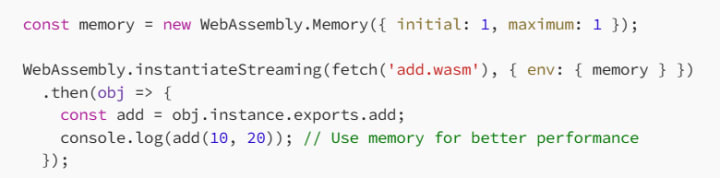
WebAssembly uses a linear memory model, which means all the memory is stored in a contiguous block (an array of bytes). JavaScript can interact with WebAssembly memory directly through the WebAssembly.Memory object.
For example, you can allocate memory in WebAssembly and pass it between JavaScript and WebAssembly:
2. WebAssembly and JavaScript Interoperability
WebAssembly allows JavaScript to call functions in the Wasm module, but the reverse is also true: WebAssembly can call JavaScript functions using the importObject technique. This enables bidirectional communication between WebAssembly and JavaScript.
3. Asynchronous Compilation
Compiling large WebAssembly modules can take time. Fortunately, WebAssembly supports asynchronous instantiation, which allows you to load and compile WebAssembly modules in the background while keeping your app responsive.

When to Use WebAssembly
WebAssembly isn’t meant to replace JavaScript — it’s meant to complement it. Use WebAssembly for tasks that require high performance and low-level memory control. Here are some common scenarios where WebAssembly shines:
Game Development: Complex 2D or 3D games often require performance optimizations that WebAssembly can provide. Game engines like Unity and Unreal Engine already use WebAssembly for their browser-based games.
Data Processing: For applications that handle large datasets or complex computations (e.g., scientific calculations, financial models), WebAssembly can provide a huge speed boost.
Image and Video Processing: Tasks like image manipulation, video encoding/decoding, and computer vision benefit from the speed improvements WebAssembly offers.
Cryptography: Secure and fast cryptographic operations can be offloaded to WebAssembly for better performance.
Conclusion
JavaScript’s integration with WebAssembly opens up a world of possibilities for web developers looking to improve the performance of their web applications. With WebAssembly, you can run code at near-native speeds, enabling your web apps to handle computationally intensive tasks more efficiently.
By using JavaScript and WebAssembly together, you can leverage the strengths of both technologies: JavaScript for high-level operations and WebAssembly for low-level, performance-critical tasks. Whether you’re building games, processing data, or performing complex calculations, WebAssembly is a powerful tool that can take your web development skills to the next level.
About the Creator
MariosDev
Hi, I’m Marios! I’ve been a developer for over 9 years, crafting cool stuff and solving tricky tech puzzles. I’m a total tech enthusiast and love sharing my thoughts and tips through blogging. Also, in love with my bike!
Why Most Fitness Apps Lose 80% of Users in 30 Days
The fitness technology sector is currently facing a "leaky bucket" crisis. User acquisition costs have stabilized in early 2026. However, the data remains very grim. Approximately 80% of users abandon new fitness applications within the first month.
By Devin Rosario6 days ago in 01




Comments (1)
WebAssembly sounds like a game-changer. I've seen how JavaScript can slow down with complex tasks. It's great that WebAssembly can run other languages near-natively in browsers. I wonder how easy it is to integrate WebAssembly with existing JavaScript projects. Have you tried using it in a real-world scenario? Also, what kind of performance gains can we expect in different types of applications?