
How Does Data Recovery Work – All You Need to Know
Understand what really happens when lost files are brought back: from how storage devices record data to the methods experts use to recover it safely.


If important files such as photos, projects, or documents suddenly become inaccessible, it may seem like they have been permanently removed. Everything may appear normal until you notice a missing folder or an empty drive. The good news is that most deleted data isn’t gone immediately, and recovery tools can often bring it back.
Below, we will explain everything you need to know: how does data recovery work and what methods can be used.
What Happens When You Delete or Lose Data?
Most people think deleting a file makes it disappear instantly. But that’s not what really happens inside your computer or memory card. In most cases, the data is still there; it’s just hidden.
A photo you removed from your camera’s SD card or an old assignment you cleared from your desktop isn’t necessarily gone. Instead, the system marks that space as “available for reuse.” Until something new is written in that space, the original information can still be retrieved.

That’s why it’s often possible to get deleted files back as long as you act quickly. Experts usually recommend stopping all activity on a device right after a loss. Every photo you take, every app you install, increases the chance of overwriting the data you want to recover. Data recovery falls into two main categories: logical vs physical data recovery.
Logical data recovery deals with software-level issues such as deleted files or corrupted partitions. These problems affect how data is accessed but not the hardware itself, so recovery tools can often restore the files.
Physical data recovery, on the other hand, involves damaged hardware: broken read/write heads or scratched platters. In these cases, professionals use cleanroom environments and specialized tools to repair the device and extract the data safely.
Both types serve the same goal: to restore access to valuable information, but through different methods. So even though it looks like a file vanishes the moment you hit “delete,” it often lingers quietly on your storage device. And with proper tools and methods, it’s often possible to get your data back.
How Data Recovery Software Works
Since most data loss cases involve logical-level issues such as accidental deletion or formatting, data recovery software is the most common way to restore lost files. One of our clients once thought years of family photos were gone after accidentally formatting an SD card. A simple scan with recovery software revealed nearly every image still intact.
There are plenty of tools out there, each with different levels of usability and recovery strength. If you're unsure where to start, you can use our Software Picker to find a recovery tool that fits your needs and comfort level.
DIY data recovery tools work on the same basic principle. Software scans the raw storage surface and searches for file signatures. They are unique patterns that mark the start or end of a file. Once those signatures are found, the program can piece the fragments back together and make the files visible again.
However, recovery software can only work if the original data hasn’t been overwritten. The moment new information is saved in the same space, the old content is gone for good.
Data Recovery Step by Step
Here’s a closer look at how the data recovery process works in practice. We’ll use Disk Drill as an example, though most modern recovery tools follow a very similar pattern:
Once installed, data recovery software lists all the storage devices connected to your computer. Select the device or partition where your files were lost.
Start the scanning process. During the scan, the software analyzes the disk sector by sector to identify file fragments and check for recoverable data structures.
Here’s a closer look at how the data recovery process works in practice. We’ll use Disk Drill as an example, though most modern recovery tools follow a very similar pattern:
1. Once installed, data recovery software lists all the storage devices connected to your computer. Select the device or partition where your files were lost.
2. Start the scanning process. During the scan, the software analyzes the disk sector by sector to identify file fragments and check for recoverable data structures.

3. Once the scan finishes, you will usually have a list of recoverable files. These are often organized by file type, such as pictures or videos.
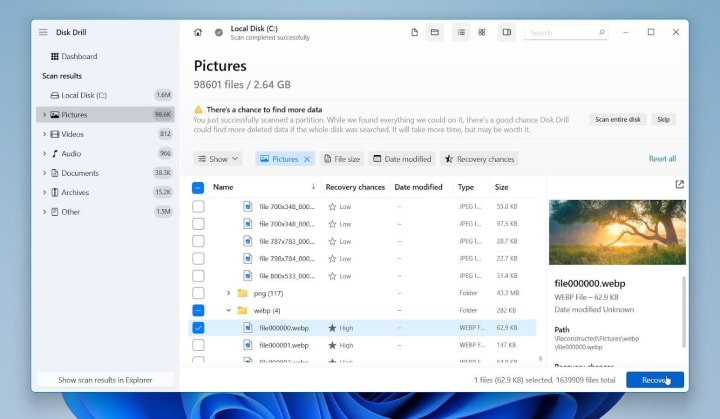
4. Select the files you want to restore and choose a new location to save them, never on the same drive where they were lost.

5. Finally, open and test the recovered files. If they open correctly and display their full content, the recovery was successful.
The entire process usually takes minutes for small drives and several hours for large or heavily damaged ones. Still, the core idea stays the same: locate the hidden data, rebuild it, and save it safely before it’s gone forever.
How Professionals Recover Data in a Lab
When the problem is more serious and involves physical damage to the device, professional recovery specialists take over. Inside specialized data recovery labs, engineers work in highly controlled environments designed to protect delicate storage components from dust, static, and further damage.
These cleanrooms often meet Class 100 or ISO 5 standards: the air contains fewer than 100 particles per cubic foot. Even a single speck of dust could destroy a drive platter or read head, so precision and cleanliness are paramount.
Common Methods Used by Professionals
Professional data recovery labs rely on several specialized techniques that go beyond regular software solutions. Some of the most common methods include:
Drive imaging involves creating an exact bit-by-bit copy of the damaged drive before any repair. This protects the original data and allows engineers to perform recovery safely on the clone.
Head stack replacement is used when the read or write heads stop functioning. Technicians carefully remove them and install compatible donor heads under a microscope to restore access to the platters.
Firmware reconstruction helps when the internal software of the drive becomes corrupted. Specialists repair or rewrite the firmware to re-establish communication with the device.
Chip-off recovery applies to flash-based storage such as SSDs and USB drives. The memory chips are physically removed, read with advanced tools, and the raw data is reassembled into usable files.
Each of these approaches requires precision tools, experience, and a controlled environment, which is why they are reserved for professional use.
Why Professional Data Recovery Services Cost More
Cleanroom recovery is expensive because it combines specialized labor, high-end equipment, and controlled conditions. A single recovery can take several days or even weeks. Yet it also delivers the highest success rates, especially for drives that have suffered head crashes, electrical damage, or severe firmware corruption.
Unlike software recovery, which operates on existing logical structures, lab recovery restores access to data that’s often physically inaccessible.
In short, professional data recovery labs represent the last line of defense. When a drive suffers catastrophic damage and the data truly matters, these experts are the ones who bring it back from the brink.
When Recovery Isn’t Possible
Even the most advanced tools and skilled engineers face limits. Some situations make data recovery impossible, no matter how much expertise or technology is involved.

- One of the main reasons is data overwriting. When new information replaces the space once used by deleted files, the original data disappears permanently. Unlike damaged files, overwritten data cannot be reconstructed; it’s replaced at the physical level of the storage medium.
- Another common barrier is severe hardware damage. Drives with shattered platters, burned chips, or broken memory cells may lose parts of the data structure entirely. In these cases, recovery specialists might retrieve fragments, but full restoration is no longer possible.
- Encryption can also make recovery impossible without access to the decryption key. Modern encryption algorithms are designed to be unbreakable, but that same security prevents recovery if the key or password is lost.
- Finally, TRIM-enabled SSDs present a special challenge. Once TRIM clears deleted data blocks to maintain drive performance, the erased information cannot be recovered. This process happens automatically, often within seconds after deletion.
While these cases are rare, they serve as a reminder of why regular backups and safe storage practices are so important. Prevention remains the only genuine guarantee when recovery is no longer an option.
Final Thoughts
There are two main approaches to data recovery: DIY recovery software and professional services. Based on our experience, in most situations, reliable DIY tools are sufficient because they are affordable, sometimes even free, and capable of handling many types of data loss.
However, prevention is always more practical than recovery. The 3-2-1 backup rule, which means keeping three copies of your data on two different media and one stored offsite or in the cloud, can reduce the risk of permanent loss.
It is also helpful to replace aging storage devices before failure, use surge protectors to avoid power-related damage, enable automatic cloud backups, and regularly test backup copies to confirm that they work correctly.
About the Creator
Pandora Data Recovery Mentor
Pandora Data Recovery Mentor offers expert, trusted guidance for rescuing lost files. Specialist-reviewed rankings & tips help you choose the best software or DIY tools to solve your data loss emergency.
Keep reading
More stories from Pandora Data Recovery Mentor and writers in 01 and other communities.
Best Data Recovery Software for Windows: Which One Should You Pick?
If you’re looking for the best Windows data recovery software to get back lost files, you’ve probably noticed it’s not an easy choice. The market is full of tools, and each promises top results, but not all deliver.
By Pandora Data Recovery Mentor5 months ago in 01
Standing While Falling
Quotation from Friedrich Nietzsche "He who wrestles long with monsters should beware lest he himself become a monster. And if you gaze long into an abyss, the abyss also gazes into you. Man is not destroyed by suffering, but by the meaning he makes of it."
By LUCCIAN LAYTH7 days ago in Critique




Comments
There are no comments for this story
Be the first to respond and start the conversation.