
Font Families and Fallbacks — How to Make Your Website Look Great Everywhere
This article is part of a free full CSS Course: Beginner to Expert


When designing a website, one of the most important aspects of your site’s look is typography. The right font can set the tone, improve readability, and make your content stand out. But here’s the catch: not all devices, operating systems, or browsers have the same fonts installed. That’s where font families and fallbacks come into play.
In this post, we’ll explore what font families and fallbacks are, how to use them effectively, and how to make sure your text looks great on every device. Let’s dive into the world of typography!
1. What Are Font Families?
A font family is a collection of fonts that share similar characteristics, such as stroke thickness, width, and spacing. When you use a font family in CSS, you’re specifying a collection of fonts from which the browser can choose. The browser will then pick the first available font in the list.
The basic structure of a font family looks like this:

- Primary Font: The first choice. This is the font that you want to use for your text.
- Fallback Font: The second choice. If the primary font is unavailable, the browser will use this one.
- Generic Font Family: A generic category of fonts (e.g., serif, sans-serif, monospace) that the browser can fall back on if neither the primary nor the fallback font is available.
Example

In this example:
“Helvetica” is the primary font.
“Arial” is the fallback font if “Helvetica” isn’t available.
sans-serif is the generic font family, which applies to all sans-serif typefaces.
2. Why Use Font Families and Fallbacks?
Why is it so important to define both a primary font and fallbacks? Here are a few reasons:
2.1 Consistency Across Devices
Not all fonts are available on all devices. For example, “Helvetica” might look great on a Mac, but it’s not available on many Windows machines. If your site relies solely on “Helvetica,” users on those systems might end up with a completely different font. By specifying fallbacks, you ensure your text will look consistent no matter the device or operating system.
2.2 Improve Performance
Using a web-safe font (like Arial or Times New Roman) can help speed up page load times since the font is already installed on most devices. If you use a custom font that needs to be loaded from a server, the page might take longer to load. A good fallback ensures users won’t see empty or broken text while the custom font is loading.
2.3 Better User Experience
Your users’ experience is key. A font that’s unavailable or broken can disrupt the visual appeal of your website. By providing a fallback, you give the browser a backup plan, ensuring that your text still looks legible and clean no matter what.
3. How to Use Font Families in CSS
Now that we know why font families and fallbacks are so important, let’s dive into the mechanics of using them in CSS.
Basic Syntax:

Let’s break it down:
- Quotation Marks: Use quotation marks around font names that have spaces (e.g., “Times New Roman”). If the font name doesn’t have spaces, you don’t need quotation marks.
- Font Stacks: The list of fonts is called a “font stack.” The browser will use the first font it finds in the stack. So, always place your most preferred font first.
Here’s an example that uses two different fonts with a generic fallback:

In this example:
“Roboto” is the first font choice.
If “Roboto” isn’t available, “Arial” will be used.
If neither “Roboto” nor “Arial” is available, the browser will choose any available sans-serif font.
4. What Are Web Fonts?
Web fonts are fonts that are not installed on a user’s device but are instead downloaded from a web server when the page loads. They can give your website a unique and consistent appearance across different devices, even if the user doesn’t have the font installed.
There are several ways to load web fonts:
4.1 Using Google Fonts
Google Fonts is a free, easy-to-use service that provides a vast collection of fonts that you can use on your website. To use Google Fonts, you simply include the link to the font in your HTML and specify the font in your CSS.
Example:
Go to Google Fonts, select the font you want, and copy the provided link tag into your HTML <head> section.
<head>
<link href="https://fonts.googleapis.com/css2?family=Roboto&display=swap" rel="stylesheet">
</head>
Then, specify the font in your CSS:

4.2 Using @font-face
If you want more control or need to use a custom font that isn’t hosted on a web font service, you can use the @font-face rule to load a font from your own server.
Example:
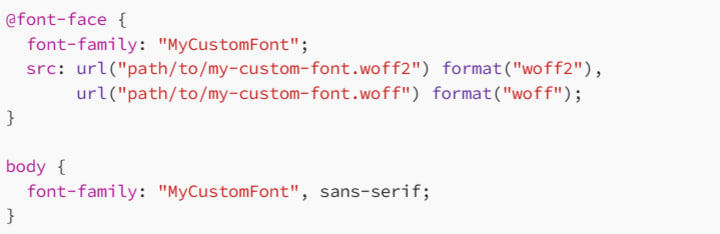
In this example, the @font-face rule tells the browser to load the custom font from your server. The src property specifies the file path for the font files in different formats (e.g., woff2, woff). The browser will use the font if it’s available, falling back to sans-serif if not.
5. Best Practices for Font Families and Fallbacks
Now that you know how to use font families and fallbacks, here are some best practices to follow:
5.1 Use System Fonts for Performance
When possible, consider using system fonts (such as Arial, Verdana, or Times New Roman) for better performance. Since these fonts are already installed on most devices, they’ll load faster than custom fonts. They can also improve page speed, which is critical for good user experience and SEO.
5.2 Create a Font Stack
Always define a list of fonts in your font-family property, in order of preference. If the first font isn’t available, the browser will try the next one in the list, and so on. Make sure to end the stack with a generic font family like serif, sans-serif, or monospace.
Example:

In this case, if “Helvetica Neue” isn’t available, it will fall back to Helvetica, then Arial, and finally any available sans-serif font.
5.3 Choose a Fallback Font with Similar Characteristics
When selecting fallback fonts, try to choose ones that are similar in design to your primary font. This ensures that if your primary font isn’t available, the fallback font won’t create jarring differences in the design of your page.
5.4 Avoid Overloading Your Site with Too Many Custom Fonts
Web fonts can slow down your site’s loading time, especially if you’re using multiple custom fonts. To avoid performance issues, limit the number of custom fonts you use and consider using just one or two for the main body text and headings.
5.5 Use the font-display Property for Better Loading Behavior
The font-display property controls how fonts are rendered while they are loading. By setting this property, you can improve the user experience and avoid situations where text is invisible while waiting for the font to load.
Example:

The swap value ensures that the browser displays fallback fonts until the custom font is fully loaded, and then swaps in the custom font.
6. Common Font Families
Here’s a quick rundown of some common font families that are safe to use across different platforms:
Serif Fonts: Times New Roman, Georgia, Garamond
Sans-serif Fonts: Arial, Helvetica, Verdana, Tahoma
Monospace Fonts: Courier New, Consolas, Monaco
You can also use generic font families like serif, sans-serif, monospace, cursive, and fantasy as fallbacks. These values don’t refer to specific fonts but to a general type of font that will be chosen based on what is available on the user’s device.
7. Conclusion: Typography That Works Everywhere
Understanding how to use font families and fallbacks effectively is essential for creating websites that look great and function well across all devices. By selecting the right fonts, defining appropriate fallbacks, and using web fonts when needed, you can ensure that your website has a professional, consistent look no matter where it’s viewed.
With a bit of planning and best practices, you can make sure that your typography doesn’t just look good — it works everywhere. So get out there and start applying those font families and fallbacks like a typography pro!
Happy coding, and remember: Great fonts make for a great experience!
About the Creator
MariosDev
Hi, I’m Marios! I’ve been a developer for over 9 years, crafting cool stuff and solving tricky tech puzzles. I’m a total tech enthusiast and love sharing my thoughts and tips through blogging. Also, in love with my bike!
Migrate from G Suite to Office 365 While Preserving Metadata & Permissions
With the growing business size, the storage and resource requirements also start to evolve. Several aspiring businesses migrate from Google Workspace to Office 365 to access advanced collaboration and communication tools. Google Workspace and Office 365, both are feature-rich SaaS platforms, designed to boost the efficiency of business operations. However, they are still quite different from each other and can experience challenges during the shift.
By Xanthe Clay2 days ago in 01




Comments
There are no comments for this story
Be the first to respond and start the conversation.