
Mastering Combinators: Child, Descendant, Adjacent, and Sibling
This article is part of a free full CSS Course: Beginner to Expert


CSS is all about selecting elements and styling them in the right way. But what if you want to be more specific in your selection? Enter combinators — special selectors that let you target elements based on their relationship to other elements. These selectors can make your CSS code cleaner, more efficient, and easier to maintain.
In today’s post, we’re going to explore the four main combinators in CSS: child, descendant, adjacent, and sibling. With these tools in your CSS toolkit, you’ll be able to style elements with precision, based on their position or proximity to other elements.
1. What Are Combinators?
Combinators in CSS allow you to define the relationship between two selectors. By using a combinator, you can specify how an element relates to another element, which gives you more control over your styles. The main combinators in CSS are:
- Child combinator (>): Targets direct children of an element.
- Descendant combinator (space): Targets all descendants, regardless of how deep the hierarchy goes.
- Adjacent sibling combinator (+): Targets an element that is immediately after another element.
- General sibling combinator (~): Targets all siblings of an element, coming after it in the HTML structure.
Each of these combinators helps you target elements with greater specificity, making your CSS more efficient and precise.
2. The Child Combinator (>)
The child combinator (>) allows you to target only direct children of an element. This is useful when you want to style only the immediate children, excluding any nested elements further down the DOM tree.
Basic Syntax of the Child Combinator

For example, let’s say you have a div with several p elements inside it, but you only want to style the first-level p tags, not the nested ones:

In this case, only the p elements that are direct children of the div will be colored blue. If any p tags are nested inside another element inside the div, they won’t be affected.
Why Use the Child Combinator?
Targeting direct children: If you want to apply styles only to the immediate children of a container, the child combinator is perfect.
Preventing over-targeting: Without this combinator, using a simple descendant selector could result in more elements being styled than intended.
Improved code clarity: Using child combinators helps make your styles more predictable, as it reduces the risk of unintentionally styling deeper nested elements.
Example: Styling Only the Direct List Items

This will make only the immediate li elements inside the ul bold. Any nested list items inside another li won’t be affected.
3. The Descendant Combinator (Space)
The descendant combinator (just a space between two selectors) is used when you want to target all descendants of an element, regardless of how deep they are nested. Unlike the child combinator, this will select all elements that are within the parent, including those that are multiple levels deep.
Basic Syntax of the Descendant Combinator

For example, let’s say you want to target all p tags inside a div, no matter how many layers deep they are:

This will make all p elements inside any div green, whether they are direct children or nested within other elements.
Why Use the Descendant Combinator?
Targeting all nested elements: When you need to style an element and all of its children, grandchildren, etc., the descendant combinator is the way to go.
Flexible styling: It provides a broad selection of elements, which can be useful for things like site-wide styles or nested structures.
Simpler structure: You don’t need to worry about how deep the elements are nested — just use the descendant selector, and all descendants will be styled.
Example: Changing the Color of All Paragraphs in a Section

In this case, all p elements inside any section will turn red, whether they are nested directly inside the section or deep within child elements.
4. The Adjacent Sibling Combinator (+)
The adjacent sibling combinator (+) is used to target an element that comes immediately after a specified element, as long as they share the same parent. This is perfect when you want to apply styles to an element that directly follows another.
Basic Syntax of the Adjacent Sibling Combinator

For example, let’s say you have a div with two p elements, and you only want to style the second p tag if it directly follows the first one:

In this case, the second p element, which immediately follows the first p, will be styled with a purple color. Any other p tags that aren’t directly after another p won’t be affected.
Why Use the Adjacent Sibling Combinator?
Targeting specific order: If you want to style elements based on their immediate position relative to others, the adjacent sibling combinator is perfect.
Creating interactive effects: This combinator is often used for things like creating “active” states in menus or buttons, where one element triggers the styling of its next sibling.
Maintaining a clean structure: It allows for fine-tuned selection without applying styles to other siblings or elements that aren’t in the exact sequence.
Example: Styling the Second Paragraph

Here, the first p element that directly follows an h2 will be styled in italics. If there are any other paragraphs not immediately after an h2, they won’t be affected.
5. The General Sibling Combinator (~)
The general sibling combinator (~) is similar to the adjacent sibling combinator, but it’s a little more relaxed. Instead of selecting only the immediate next sibling, the general sibling combinator selects all elements that come after the first one, as long as they share the same parent.
Basic Syntax of the General Sibling Combinator

For example, let’s say you have a div with multiple p elements, and you want to style every p element that comes after a h2, regardless of how many elements are in between:
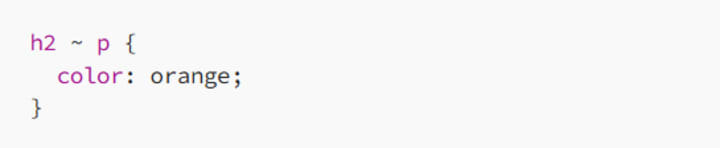
This will color all p elements that follow any h2 in the same parent div orange, even if they are not immediately after the h2.
Why Use the General Sibling Combinator?
Targeting multiple siblings: When you need to apply the same style to multiple siblings after a certain element, the general sibling combinator is ideal.
Flexible relationships: It gives you flexibility when working with elements that are not immediately adjacent, allowing you to style all siblings that follow the first one.
Simpler CSS structure: You don’t need to worry about exact order, as long as the sibling appears after the specified element.
Example: Changing the Font of Paragraphs After an H2

In this case, all p elements that follow an h2 tag in the same parent will get the Arial font family.
6. Best Practices for Using Combinators
While combinators are extremely powerful, here are a few tips to use them effectively:
6.1 Use Child Combinators for Specificity
When you want to target only the immediate children of an element, use the child combinator (>). This will give you more control and prevent you from styling unintended deeper nested elements.
6.2 Avoid Overuse of Descendant Selectors
While the descendant combinator is very flexible, using it too broadly can lead to performance issues and unwanted styles. It’s a good idea to be as specific as possible with your selectors.
6.3 Combine Combinators for Complex Structures
You can combine different combinators in one CSS rule to target more complex structures. For example, you can use a child combinator along with a sibling combinator to style an element based on both its parent and position relative to other elements.
6.4 Maintain Readability
As your styles grow, using combinators can make your CSS more compact, but be careful not to over-complicate your selectors. Ensure your code remains readable and maintainable.
7. Conclusion: Power Up Your CSS with Combinators
CSS combinators — child, descendant, adjacent sibling, and general sibling — are incredibly powerful tools that give you precise control over how elements are styled based on their relationships in the DOM. Whether you’re styling direct children, targeting all descendants, or focusing on elements that follow others, combinators allow you to create complex designs with ease.
By mastering these combinators, you’ll be able to write cleaner, more efficient CSS that’s both easier to maintain and understand. So go ahead — start combining your selectors, and watch your CSS skills reach a new level.
Happy coding, and remember: Combinators are your secret weapon for more powerful, precise styles!
About the Creator
MariosDev
Hi, I’m Marios! I’ve been a developer for over 9 years, crafting cool stuff and solving tricky tech puzzles. I’m a total tech enthusiast and love sharing my thoughts and tips through blogging. Also, in love with my bike!
ICO Marketing Explained: A Beginner’s Roadmap for 2026
The blockchain industry continues to evolve rapidly, and Initial Coin Offerings (ICOs) remain one of the most powerful fundraising mechanisms for blockchain startups and Web3 projects. Even though the crypto market has matured significantly over the past decade, ICOs in 2026 are experiencing a resurgence due to improved regulatory clarity, stronger investor protection frameworks, and advanced marketing technologies that help projects reach a global audience. However, launching a successful ICO is not just about developing a great blockchain product; it requires a well-structured marketing strategy that builds trust, generates awareness, and attracts the right investors. ICO marketing has transformed dramatically compared to the early days of crypto fundraising. In the past, many projects relied on hype and aggressive promotion to raise funds, but today's investors are far more informed and cautious. They expect transparency, detailed roadmaps, credible teams, and strong community engagement before investing in a token sale. As a result, ICO marketing in 2026 focuses on strategic storytelling, community building, influencer collaborations, data-driven campaigns, and regulatory compliance.
By Jack santo5 days ago in 01
Taxi Booking App Development Cost: Full Guide (2026)
Building a ride-sharing platform today is like trying to fix a plane while it is flying. You want a piece of that Uber pie, but the entry price is steep. I have seen founders dump six figures into a "simple" app only to watch it crash during the first load test.
By Sherry Walker6 days ago in 01


Comments
There are no comments for this story
Be the first to respond and start the conversation.