
Enhance Your WordPress Website's Security with CleanTalk Anti-Spam
Discover how CleanTalk Anti-Spam can boost your WordPress website's security by effectively blocking spam and malicious content. Say goodbye to annoying spam comments and protect your valuable data with CleanTalk's powerful anti-spam solution.
In today's digital landscape, website security is paramount. As a WordPress website owner, protecting your valuable data, user information, and online reputation should be a top priority. One of the most effective ways to safeguard your website from spam and malicious content is by integrating CleanTalk Anti-Spam. In this article, we will explore the features and benefits of CleanTalk Anti-Spam and how it can enhance the security of your WordPress website.
The Importance of Website Security:
Website security is critical for every online business or blog. A compromised website can result in stolen data, malware infections, damaged reputation, and loss of valuable customers. Protecting your WordPress website from spam attacks is an essential step in maintaining a secure online presence.
Understanding CleanTalk Anti-Spam:
CleanTalk Anti-Spam is a robust WordPress plugin that provides advanced protection against spam comments, registrations, contact form submissions, and other spam activities. It utilizes intelligent algorithms and powerful filters to detect and block spam in real-time.
Key Features of CleanTalk Anti-Spam:
- Real-Time Spam Protection: CleanTalk Anti-Spam works seamlessly in the background, continuously analyzing incoming data and filtering out spam comments and submissions in real-time.
- Global Anti-Spam Database: The plugin has access to a vast database that includes information about spam sources, patterns, and behavior, ensuring effective protection against the latest spam techniques.
- Invisible to Users: CleanTalk Anti-Spam works silently without requiring any additional input from your website visitors. It keeps the user experience intact while efficiently combating spam.
- Compatibility: The plugin is compatible with various WordPress themes, plugins, and form builders, ensuring smooth integration and optimal functionality.
Benefits of CleanTalk Anti-Spam:
- Spam-Free Website: By implementing CleanTalk Anti-Spam, you can significantly reduce or eliminate spam comments, registrations, and form submissions. This not only improves the user experience but also saves time moderating and managing spam.
- Enhanced Security: CleanTalk Anti-Spam goes beyond spam filtering by offering additional protection against brute force attacks, content scraping, and IP blacklisting. It acts as an extra layer of defense for your WordPress website.
- Improved Performance: By eliminating the need to process and manage spam content, CleanTalk Anti-Spam helps optimize your website's performance. It reduces server load, speeds up page load times, and enhances overall website efficiency.
- Reputation Management: Spam content can harm your online reputation and impact search engine rankings. CleanTalk Anti-Spam prevents malicious links, unwanted advertisements, and irrelevant comments from tarnishing your website's credibility.
- Detailed Statistics and Reports: The plugin provides insightful statistics and reports, giving you a comprehensive overview of spam activity on your website. You can analyze trends, identify potential vulnerabilities, and make informed decisions to further enhance security.
Easy Installation and Configuration:
Integrating CleanTalk Anti-Spam into your WordPress website is a straightforward process. Simply install the plugin from the WordPress repository, activate it, and enter your CleanTalk access key. The plugin takes care of the rest, automatically protecting your website from spam.
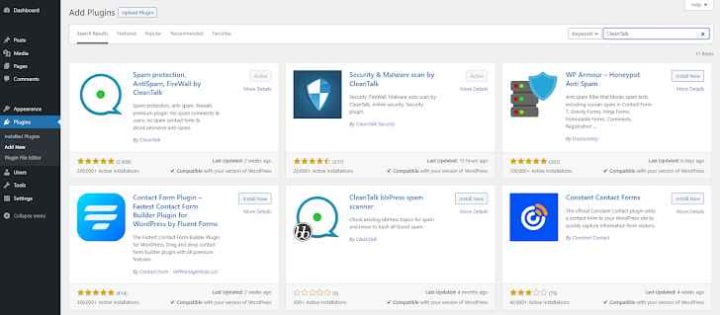
1) To install the plugin: Navigate to your WordPress Dashboard → Click on 'Plugins,' then 'Add New' → In the search field, type 'CleanTalk.'
2) Install the plugin and activate it. You will be automatically redirected to the plugin's settings.
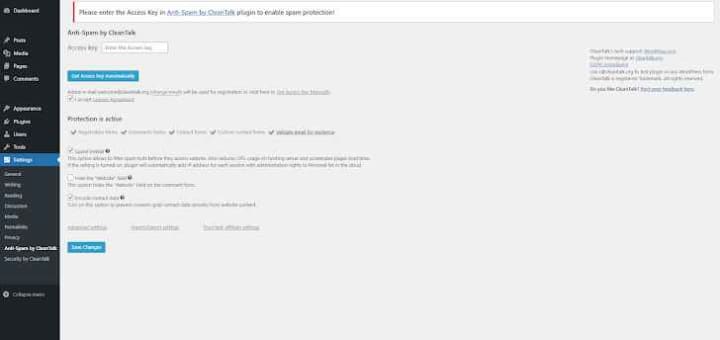
3) Click on 'Get Access Key Automatically,' then save the settings. At this point, a CleanTalk account will be created for you. The account credentials will be sent to your email.
To test the form, open the website in a new Incognito tab. This is necessary because the plugin doesn't register actions performed by the admin.
Navigate to the page containing the contact form and enter the test email address [ [email protected] ]. Click the "Submit" button to send the data. If the data is blocked, a corresponding message should appear.
The CleanTalk plugin captures the website request made via the contact form and forwards the gathered data to the CleanTalk Cloud for processing. In the Cloud, a decision is made regarding the "Spam/Not Spam" status. This status is then relayed back to the plugin, which either forwards the form data to the website backend or blocks it. This request data gets logged in your Anti-Spam Log within your service Dashboard.
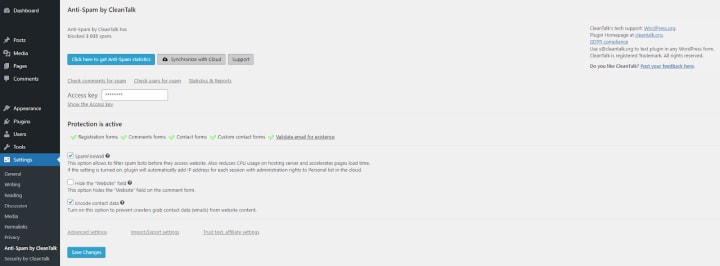
To access your Anti-Spam Log, either go directly to your Dashboard or open the plugin settings and click the "Click here to get the Anti-Spam statistics" button.
Service Dashboard Features
The Anti-Spam Log - This tool gives you insight into all website requests processed by the CleanTalk Cloud, including their status and additional details.
- Each request includes the following:
- Status — Denied or Approved
- Date and time of request
- Sender's username, IP, and email addresses
- Spam activity linked to these IP and email addresses
- Email address validation result — Fake or Real
You can click on "Details" under each request to access complete information.
This feature ensures that you never miss out on any data and allows you to monitor the accuracy of the filtering process. Another notable feature of the CleanTalk plugin is that it captures data even when a visitor makes a typo or fails the built-in form validation, making the data available in your Anti-Spam Log.
- The Dashboard also allows you to:
- Manage your list of protected websites.
- Update your account settings.
- View summary statistics.
- Manage Personal Lists of IPs, Emails, Stop-Words, Countries, and Languages.
These features make our Anti-Spam Service a robust solution for spam protection and shielding your website from unwanted messages or requests.
Conclusion:
Securing your WordPress website against spam and malicious content is crucial for maintaining a safe and reputable online presence. CleanTalk Anti-Spam offers a comprehensive solution to enhance your website's security, effectively blocking spam comments, registrations, and form submissions. By implementing Clean
About the Creator
Sumedh Barsagade
I am a software developer with over 5 years of experience in the industry. Individual. I am always looking for new challenges and opportunities to learn and grow. I am also a team player and I am always willing to help others.
Keep reading
More stories from Sumedh Barsagade and writers in 01 and other communities.
5 Best Mobile App Development Companies in Pittsburgh (2026)
Pittsburgh has quietly become one of the most compelling technology cities in the United States. What was once known for steel mills and bridges is now home to a thriving ecosystem of software engineers, AI researchers, and product builders. Carnegie Mellon University alone pumps world-class computer science and machine learning graduates into the local workforce every single year, and a growing number of them are choosing to stay and build here rather than relocating to the coasts.
By Samantha Blakea day ago in 01
The Rise of AI Presentation Tools: Transforming the Way We Create Slides
Artificial intelligence is quietly reshaping how we work, learn, and communicate. One area where this shift is especially noticeable is presentation design. Creating slides used to mean hours of formatting, arranging content, and adjusting visuals. Today, AI-powered tools are simplifying that process, helping users turn ideas into polished presentations in a fraction of the time.
By charliesamuela day ago in 01
The BAFTA Awards
By now, in a stunning departure from recent years, most of the world is aware of what happened at the BAFTA film awards. Social Media Headlines will tell you the bare bones: that John Davidson, a Tourette's Syndrome advocate, shouted a racial slur at two Actors of Colour, Michael B Jordan and Delroy Lindo.
By Natasja Rose7 days ago in Psyche




Comments
There are no comments for this story
Be the first to respond and start the conversation.