
BIM Handoff Issues Between Architects and Contractors | How to Avoid Data Loss
BIM Handoff Issues Between Architects and Contractors | How to Avoid Data Loss
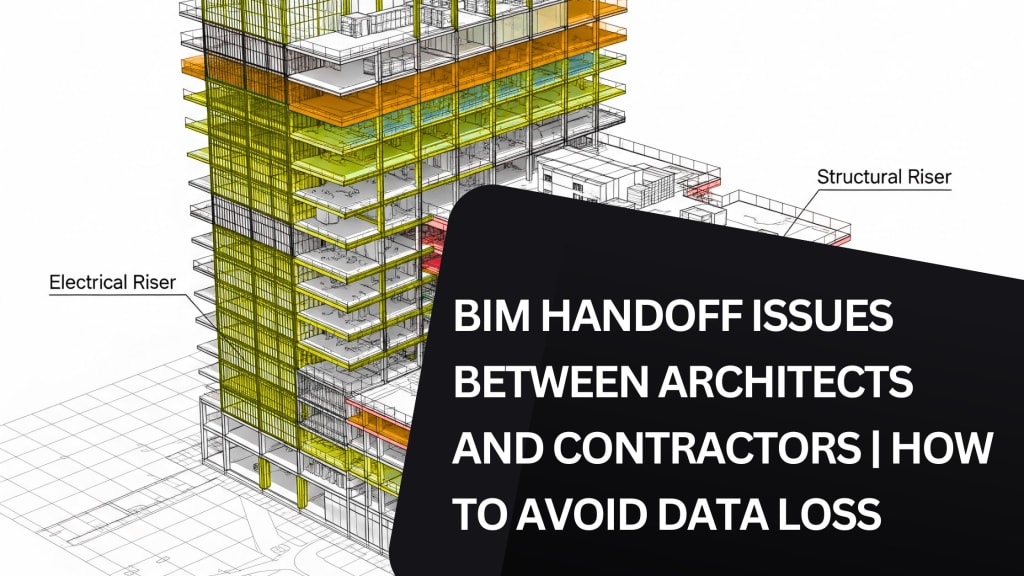
A successful building project relies heavily on accurate data exchange between different teams. One of the most critical points in a construction project is the handoff from architects to contractors.
When Architectural BIM Services are involved, this handoff becomes even more complex, as it includes not just drawings but also detailed data models. However, if not managed properly, this transfer often leads to delays, miscommunication, and even data loss.
Understanding how and why these issues occur is the first step toward building a better workflow. In this blog, we’ll explore the most common BIM handoff problems between architects and contractors and how to reduce or completely avoid data loss during this stage.
Common BIM Handoff Issues in Architecture-to-Construction Workflow
Incomplete or Inconsistent Models
One of the frequent issues during handoff is the incompleteness of BIM models. Architects typically develop models focused on design intent, but contractors need models that also reflect construction logic. When using Architectural BIM Modeling Services, the design model may lack buildable components, or critical parameters might be missing.
This leads to back-and-forth communications, which wastes time and introduces the risk of working with incorrect or outdated information.
Different Modeling Standards
Architectural and construction teams often follow different modeling standards or Level of Development (LOD). What an architect considers “complete” at LOD 300 might not be usable by a contractor aiming for LOD 350 or higher. Misalignment in expectations leads to confusion, rework, and delays in schedules.
Even though Revit Architectural BIM Services follow structured practices, interpretation and application of standards still vary across firms. This inconsistency affects the overall quality of the model received by contractors.
File Compatibility and Software Issues
Another technical roadblock appears in the form of file compatibility. If architectural teams use one version of Revit or different plug-ins, and the contractor’s team uses another, data may not translate as expected. Often, certain annotations, parameters, or links get lost or corrupted during file conversion or transfer.
Although the problem seems small, it becomes a serious one when vital elements like wall assemblies, embedded components, or key dimensions are lost in the process.
Lack of Documentation with the Model
Delivering a model without proper documentation is like handing over a machine without an instruction manual. Contractors often receive files without notes, naming conventions, or parameter guides. Even models delivered through BIM Architectural Services sometimes lack detailed metadata, drawing sheets, or user guides that help the next team make sense of the model.
The absence of such information forces the contractor's team to guess the intent or reach out multiple times for clarification, which slows down the process.
Disconnected Design and Shop Drawings
Architectural models and Architectural Shop Drawings are sometimes developed separately or with minimal coordination. As a result, what is modeled in BIM may not match what appears on the printed sheets. Contractors depending on both visual references and construction documentation may be misled by inconsistencies between them.
When the shop drawings are not extracted directly from the live BIM model or are outdated, the risk of error during execution increases.
How to Minimize or Avoid BIM Handoff Failures
Begin with Clear Handoff Protocols
It’s crucial to define a clear BIM Execution Plan (BEP) at the start of the project. This plan should detail who is responsible for what, the expected LOD at each phase, naming standards, file formats, and key delivery dates. While Architectural BIM Modeling Services often provide structured models, the clarity of documentation and expected outcomes should be aligned between both sides early on.
Setting expectations from the beginning eliminates assumptions and helps each team know exactly what needs to be delivered and when.
Use Shared Data Environments
Relying on email or individual file-sharing systems increases the risk of version confusion. Instead, teams should work through a shared Common Data Environment (CDE). Using platforms like Autodesk Construction Cloud or BIM 360 allows both architects and contractors to access the same files, updates, and communications in real time.
By accessing a single source of truth, contractors won’t be stuck working on outdated models or drawings. Even Revit Architectural BIM Services become more effective when integrated with CDE platforms that support seamless version control and audit trails.
Align on LOD Expectations
The definition of LOD should not be left to guesswork. Each discipline must agree on what each LOD level includes. For example, LOD 300 for architecture should be more than just visual, it must contain object properties, tags, and relationships that the contractor can use for quantity take-offs and planning.
BIM Architectural Services need to coordinate with contractors to make sure their models contain the necessary construction-ready data. Regular coordination meetings between both teams, even in the early design stages, can help align these expectations.
Maintain a Live Link Between Models and Drawings
To avoid inconsistencies between BIM models and Architectural Shop Drawings, the drawings must always be extracted from the current version of the BIM model. Any updates made to the model should reflect in the drawings automatically.
Using tools within Revit to automate drawing generation helps reduce human errors and keeps documentation accurate. This practice makes it easier for contractors to trust the visual guides they receive and use them directly for field execution.
Perform Model Audits Before Handoff
Before transferring a model to the contractor, it's important to conduct an internal audit. This includes checking for missing parameters, verifying object placements, testing linked files, and reviewing the sheet sets. A model that passes internal quality checks is more likely to support a smoother handoff.
In Architectural BIM Services, these audits can be built into the workflow at every project milestone to catch problems early rather than letting them grow into serious issues during construction.
Include Metadata and User Guidelines
A handoff should not include just a 3D model but also a simple guide that explains the file structure, naming conventions, key views, and object properties. This helps contractors understand how to navigate and interpret the model more efficiently.
When Architectural BIM Modeling Services include this level of detail, the model becomes a working tool rather than a passive reference. Clear metadata also supports better collaboration with trades, engineers, and estimators who rely on the data during later stages.
Encourage Ongoing Communication, Not Just Final Delivery
Instead of treating handoff as a single event, it should be a series of checkpoints. Architects and contractors should have regular exchanges during schematic, design development, and construction documentation phases. This continuous feedback helps identify potential disconnects before they become critical.
Communication tools, model coordination software, and direct model-sharing links can streamline this process. By staying connected throughout, both teams develop trust and build stronger models over time.
Final Thoughts
Handing off a BIM model from the architect to the contractor is not just about transferring files. It's about transferring information in a way that’s understandable, usable, and actionable for the next team. If that data gets lost, misinterpreted, or delayed, it affects everything from budgets to build quality.
About the Creator
lisa Brown
Building Information Modelling delivers high quality out performing designs in Electrical BIM Services. We collectively work as a team and we believe in delivering end to end solutions in electrical designs and drawings.
Keep reading
More stories from lisa Brown and writers in 01 and other communities.
When and How to Migrate Legacy Building Designs into an Architectural BIM Workflow
Many buildings around the world were designed using older 2D drafting methods or early CAD systems. While those drawings served their purpose at the time, they lack the flexibility, detail, and coordination needed for modern construction and renovation demands.
By lisa Brown6 months ago in 01




Comments
There are no comments for this story
Be the first to respond and start the conversation.