
What Is an IP Tracker? How to Locate IP Addresses Easily (By: Streak Ranker)
What Is an IP Tracker? How to Locate IP Addresses Easily

Understanding the Essence of an IP Tracker
An IP tracker is a digital utility designed to identify, monitor, and gather information about an Internet Protocol (IP) address. An IP address serves as a unique numerical identifier for every device connected to a computer network, such as the internet, facilitating seamless communication and data routing. These trackers are instrumental in revealing details like the approximate geographical location, the Internet Service Provider (ISP) associated with the address, the hostname, and sometimes even the type of device or network status.
The functionality of IP trackers extends across various domains, making them invaluable for network management, enhancing security protocols, troubleshooting connectivity issues, and refining marketing strategies. However, it is crucial to acknowledge that the misuse of these tools can raise significant privacy concerns. While IP addresses can indicate an approximate location and ISP, they generally do not expose personally identifiable information, such as names or exact physical addresses, without appropriate legal authority or cooperation from the ISP.
Key Insights into IP Tracking
IP Tracker Definition: An IP tracker is a sophisticated tool or service that identifies and gathers information associated with an IP (Internet Protocol) address, which is a unique numerical label assigned to every device on a network.
Information Revealed: These trackers can pinpoint approximate geographic location (country, city, region), Internet Service Provider (ISP), and sometimes the organization or hostname linked to the IP address.
Ease of Use: Locating IP addresses is highly accessible through various free online lookup tools and command-line utilities, enabling quick retrieval of essential network and location data.
The Mechanics Behind IP Tracking
The process by which IP tracking operates is systematic and efficient:
Data Capture
When a user visits a website that has an IP tracker integrated, a small code snippet is activated. This code loads a tracker file from the tracking service's server, which then records the visitor’s IP address, along with browser information and the pages viewed during the session.
Database Matching
The captured IP address is subsequently cross-referenced against extensive databases containing known IP ranges and their associated metadata. This includes information such as company names, geographical locations, and network specifics. A technique known as reverse IP lookup is frequently employed during this phase to identify the entity or organization behind a particular IP address.
Information Display
Once the data is collected and matched, IP tracking tools process this information and present it in a clear, readable format. This allows website owners, network administrators, or cybersecurity professionals to analyze visitor activity, identify potential customers, monitor network health, or enhance security measures by detecting suspicious patterns.
This process of data capture, matching, and display forms the core of IP tracking, providing a powerful means to understand digital interactions and network landscapes.
The Versatile Applications of IP Tracking
IP tracking serves a multitude of purposes across different sectors, offering significant benefits for businesses, cybersecurity, and network management.
Business and Marketing Advantages
For businesses, IP trackers are a powerful asset for understanding their online audience. They provide valuable insights into website traffic, helping to identify visitor origins and tailor marketing efforts through precise geolocation data. This allows companies to personalize content, advertisements, and services based on the geographical location of their users, leading to more effective engagement and conversion rates.

Cybersecurity and Network Management
In the realm of cybersecurity, IP tracking is indispensable. It plays a critical role in network troubleshooting, aiding in the diagnosis of connection issues and the investigation of suspicious activities, such as Distributed Denial of Service (DDoS) attacks. By tracking IP addresses, security professionals can identify the source of threats, implement protective measures, and respond swiftly to potential breaches. Furthermore, IP tracking can assist in asset recovery, helping to locate lost or stolen devices by tracing their last known IP address.
Methods and Tools for Effortless IP Address Location
Locating IP addresses has become remarkably straightforward, thanks to a variety of accessible online tools and command-line utilities. These methods cater to both technical users and those seeking quick, simple lookups.
Online IP Lookup Tools
Numerous websites offer free IP lookup services, providing a user-friendly interface to quickly obtain information about an IP address. By simply entering an IP address into these tools, users can instantly retrieve details such as the country, city, region, ISP, and sometimes even approximate geographical coordinates. Popular examples include Whatismyipaddress.com, IPinfo.io, iplocation.net, and NordVPN's IP lookup tool. These tools are often the first choice for anyone needing quick IP information.
Website Server Logs
For website administrators, server logs are a goldmine of information. These logs record the IP addresses of every visitor who connects to their site, along with other data like pages viewed and timestamps. The specific method for accessing and analyzing these logs varies depending on the server type (e.g., Apache, Nginx), but they offer a detailed historical record of site traffic.
Email Headers
In certain scenarios, the IP address of an email sender can be found by examining the email's header information. This method is particularly useful for investigating suspicious emails or tracking the origin of communication. However, the availability and clarity of IP information in email headers can vary significantly depending on the email service provider and sender's configurations.
Command-Line Tools
For users with technical expertise, command-line tools offer powerful ways to retrieve IP-related information. Utilities like ping can test network connectivity and display the IP address of a given domain, while traceroute (or tracert on Windows) maps the path that data packets take to reach a destination, revealing the IP addresses of intermediate routers. These tools are invaluable for network diagnostics and troubleshooting.
Dedicated IP Tracker Software and Mobile Apps
Beyond online tools, specialized software applications and mobile apps are available for dedicated IP tracking. Examples like "IP Finder & Tracker" (available on various app stores) provide advanced features, often including more detailed maps, real-time monitoring capabilities, and enhanced analytical insights. These solutions are typically geared towards more intensive use cases, such as IT professionals managing large networks.
Visualizing IP Tracking Capabilities
To better illustrate the potential of IP tracking, let's look at how different aspects of a tracker can be rated. The radar chart below provides an opinionated analysis of key features found in various IP tracking tools, on a scale from 0 to 5.
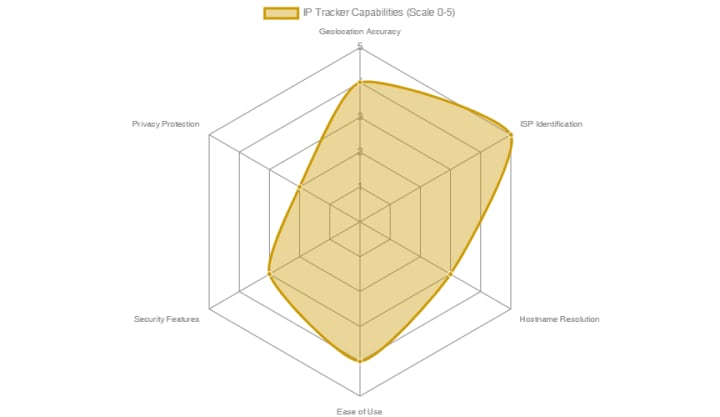
This radar chart evaluates typical IP tracker features, demonstrating their strengths and limitations.
Understanding Data Accessibility and Accuracy
While IP tracking provides valuable insights, it's essential to understand the nuances of data accessibility and accuracy.
Limitations of IP Tracking
It is important to remember that while IP tracking can provide approximate geographic locations, it generally cannot guarantee pinpoint accuracy down to exact street addresses without legal intervention or direct cooperation from the Internet Service Provider (ISP). The accuracy of geolocation data derived from an IP address can vary, often indicating the city or region rather than a precise physical location. This is because IP addresses are typically assigned to network blocks rather than individual devices at precise geographic coordinates.
Impact of Privacy Tools
Furthermore, the widespread use of VPNs (Virtual Private Networks) and proxy servers can significantly complicate precise IP tracking. These tools function by routing internet traffic through an intermediary server, effectively masking the user's true IP address with the IP address of the VPN or proxy server. This makes it challenging to ascertain the user's actual location or identity, as the tracking tools will only see the IP address of the intermediary server.
Exploring the Landscape of IP Tracking Tools
The chart below provides an overview of various types of IP tracking tools and their relative effectiveness across different use cases, scored on a scale of 0 to 10.
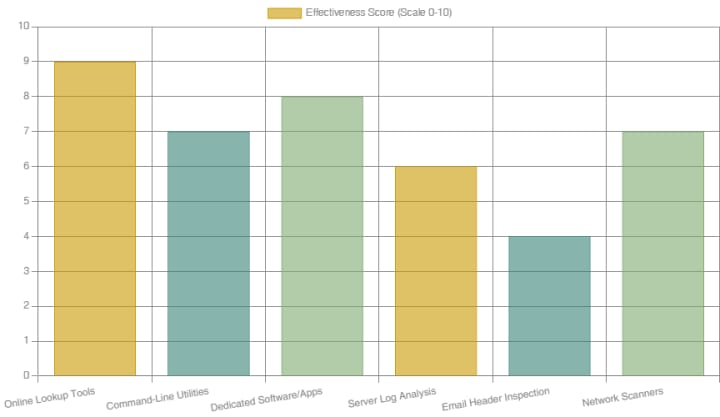
This bar chart illustrates the comparative effectiveness of different IP tracking tool categories.
Conclusion
In the digital age, understanding IP tracking is essential for both individuals and organizations. An IP tracker is a fundamental tool that deciphers the unique numerical labels assigned to devices on a network, providing approximate geographical locations, Internet Service Provider details, and other crucial network information. While not capable of revealing precise personal data without legal intervention, these tools are invaluable for a myriad of applications, ranging from enhancing cybersecurity and troubleshooting network issues to refining marketing strategies through geolocation insights. The accessibility of numerous free online lookup tools, coupled with more advanced command-line utilities and dedicated software, makes the process of locating IP addresses remarkably straightforward. As digital interactions continue to evolve, the ethical and informed use of IP tracking remains paramount, balancing the pursuit of knowledge with the imperative of privacy.
About the Creator
Streak Ranker
Grow Faster with the Top-Rated Digital Marketing Agency (Streak Ranker) – Trusted for Real Results and Expert Support.
Keep reading
More stories from Streak Ranker and writers in Writers and other communities.
The Power of Data-Driven Strategies (By: Streak Ranker)
In today's dynamic digital landscape, social media is more than just a platform for interaction; it's a goldmine of invaluable data. Leveraging social media analytics effectively is paramount for businesses and individuals aiming to enhance their online presence, engage target audiences, and achieve measurable business objectives. By systematically gathering, interpreting, and acting on data from platforms like Facebook, Instagram, TikTok, and YouTube, organizations can make informed decisions, optimize content, and refine strategies to drive engagement and conversions. The process moves beyond simply tracking likes and shares, delving into deeper insights such as audience sentiment, optimal posting times, and the performance of various content formats.
By Streak Ranker7 months ago in Writers
It's Winter
Anne Bernays and Pamela Painter — What If? Writing Exercise for Fiction Writers prompts The Exercise —Write a scene involving two characters. Have the point-of-view character presume something entirely different about the situation from what the other character's overt behavior seems to imply. For example, a landlord comes to visit, and the tenant suspects that it isn't a visit but an inspection. Make up several situations in which one character can fantasize or project or suspect or even fear what another character is thinking. The Objective - To show how your characters can use their imaginations to interpret the behavior and dialogue of other characters.
By Denise E Lindquist19 days ago in Writers
Public Notice
The United States now has a Ministry of Truth, just like the one where Winston Smith worked. Freedom is slavery; ignorance is strength; war is peace. We are here. You are being asked to reject the evidence your eyes and ears have given you for what they tell you. This is not a test.
By Harper Lewisabout 15 hours ago in Writers
Smart phones, Humans and Aliens.
WARNING. I will be tapping into one of your favorite creative tensions: The absurdity of humans worshipping their glowing rectangles as if they were tiny oracles. There’s something deliciously poetic about that contradiction, and it lends itself beautifully to an instructive proviso.
By Novel Allen4 days ago in Poets



Comments
There are no comments for this story
Be the first to respond and start the conversation.