
How to Hire a Virtual Assistant for Personal Organisation and Scheduling
A Practical Guide


If your calendar feels like a battlefield back-to-back meetings, personal errands, rescheduling, missed reminders you’re not alone. In 2025–2026, more professionals and founders are hiring a virtual assistant (VA) not for “extra help,” but to build a system that keeps life and work running smoothly.
A virtual assistant can manage your schedule, protect your focus time, handle follow-ups, and organise personal admin-without you constantly chasing details.
This guide explains exactly how to hire the right VA for personal organisation and scheduling, how to onboard them safely, and how to get results fast.
How Do I Hire a Virtual Assistant for Personal Organisation and Scheduling?
To hire a virtual assistant for personal organisation and scheduling, define your recurring tasks, set clear rules for calendar decisions, choose a hiring channel (agency, outsourcing partner, or freelance platform), run a short trial with real scheduling tasks, and onboard with secure access and communication routines.
Define What You Want Off Your Plate
Most people hire too broadly (“manage my life”) and end up disappointed. Start specific.
Build a task list in three buckets
A) Daily scheduling
- Meetings, appointment booking, rescheduling
- Confirmations, reminders, calendar hygiene
B) Weekly organisation
- Plan the week ahead, organise priorities
- Prep agendas, reminders, follow-up items
C) Personal admin
- Bills/renewals reminders, document organisation
- Travel coordination, family calendar syncing
- If a task happens twice a month or more, it’s a VA task.
Create Your “Scheduling Rules” (This Prevents Mistakes)
A VA can’t read your mind, but they can follow rules perfectly.
- Examples of useful rules
- No meetings before 10:30am
- Always add 15-minute buffers
- Keep Fridays for deep work only
- Never schedule personal appointments on launch weeks
- Confirm time zones for every external booking
Write this as a one-page “Calendar Policy.” It becomes your VA’s playbook.
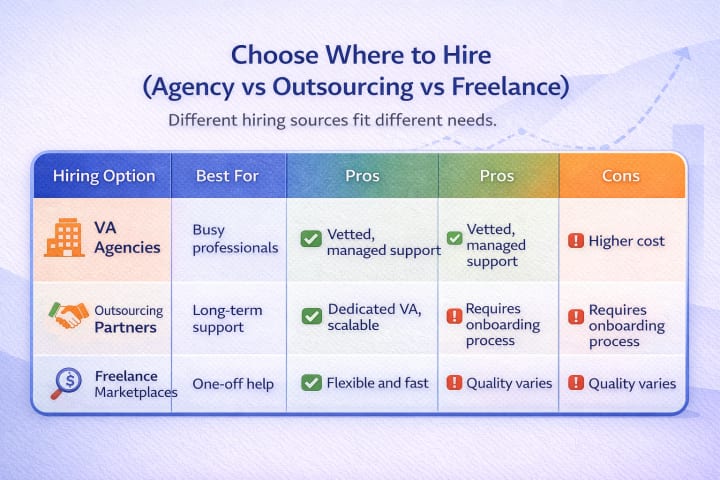
Popular places to hire
- VA agencies (UK-based or global) for fully managed support
- Outsourcing partners for dedicated assistants
- Freelance platforms like Upwork/Fiverr for short-term scheduling tasks
Write a Job Post That Attracts the Right VA
A strong VA job post for scheduling should list the tools you use (Google Calendar, Outlook, Calendly), define recurring tasks, explain decision rules, request proof of similar experience, and include a small trial task. This filters for detail-oriented candidates who are comfortable managing calendars.
What to include
- Tools: Google Calendar / Outlook / Calendly / Zoom
- Scope: scheduling, reminders, booking, rescheduling
- Availability: working hours + response time
- Communication: WhatsApp/Slack/email preferences
- Confidentiality expectations
Interview Like a Pro (Even If It’s Quick)
Ask questions that reveal judgement and accuracy:
- “How do you handle double-bookings?”
- “What’s your process for time zones?”
- “How do you confirm appointments?”
- “What would you do if I’m unresponsive but a client needs a time change?”
- “What scheduling system have you used before?”
You’re testing reliability, not charisma.
Run a Trial Week (The Fastest Way to Choose)
Instead of guessing, assign real tasks:
- Reschedule 3 meetings with constraints
- Book 2 appointments with location/time limits
- Clean your calendar and add buffers
- Create a weekly plan draft
A good VA will:
- Ask clarifying questions once
- Follow rules consistently
- Keep communication crisp
- Document what they did
Onboard with Security (Don’t Skip This)
For safe onboarding, never share your main password. Use delegated access (Google Workspace/Outlook), role-based permissions, password managers, and two-factor authentication. Limit access to only what the assistant needs for scheduling and personal organisation, and review access monthly.
Best practices
- Use Google Calendar “Make changes to events” access
- Use scheduling tools (Calendly) instead of direct inbox access at first
- Use a password manager for shared credentials
- Turn on 2FA everywhere
- Start with limited permissions, expand as trust builds
Set a Simple Communication Rhythm
Personal organisation improves when communication is predictable.
Suggested workflow
- Daily: short message with “Today’s schedule + urgent changes”
- Weekly: 20-minute review (next week priorities + deadlines)
- Monthly: clean-up (subscriptions, renewals, recurring events)
Tools that work well:
- Google Calendar / Outlook
- Notion / Google Docs (shared task list)
- Slack / WhatsApp
- Calendly (booking and buffers)
Common Mistakes When Hiring a Scheduling VA
- No clear rules
Without rules, assistants guess. Guessing creates errors.
- Too many tasks too early
Start with scheduling first. Add admin later.
- No trial period
A 5-day trial prevents long-term frustration.
- Messy access management
Security should be built into the workflow, not added later.
2025–2026 Trends: How Scheduling VAs Are Changing
- AI-assisted scheduling: VAs use AI to draft agendas, summarise emails, and plan time blocks
- Hybrid systems: one VA + tools like Calendly, Notion, and smart reminders
- Focus-time protection: founders hire VAs specifically to protect deep work
- Outcome-based support: pay for results (clean calendar, weekly plans) rather than hours
The modern VA isn’t just booking meetings-they’re helping you run a smoother personal operating system.
Read also : Get things done: Hiring a virtual assistant in India
Final Insight
Hiring a VA for personal organisation and scheduling isn’t about outsourcing your life-it’s about designing a system where your time is protected and your brain isn’t doing admin all day. The best results come from a simple truth: clear rules, clean tools, and a reliable person who follows the process consistently.
About the Creator
Michael Coplin
I'm Michael Coplin, a New York-based business consultant offering remote employees to entrepreneurs and startups seeking expert guidance
Keep reading
More stories from Michael Coplin and writers in Writers and other communities.
Which Top-Rated Virtual Assistant Companies Offer UK-Based Support?
Hiring a Virtual Assistant has become a practical growth strategy for UK businesses navigating remote work, AI-driven operations, and rising operational costs. From founders and startups to established SMEs, many teams now rely on external assistants to manage admin, operations, customer support, and marketing-without expanding headcount.
By Michael Coplin2 months ago in Journal
Early March 2026: 4 Goals Accomplished
It's early March and I've now accomplished my 4th writing goal for the year of 2026. Before diving into the behind-the-scenes of it... why not tell you up front what that accomplishment was? I was published in a 2nd publication for this year. Published in Helix Literary Magazine out of Central Connecticut State University. You can read it for free right now!
By Stephen Kramer Avitabile3 days ago in Writers
On blood moons, fantasy novels and the overwhelming feeling of what's the fucken point
Honestly, what's the fucken point? From the opposite side of the world, I recently tried to convince my sister that creative, artistic endeavours were still a worthwhile use of her time.
By Roderick Makim6 days ago in Writers
Who is your "Person"?
It's important to recognize that you cannot go through life as easily on your own. My name is Elizabeth and I'm a survivor of child abuse and horrific trauma. Healing from trauma is not a quick fix and recognizing that it will take time, is part of the struggle.
By Elizabeth Woods7 days ago in Psyche




Comments
There are no comments for this story
Be the first to respond and start the conversation.