
How a Projector Throw Distance Calculator Can Improve Your Home Theater Experience
How to calculate projector throw distance?

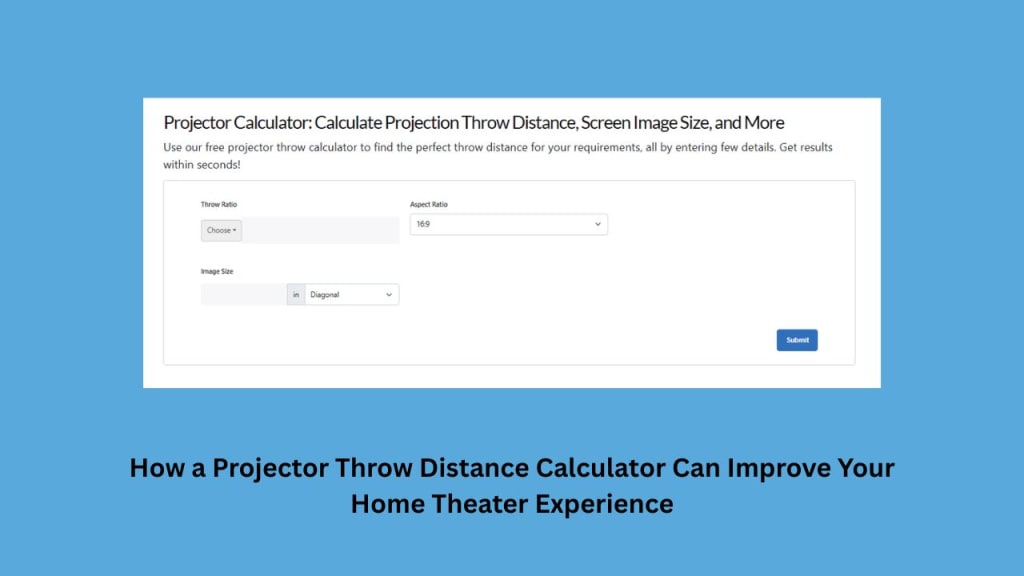
Creating the perfect home theater experience requires careful planning, especially when it comes to projector placement. One of the most crucial factors in getting a crisp, immersive image is determining the right throw distance. This is where a projector throw distance calculator becomes an essential tool.
A projector calculator helps users determine the ideal distance between the projector and the screen based on factors like screen size, throw ratio, and room dimensions. Without these calculations, you may end up with a blurry image, incorrect focus, or an image that’s too big or too small for your screen.
What is Throw Distance in a Projector?
Before we get into calculations, let’s define throw distance. Throw distance is the space between the projector and the screen required to produce a properly sized image.
This distance is determined by the projector’s throw ratio, which is the ratio of the image width to the distance from the screen. The formula is:
ThrowDistance=ThrowRatio×ScreenWidth
For example, if a projector has a throw ratio of 1.5:1, it means that for every 1 foot of screen width, the projector needs to be 1.5 feet away.
Types of Throw Distances
Short Throw Projectors (0.4:1 – 1.0:1)
- Ideal for small rooms
- Can project large images from a short distance
Example: A short throw projector can project a 100-inch image from 4 feet away
Standard Throw Projectors (1.5:1 – 2.5:1)
- Most common for home theaters
- Require 8-12 feet for a 100-inch screen
Long Throw Projectors (2.5:1 or higher)
- Used in large spaces like auditoriums or outdoor setups
- Require 15+ feet for a large screen
How a Projector Throw Distance Calculator Works
A projector throw distance calculator is an online tool that allows you to input the screen size and projector model to determine the ideal placement.
How to Use a Projector Calculator
Select Your Projector Model
- Many calculators have a database of projectors with preloaded specs
Enter Your Screen Size
- Input the diagonal measurement of your screen in inches
Choose the Throw Ratio
- Some calculators allow you to adjust this manually if you have a custom setup
Get the Ideal Distance
- The calculator will display the required minimum and maximum distances
- Some tools also show vertical offset to help with mounting
How Far Does a Projector Need to Be from the Screen?
The answer depends on:
- Screen size: A larger screen requires a greater throw distance
- Throw ratio: Different projectors have different throw capabilities
- Room size: Limited space may require a short throw projector
Example Calculations
Using a projector distance throw calculator, here’s where you should place the projector for different screen sizes:
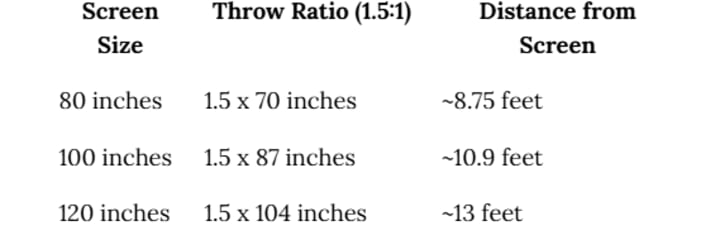
Pro Tip: If your room is small, a short throw projector may be a better option.
Home Theater Projector Setup Diagram
For a well-planned home theater, follow this projector placement guide:
- Screen Placement: Mount the screen at eye level when seated
- Projector Distance: Use a projector distance calculator to place the projector correctly
- Seating Arrangement: Ensure seating is at least 1.5x the screen width for the best viewing experience
- Lighting Control: Reduce ambient light to improve image quality
A well-placed projector ensures a sharp, vibrant image!
Why Is My Projector Blurry?
A common issue in home theaters is blurry projections. This happens due to:
Incorrect Throw Distance
- If the projector is too far or too close, the image may appear out of focus
- Use a projector throw distance calculator to find the perfect spot
Lens Not Focused
- Adjust the focus ring until the image is crisp
Low-Quality Lens
- Cheap projectors may struggle with edge-to-edge sharpness
Ambient Light Issues
- Too much light in the room reduces contrast and clarity
Wrong Resolution Setting
- Ensure the projector resolution matches the source resolution

Conclusion
Setting up a home theater projector isn’t just about picking the best model—it’s about placing it at the right distance to achieve the perfect image. A projector throw distance calculator takes the guesswork out of projector placement, ensuring that your screen size, room dimensions, and throw ratio all align for the best viewing experience.
If you've ever asked, "How far does a projector need to be from the screen?", or struggled with placement, a projector distance throw calculator is your best tool. Whether you have a short throw projector for small spaces or a standard throw model for a dedicated theater room, the right distance makes all the difference.
Also read: How Can I Calculate the Best Projector Throw Ratio for Viewing Distance?
Also rea: Essential Features of XTEN-AV That Make AV Projector Integration a Breeze
About the Creator
Anni Grey
My name is Anni Grey, and I possess substantial knowledge and proficiency in the field of audio visual (AV) technology.
📢 Raise Your Voice Thread: 01/22/2026
Our “Raise Your Voice Threads” are hosted most alternating Thursdays at 12PM ET to offer creators more avenues to uncover exceptional stories on Vocal. As we are continuously searching for fresh creators and inspiring stories, this thread provides an opportunity to exchange and discuss the stories that have moved and motivated us on Vocal.
By Raise Your Voice by Vocal4 days ago in Resources



Comments
There are no comments for this story
Be the first to respond and start the conversation.