
3 Tools I Use That Actually Maximize My Writing
And two I skip, but that might turn your writing sessions into adventures


Writing isn’t magic. It’s mostly sitting down with a few decent tools and convincing yourself that typing words counts as progress.
I’ve tried plenty of apps that promised to make me productive, but the truth is simpler: the tools that work best are the ones that don’t demand attention.
Here are the sites that actually help me write, along with a few that I admire but don’t use — either because they’re too intense or because they seem designed for writers braver than I am.
onelook.com
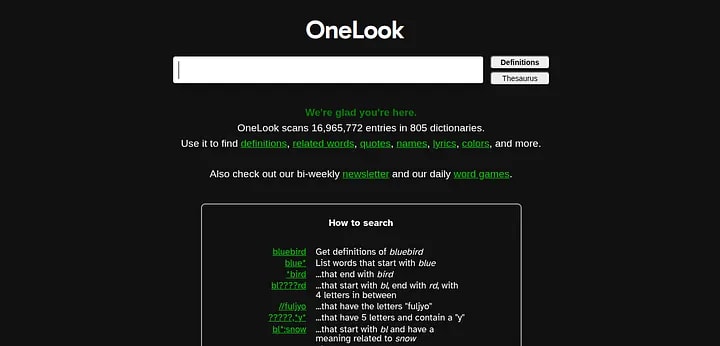
Sometimes, I know the idea but not the word. That’s when I open onelook.com — a site that feels like a psychic thesaurus.
You can type something vague like “word for hopeful sadness” and it somehow delivers melancholy or wistful.
It’s a lifesaver when your brain stalls halfway through a sentence.
You can search by meaning, rhyme, or even pattern. Want a four-letter word that ends in “ate”? It’ll find it.
Want to sound poetic without losing meaning? It’s got your back.
It’s the kind of tool that doesn’t just feed you words — it restores your sense of language when you feel like you’ve lost it.
hemingwayapp.com
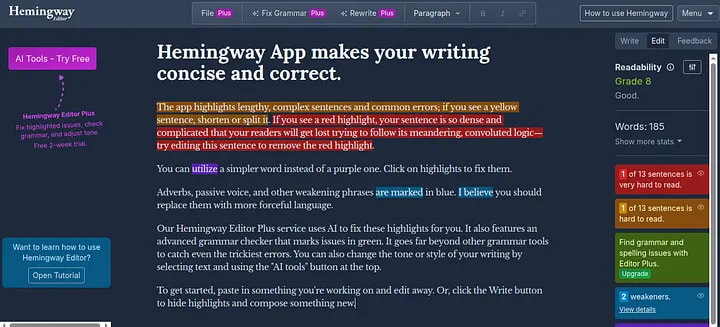
Hemingway App is the writing coach you didn’t ask for but probably need.
You paste your text into its clean interface, and suddenly your sentences light up like a Christmas tree.
Yellow means your sentence is getting winded and could use a jog.
Red means it’s tangled, gasping for air, and needs a rewrite.
Blue highlights adverbs you might not need.
Green points out your passive voice.
Even purple joins the party to suggest simpler word choices.
What makes it so addictive is the instant feedback loop — it turns editing into a small game of clarity.
You trim, shorten, and swap words, watching your readability score improve in real time.
There’s also a Grade Level tracker that shows how easy your writing is to read (shoot for grade 6–8 for online writing), and a paid version that adds AI grammar and tone checks.
In short, Hemingway doesn’t just make us concise, it makes us aware of how often we might hide behind complicated phrasing.
notepad.js.org

Notepad.js.org is what happens when minimalism gets personality.
It’s a browser-based notepad that lets you choose background sounds (rain, forest, coffee shop), set timers, and even pop the window into picture-in-picture mode so your draft floats while you work — or procrastinate — on other tabs.
It’s built for writers who need focus but can’t stand sterile tools.
The ambient noise softens the pressure, the timer gives you boundaries, and the interface quietly disappears into the background.
It’s not just functional — it creates a steady rhythm for thinking and typing.
The Most Dangerous Writing App

The Most Dangerous Writing App deletes your work if you stop typing for more than a few seconds.
It’s marketed as a way to destroy writer’s block through fear, which is… one approach.
If you’re the kind of person who thrives on adrenaline and chaos, it might actually help.
But for me, the idea of watching a paragraph vanish because I paused to think feels less like motivation and more like psychological warfare.
4thewords.com

Imagine if writing were a role-playing game.
That’s 4thewords.com, you write to fight monsters.
Each word you type deals damage, and every session becomes a battle for creative glory.
There are quests, levels, and even virtual rewards.
It’s fun, original, and perfect for people who like gamified accountability.
But I’ve learned that I don’t need my writing to double as an adventure game.
My own brain already throws enough boss fights at me.

The best writing tools don’t promise perfection, they make space for consistency.
Whether it’s finding the right word, trimming excess sentences, or creating a calm digital environment, each of these helps in small, practical ways.
In the end, the tool matters less than what it encourages: showing up, thinking clearly, and typing something — anything — before doubt talks you out of it.
About the Creator
Keep reading
More stories from João Pedro and writers in Writers and other communities.
Early March 2026: 4 Goals Accomplished
It's early March and I've now accomplished my 4th writing goal for the year of 2026. Before diving into the behind-the-scenes of it... why not tell you up front what that accomplishment was? I was published in a 2nd publication for this year. Published in Helix Literary Magazine out of Central Connecticut State University. You can read it for free right now!
By Stephen Kramer Avitabile4 days ago in Writers




Comments
There are no comments for this story
Be the first to respond and start the conversation.