
10-Day .Net Aspire Challenge: Day 2- Add MSSQL Component
Step-by-step guide on how to use the .Net Aspire MSSQL component in Visual Studio.

Introduction
.Net Aspire framework is used to develop cloud and production-ready distributed applications. It consists of components to handle cloud-native concerns such as Redis, Postgres etc.
Prerequisites
- Install .Net 8
- Install Visual Studio 2022 version 17 or higher
- .Net Aspire Workload
- Container runtime such as Docker Desktop
Objectives
Learn how to create a starter project using .Net Aspire with MSSQL EF Core component.
Github Sample: The solution structure is divided into the following projects
- DotnetAspireChallenge.ApiService
- DotnetAspireChallenge.AppHost
- DotnetAspireChallenge.ServiceDefaults
- DotnetAspireChallenge.Web
Getting Started
Step 1: Install the following NuGet package
Install the following Nuget package into the subsequent project "DotnetAspireChallenge.AppHost"
dotnet add package Aspire.Hosting.SqlServer
In the above project, register a SQL server database and costume the SQL connection using following code.
Step 2: Install another NuGet package
Install the following Nuget package into the subsequent project “DotnetAspireChallenge.ApiService”
dotnet add package Aspire.Microsoft.EntityFrameworkCore.SqlServer
then register the context into the Program.cs file as follows
builder.AddSqlServerDbContext<MssqlDbContext>("sqldata");
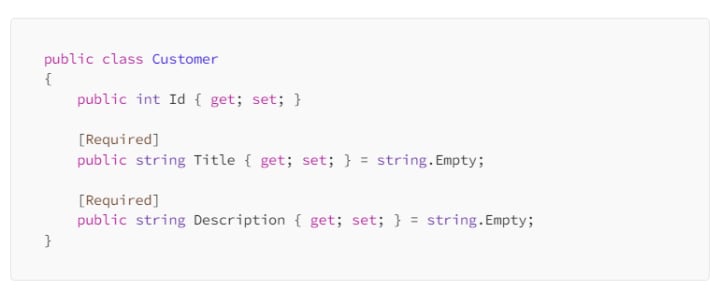
Step 3: Create a “Customer” class
Step 4: Create an extension class
Create an extension class and register a minimal API get method to demonstrate the MSSQL context usage in the API Service
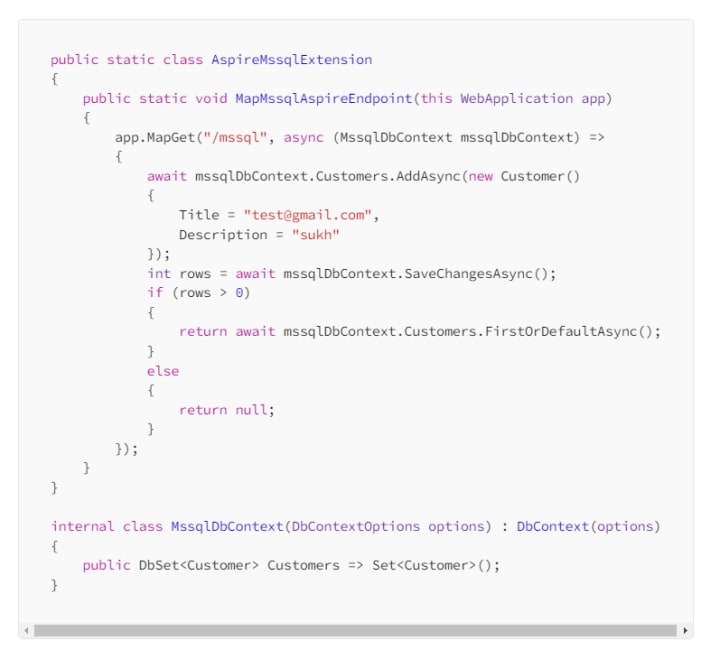
and finally, register in the Program.cs file
app.MapMssqlAspireEndpoint();
Step 5: Hit the GET endpoint
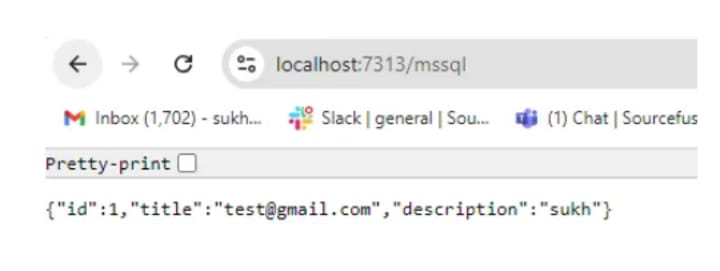
Finally, navigate to the GET URL shown below in your browser. It will insert the specified customer into the MSSQL database, retrieve the most recently inserted row, and display it as a response.
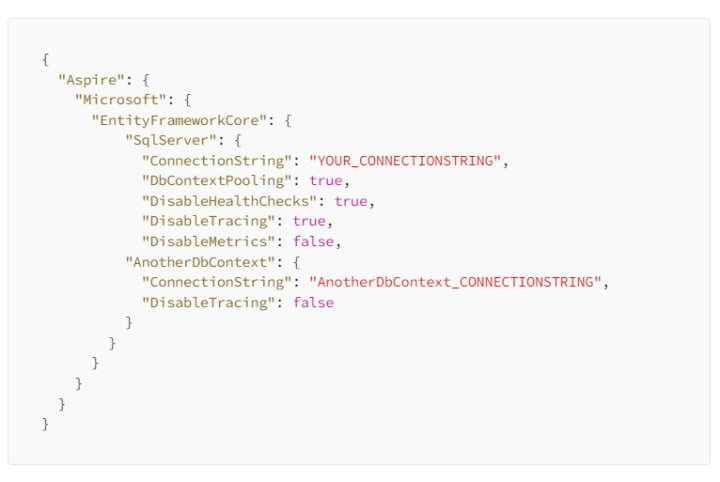
Add additional connection string properties using the JSON syntax
Github Sample
C# Programming🚀
Thank you for being a part of the C# community!
About the Creator
Keep reading
More stories from Sukhpinder Singh and writers in Writers and other communities.
I Chose Self-Publishing Because 70% Royalties Sounded Better. Then 70% Of Zero Changed My Mind.
I have a self-published book, and it was a flop. Only sold 10 copies type of flop. But I didn't choose self-publishing after careful consideration of both paths. I chose it because it seemed obviously better, and I didn't want to interrogate that assumption.
By Ellen Frances6 days ago in Writers
The Forsyth House Fire
Since 1851, Forsyth House has stood on the corner of Union Street and Gordon Street in the heart of Glasgow. Its iconic, or was... because on Sunday 8th of March, 2026, a fire broke out in a small, seemingly un-named shop in the building and tore all that history down. As I write, the rubble is still unsettled and the street is still blocked off. Central Station is quiet on the upper level, and around 30 small businesses have quite literally gone up in smoke.
By S. A. Crawford2 days ago in The Swamp



Comments
There are no comments for this story
Be the first to respond and start the conversation.