
How to Check RTO Vehicle Details Online - Registration, Ownership & More
Easily access RTO vehicle details online, including registration, ownership, challan status, insurance, and PUC certificate information. Learn how to use the Parivahan portal to verify and manage your vehicle details. Save time and stay compliant!
In today’s fast-paced world, easy access to vehicle information is essential for car and bike owners. Whether purchasing a used vehicle, verifying ownership, or checking compliance details, understanding rto vehicle detail can simplify many processes. This guide explores how to obtain comprehensive RTO vehicle information, including registration details, RC (Registration Certificate) details, challan status, and RTO office information.
What Are RTO Vehicle Details?
RTO vehicle detail refer to the information maintained by the Regional Transport Office (RTO) about every registered vehicle in India. This data is crucial for:
- Vehicle owners
- Buyers of used vehicles
- Law enforcement authorities
- Financial institutions verifying vehicle ownership for loans
Key Information Available in RTO Vehicle Details
1. RTO Office Details
Finding the nearest RTO office or obtaining specific details about an RTO is simple. You can:
- Locate the nearest RTO office.
- Check office timings and contact information.
- Understand services provided at specific RTOs.
2. RC Details
The Registration Certificate (RC) is an essential document for all vehicle owners. Access RC details to:
- Verify the RC status of a vehicle.
- Access information such as the owner's name, registration date, vehicle make, and model.
- Ensure the RC is valid and up-to-date.
3. Challan Search
Keeping track of pending fines or traffic violations is crucial to avoid penalties. You can:
- Search for any pending challans linked to your vehicle.
- View details of traffic violations, including the date and location of the offense.
- Pay pending challans directly through the appropriate channels.
4. Ownership Verification
Planning to buy a second-hand car or bike? Verify the ownership details of the vehicle to:
- Confirm the ownership details.
- Check for any hypothecation, such as loans linked to the vehicle.
- Avoid potential fraud or disputes in ownership.
5. Vehicle Insurance Status
Driving a vehicle without valid insurance is illegal. Checking vehicle details can help you:
- Verify the insurance status of your vehicle.
- Check the expiry date and insurance provider.
- Renew insurance policies on time.
6. Emission Test Certificate Details
- Compliance with pollution control norms is mandatory. You can:
- Check the validity of the Pollution Under Control (PUC) certificate.
- Ensure your vehicle meets the necessary emission standards.
How to Check RTO Vehicle Details Online
Checking RTO vehicle details online is simple and user-friendly. Follow these steps:
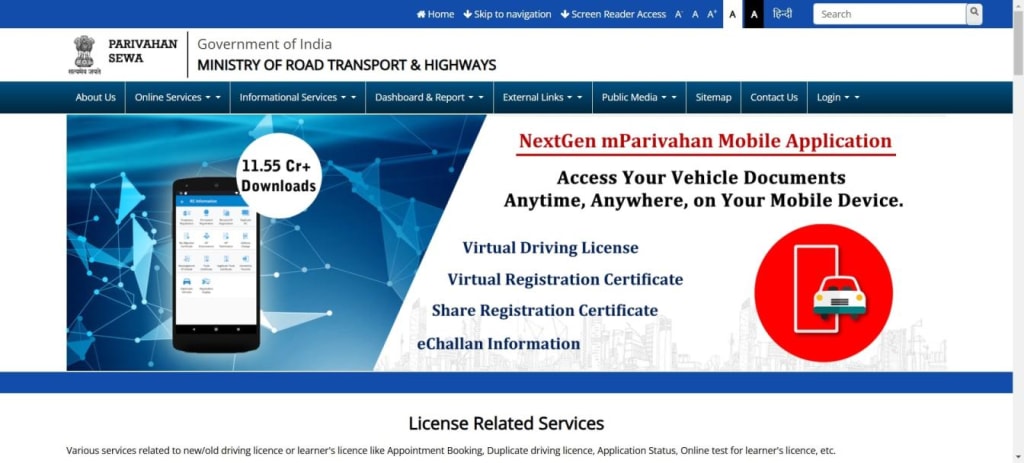
PARIVAHAN
Finding the owner of a car or bike or accessing details about a vehicle is now easier than ever with online services. By visiting the official Parivahan website or using other vehicle registration search platforms, you can quickly get the information you need. Here's a simple guide to checking vehicle details using the VAHAN vehicle registration search:
Steps to Check Vehicle Information:
- Visit the official Parivahan website.
- Navigate to the ‘Online Services’ section.
- Select ‘Vehicle-Related Services’ from the menu.
- Choose the state where the registration certificate (RC) was issued from the dropdown.
- Enter the vehicle registration number.
- Select the State RTO from the dropdown.
- Click on ‘Know Your Application Status’ under the ‘Status’ option.
- Enter the captcha code and your application number, then click ‘Submit’.
- Select ‘View Report’ to access the vehicle details.
With just a smartphone or computer and an internet connection, you can access accurate vehicle information in no time!
Benefits of Accessing RTO Vehicle Details
Convenience: Access vehicle information from the comfort of your home.
Time-Saving: Avoid long queues and paperwork at RTO offices.
Transparency: Ensure clarity when buying or selling vehicles.
Legal Compliance: Stay updated on challans, insurance, and emission certificates to avoid penalties.
Accurate Data: Reliable and up-to-date information sourced directly from RTO databases.
Why Checking RTO Vehicle Details is Important
Accessing RTO vehicle details is vital for several reasons:
For Buyers: Ensures a smooth and transparent transaction when purchasing a used vehicle.
For Owners: Helps maintain compliance with legal requirements such as insurance and pollution certificates.
For Authorities: Assists in tracking vehicles involved in violations or criminal activities.
Whether you're a vehicle owner, a potential buyer, or someone simply looking to verify details, accessing RTO vehicle information is crucial. From RTO office details and RC verification to challan searches and insurance status, understanding and utilizing RTO vehicle details can save time and prevent complications.
Make sure to regularly check your vehicle’s information and stay compliant with all legal requirements to enjoy hassle-free ownership and driving!
FAQs
1. What are RTO vehicle details?
RTO vehicle details include information like registration, ownership, challans, insurance, and emission compliance maintained by the Regional Transport Office.
2. How can I check my vehicle’s registration details?
Visit the Parivahan website, navigate to ‘Vehicle-Related Services,’ and enter your vehicle registration number.
3. How do I verify ownership of a used vehicle?
Use the VAHAN portal to check ownership details by entering the vehicle registration number.
4. How can I check my vehicle’s challan status?
Search for pending challans online on the Parivahan website or the state traffic police portal.
5. How do I check my vehicle insurance validity?
Visit the VAHAN portal or your insurance provider’s website to check the expiry date and insurer details.
6. What is an RC, and why is it important?
An RC (Registration Certificate) proves vehicle registration and is required for legal ownership and driving.
7. How do I pay challans online?
Pay pending challans via the Parivahan website or state traffic portals using the payment gateway.
8. How can I find my nearest RTO office?
Search online or use the Parivahan website to find RTO office locations, timings, and services.
9. Why should I access RTO details regularly?
Regular checks ensure compliance, avoid penalties, and provide clarity in vehicle ownership or transactions.
10. How do I check PUC certificate validity?
Visit the Parivahan portal and enter your registration number to verify PUC status.
11. Can I check vehicle loan or hypothecation status?
Yes, use the Parivahan website to verify loans or hypothecation linked to your vehicle.
12. How do I renew vehicle insurance online?
Renew insurance on your insurer’s website by entering vehicle details and making the payment.
About the Creator
Vehicle Details
Discover how to easily check RTO vehicle details online with the help of the RTO Vehicle Details service. This platform allows you to access comprehensive RTO vehicle information for both bikes and cars in just a few clicks.
Keep reading
More stories from writers in Wheel and other communities.
Autonomy Is The Real Privilege
Good morning, freedom-seekers! Today we’re gonna be looking at autonomy. A strange word, I know; one many would probably look at blankly and run away from on sight. We’re gonna figure out what it actually means, consider how it’s achieved, and decipher just how deeply most of us are tangled up in dependence without realising it.
By That ‘Freedom’ Guy3 days ago in Humans




Comments
There are no comments for this story
Be the first to respond and start the conversation.