
How to Withdraw from Tangem Wallet: A Step-by-Step Guide
How to withdraw from Tangem Wallet, common pitfalls to avoid, and tips for safe transactions. Let’s get started.

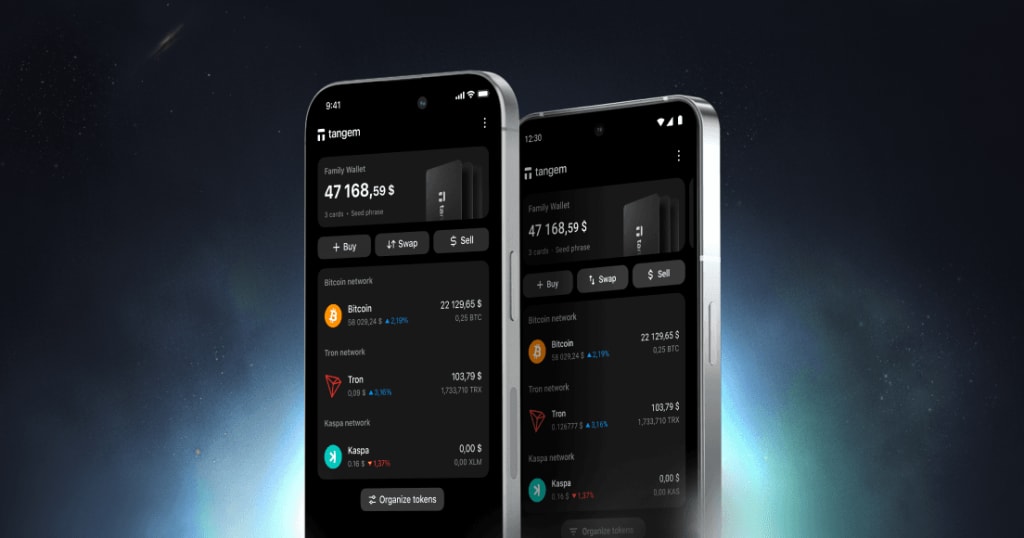
If you're holding your crypto assets in a Tangem Wallet and wondering how to withdraw funds securely and efficiently, you're not alone. Tangem's hardware wallet offers a unique card-based experience that combines simplicity with cutting-edge security. But when it comes to withdrawing crypto from your Tangem Wallet to an exchange, another wallet, or converting it to fiat, you need to follow the right steps.
In this guide, we'll walk you through exactly how to withdraw from Tangem Wallet, common pitfalls to avoid, and tips for safe transactions. Let’s get started.
What Is Tangem Wall? A Quick Recap
Tangem Wallet is a hardware wallet in the form of a smart card that stores your private keys offline. Unlike traditional wallets that use a screen and buttons, Tangem uses NFC (Near Field Communication) to interact with your smartphone via the Tangem mobile app.
It's highly secure, user-friendly, and ideal for long-term storage. But while storing is easy, withdrawing requires a few key steps.
Before You Withdraw: Things You’ll Need
Before initiating a withdrawal from your Tangem Wallet, make sure you have:
- The Tangem mobile app installed and set up.
- Your Tangem card (you’ll need to tap it to authorize).
- A destination address (another wallet, exchange, or recipient).
- Enough crypto to cover network fees (especially for Ethereum or Bitcoin transactions).
- Strong internet connection and NFC-enabled phone.
How to Withdraw from Tangem Wallet – Step-by-Step
Here’s the step-by-step process to withdraw crypto from your Tangem Wallet:
Step 1: Open the Tangem App
- Launch the Tangem Wallet app on your Android or iOS device.
- Ensure NFC is enabled on your phone.
- Tap your Tangem card when prompted to access your wallet balance and assets.
Step 2: Select the Asset You Want to Withdraw
- From the home screen, tap the cryptocurrency (e.g., BTC, ETH, USDT) you wish to send.
- This will open the asset details, including balance, transaction history, and options.
Step 3: Tap “Send”
- Hit the “Send” button.
- You'll be prompted to enter the recipient’s wallet address or scan a QR code.
Step 4: Enter the Amount to Send
- Specify the amount of crypto you want to withdraw.
- The app will show you the estimated network fee—make sure your balance covers both the amount and the fee.
Step 5: Confirm and Tap Your Tangem Card
- Review the transaction details: amount, recipient address, and fee.
- When ready, tap “Confirm” and then hold your Tangem card near the back of your phone to authorize the transaction.
- The app will process and broadcast the transaction to the blockchain.
Step 6: Check Transaction Status
- After submission, you’ll see a transaction hash and status (e.g., pending, confirmed).
- You can copy the hash and track it on a blockchain explorer (like Etherscan, Blockchain.com, etc.).
📚 Also Read: How to Withdraw from Tangem Wallet Without Card
Pro Tips for Safe Withdrawals
- Double-check the recipient address – Crypto transactions are irreversible.
- Always use official exchanges (Binance, Coinbase, Kraken) if you're withdrawing to sell.
- Check network congestion before sending; fees can spike.
- Don’t share your Tangem card – Treat it like a physical vault.
- Backup multiple cards using Tangem’s multisig features for added security.
Common Issues and Troubleshooting
1. “Transaction failed” or “Card not recognized”
- Ensure NFC is turned on.
- Try tapping the card at different angles.
- Restart your phone and retry.
2. “Insufficient funds”
- Check if you're trying to send the entire balance; some wallets require leaving enough for fees.
3. “Network fee too high”
- Consider sending at off-peak hours or using a different blockchain (e.g., send USDT via TRC-20 instead of ERC-20).
Can You Withdraw to a Bank Account?
No, Tangem Wallet does not support direct fiat withdrawals to a bank. To withdraw to fiat:
- Send crypto to an exchange (like Coinbase or Binance).
- Sell the crypto for fiat (USD, EUR, etc.).
- Withdraw from the exchange to your bank using their withdrawal process.
This extra step is standard with all hardware wallets.
Frequently Asked Questions (FAQs)
Q: Can I use Tangem Wallet without the app?
No, the Tangem app is required to send/receive assets and interact with your card.
Q: Does Tangem charge withdrawal fees?
Tangem itself doesn’t charge fees, but you’ll need to pay network fees (e.g., gas fees for Ethereum).
Q: Is Tangem Wallet safe for large amounts?
Yes, it’s highly secure. Just make sure to keep your card safe and consider using multiple cards for redundancy.
Final Thoughts
Withdrawing from your Tangem Wallet is easy once you understand the process. While it may feel different from app-based wallets like MetaMask or Trust Wallet, Tangem offers the same functionality with greater physical security.
For more guides, crypto wallet tips, and expert support, visit Kraken Wallets info — your trusted source for everything related to digital wallets and security.
Just remember: use the official Tangem app, double-check your recipient address, and account for network fees. If you’re new to hardware wallets, take it slow and test with small amounts first.
Looking to store crypto securely and still have the flexibility to send it when needed? Tangem gives you that balance—secure, mobile, and simple.
About the Creator
Kraken Wallets Info
Contact our Kraken Wallets Info Customer Service, we are dedicated to providing exceptional support for all your Kraken Wallets needs.
Read Blog:- How Long Does a Kraken Wire Transfer Take
Keep reading
More stories from Kraken Wallets Info and writers in Trader and other communities.
Crypto.com Response Time: What You Need to Know in 2025
In today’s fast-paced digital economy, timing is everything—especially in the world of cryptocurrency. Whether you’re placing trades, withdrawing funds, or resolving account issues, prompt and dependable support can significantly impact your crypto experience. As one of the fastest-growing platforms in the crypto space, Crypto.com has attracted millions of users worldwide. But with that growth comes an important question: How fast is Crypto.com response time?
By Kraken Wallets Info9 months ago in Education
Australia Hearing Aids Market to Expand to USD 639.1 Million by 2033 on Aging Population & Tech Innovation
The Australia hearing aids market is experiencing steady expansion as demographic and technological trends reshape demand for auditory healthcare solutions. According to IMARC Group, the market reached USD 383.0 million in 2024 and is forecast to grow to USD 639.1 million by 2033, registering a compound annual growth rate (CAGR) of 6.15 % during 2025–2033. This growth reflects rising incidence of hearing loss, increased healthcare spending, broader insurance coverage and innovation in digital and wearable hearing technologies.
By Rashi Sharma6 days ago in Trader
Philippines CT Scanners Market: Diagnostic Imaging Growth, Healthcare Modernisation & Technology Adoption
Philippines CT Scanners Market Overview The Philippines CT scanners market is experiencing strong growth as healthcare systems modernise, diagnostic imaging awareness increases, and technological advancements improve clinical outcomes. Computed Tomography (CT) scanners — essential radiology equipment that provides detailed cross-sectional images for disease diagnosis, trauma evaluation and treatment planning — are increasingly utilised across hospitals, diagnostic centres and specialty clinics nationwide. The Philippines CT scanners market size reached USD 196.65 Million in 2025. The market is projected to reach USD 355.98 Million by 2034, growing at a CAGR of 6.82% during 2026-2034. This expansion reflects rising healthcare demand, increased investment in medical infrastructure, and broader adoption of advanced imaging modalities that support early detection, personalised care and improved clinical workflows.
By Manisha Dixit7 days ago in Trader


Comments
There are no comments for this story
Be the first to respond and start the conversation.