
How to Trade Crypto on Binance: [Easy Steps]
Trade on Binance Exchange [Follow these Easy Steps]

Cryptocurrency trading has gained immense popularity, and Binance is one of the most trusted and widely used crypto exchanges. Whether you’re a beginner or an experienced trader, Binance provides a robust platform with various trading options. This guide will walk you through the step-by-step process of trading crypto on Binance efficiently and safely.
Step 1: Create and Verify Your Binance Account
To start trading on Binance, you must first create an account.
- Sign Up: Visit the Binance website or mobile app and click on "Register." Enter your email and create a strong password.
- Verify Your Identity: Complete the Know Your Customer (KYC) process by submitting a government-issued ID and a selfie for verification.
- Enable Security Features: Set up two-factor authentication (2FA) for additional security.
Once your account is verified, you can deposit funds and begin trading.
Step 2: Deposit Funds into Your Binance Account
Before trading, you need to deposit funds into your Binance wallet.
- Deposit Crypto: If you already own cryptocurrency, go to "Wallet" > "Deposit" and choose the crypto you wish to deposit. Copy the wallet address and transfer funds from your external wallet.
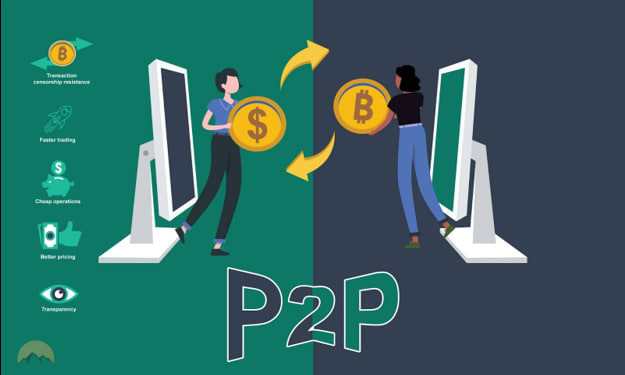
- Buy Crypto with Fiat: If you don’t own crypto yet, you can purchase it using a credit/debit card, bank transfer, or peer-to-peer (P2P) trading.
- Check Your Balance: Navigate to "Wallet" > "Overview" to ensure your deposit has been credited.
Step 3: Choose a Trading Method
Binance offers multiple trading options. Choose the one that best suits your needs:
Spot Trading
This is the most common method, where you buy and sell crypto at market prices.
- Navigate to "Trade" > "Spot."
- Select the trading pair (e.g., BTC/USDT, ETH/BUSD).
- Choose an order type:
- Market Order: Buy or sell instantly at the current market price.
- Limit Order: Set a specific price at which you want to buy or sell.
- Stop-Limit Order: Execute a trade when the price reaches a predefined level.
4. Enter the amount and confirm the trade.
Futures Trading
For experienced traders looking to speculate on price movements with leverage.
- Go to "Derivatives" > "Futures."
- Select the contract type (USDT-margined or Coin-margined).
- Adjust leverage based on your risk appetite.
- Open a long (buy) or short (sell) position.
Note: Futures trading involves higher risks due to leverage.
Margin Trading
This option allows users to borrow funds to increase their buying power.
- Navigate to "Trade" > "Margin."
- Transfer funds to your margin wallet.
- Borrow funds and trade with leverage.
- Monitor liquidation risks closely.
Step 4: Execute Your Trade
Once you’ve selected your trading method, execute the trade based on your strategy.
- Monitor price charts and use technical indicators for informed decisions.
- Consider risk management strategies like stop-loss orders.
- Track market trends to optimize profits.
Step 5: Withdraw Funds or Reinvest
After making profits, you can either withdraw funds or reinvest in other assets.
- Withdraw Crypto: Navigate to "Wallet" > "Withdraw," enter the recipient wallet address, and confirm.
- Convert to Fiat: Sell crypto for fiat currency and withdraw to your bank account.
Tips for Safe Trading on Binance
- Use Strong Security Measures: Enable 2FA, anti-phishing codes, and withdrawal whitelist.
- Beware of Scams: Avoid unsolicited messages and verify URLs before logging in.
- Start Small: If you’re new, trade with small amounts before committing large funds.
- Stay Updated: Follow market news and Binance updates for better trading decisions.
- Use Stop-Loss Orders: Protect your funds by setting stop-loss limits to minimize losses.
Conclusion
Trading crypto on Binance is straightforward once you understand the platform and available options. By following these steps and implementing risk management strategies, you can trade efficiently and securely. Always stay informed, use protective measures, and continue learning to maximize your trading success. Happy trading!
About the Creator
UNH Stock Price: Market Analysis and Investment Insights
Introduction UnitedHealth Group Incorporated (UNH) is one of the largest healthcare companies globally, offering a range of health insurance products and services. As the healthcare sector continues to expand, investors increasingly track the UNH stock price to understand market trends, growth opportunities, and sector performance.
By Hammad Nawaz2 days ago in Trader
Australia Blockchain Market Set for Explosive Growth: From Niche Tech to Multi-Billion Dollar Infrastructure
The Australia blockchain market is entering a phase of unprecedented growth. According to IMARC Group’s latest industry forecast, the market was valued at USD 0.72 billion in 2024, and is expected to surge to USD 123.13 billion by 2033 — exhibiting an extraordinary compound annual growth rate (CAGR) of 67.30% during 2025–2033.
By Rashi Sharmaa day ago in Trader



Comments
There are no comments for this story
Be the first to respond and start the conversation.