
How to Transfer Amazon Video Between Devices
Download and play on any device

For Amazon users, downloads are device-specific, and purchases are account-specific. It means that your purchased Amazon items are synced to all of your devices and you can access them when switching devices, yet your downloaded content cannot be synced between devices.
More specifically, it means that if you purchased or rented a movie on your iPad, you can still watch the purchased or rented content on your other devices. However, if you download a movie on your iPad, you can only watch it on the iPad and the content cannot be synced to other devices registered to your account.
How to transfer downloaded Amazon video between devices
Given the restrictions of Amazon, it seems like the only way is to download your desired video on every device, yet this really wastes your time and takes up your device storage. You can actually get rid of these restrictions by using a third-party tool, which can download Amazon videos as local files so that you can transfer the videos between devices as you like.
NoteBurner Amazon Video Downloader is a powerful tool designed to download videos from Amazon Prime Video. It supports video quality from 240P to 1080P and ensures that all subtitles and audio tracks are well preserved. The downloaded videos are ad-free and available in MP4 or MKV formats. The software offers a quick batch download mode, making it an efficient option for users.
Tutorial: how to download Amazon video
Please install the latest version of NoteBurner Amazon Video Downloader to your computer before reading the following tutorial.
1 Launch Amazon Video Downloader
Launch and register NoteBurner on your computer first. Then type random words into the search bar and log in to your Amazon account in the pop-up window.

To read the full tutorial on how to download Amazon videos, please click here.
Extra tips on use switch accounts
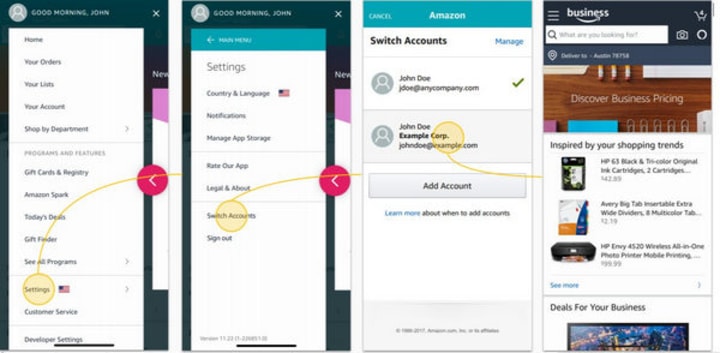
Switch Accounts allows you to add and switch between Amazon accounts without having to sign out and in. Note that to prevent others from accessing your Amazon accounts, we recommend that you don't use this feature on shared devices and computers.
To switch or add accounts in a browser:
1. In the Account & Lists menu, select Switch Accounts.
2. To add a new Amazon account to the browser, select Add account. Enter your account credentials and select Save.
3. To switch between accounts, select the account you want from the Switch Accounts page.
To manage your Amazon account on a mobile device:
1. In your Amazon shopping app, go to Menu.
2. Go to settings and select Switch Accounts.
For more information about managing your Amazon accounts on mobile devices, click here.
Extra tips on what you can and cannot transfer when changing accounts
Amazon supports transferring your Amazon Prime Membership and Prime Video Subscriptions when changing your Amazon accounts. You can check the lists below on what you can and cannot transfer when changing your account.
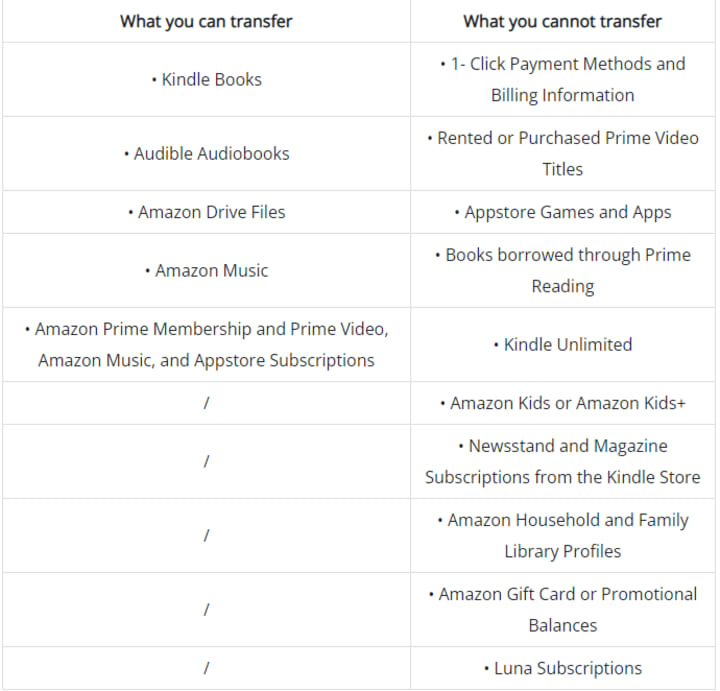
You can click here to learn more details about what content, features, and services you can and can’t transfer to your Amazon account.
Final word
With NoteBurner Amazon Video Downloader, you can transfer any Amazon content between your devices without limits and enjoy them offline at any time anywhere. Install it and enjoy your Amazon videos on every device you like now!
Note: Only the first 5 minutes of each video can be downloaded with trial version, please purchase a license to enjoy the full video. It is suggested that to download the trial version and have a test before purchasing it.
About the Creator
2026 Oscar Nominations: The Complete List of Nominees
The annual celebration of cinematic achievement is upon us once again. On January 22, 2026, the 98th Academy Awards nominations were officially revealed, setting the stage for one of the most exciting Oscar seasons in recent memory. With record-breaking nods, surprise contenders, and an unusually diverse field of films and talents, the Academy Awards nominations have generated widespread conversation in Hollywood and around the world.
By Salaar Jamalia day ago in Styled
Indian Dresses You Can Wear More Than Once Without Re-Styling
The winds of Indian fashion in 2026 are blowing new. Rather than clothes requiring new jewellery, new shoes, and a whole new mood to pull off each time you wear them, women favour Indian dresses that simply work on repeat. The kind you can recycle time and again for various occasions without feeling bored or overdressed.
By Amit Mandalabout 18 hours ago in Styled


Comments
There are no comments for this story
Be the first to respond and start the conversation.