
How to Download YouTube Video without the App
Keep YouTube videos forever as local files
This article is specially written for those who want to download videos from YouTube without its own app. Read and learn to keep YouTube videos forever as local files.
Part 1: All you need to know about YouTube’s download feature
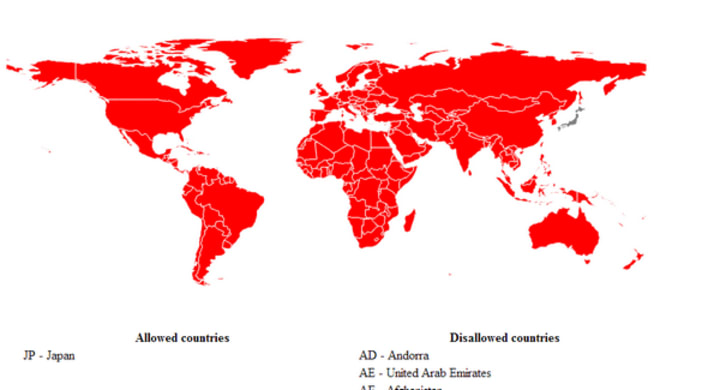
Region restriction
The download feature is only available in the locations listed by YouTube (click here to view the list). If YouTube Premium is available in your location, you can download videos to your computer or mobile device by becoming a YouTube Premium member.
Update Download settings
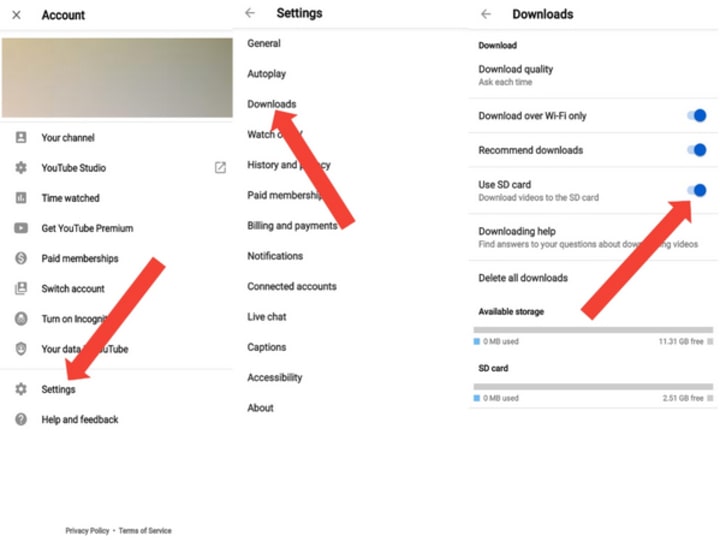
To allow videos or playlists to be downloaded over mobile networks, go to your profile picture, select Settings, then Background & downloads, and turn off Download over Wi-Fi only. By default, videos are downloaded over both Wi-Fi and mobile data.
To set the default quality of your downloads, go to Settings, then Background & downloads, and select Download quality. Keep in mind that higher-quality videos may consume more data, take longer to show in the Downloads section, and take up more space on your device.
To check how much space you have left for downloadable content, go to your profile picture, select Settings, then Background & downloads within the app. If you have less than 5% of storage space remaining, you won't be able to download more videos. Try removing existing downloads or other content stored on your device to free up extra space.
Download YouTube video with the app
To download videos to your device with the app:
1. Sign in to your Premium account within the YouTube App.
2. Go to the Watch page of the video you’d like to download.
3. Below the video, click Download.

Troubleshoot issues downloading videos
Downloaded videos are available for offline playback for up to 29 days. After that, you'll need to reconnect to the internet to check for changes to the video or its availability. If a video is no longer available, it will be removed during the next sync. In select regions, content can be played offline for up to 48 hours. You must have a Premium account to download videos and be signed in to access them. Some features, such as commenting and liking, require a Wi-Fi connection.
Part 2: Free download YouTube video without the app
Given the issues users may encounter when they download videos or play the downloaded videos in the app, it would be better if users can download YouTube videos without the app. With a professional YouTube downloader, you can easily download YouTube videos as local files without the app and keep them forever for offline playback even without subscribing to a Premium membership.
NoteBurner YouTube Video Downloader is a reliable and user-friendly program for downloading ad-free YouTube videos in high-definition quality up to 8K, with original subtitles and audio tracks. Users can also use VPN to download videos from different countries or regions. It doesn't include any additional software, ensuring a smooth experience. The output quality depends on the original video quality, but NoteBurner still ensures the best possible quality for an enjoyable viewing experience.
Tutorial: How to Download YouTube video without the App
To ensure a smooth experience with the following tutorial, we recommend installing the latest version of NoteBurner YouTube Video Downloader on your Windows or Mac computer. You can easily download the software from the official website for both systems.
1 Launch YouTube Video Downloader
Please launch NoteBruner YouTube Video Downloader on your computer and there will be a concise interface.

......
Click here to read the full passage and learn how to download YouTube video without the app.
About the Creator
Concealed Carry on the Move: Bags That Meet Legal and Practical Requirements
Key Takeaways Concealed carry bags are one of the many options for keeping a hidden weapon with you in a way that’s accessible. If you’re looking for concealed carry bags, explore options that follow safety guidelines, including a dedicated firearm compartment, internal holster, trigger guard protection, and a low-profile exterior. Bags that meet the practical requirements for concealed safety prioritize the functionality of carrying off-body, including safety, accessibility, and lockability.
By Tess DiNapoli3 days ago in Styled
Global Jewelry Market – Forecast & Growth Trends 2025–2033
Global Jewelry Market Size and Outlook The Global Jewelry Market was valued at US$ 349.5 billion in 2024 and is projected to grow steadily to US$ 546.85 billion by 2033, expanding at a CAGR of 5.10% during 2025–2033, according to Renub Research. This robust growth trajectory is being fueled by rising disposable incomes, evolving fashion preferences, increasing demand for luxury and customized jewelry, and the rapid digitalization of retail channels worldwide.
By Sushant. Renub Researchabout 13 hours ago in Styled



Comments
There are no comments for this story
Be the first to respond and start the conversation.