
How to Colorize Black and White Photos Free
Add colors to the black and white photos to bring events back to life and give them a new look.

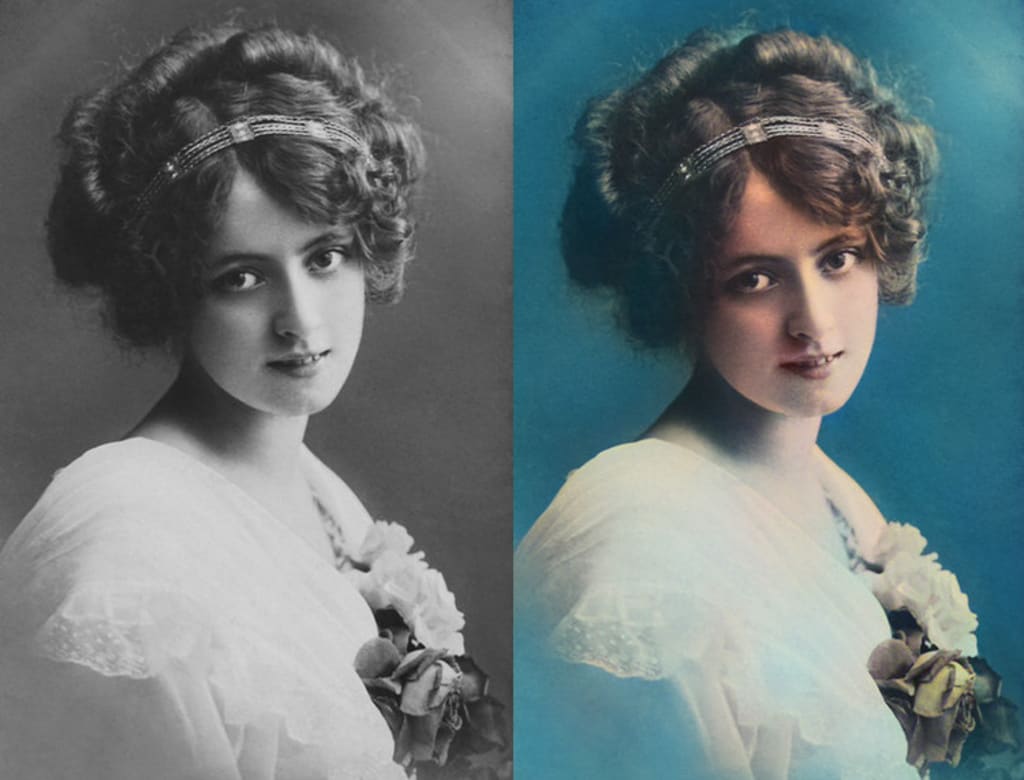
How do you colorize black and white photos? Is there an app to change black and white photos to color? Could you please give me some suggestions? I stored many black and white photographs in my family photo collection. Please help." - Jessica
Have you ever wanted to turn old, black and white family photos into modern-looking colorized photos? Thankfully, there are various online and offline tools on the market that can help users to automatically colorize black and white photos using Artificial Intelligence. Even if you have never any photo editing skills, you can still colorize an old photo with these AI Photo Colorizers. Now, let's follow this article to learn how to add colors to the black and white photos to bring events back to life and give them a new look.
• Part 1: Colorize Black and White Photos with AVCLabs Photo Enhancer AI
• Part 2: Colorize Black and White Photos Online Free with Photo Colorizer
1) Colorize Black and White Photos Online Free with Colourise.com
2) Colorize Black and White Photos Online Free with Image Colorizer
3) Colorize Black and White Photos Online Free with Cutout Pro
Part 1: Colorize Black and White Photos with AVCLabs Photo Enhancer AI
AVCLabs Photo Enhancer AI is one of the AI photo colorizer tools that allows you to colorize black and white photos automatically in seconds. With the help of AVCLabs AI Photo Colorizer, you can colorize old pictures of family, historic figures, ancestors, films, and more. Powered by Deep Convolutional Neural Network, this AI Image Colorizer can automatically and naturally convert grayscale pictures to color in one click.
If the old photos are too small or not clear enough, you can also use the built-in AI image enlarger and unblurring function to upscale old, black and white photos to 200%, 300%, and 400% without quality loss and enhance their quality for printing. What's more, it supports colorizing old photos in batch and cropping unwanted parts before adding color to the photos. JPG, JPEG, PNG, and BMP formats are all supported.

*Enlarge and upscale image without losing quality.
*Sharpen image edges and deblur image online 100% automatically.
*Upscale low-definition photos to HD.
*Enhance color and contrast with only one click.
*Remove backgrounds from a batch of images automatically in one click.
*No editing skills are needed.
How to Colorize Black and White Photos Using AVCLabs Photo Enhancer AI
Here are the simple steps to colorize photos and bring life to black and white pictures. You can use AVCLabs Photo Enhancer AI to colorize black and white photos for free. And for the trial version, there is a watermark on the exported photo.
Step 1 Install and Run AVCLabs Photos Enhancer AI
Download AVCLabs Photo Enhancer AI from the link given above and then run it after the installation is completed.
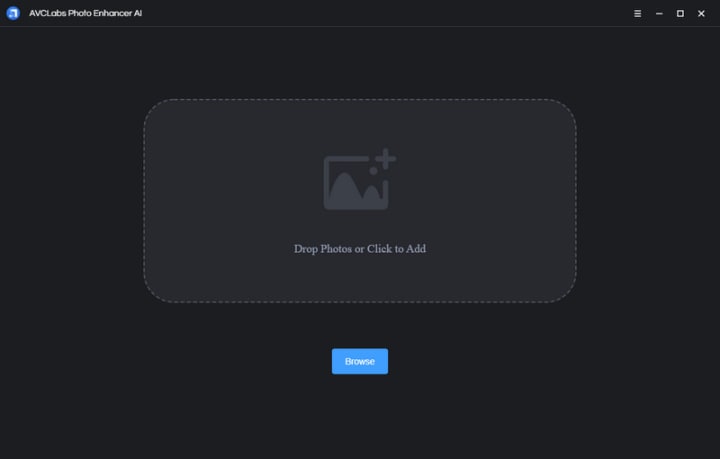
Step 2 Add One or Multiple Old Black and White Photos to AVCLabs Photos Enhancer AI
Click on the Browse button in the middle of the software to add one old photo or a batch of old black and white photos to the program. You can also directly drag and drop the old, black and white photos you need to colorize from the computer to the program.
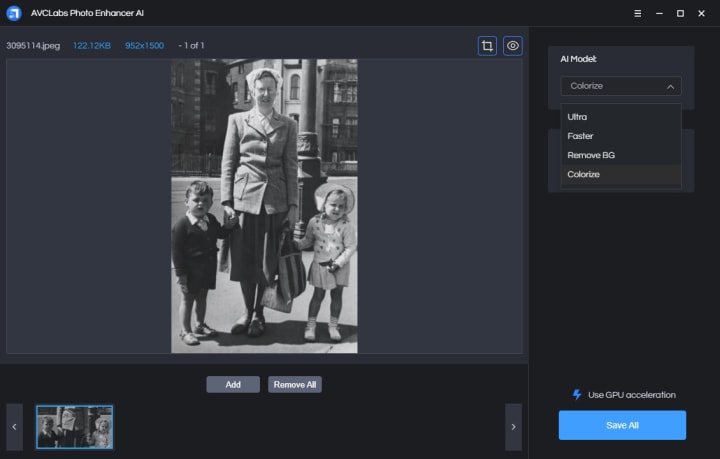
Step 3 Select the Processing AI Models and Photo Scale Value
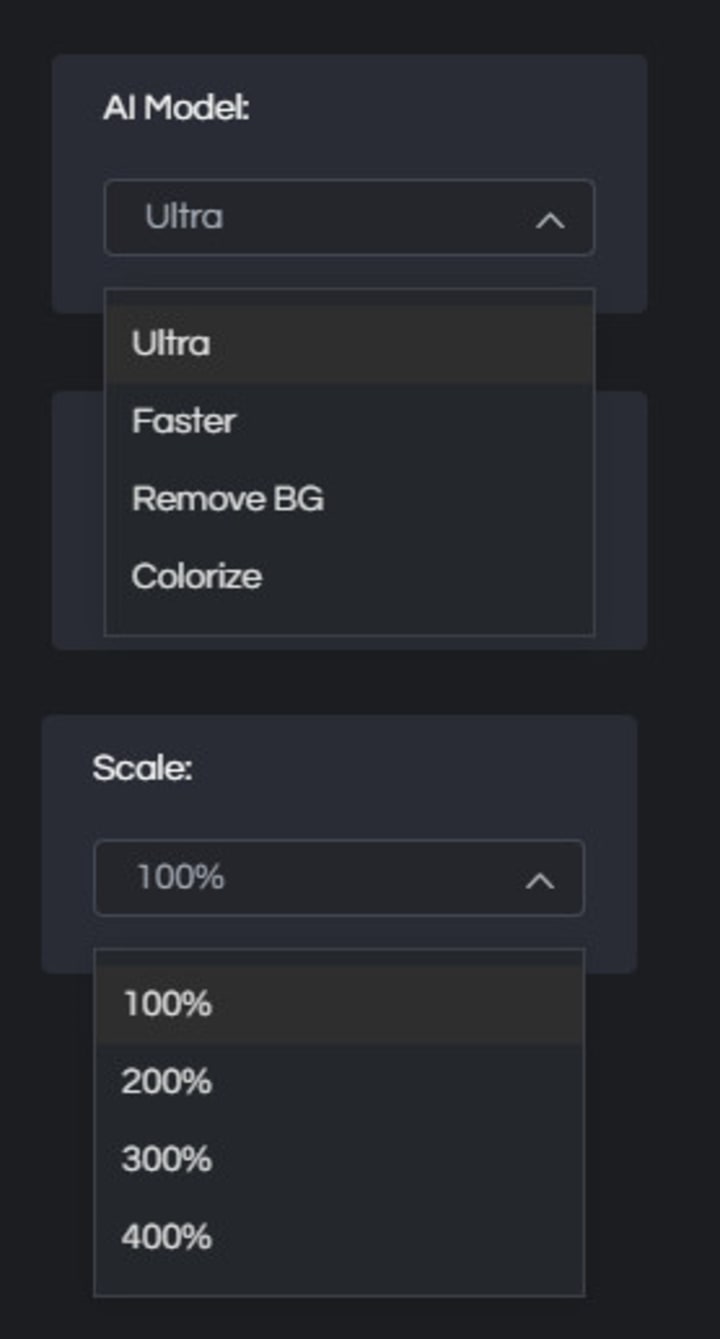
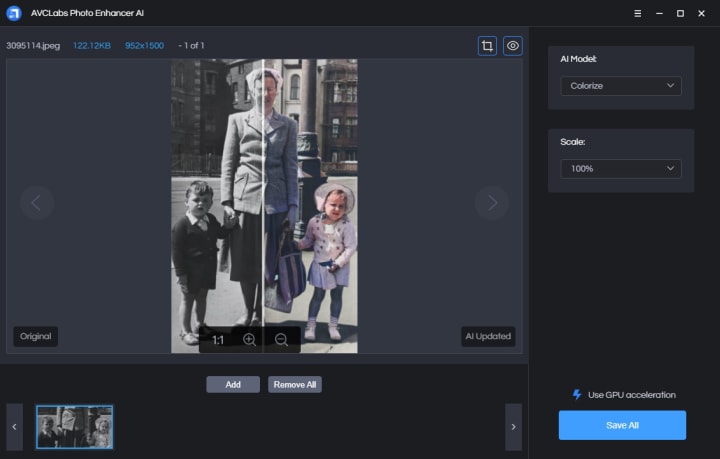
In the upper-right panel of the software, you can choose the AI Model you prefer. To colorize old family photos, simply select the Colorize model. The default scale is 200%. You are able to click on Scale to select to upscale photo size to 100%, 300%, and 400%.
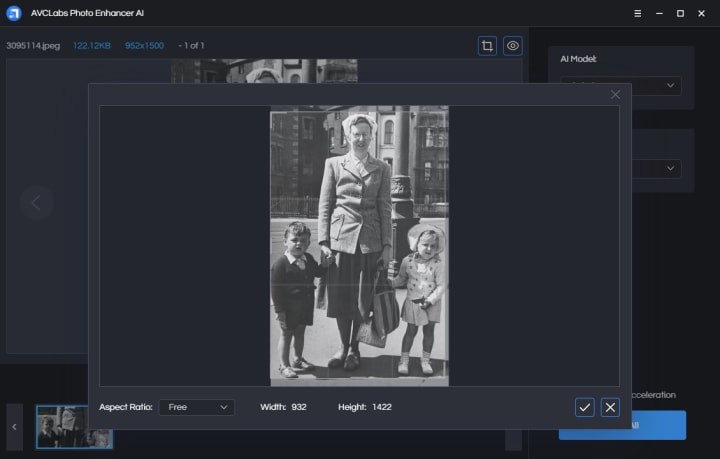
Step 4 Crop and Preview the Photo Effect before Colorizing the Photos
There are two little icons in the top right corner of the main interface. You can click on the left little square icon to crop an old family photo.
You can also click on the right little eye icon to preview the effect before processing the photos.
Step 5 Start to Colorize Old Photos
Click on the Save All button to start to colorize the old photos. All you need to do is wait for the AVCLabs Photo Enhancer AI to convert black and white photos to color automatically.
Once the photo colorization process is done, you can click on the Open Output Directory button to find and check the colorized photos.
Pros:
• Colorized photos are of superior quality using AI technology
• Automatic photo colorizer
• Support enlarging the black and white photo by 2X, 4X
• Batch processing and cropping the photo are supported
• Offer free trial service
Cons:
• Add watermark to result in the free trial version
Part 2: Colorize Black and White Photos Online Free with Photo Colorizer
If you wanna get rid of the third-party software and prefer using the lightweight online photo colorizer tools to colorize black and white photos online for free, you can move to this part. Here we are going to introduce three online AI Photo Colorizers, just read on for more detailed information. In this way, you just have to upload your photos online and your photo gets converted into a colorful one.
Method 1: Colorize Black and White Photos Online Free with Colourise.com
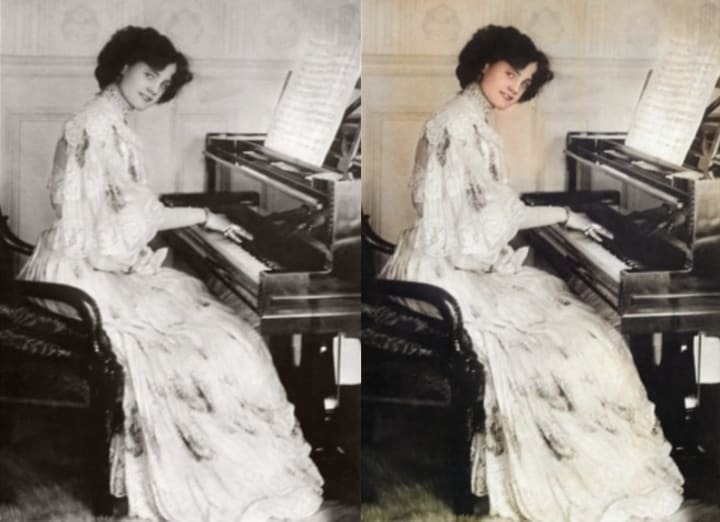
Colourise.com is an online AI image colorizer designed for colorizing black and white images instantly online in one click. You just need to upload your old photo and get it colored automatically.
Follow the simple steps to learn how to colorize photos online free with Colourise.com.
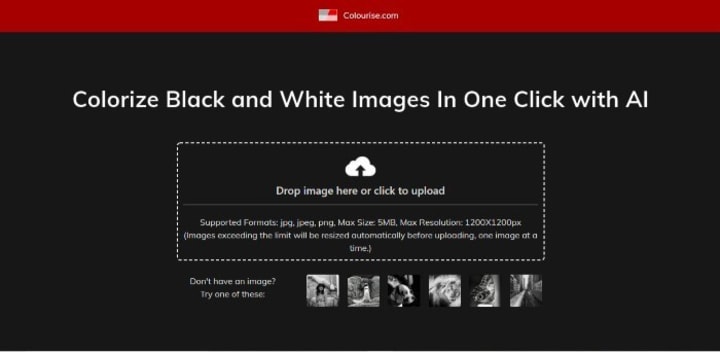
Step 1 Upload An Old Photo to Colourise.com
Simply drag and drop an old black and white photo to this AI colorizer or click on the Upload icon to select a photo from your computer. Colourise.com works best with photos less than 1200x1200px. Exceeding the limit, your photos will be compressed automatically.
Step 2 Download Colorized Photo for Free
Colourise.com is 100% automatic and free to use. Click Download button to save the colorized photo, which will be deleted permanently after 30 minutes.
Pros:
• Colorize images in one click using AI technology
• Colorize black and white photos online free
• Fast to use and user-friendly
Cons:
• Batch processing is not supported
• Cropping the old image is not supported
Method 2: Colorize Black and White Photos Online Free with Image Colorizer
Image Colorizer is also a good solution to colorize black and white photos online free. As an AI-powered image colorizer, it analyzes black and white pictures and turns them into realistic color photos automatically in only a few seconds. No PhotoShop skills are required to colorize black and white photos. There is no need to sign up or download any program.
Here is how to colorize photos online free with Image Colorizer.
Step 1 Upload A Black and White Photo to Image Colorizer
Drag and drop a black and white picture to this AI colorizer. The uploaded images should be less than 5MB and 3000px for any dimension.
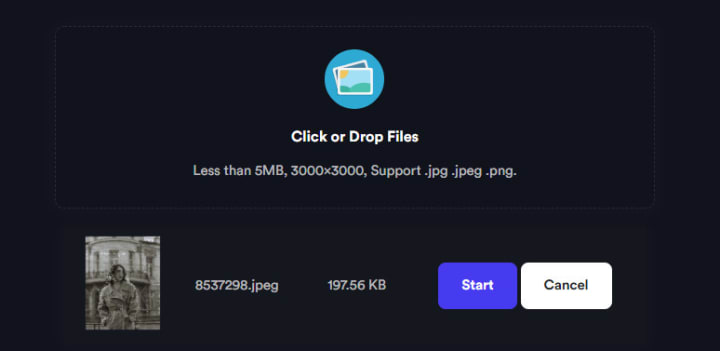
Step 2 Add Color to Black and White Old Photos Online Free
Click on the Start button to change your black and white photo into color in just a few seconds.
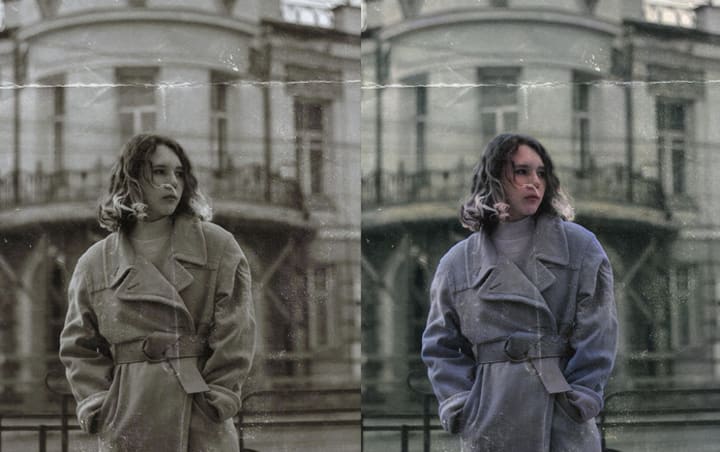
Step 3 Download Colorized Photo for Free
Click on the Download button to save the colorized photo to your computer. You can check the comparisons between the old photo and colorized photo.
Pros:
• No need to register or log in
• Automatically convert black and white photos to color online free
• Provide both online tools and colorize black and white photos freeware (free&paid)
Cons:
• Set file size limit: less than 3000px for any dimension
• Do not support cropping the photo
Method 3: Colorize Black and White Photos Online Free with Cutout Pro
Cutout Pro uses an AI image coloring algorithm to easily colorize your old black and white photos instead of traditional color filters. By training on millions of black and white photos, this image colorizer can add natural and realistic colors to your old photos. Whether you want to colorize old family photos, classic movie screenshots or black and white landscapes. You can access high-quality color photos in a few seconds without photo editing skills.
Here is how to colorize photos online free with Cutout Pro.
Step 1 Add A Black and White Photo to Cutout Pro
Upload or drag & drop a black and white picture to this AI photo colorizer. You can also press CTRL+V to paste an image or URL to this online photo colorization tool.

Step 2 Colorize Photo Automatically
Click on the Start button to change your black and white photo into color in just a few seconds.
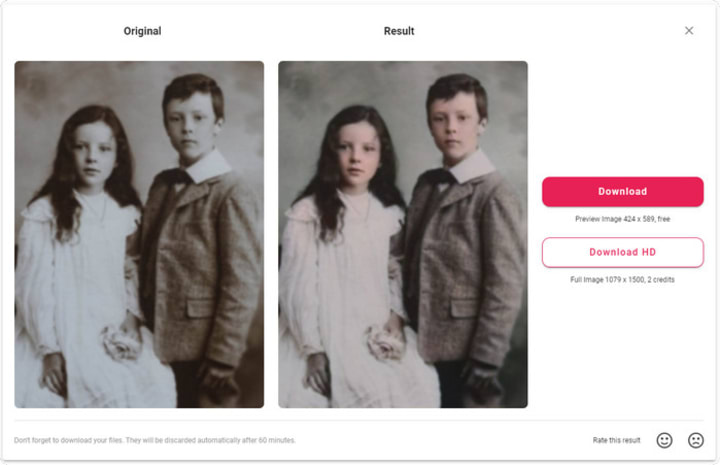
Step 3 Download Colorized Photo for Free
Click on the Download button to save the colorized photo (424 x 589px) to your computer free and preview the colorized photo, which will be discarded automatically after 60 minutes. But if you wanna download high-quality photos (full image 1079 x 1500px), you need 2 credits.
Pros:
• No account is needed
• Automatically colorize black and white photos online
• Use deep neural networks to restore beautiful color to images
Cons:
• limited image size and limited credits to get high quality colorized black and white photos free
• Lack bulk process
Conclusion:
That's all. As you can see, there are various ways by which you can turn any of your old black and white images to colourful and artistic photos easily with Artificial Intelligence and Machine Learning. Both the online tools and apps are easy to use and helpful to make grayscale pictures to color, so you can choose the preferable way to get started. These AI image colonizers make things much easier for those who just want to do automatically colorize black and white photos, and restore old images with stunning colors. As a desktop AI Photo Colorizer software, AVCLabs Photo Enhancer AI provides more advanced features for users. It allows users to fix old photos by removing the blur, upscaling the low-resolution old photos by 2X, and 4X.
About the Creator
Caroline White
Anime Lover
Keep reading
More stories from Caroline White and writers in Photography and other communities.
How to Convert Black and White Photos to Color Online for Free with AI
Black and white photos have a timeless appeal, evoking a sense of nostalgia and artistic charm. However, there may be instances when adding color to these monochromatic images can breathe new life into them. Thanks to the advancements in artificial intelligence (AI), converting black and white photos to color has become more accessible than ever. In this article, we will explore how to convert black and white photos to color online for free using AVC.AI.
By Caroline White3 years ago in Photography
Why Printed Photographs Still Matter: The Art and Value of Preserving Memories in Print
In a world where most photographs live on phones, laptops, and cloud storage, it is easy to assume that printing pictures is a thing of the past. Yet something meaningful gets lost when memories stay locked inside a device. A photograph printed on high quality paper carries a weight and warmth that no screen can fully replicate. It can be held, shared, framed, and passed down through generations.
By The Iconabout 10 hours ago in Photography
The Gold Tone (Orotone) Technique
She picked it up from a dusty shelf at an estate sale, thinking it was just an old frame. Then the light caught it. The image glowed, not like a print, not like a painting, but like something that seemed to carry its own inner warmth. That was her first encounter with an Orotone, and she bought it without asking the price.
By CurlsAndCommas4 days ago in Photography
Sometimes It's Like That and That'sThe Way It Is
It was the late 1960s, and ten-year-old Gloria Coleman was standing with her grandmother on the side of the highway waiting for the bus. As the Greyhound pulled up, it seemed monstrous and intimidating. Grandma Elizabeth grabbed Gloria's hand, holding it tightly as they boarded.
By Cheryl E Preston3 days ago in Fiction


Comments
There are no comments for this story
Be the first to respond and start the conversation.