
Effortlessly Remove Unwanted Objects from Your Images Using PhotoCut
Effortlessly Remove Unwanted Objects from Your Images Using PhotoCut

Effortlessly Remove Unwanted Objects from Your Images Using PhotoCut
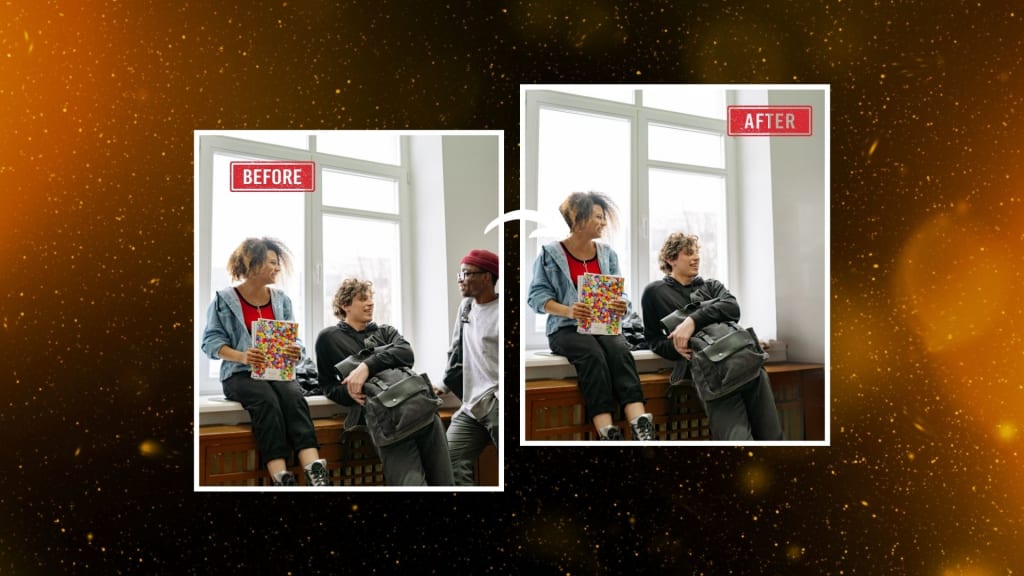
Have you ever taken a picture only to discover later that it contains something you don't want there? It may be a date stamp you didn't want, an obnoxious text overlay, or even a random person hiding in the backdrop. You're at the perfect place if you've ever wished you could quickly and simply get rid of these items from your pictures. Use PhotoCut's free AI object remover to quickly eliminate unwanted things from your images. You can get rid of people, text, watermarks, blemishes, and any other distraction, with the clean-up and perfecting of images in the minimum effort by the use of AI in PhotoCut's tool. This article explains the use of the AI object remover from PhotoCut in step-by-step ways.
What is the AI Object Remover?
PhotoCut's AI object-removing tool is far more advanced. As a tool developed with artificial intelligence, it aims to detect, remove, or mask unwanted features in your photographs to give you smooth, flawless picture-taking experiences while eliminating distractions caused by unwanted persons, objects, or other irritating elements in these photographs. This technology removes the object, filling the space that has been vacated. Therefore, your picture looks completely natural and untouched. It's very helpful for personal pictures, product photos, and professional work. In other words, this tool is incredibly useful for photographers, e-commerce businesses, content creators, and everyone else who wants to improve the quality of images.
How Does the AI Object Remover Work?
The AI object remover operates by scanning the area around an object you'd like to erase. It analyses the textures and patterns in the area and applies this knowledge to filling in space after the removal of the object. The AI does all this work automatically, thus not requiring one to manually retouch or paint over the space left. Whether it's a person, text, logo, or anything else, the AI does a fantastic job of recoloring the background so the image looks pristine. You never have to fear the quality of the photo-you can be certain everything will still be sharp and clean, like before the object was removed.
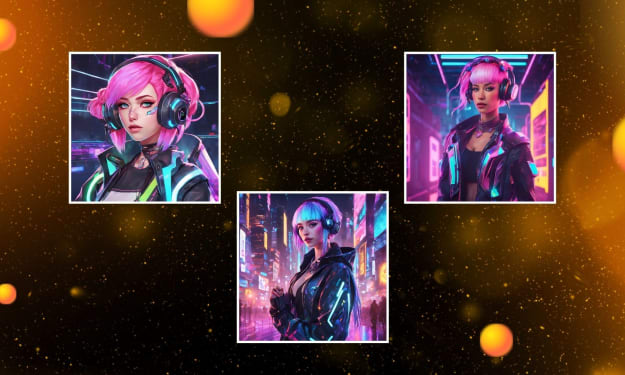
Create your own VTuber characters using PhotoCut’s VTuber creator.
Benefits of Using the AI Object Remover
- Simplicity: You don't need to be a professional at photo editing. The AI does everything for you. It's that simple: just upload a picture and click on the button that removes unwanted things.
- Speed: It doesn't take long to remove objects from your photos. PhotoCut's AI tool works in the blink of an eye; it will get rid of unwanted things within a few seconds. Now you can easily clean up the mess in your photo and get onto other things in life.
- Accuracy: This AI object remover by PhotoCut is accurate meaning that it removes objects and replaces these with the actual background texture and pattern. You can't see any traces of an edited photo.
- Versatility: This program can handle everything, including persons, text, date stamps, watermarks, flaws, and more. It's ideal for cleaning up a wide range of photos and scenarios.
- Quality Preservation: One of the biggest concerns when editing photos is that the quality of the image may suffer. With PhotoCut’s AI object remover, the quality remains intact. The background is seamlessly filled in, and the overall image stays clear and sharp.
Use Cases for the AI Object Remover
Here are a few common scenarios where the AI object remover can come in handy:
1. Remove People from Photos
Sometimes, you take a picture and capture the background with people whom you do not want to appear in the photo. PhotoCut's AI object remover will let you remove unwanted people from your photos. This is whether you are dealing with an uninvited photobomber or someone who happened to be at the wrong place, you can easily eliminate them from your photos within a few seconds. The AI will replace the removed area with a natural background that perfectly fits in with the rest of the image.
2. Get Rid of Text and Watermarks
Watermarks, captions, and text can sometimes obscure photos, especially if you need to use them for a different thing. It may contain a date stamp or a logo that you don't want on your photo. The object remover in PhotoCut can take away text and watermarks from images by making minimal changes to the original background. This will bring back the purity of your photos.
3. Fix Skin Imperfections in Portraits
If you have a portrait to edit, you may probably want to delete pimples, wrinkles, or marks. Instead of manually retouching each imperfection, PhotoCut's AI can do it all for you by erasing such blemishes and making the skin look incredibly smooth and flawless. For example, using the tool may also help repair red-eye conditions or even smoothen some facial features via digital makeup applications.
4. Enhance Product Photos for E-Commerce
If you sell products online, then you desire that your images look clean and professional. Photocut AI object remover helps eliminate distraction from product images through background clutters, stray objects, unwanted shadows, and even making the plain white background at your product images that will make them more appealing to look for in line with uniformity across your online store or social media.
5. Restore and Clean Up Old Photos
If you have old photos that are marked, torn, or have spots, the AI object remover tool by PhotoCut will help revive them. The tool can remove blotches, scratch marks, or other damage on an old picture that might make it look new. You can even add color to black-and-white photographs using this tool, giving them a bright and fresh look.
Change your image colors easily using PhotoCut’s color changer.
6. Real Estate Photography
When it comes to real estate photographs, presentation makes all the difference. You need your property pictures as clean and as inviting as they can be. PhotoCut object remover helps remove the kind of distractions found in power lines, trash cans, or even clutters at the back, ensuring your real estate photos are made to look professional, and thus attractive for potential buyers or renters.
7. Privacy Protection
Sometimes, you may wish to remove your license plate number or identification numbers from your photos before posting them on the internet. PhotoCut offers an object remover that allows you to safely remove such sensitive information about yourself to safeguard your privacy.
How to Use PhotoCut’s AI Object Remover
PhotoCut's AI object remover is very easy to use. This is a simple step-by-step guide to get you started:
- Go to the PhotoCut website and upload the photo you would like to edit. It allows users to upload from their computer, phone, or tablet.
- Use the brush tool on the uploaded picture and paint the unwanted object; this may be a person, text, or whatever object you wish to delete from the image.
- Click the "Remove" button after marking the object you want to eliminate. The AI will automatically scan the area and replace the object with a seamless background.
- Once the object is removed and the image is perfect, you can click on the "Download" button and get your edited image saved onto your device. You can share your flawless photo wherever you like.
Why Choose PhotoCut?
There are various reasons to select PhotoCut's AI object remover for your picture editing needs:
- AI Technology: PhotoCut uses the latest algorithms of AI that make object removal quick, easy, and seamless.
- High-Definition Quality: AI ensures that your pictures stay sharp and clear after photo editing. It replaces the object with a perfect blend of the background.
- Mobile Friendly: It allows you to access PhotoCut anytime, anywhere since it is a mobile-friendly website and is available for iOS and Android apps.
- Free: There is free object removal in PhotoCut. You will not have to pay for costly photo editing software or professional services.
Learn two easy ways to change your photo backgrounds to white.
Conclusion
PhotoCut is a very easy-to-use powerful tool for the removal of unwanted objects from a photo. Clean up that private image, prepare your product photo for uploading to your store, or perhaps restore an old picture with PhotoCut. Get pro results in seconds, no fuss, and a breeze to edit with AI technology. Try it out today!
Read everything you need to know about the Violet color and use it for your designs.
FAQs
Q1. How does the AI object remover work?
Ans. PhotoCut’s AI object remover uses powerful algorithms to identify unwanted objects in a photo. It then fills in the erased area by recreating the background based on surrounding textures and patterns, making the object removal seamless.
Q2. What types of objects can be removed?
Ans. People, text, watermarks, logos, stickers, blemishes, and much more can be removed from the pictures using the AI object remover from PhotoCut.
Q3. How long does it take to remove unwanted objects?
Ans. It only takes 3-5 seconds, and cleaning up your images and getting ready to use is quite fast with it.
Q4. Is my data safe?
Ans. Of course, your privacy matters. PhotoCut handles all photos securely. Your data won't be forwarded to any third parties.
Q5. How do I remove something from a picture?
Ans. Just upload your picture to PhotoCut. Mark the object you want to take away with the brush tool. Let AI make this piece of work. You are good to download your photo once it's done.
Q6. How do I remove text from a picture?
Ans. Upload your image to PhotoCut, then brush over the text to have the AI automatically remove it and replace it with a backdrop that matches.
About the Creator
PhotoCut
AI Photo Editing Tool - Remove or Change your Background & Enhance Product Photos
Keep reading
More stories from PhotoCut and writers in Photography and other communities.
Creating Your VTuber with AI Technology
Want to become a VTuber or enhance your VTuber stream with cool custom-made designs? Whether you just started or are already part of the VTuber community, you can easily create your VTuber avatar, backgrounds, and other streaming assets using AI technology. There's PhotoCut's AI VTuber creator that makes these custom designs fast and hassle-free, not requiring expertise. Let us guide you step-by-step on how to create VTuber assets from avatars to backgrounds through the power of AI.
By PhotoCut12 months ago in Photography
Gold Chrysotype Photography Is Back and the Colours Are Breathtaking
There is a moment when a chrysotype print is lifted from its chemical bath and held up to the light stops people mid-breath. The colours that bloom across the surface — soft dusty pinks fading into deep magenta, rich cyans pooling at the edges, velvety blacks settling into the grain of the paper — look less like a photograph and more like something pulled from a dream.
By CurlsAndCommas4 days ago in Photography



Comments
There are no comments for this story
Be the first to respond and start the conversation.