
Create a Cool Passport Photo with PhotoCut
Create a Cool Passport Photo with PhotoCut

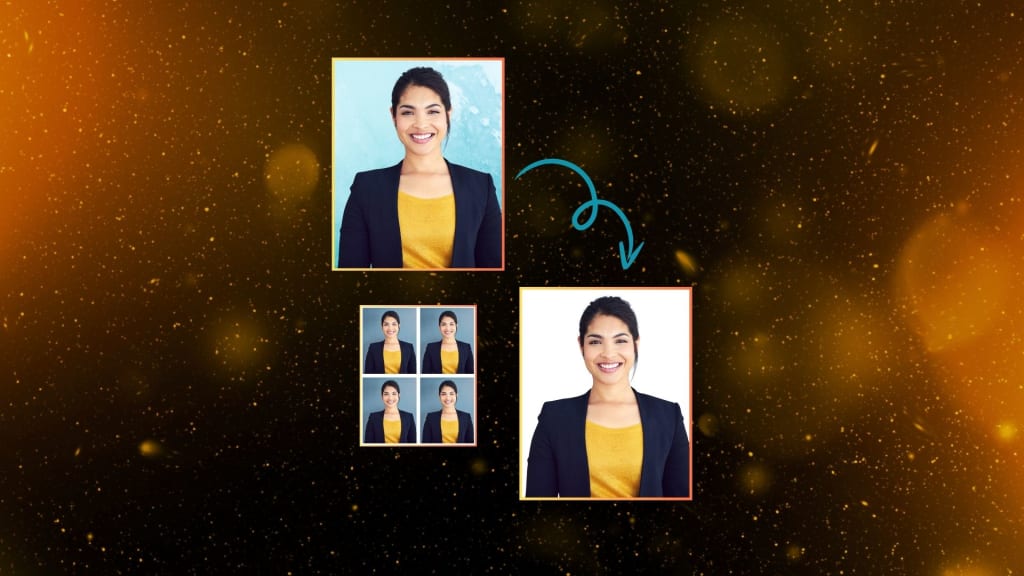
Getting the perfect passport photo is one of the more challenging processes one has to undergo. Whether you need one for a passport, visa, or ID card, you will need to get a photo that meets the standard requirement but should look professional. With PhotoCut's online passport photo maker, you can obtain a high-quality passport photo without a headache. It does not take professional photography skills or editing experience to have it accomplished. Let's, first of all, check what PhotoCut's passport photo maker does and about its capabilities for features and as an ideal instrument that would create just that perfect passport photo of yours.
Remove unwanted objects from your photos using PhotoCut’s AI object remover.
What is PhotoCut’s Passport Photo Maker?
PhotoCut is an easy way to get passport and identification pictures online. Its passport photo maker tool lets you transform your ordinary photograph into a professional passport-sized picture that usually complies with the standards of most countries. Apply for a passport ID card or visa- PhotoCut makes this task as simple, fast, and effective as possible. The AI-powered features of the platform automate such tasks as background removal, size changes, and outfit changes so that you can focus on getting the best shot.
How to Create Passport Photos with PhotoCut?
To create a passport photo using PhotoCut is pretty simple and requires no editing knowledge. This is how you create the passport photo using the online passport photo maker:
- Firstly, go to the website of PhotoCut, then click the "Make Passport Photo Now" button. From here, you are taken to the online tool, which you will start working with to produce your passport-sized photo.
- Once you open it on the edit page, a preset size template will be set for you. PhotoCut has several preset sizes based on common passport and ID photo sizing. In this way, you don't have to struggle with getting a wrong-size photo. You would just select any template, and then attach the photograph.
- Then you need to upload the photo. Just click on the "Upload" button and browse to the photo that you need to upload. PhotoCut supports almost all formats, so there is no need to worry beforehand about converting the image to one format.
- After uploading your photo, the AI-powered system of PhotoCut will automatically remove the background and replace it with a clean white background. This feature is especially important for passport photos since a white background is most often required by official documents.
- Once the background has been removed, you can now make adjustments to the image. PhotoCut enables you to enhance the brightness and contrast, and even other settings for your photo to look its best. You may also use the tool in cropping your photo to ensure that your face is properly centered and framed.
- This is one of the novelties of using PhotoCut's passport photo maker, as it allows changing your clothes in the picture using AI. If you are not dressed professionally enough to have a passport photo, you can easily substitute your outfit with something more appropriate with just a few clicks. This will come in handy when you are not attired properly for the photo shoot.
- Once you are satisfied with your output you can download your passport photo in PDF, PNG, or JPG in good high-quality format. PhotoCut optimizes the image for printing therefore you can print it at home or get printed by experts without losing one detail.
Learn two easy ways to change your photo backgrounds to white.
Features of PhotoCut’s Passport Photo Maker
PhotoCut's passport photo maker offers various features to make the process easy and efficient. Some of the major features that set PhotoCut apart from other online passport photo tools are listed below:
1. Preset Sizes for Easy Cropping
One of the biggest time-consuming jobs in creating a passport photo is getting it to the correct size. Well, PhotoCut has multiple preset sizes available that match up with most countries' requirements. No need to fiddle around trying to crop out your image so that it reaches the required dimensions; the tool automatically does it for you.
2. Automatic Background Removal
Using an AI-powered tool in PhotoCut is efficient in removing the background from your photograph. This would be a pre-requisite process in creating passport photos since the majority of countries require a plain, white background for a passport photograph. The result would be an image that's clean and professional.
3. AI-Powered Outfit Replacement
One of the most impressive features of the passport photo maker feature by PhotoCut is the option for an outfit change. PhotoCut can change your outfit into one that's professional with the help of its AI, whether it is a business suit or a formal shirt. It's quite helpful if you didn't dress right for the photo shoot or want a more polished look for the passport.
Create your own VTuber characters using PhotoCut’s AI VTuber Maker.
4. High-Quality Output
PhotoCut will always ensure that your passport photo is generated in high resolution to appear clear and sharp. In case you opt to print the picture yourself or order the printing service from a professional lab, you are guaranteed that nothing will go wrong.
5. Multiple Format Options for Download
You can then download the passport photo in several formats, including PDF, PNG, or JPG. This will allow you to print it in various sizes or send it via electronic mail if you need to.
6. User-Friendly Interface
PhotoCut is intuitive and user-friendly. You do not have to be experienced in photo editing for you to use the tool, as it has simple steps for you to produce the perfect passport photo. It guides you step by step throughout the process.
Benefits of Using PhotoCut for Passport Photos
There are various benefits to using PhotoCut to produce your passport photos. Here are a few of them:
1. Convenience
No longer do you need to schedule a sitting with a photographer or have a photo studio just to get a passport photo? With PhotoCut, you can have your passport photo at any given time and any place if only you have a connection to the internet.
2. Saves Time and Money
There are savings in terms of time and money as you won't have to pay for photographers and also avoid standing in long lines at a photo booth to take photos. With a few clicks, you have your passport photo ready.
Change your image colors easily using PhotoCut’s color changer.
3. No Need for Technical Skills
You won't need special technical skills to use PhotoCut. The application is simple to use and even a layperson can produce the passport photo by meeting the desired standards. More so, these AI features for background removal and outfit replacement simplify the process further.
4. Instant Results
Within a minute, PhotoCut will give you a passport photo. It doesn't have to take you hours or even days to wait before your photo is processed; it's ready for you to download the moment you're done editing.
5. Customizable Options
PhotoCut lets you make minor changes to your photo, such as changing the brightness and contrast and many other image adjustments. This means that your passport photo will be flawless and meet all the specifications that are required.
Why Choose PhotoCut?
There are several reasons why you should choose PhotoCut's passport photo maker over the rest of the online tools:
- Fast & Easy: The software will make the process of transforming any photo into a passport-sized image quickly and easily, no technical expertise is needed.
- AI Clothes Replacement: Using the AI, you can replace your outfit in the photo to look professional all the time.
- High-Quality Output: PhotoCut produces your passport photos in HD quality, which will ensure that the picture is crystal clear and can be printed out.
- Works on All Platforms: PhotoCut works on all the major web browsers and devices so you can work it out on your laptop, tablet, or even your smartphone.
- Cheap and Convenient: There is no need to pay for costly photos or visit a studio. With PhotoCut, you can easily make passport photos at home.
Conclusion
PhotoCut provides users with its highly efficient and straightforward passport photo maker with features including an automatic removal of the background from the picture and a clothing change facility while producing it as a very good quality file. Whether it's a passport photo for traveling, a visa, or an ID card, PhotoCut will do it for you in the comfort of your home. Try it out today!
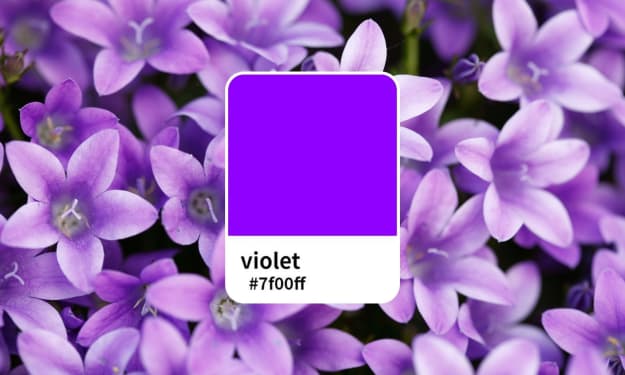
Read everything you need to know about the Violet color and use it for your designs.
FAQs
Q1. What Are the Requirements for US Passport Photos?
Ans. In a US passport photo, the photo must:
Be a color photograph taken less than six months ago.
Have a clear, frontal view of your face.
Be set up with a white backdrop and 2 x 2 inches (51 × 51 mm).
Your head must be between 25 and 35 mm (1 inch to 1 3/8 inches) tall.
Q2. How Do I Make a Passport-Size Photo?
Ans. Make a passport photo within a minute with PhotoCut's Passport Photo Maker software. You only need to upload the photo, and then automatically crop it on the correct template size with your desired image inside.
Q3. How Do I Change My Outfit in a Passport Photo?
Ans. Within the AI-powered clothes replacer tool of PhotoCut, you can easily change your outfit in your passport photo. All you have to do is upload your image, and then the AI will help change it for you with a professional-looking outfit.
Q4. Can I Make My Passport Photo with PhotoCut?
Ans. Yes, PhotoCut does make taking your passport photograph so easy-it is as simple as uploading your photo, adjusting your settings, and then downloading your perfect passport photo within minutes.
About the Creator
PhotoCut
AI Photo Editing Tool - Remove or Change your Background & Enhance Product Photos
Keep reading
More stories from PhotoCut and writers in Photography and other communities.
Everything You Should Know About the Color Violet
One of the most distinctive and fascinating purple hues is violet, which can be utilized to add a hint of mystery and elegance to a variety of designs. Though far more vivid than indigo, it is not as gaudy as the lighter purples. We've covered all you need to know about violet in this article, including its definition, significance, and artistic applications.
By PhotoCut12 months ago in Photography
The Gold Tone (Orotone) Technique
She picked it up from a dusty shelf at an estate sale, thinking it was just an old frame. Then the light caught it. The image glowed, not like a print, not like a painting, but like something that seemed to carry its own inner warmth. That was her first encounter with an Orotone, and she bought it without asking the price.
By CurlsAndCommas4 days ago in Photography
Gold Chrysotype Photography Is Back and the Colours Are Breathtaking
There is a moment when a chrysotype print is lifted from its chemical bath and held up to the light stops people mid-breath. The colours that bloom across the surface — soft dusty pinks fading into deep magenta, rich cyans pooling at the edges, velvety blacks settling into the grain of the paper — look less like a photograph and more like something pulled from a dream.
By CurlsAndCommas4 days ago in Photography
The First Rainbow Baby
Pitter-patter, pitter-patter. The rain fell in rhythmic splatters, slowly slowing, but still constant. Mira rolled onto her side pulling the blanket tight against her ears, but still she could hear chitter-chatter and scurrying feet of the creatures that refused to sleep in the lower decks.
By A. J. Schoenfeld3 days ago in Fiction


Comments
There are no comments for this story
Be the first to respond and start the conversation.