
AVCLabs Video Enhancer AI In-depth Review
Is it Worth Trying for Video Enhancement?

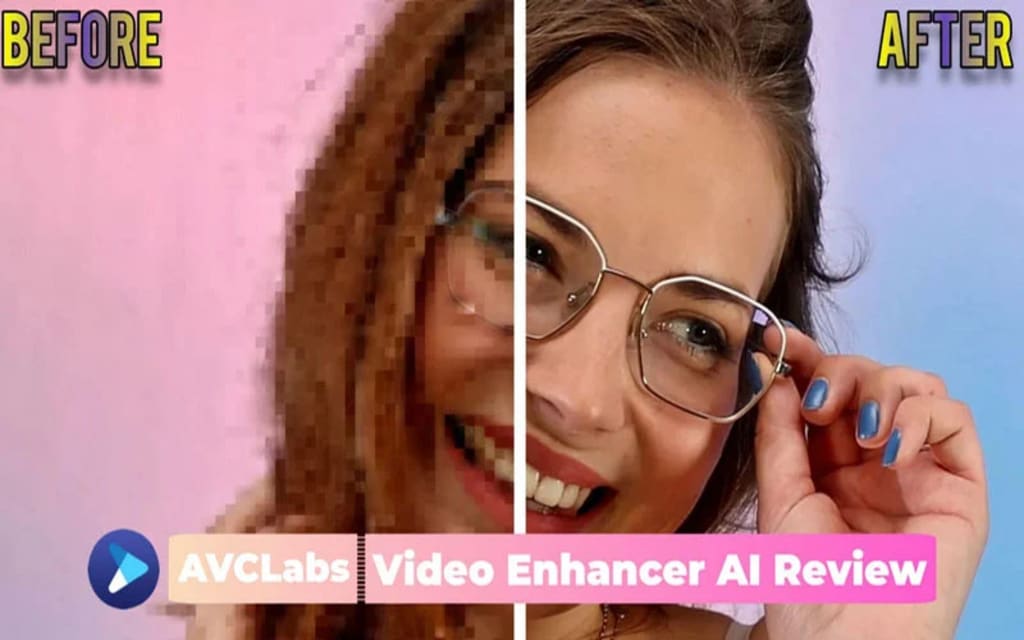
When searching for keywords like video enhancer or video upscaler, you'll come across a wide range of options to choose from. Prominent brands such as Topaz, AVCLabs, DVDFab, and Hitpaw, as well as various online tools, might catch your attention. Naturally, you may find yourself wondering which one is the best fit for you or which one can fulfill your specific requirements. To provide you with valuable insights so that you can confidently make the right choice for your needs, we have prepared a comprehensive and in-depth review of AVCLabs Video Enhancer AI.
Before Starting: What Should You Know Before Using AVCLabs Video Enhancer AI?
Welcome to this informative section where you can learn more before trying out AVCLabs Video Enhancer! If you've heard about it and are curious to give it a try, keep reading for all the details you need to get started.
1. Brief Introduction: What Is AVCLabs Video Enhancer AI?
AVCLabs Video Enhancer AI is a specialized desktop software designed to enhance video quality, upscale videos to HD and 4K resolution, recover&refine face, colorize black and white videos, and convert videos into higher frame rates.
AVCLabs Video Enhancer AI was released in November 2021, although it had some imperfections at that time, including an unstylish user interface, rough features, slow processing speed, and inferior quality. However, with several updates and continuous improvements, AVCLabs Video Enhancer AI has made significant progress. Its latest versions showcase remarkable advancements and demonstrate its commitment to delivering the best video enhancement capabilities.
More significantly, AVCLabs is the first one who introduces the technique of face detection, face recognition, and face refinement into video enhancement. As far as is known, this piece of technique has been under continuous improvement through algorithm adjustments and training with samples. As a result, you can definitely expect big improvements in the higher accuracy of face recognition and better overall quality of face refinement.
2. System and Hardware Requirements: Is Your Machine Capable of Running AVCLabs?
As we know, most AI-powered video enhancement software relies on machine learning or deep learning techniques. Therefore, to ensure better performance and a happier user experience, you are recommended to have a desktop with a good GPU (at least 4GB VRAM), a decent CPU, and sufficient physical memory.
System requirements: Windows 10 (64-bit) and Windows 11, with at least 4 GB of RAM; macOS Catalina 10.15 and above with M1 or M2 chip.
Hardware requirements: dedicated GPU with at least 4GB VRAM (GPU memory), including NVIDIA GTX 600 series and above, AMD Radeon HD 7000 series and above, and Intel HD Integrated Graphics.
You can also refer to this page for more detailed information about the system and hardware requirements for AVCLabs Video Enhancer AI.
3. The Price Information: Is AVCLabs Video Enhancer AI Affordable?
3.1 Price and plans
① $299.90/One-time purchase, free lifelong updates without additional fee;
② $119.95/Year, billed yearly, you can cancel the subscription anytime;
③ $39.95/Month, billed monthly, you can cancel the subscription anytime.
3.2 Is it a bit more expensive?
It is obvious that AI-powered video enhancers are more expensive than other desktop software. This can be attributed to the substantial investment of resources in research and development.
3.3 Do you dislike subscriptions?
AVCLabs offers a monthly subscription plan designed to cater to users looking for cost-effective options and those who require the program for occasional projects. While some users express their dislike towards subscription plans, this model allows for flexible and affordable access to AVCLabs for various evaluation needs.
3.4 Looking for a better deal? Is it possible to purchase it at a lower cost?
AVCLabs Video Enhancer AI is available for purchase at a price of $299.90 as a one-time option, which offers the greatest value. However, keep an eye out for special holiday promotions or occasional discounts in specific months to potentially enjoy savings of $50-$100.
4.Input and Output Formats: What Kinds of Video Footage Are Supported by AVCLabs?
4.1 Supported input formats
3G2, 3GP, AVI, DIVX, FLV, F4V, M2TS, MTS, MOV, MP4, M4V, MPEG, MPG, DAT, MKV, OGM, RMVB, RM, TS, TP, VOB, WMV, WTV, ASF, DV, WEBM, etc.
4.2 Supported output formats
MP4, MKV, MOV, AVI, Webm.
4.3 What should you do if you find the video is not supported?
If you encounter the prompt "the video format is not supported" while using AVCLabs Video Enhancer AI, there's no need to worry. The technical team will make sure it becomes supported soon. All you have to do is send this feedback to their support team.
4.4 What kinds of videos can be enhanced by AVCLabs Video Enhancer AI
In general, AVCLabs Video Enhancer AI is capable of processing all low-quality and low-resolution video footage. To give you a better idea of its capabilities, let's take a closer look at some of the video types that can benefit from the quality improvement offered by AVCLabs Video Enhancer AI.
① SD resolution video footage in 240p, 360p, 480p, 640p;
② HD resolution video footage in 720p, 1080p;
③ Noisy video footage recorded in low light conditions with a high IOS rating;
④ Blurry video footage caused by out-of-focus, or motion blur;
⑤ Highly compressed video with artifacts and quality loss;
⑥ Pixelated video footage that is stretched by traditional upscalers;
⑦ Anime videos in low frame rate and low quality;
⑧ Interlaced video footage with obvious lines in the screen;
⑨ Old black-and-white video footage.
5. The User Interface: Is it Friendly for Beginners and Easy to Get Started?
Read more: avclabs.com
About the Creator
Keep reading
More stories from Madeline and writers in Photography and other communities.
How to Remove Background Noise from Video
Background noise can often be minimized during recording by selecting a quiet environment, using the right equipment and accessories, and adjusting device settings. However, even with these precautions, unwanted noise can still make its way into your recordings. So, how do you remove background noise from video after it’s been recorded? In this article, we’ll share 6 easy and practical methods on how to remove background noise from video, helping you enhance the audio quality and create a cleaner sound experience.
By Madelineabout a year ago in Photography
Why Printed Photographs Still Matter: The Art and Value of Preserving Memories in Print
In a world where most photographs live on phones, laptops, and cloud storage, it is easy to assume that printing pictures is a thing of the past. Yet something meaningful gets lost when memories stay locked inside a device. A photograph printed on high quality paper carries a weight and warmth that no screen can fully replicate. It can be held, shared, framed, and passed down through generations.
By The Iconabout 2 hours ago in Photography



Comments
There are no comments for this story
Be the first to respond and start the conversation.