
Automatically Colorize Black and White Photos Online
Automatically Colorize Black and White Photos Online

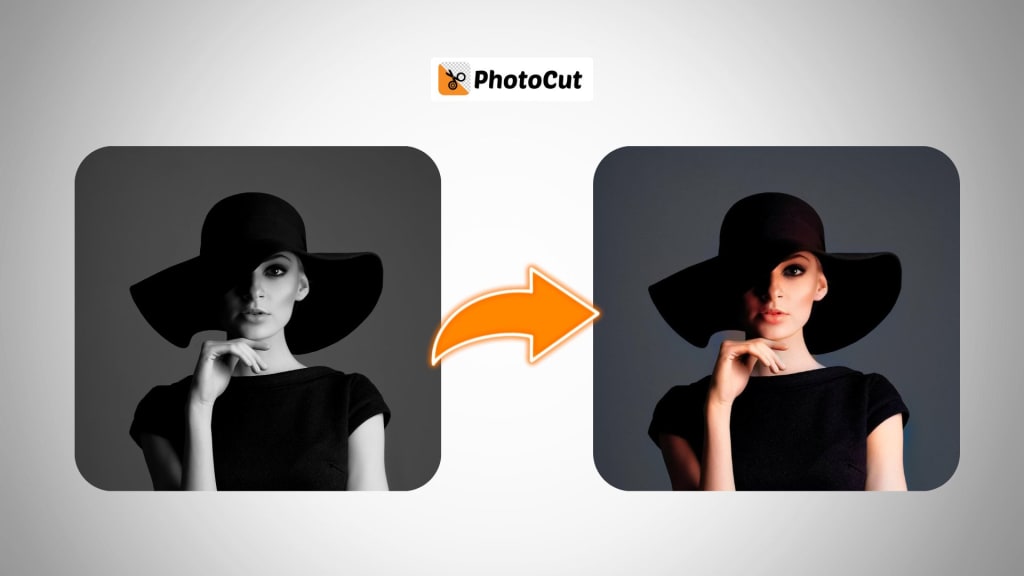
Do you have old black-and-white pictures from your family albums, old historical events, or even classic films that you wish were in color? Thanks to the growth of AI technology, it has never been easier to add these vibrant colors to your old black-and-white images. PhotoCut's AI Photo Colorizer can give those nostalgia-evoking pictures a simple click to transform them into amazing, colorized versions.
This is a step-by-step guide on how to use PhotoCut's AI Photo Colorizer and restore your old photos easily. In addition, we'll explore the technology behind colorization, and the benefits of using AI in this task, and also answer some frequently asked questions. You can make beautiful collages with your colorized photos using PhotoCut’s Collage Maker.
What is AI Photo Colorization?
The colorization of black-and-white pictures by AI represents a procedure where AI algorithms automatically include color in those black-and-white images. AI uses deep learning algorithms to make appropriate predictions about various elements found within the images: a skin tone or clothes may require one specific color or multiple colors, lands or scenery might need bright, beautiful colors, among other types of elements which could necessitate different varieties of coloring.
The process becomes that easy with AI Photo Colorizer by PhotoCut, providing you with a simple platform for uploading those black-and-white photos from which you'll automatically acquire colorized copies within seconds, with the precision of coloring so high as to mix realism with accuracy.
How PhotoCut’s AI Photo Colorizer Works
1. Upload Your Black-and-White Photo
To get started with colorizing your black-and-white photo, simply go to PhotoCut's website and upload your black-and-white photo to be colorized. You can sharpen your images with PhotoCut’s Image Sharpener and upload them. This platform accepts various photo formats, including JPEG, and PNG, among others.
2. AI Technology Analyzes the Image
Once an image is uploaded, PhotoCut's AI algorithms do their work. It looks into the key elements such as face, clothing, background, and objects within the picture. Finally, it adds color to the photograph based on the context, historical data, and patterns learned from its large image database.
3. Automatic Colorization
After analyzing the picture, the AI system applies natural colors to the black-and-white photo automatically. This is done by selecting colors from realistic patterns so that the result will look natural. For instance, the AI will detect skin tones, hair colors, and clothing colors common during the time the picture was taken.
4. Final Results
The erstwhile black-and-white image acquires an eye-catching display as it evolves within seconds, and more often than not, produces very surprisingly apt results of the colors depicted in all those realistic hues and shades. From families to photographs depicting history and even movies from yore, now, your black and white photos will simply come to life with something fresh but so real in them. You can create yearbook photos with colorized images using PhotoCut’s AI Yearbook Generator.
Benefits of Using AI for Photo Colorization
1. Efficiency and Speed
Traditional colorization methods, including manual painting or hand-coloring of photographs, take hours or even days to finish. The process can be done within seconds by using PhotoCut's AI Photo Colorizer, which is highly efficient and saves time.
2. High-Quality Results
AI-driven colorization provides high-quality, natural-looking results. Colorized photos are often more accurate than manually colored images, as AI can predict and apply realistic color schemes based on historical data, context, and deep learning.
3. Cost-Effective
The cost of hiring a professional photographer or artist to colorize your photos can be pricey. PhotoCut's AI technology provides a more budget-friendly alternative, giving you results at a professional level with much less cost.
4. Ease of Use
It is as easy as uploading a photo and clicking a button with PhotoCut's AI Photo Colorizer. There is no need for technical skills or artistic expertise. Everything is done for you from analyzing the image to applying the colors.
5. Preserve Memories
Colorizing old photographs is the best way to make memories richer. By bringing aged family photographs or historic pictures into color life, it is possible to recreate all those moments through the lenses of new color perspectives. It allows a glimpse at the past through the life-like colors in memory creation. You can also use the colorized photos as your Facebook Profile Picture.
Types of Photos You Can Colorize with PhotoCut’s AI
You can colorize all kinds of black-and-white images using PhotoCut's AI Photo Colorizer, such as:
1. Family Photos
Family photos are usually in black and white, especially those taken a long time ago. Be it your grandparents, your parents, or a picture of yourself from your childhood, colorizing them makes them come alive and brings them closer to your heart. Restore your old family photos with PhotoCut’s Photo Restoration tool.
2. Historical Images
Photos of historic wars, events, or iconic moments always seem to be in black and white. Colorizing the same pictures gives history a new twist, helping understand the past even better and bringing it closer to the present for people.
3. Old Movie Scenes
Many of the films are taken in black and white. This means that by using PhotoCut's AI Photo Colorizer, you would be able to color old movie scenes so that the original look would still show but with a new twist.
4. Portraits and Artwork
You can also colorize black-and-white portraits or artwork. Be it a portrait of a great historical figure or an old painting, AI technology will be able to add depth and realism to the artwork, giving one a new perspective in viewing such images.
5. Landscapes and Cityscapes
Even black-and-white photographs of landscapes or cityscapes can be colorized, bringing out the richness of colors and beauty of a location, making the viewer feel as if he's there.
How to Colorize Your Photos with PhotoCut
Follow these simple steps to colorize your black-and-white photos:
Step 1: Visit PhotoCut’s Website
Go to PhotoCut’s homepage and select the AI Photo Colorizer option. You will be directed to the photo upload page.
Step 2: Upload Your Black-and-White Photo
Click on the “Upload Photo” button and choose the black-and-white photo you want to colorize from your device. The platform accepts common photo formats like JPG, PNG, and more.
Step 3: Let AI Work Its Magic
Once your photo is uploaded, PhotoCut’s AI system will analyze it and automatically apply colors. This step typically takes just a few seconds.
Step 4: Download Your Colorized Photo
Once the process is complete, you can preview your colorized photo. In case the outcome is satisfying enough to you, then you can download the colored version through the download option provided at the bottom. Now share it with your friends and family or on social media too!
Conclusion
You can bring your old black-and-white photos to life so easily with PhotoCut's AI photo colorizer. From family photos and historic images to iconic scenes from the movies, here's how you can easily turn pictures into realistic colors right in front of your very eyes. Using advanced AI technologies, PhotoCut ensures that even in the shortest time imaginable, colorization is perfectly done with great quality, opening the possibility of reliving some parts of the past in whole new ways.
FAQs
Q1. What is AI photo colorization?
Ans. AI photo colorization is the process by which artificial intelligence adds color to black-and-white photographs. AI algorithms scan through the images and automatically predict and apply realistic colors to the photo, giving the impression that it was taken in color.
Q2. How does PhotoCut’s AI Photo Colorizer work?
Ans. PhotoCut's AI Photo Colorizer applies the most advanced machine learning algorithms in analyzing black-and-white photos. AI would predict the appropriate color by content in the picture like skin tones, clothes, and background. The result is automatically applied as being realistic and consistent.
Q3. Is PhotoCut’s AI Photo Colorizer free to use?
Ans. PhotoCut uses free and paid versions of this AI Photo Colorizer to use. Although you might use the free version without paying, you will have to spend money on some of its advanced options or higher downloads.
Q4. How long does it take to colorize a photo?
Ans. PhotoCut's AI Photo Colorizer does colorization very fast; the colorization process can take just a few seconds to complete. The time varies with the complexity of the photo, but it is always pretty fast.
Q5. Can I colorize any black-and-white photo?
Ans. Yes, PhotoCut's AI Photo Colorizer works wonderfully well on a vast section of black-and-white family pictures, historical images, old movies, and similar old-timey photos that look excellent after being treated to colorization by AI.
About the Creator
PhotoCut
AI Photo Editing Tool - Remove or Change your Background & Enhance Product Photos
Keep reading
More stories from PhotoCut and writers in Photography and other communities.
Step-by-Step Guide for Taking Passport Photos with an iPhone
Having to travel to a professional photo studio or kiosk to take your passport photo can sometimes be a hassle. But due to advances in smartphone cameras, you can now take a quality passport photo from your home using your iPhone. Adhering to some guidelines will ensure that your photo will meet all of the criteria listed for passport applications, even though it might seem somewhat tricky at first. You can change hairstyles using PhotoCut’s Hairstyle Changer for a formal look.
By PhotoCutabout a year ago in Photography
The Gold Tone (Orotone) Technique
She picked it up from a dusty shelf at an estate sale, thinking it was just an old frame. Then the light caught it. The image glowed, not like a print, not like a painting, but like something that seemed to carry its own inner warmth. That was her first encounter with an Orotone, and she bought it without asking the price.
By CurlsAndCommas3 days ago in Photography
Gold Chrysotype Photography Is Back and the Colours Are Breathtaking
There is a moment when a chrysotype print is lifted from its chemical bath and held up to the light stops people mid-breath. The colours that bloom across the surface — soft dusty pinks fading into deep magenta, rich cyans pooling at the edges, velvety blacks settling into the grain of the paper — look less like a photograph and more like something pulled from a dream.
By CurlsAndCommas4 days ago in Photography


Comments
There are no comments for this story
Be the first to respond and start the conversation.