
Choosing Between a Laptop and a Desktop for Your Home Business
By: Paul Claybrook, MS, MBA
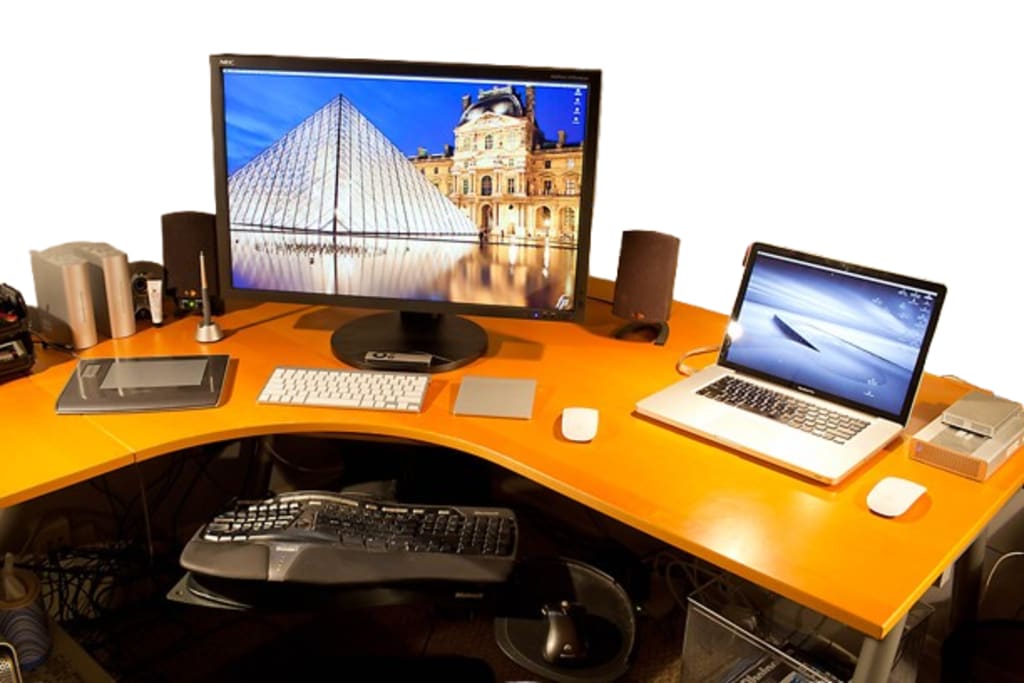
In today's increasingly digital economy, the computer has become the central nervous system of nearly every home business, from freelance creative studios to e-commerce operations, from consulting practices to remote tech startups. This fundamental tool influences nearly every aspect of business operations—productivity, communication, creative output, and even client perceptions. Yet many entrepreneurs launching home-based ventures give surprisingly little thought to their choice between the two primary computing options: the portable laptop or the stationary desktop. This decision carries far-reaching consequences that extend well beyond simple preferences about mobility, affecting everything from daily work habits to long-term financial planning, from ergonomic health to business scalability.
The laptop versus desktop debate has grown increasingly complex as both technologies have evolved. Modern laptops now pack processing power that rivals many desktops from just a few years ago, while contemporary desktops offer sleek designs that occupy minimal space. Yet the core distinctions remain—laptops prioritize convenience and mobility, while desktops emphasize power and upgradability. For the home business owner, this isn't merely a technical specification comparison but a strategic decision that will shape their work experience, efficiency, and even the potential growth trajectories of their ventures. The right choice can become a silent business partner, enabling seamless workflows; the wrong choice may manifest as a constant source of frustration and limitation.
Several critical factors demand careful consideration in this decision-making process. The nature of the work itself stands paramount—does the business require intensive computing power for tasks like video editing or 3D rendering, or is it primarily document-based work that values mobility? Financial considerations extend beyond initial purchase price to encompass long-term value, upgrade potential, and peripheral requirements. Physical workspace constraints in home environments often play a decisive role, as not all residences can accommodate an ideal desktop setup. Perhaps most importantly, entrepreneurs must consider how their computing needs may evolve as their business grows—what serves a solopreneur today may prove inadequate for a small team tomorrow.
This analysis becomes even more nuanced when considering hybrid solutions that blend the advantages of both approaches. Docking stations can transform laptops into desktop-like workstations, while cloud computing can offset local hardware limitations. Some businesses may even benefit from maintaining both systems for different purposes. These alternatives create a spectrum of possibilities between the traditional binary choice, allowing for customized solutions tailored to specific business needs.
As we examine this critical decision, we must recognize that there is no universal "best" choice—only the most appropriate solution for a particular business at a specific stage of its development. The following analysis will explore the advantages and limitations of each option, providing home business owners with the framework needed to make an informed, strategic decision about this foundational element of their operations.
Find the Best Performing and Best Prices on Laptops
The Unparalleled Advantages of Laptops for Home Business Operations
In an era where work flexibility has become not just desirable but essential, laptops have emerged as the quintessential tool for home business owners. Their inherent advantages fundamentally transform how and where entrepreneurial work can be conducted, offering a level of convenience that desktop systems simply cannot match. The modern laptop represents more than just portable computing power—it embodies a complete, self-contained office that fits in a backpack while delivering professional-grade functionality.
The most transformative benefit of laptops lies in their portability and flexibility, characteristics that redefine the traditional concept of "office space." Unlike their stationary desktop counterparts, laptops empower entrepreneurs to establish a productive workspace anywhere—from kitchen tables to coffee shops, from client offices to airport lounges. This mobility proves particularly valuable for home business owners who need to maintain productivity while traveling for meetings, networking events, or simply when seeking a change of environment to spark creativity. The psychological benefits of this flexibility should not be underestimated; the ability to alter one's work environment can significantly enhance focus, inspiration, and overall job satisfaction. Even within the home, laptops provide unparalleled adaptability, allowing users to seamlessly transition from a formal desk setup in the morning to a more relaxed couch or patio arrangement in the afternoon without any loss of productivity or workflow continuity.
When examining space efficiency, laptops demonstrate clear superiority for home-based operations. Many entrepreneurs launching businesses from residential spaces face spatial constraints, whether working in studio apartments, shared living environments, or makeshift home offices. A laptop eliminates the need for bulky CPU towers, multiple monitor setups, and tangled cable arrangements that characterize desktop workstations. The entire computing system consolidates into a single, slim device that requires nothing more than a flat surface to operate effectively. This minimalist approach proves particularly advantageous for those who need to frequently reconfigure their living spaces, allowing the work environment to disappear when not in use. The space-saving nature of laptops also facilitates cleaner, more organized work areas—a crucial factor in maintaining productivity and mental clarity in limited home spaces.
Modern laptops come equipped with integrated features that create immediate value for home business operators. The built-in battery system serves as an uninterruptible power supply, protecting against data loss during unexpected power outages—a feature particularly valuable for those in areas with unreliable electrical infrastructure. Contemporary models include high-definition webcams, noise-canceling microphones, and premium speaker systems, transforming the laptop into a complete communication hub for video conferences, client presentations, and virtual team meetings. This integration eliminates the need for and expense of purchasing external peripherals while reducing setup complexity. The self-contained nature of these systems means business owners can join important video calls or access critical documents within seconds, whether they're at their primary workspace or temporarily working from an alternate location.
The ease of setup associated with laptops provides another compelling advantage for time-constrained entrepreneurs. Unlike desktop systems that require assembly, peripheral connections, and often complex cable management, a new laptop requires nothing more than opening the lid and pressing the power button to become operational. This plug-and-play functionality proves invaluable when quick deployment is necessary or when technical expertise is limited. The simplicity extends to maintenance and troubleshooting as well; with fewer components and connections than desktop systems, laptops generally present fewer points of failure and more straightforward diagnostic processes when issues do arise. For home business owners who need reliable technology without the burden of complex IT management, this streamlined operation can mean the difference between focusing on business growth and wrestling with technical complications.
These advantages collectively position laptops as the ideal computing solution for most home business scenarios. While certain specialized professions may require the raw power of desktop systems, the vast majority of entrepreneurial ventures—from consulting services to e-commerce operations, from digital marketing agencies to freelance writing businesses—will find that laptops provide the perfect balance of performance, convenience, and professional capability. As remote work continues to dominate the business landscape and the line between home and office increasingly blurs, the laptop stands as the definitive tool for the modern home-based entrepreneur, offering freedom and functionality in equal measure.
The Enduring Advantages of Desktop Systems for Home Business Operations
While portable computing solutions have gained popularity in recent years, desktop computers maintain significant advantages that make them the superior choice for many home business applications. The inherent design philosophy of desktop systems—prioritizing performance, customization, and durability over portability—creates distinct benefits that directly address the needs of serious professionals operating from home offices. These advantages become particularly apparent when examining four key areas: computational power, long-term value, ergonomic considerations, and system reliability.
The performance capabilities of desktop computers remain unmatched in the computing world, especially for professionals engaged in resource-intensive work. Video editors working with high-resolution footage, graphic designers manipulating complex vector files, software developers compiling large codebases, and data analysts processing substantial datasets all benefit tremendously from the raw processing power that desktop configurations provide. This performance advantage stems from several factors: desktop processors typically operate at higher thermal thresholds without throttling, dedicated graphics cards deliver superior rendering capabilities, and the physical space allows for more effective cooling solutions. Unlike laptops where components are miniaturized for portability, desktop parts are designed purely for optimal performance. The modular nature of desktop systems also enables straightforward upgrades—swapping out graphics cards, adding memory modules, or installing additional storage drives can be accomplished with basic technical knowledge, ensuring the system evolves alongside growing business needs.
From a financial perspective, desktop computers offer compelling value propositions for cost-conscious business owners. When comparing systems at similar price points, desktops consistently deliver better performance metrics—faster processors, more powerful graphics solutions, and greater expandability. This price-to-performance ratio becomes especially important for businesses that require substantial computing resources but operate with limited budgets. The economic benefits extend beyond the initial purchase through the system's upgradability. Where laptops often become obsolete when their non-replaceable components can no longer meet software demands, desktops can be incrementally improved. A five-year-old desktop with a new graphics card and additional RAM can often outperform brand-new mid-range laptops in demanding applications. This extendable lifespan translates to significant long-term savings, as the need for complete system replacements diminishes.
Ergonomics represent another area where desktop systems excel for home office environments. The ability to configure multiple large-format monitors reduces eye strain and improves workflow efficiency—a critical advantage for professionals spending extended periods at their workstations. Keyboard and mouse positioning can be optimized for proper wrist alignment, and monitor height can be adjusted to maintain neutral neck positions. These ergonomic considerations become increasingly important as work sessions lengthen, helping prevent repetitive stress injuries that can develop from prolonged computer use. The superior cooling solutions in desktop systems also contribute to comfort, as they operate more quietly and maintain lower surface temperatures than laptops under heavy loads, creating a more pleasant working environment.
Security and durability considerations further strengthen the case for desktop systems in home business settings. The stationary nature of desktops inherently reduces theft risk compared to portable devices that may be carried to public spaces or left unattended in vehicles. For businesses handling sensitive client information or proprietary data, the physical security of having critical systems remain in a controlled environment provides peace of mind. The durability of desktop components also surpasses that of laptops—without moving parts like hinges or batteries that degrade over time, desktops often maintain reliable operation for years longer than their portable counterparts. The absence of battery-related concerns means desktop systems won't suffer from decreasing runtimes or swelling battery packs that can damage other components.
These advantages position desktop computers as the optimal choice for home businesses where performance, longevity, and workspace quality take precedence over mobility. Creative professionals, technical specialists, and data-intensive operations will find that desktop systems provide the stable, powerful foundation needed for demanding work. While the initial setup may require more space and planning than a simple laptop solution, the long-term benefits in productivity, comfort, and total cost of ownership make desktops a wise investment for serious home-based professionals. As business needs grow and technology requirements evolve, the flexibility and power of desktop systems ensure they can adapt alongside the business itself.
Strategic Considerations for Selecting Your Home Business Computing Solution
The decision between a laptop and desktop for your home business extends far beyond simple personal preference—it represents a strategic investment that can significantly influence your operational efficiency, financial planning, and long-term business scalability. This critical choice demands careful evaluation of several interrelated factors that collectively determine which system best aligns with your professional requirements and growth trajectory.
The fundamental consideration lies in thoroughly assessing the nature of your work and its specific technical demands. Professionals whose workflow revolves around mobility—frequent client meetings, co-working spaces, or business travel—will naturally gravitate toward the portability of laptops. Conversely, those engaged in stationary, resource-intensive tasks such as video production, architectural rendering, or complex data analysis will benefit more from desktop workstations. Beyond physical mobility requirements, the specific software ecosystem you operate within plays an equally crucial role. Creative suites like Adobe Premiere Pro or AutoCAD, development environments such as Android Studio, or scientific computing packages often have substantial hardware requirements that may exceed the capabilities of all but the most premium laptops. Carefully evaluating your daily applications' processor, graphics, and memory demands will prevent costly underestimations of your computing needs.
Financial considerations introduce another layer of complexity to the decision-making process. While initial purchase price represents the most visible cost component, savvy business owners must adopt a more nuanced perspective that accounts for total cost of ownership. Laptops typically command higher price premiums for equivalent performance levels, yet their integrated nature often means fewer additional peripheral purchases. Desktops may present lower entry costs for raw computing power but frequently require separate investments in monitors, input devices, and potentially ergonomic furniture to create a complete workstation. The long-term financial picture becomes particularly important when considering technology refresh cycles—where laptops may require complete replacement every 3-4 years, desktops can often be upgraded incrementally, spreading costs over a longer operational lifespan. This financial calculus should also account for potential business deductions and depreciation schedules available for home office equipment.
Physical workspace constraints frequently emerge as a decisive factor for home-based operations. Urban entrepreneurs or those working in compact living spaces must carefully evaluate their available real estate before committing to a desktop setup. The spatial requirements extend beyond just the computer itself—additional monitors, proper cable management, and ergonomic positioning all demand careful planning in limited spaces. Electrical infrastructure also warrants consideration, as power-hungry desktop configurations may require dedicated circuits or surge protection in older homes. Laptops inherently solve many of these spatial challenges with their all-in-one design and lower power demands, making them particularly appealing for businesses operating in temporary or multi-use spaces where a permanent workstation isn't feasible.
Forward-thinking business owners must also consider how their technology choices will accommodate future growth and evolving industry demands. The concept of future-proofing takes on particular significance in this context. Desktop systems generally offer superior upgrade pathways, allowing for component-by-component improvements as needs change—a valuable flexibility for businesses anticipating scaling requirements. Laptops, while improving in this regard, still largely follow a planned obsolescence model where the entire system requires replacement when key components become outdated. This evaluation should extend to peripheral considerations as well—will your display needs grow from single to multiple monitors? Will your data storage requirements expand exponentially? Anticipating these developments during the initial purchase decision can prevent costly mid-course corrections down the line.
The interplay between these factors creates a decision matrix unique to each home business. A freelance graphic designer might prioritize color-accurate displays and GPU performance, while a management consultant could value portability and battery life above all else. The optimal choice emerges not from isolating any single factor, but from carefully weighing how each consideration interacts with your specific business model, growth plans, and working style. This comprehensive evaluation ensures your computing investment becomes a true business enabler rather than a limiting constraint as your enterprise evolves.
Find the Best Performing and Best Prices on Desktops
Hybrid Computing Solutions: Bridging the Gap Between Mobility and Power
For home business owners who find themselves torn between the competing advantages of laptops and desktops, modern technology offers several sophisticated hybrid solutions that deliver the best of both worlds. These innovative approaches effectively dissolve the traditional binary choice, creating flexible computing ecosystems that adapt to varying professional demands. By strategically combining hardware configurations and leveraging cloud technologies, entrepreneurs can craft personalized systems that align precisely with their workflow requirements and business objectives.
The laptop-docking station combination has emerged as one of the most popular hybrid solutions, particularly for professionals who require both mobility and workstation-level productivity. This approach centers around using a high-performance laptop as the primary computing device, which then connects to a docking station when in the home office. The docking station transforms the portable device into a powerful workstation by enabling connections to multiple external monitors, full-sized keyboards and mice, network cables, and additional storage drives. Thunderbolt and USB-C docking solutions now support single-cable connections that handle power delivery, data transfer, and video output simultaneously. This setup provides the seamless transition between mobile and stationary work modes—simply undocking the laptop when needing to work remotely, then reconnecting upon returning to the home office to regain access to the full workstation setup. The psychological benefit of this physical separation between mobile and stationary work modes should not be underestimated, as it helps establish clearer boundaries between different work contexts.
Cloud computing solutions present another compelling hybrid alternative that fundamentally redefines hardware requirements. By shifting processing workloads to remote servers, business owners can access substantial computing power through relatively modest local devices. Services like Microsoft Azure Virtual Desktop or Amazon WorkSpaces allow users to run demanding applications on cloud-hosted machines, streaming the interface to lightweight laptops or even tablets. This approach proves particularly valuable for businesses with fluctuating computing needs—temporary requirements for enhanced processing power can be met through scalable cloud resources rather than permanent hardware investments. The financial model of cloud computing, operating on subscription or pay-as-you-go bases, also appeals to businesses seeking to minimize upfront capital expenditures. Data security and accessibility benefits emerge as additional advantages, as cloud-hosted environments typically include robust backup solutions and enable access from any location with internet connectivity. However, this solution does demand reliable, high-speed internet access and may introduce latency issues for real-time applications.
For businesses with sufficient budgets, maintaining both laptop and desktop systems represents the most comprehensive hybrid approach. This dual-system strategy allows for purposeful allocation of different computing tasks to the most appropriate device. The desktop serves as the primary workhorse for demanding, stationary tasks—video rendering, complex data analysis, or graphic design work—while the laptop handles mobile needs such as client presentations, offsite work, and business travel. The two systems can be synchronized through cloud storage solutions or local network configurations, ensuring seamless access to files and applications across both platforms. While this approach requires greater initial investment and more sophisticated file management practices, it eliminates the compromises inherent in single-device solutions. The psychological separation between "serious work" conducted on the desktop and "mobile productivity" on the laptop can also help establish healthier work-life boundaries for home-based professionals.
Emerging technologies continue to expand the possibilities for hybrid computing solutions. Virtualization software now allows powerful desktop systems to be accessed remotely from laptops with near-native performance. Wireless docking solutions are eliminating cable clutter in home office setups. The growing ecosystem of universal peripherals—keyboards, mice, and monitors that seamlessly switch between multiple devices—further simplifies hybrid workflows. These developments collectively empower home business owners to design computing environments that precisely match their operational requirements rather than forcing their workflows to conform to hardware limitations.
The choice among these hybrid solutions ultimately depends on an honest assessment of work patterns, budget considerations, and growth projections. The docking station approach suits professionals who value simplicity and consistency in their computing environment. Cloud-based solutions appeal to those prioritizing flexibility and scalability. The dual-system model serves businesses with clearly differentiated mobile and stationary computing needs. As remote work continues to evolve and hybrid work models become increasingly prevalent, these technological solutions will likely grow even more sophisticated, offering home business owners ever-greater flexibility in crafting their ideal computing ecosystem.
Conclusion
The journey through the laptop versus desktop decision reveals that selecting the right computing solution for a home business is far more than a simple equipment choice—it's a strategic decision that touches nearly every aspect of operations. As we've explored, both options present compelling advantages: laptops offer unmatched flexibility and space efficiency, while desktops provide superior power and ergonomics. Hybrid solutions bridge these worlds, and emerging technologies continue to expand the possibilities for customized computing environments. What becomes clear is that the ideal choice depends entirely on the specific needs, constraints, and aspirations of each individual business.
For many home business owners, the decision ultimately comes down to a balance between two fundamental values: freedom and power. Laptops represent the freedom to work anywhere, to transform any space into a productive environment, and to remain responsive to opportunities beyond the home office. Desktops embody the power to tackle demanding projects without compromise, to create an optimized and comfortable workspace, and to build a system that grows with the business. The tension between these values reflects a deeper question about how the business owner envisions their work life and business trajectory.
The rapid evolution of computing technology continues to reshape this landscape. Cloud computing reduces hardware dependence, wireless connectivity simplifies workspace setups, and virtualization blurs the lines between local and remote resources. These advancements mean that today's decision need not be permanent—business owners can adapt their computing strategies as their needs evolve. However, making an informed initial choice prevents unnecessary expenditures and workflow disruptions down the line.
Perhaps the most important insight is that this decision should be made proactively rather than reactively. Too many entrepreneurs default to using whatever computer they have on hand without considering whether it truly serves their business needs. By taking the time to analyze work patterns, project requirements, and growth plans, business owners can select or create a computing solution that becomes a true asset rather than a limitation.
In an era where technology increasingly defines business capabilities, the choice between laptop and desktop—or some combination thereof—represents one of the most practical yet impactful decisions a home business owner will make. By approaching this decision with the same strategic consideration given to business plans and marketing strategies, entrepreneurs can ensure their computing infrastructure actively supports rather than inadvertently hinders their business aspirations. The right solution won't just be a tool for getting work done—it will be an enabler of creativity, productivity, and ultimately, business success.
About the Creator
Paul Claybrook MS MBA
Successful affiliate marketer focused on running, health, and wellness. I create engaging content that informs and inspires my audience, driving conversions through strategic partnerships and a commitment to promoting top-quality products.
Keep reading
More stories from Paul Claybrook MS MBA and writers in Motivation and other communities.
Tokenized Rewards Systems: Redefining Incentives for Remote Work Teams
By: Paul Claybrook, MS, MBA ________________________________________ For small businesses and startups looking to boost engagement and motivation in their remote teams, trying out tokenized rewards can be a great idea. By following a few simple steps and using the right tools, companies can set up an exciting rewards system that aligns with their culture and goals. Here's a guide to help you get started.
By Paul Claybrook MS MBA12 months ago in Motivation
The Light Beyond the Fog
In the quiet coastal town of Whitby in northern England, where the sea winds often carried thick morning fog, lived a young man named Daniel Mercer. Whitby was beautiful but small, and for many young people it felt like a place where dreams arrived slowly—or not at all. Daniel grew up in a modest home above his mother’s small bakery. The smell of fresh bread and cinnamon rolls filled the air every morning before sunrise. His mother worked tirelessly, kneading dough while the town still slept. Daniel admired her strength, but deep inside he dreamed of something bigger. He wanted to become an engineer. Ever since he was a child, Daniel loved building things. Broken radios, old bicycles, discarded machines—he collected them all and tried to understand how they worked. His tiny bedroom slowly turned into a workshop filled with wires, screws, and small tools. But dreams are rarely easy. When Daniel finished secondary school, he applied to several universities. Weeks passed, then months. One by one, the letters arrived. Rejection. Another rejection. And another. Daniel sat quietly at the kitchen table staring at the final letter. His mother placed a warm cup of tea beside him. “Dreams don’t end because a door closes,” she said softly. “Sometimes they’re just asking you to find another way in.” Daniel nodded, but doubt filled his mind. Many of his friends had already found jobs in nearby towns. Some told him he was chasing an impossible dream. For a while, Daniel worked at the bakery with his mother. Every morning at 4 a.m., he helped prepare bread and pastries for the day. It was honest work, but each time he passed his old workshop corner, he felt the quiet ache of unfinished dreams. One rainy afternoon, while repairing the bakery’s old electric mixer, Daniel had an idea. The machine was inefficient and consumed too much electricity. With a few adjustments and a small motor he built himself, Daniel managed to reduce the energy use by almost half. His mother was amazed. Soon, nearby shop owners began hearing about Daniel’s small invention. A café owner asked if he could fix their coffee grinder. A butcher wanted help improving his refrigeration unit. Daniel started spending evenings repairing and improving machines for local businesses. What began as small favors slowly turned into a growing reputation. One day, a professor from a technical college in Leeds visited Whitby and stopped by the bakery. He heard about Daniel’s mechanical talent and asked to see his work. Daniel nervously showed him his workshop—small, messy, but full of creativity. The professor smiled. “Talent like this shouldn’t stay hidden,” he said. Within months, Daniel received an offer to study engineering at the college with a partial scholarship. For the first time in years, Daniel felt the fog lifting. University life was challenging. Many of his classmates had advanced education and expensive equipment, while Daniel had only his determination and experience from the bakery workshop. But he worked harder than anyone else. Late nights in the laboratory. Early mornings studying designs. Weekends building prototypes. Three years later, Daniel graduated with honors. Soon after, he launched a small startup focused on designing energy-efficient machines for small businesses—bakeries, cafés, and restaurants across Europe. The idea was simple: help small family businesses reduce energy costs and operate more sustainably. Within five years, Daniel’s company expanded across the United Kingdom, Germany, and France. His technology helped hundreds of local businesses save money and reduce electricity consumption. Yet despite his success, Daniel never forgot where he started. Whenever he visited Whitby, he still woke up early to help his mother in the bakery. The same mixer he had once repaired now sat proudly in the corner, still running smoothly. Looking at it, Daniel often remembered the moment when everything seemed lost. Success, he realized, is not about avoiding failure. It is about continuing forward when the path disappears into fog. Because sometimes, the light that guides us forward isn’t waiting somewhere far away. Sometimes, it’s something we build ourselves.
By Iazaz hussain4 days ago in Motivation
Four years after fleeing domestic violence
(Trigger warning: This article covers the topic of domestic violence. If you or someone you know needs help, please contact the National Domestic Violence Hotline for help https://www.thehotline.org/ 1–800–799–7233)
By Kristine Franklin6 days ago in Motivation




Comments
There are no comments for this story
Be the first to respond and start the conversation.