
Why an Adjustable Monitor Arm Is One of the Smartest Upgrades for a Remote Workspace
One of the most underrated upgrades for a remote workspace is an adjustable monitor arm
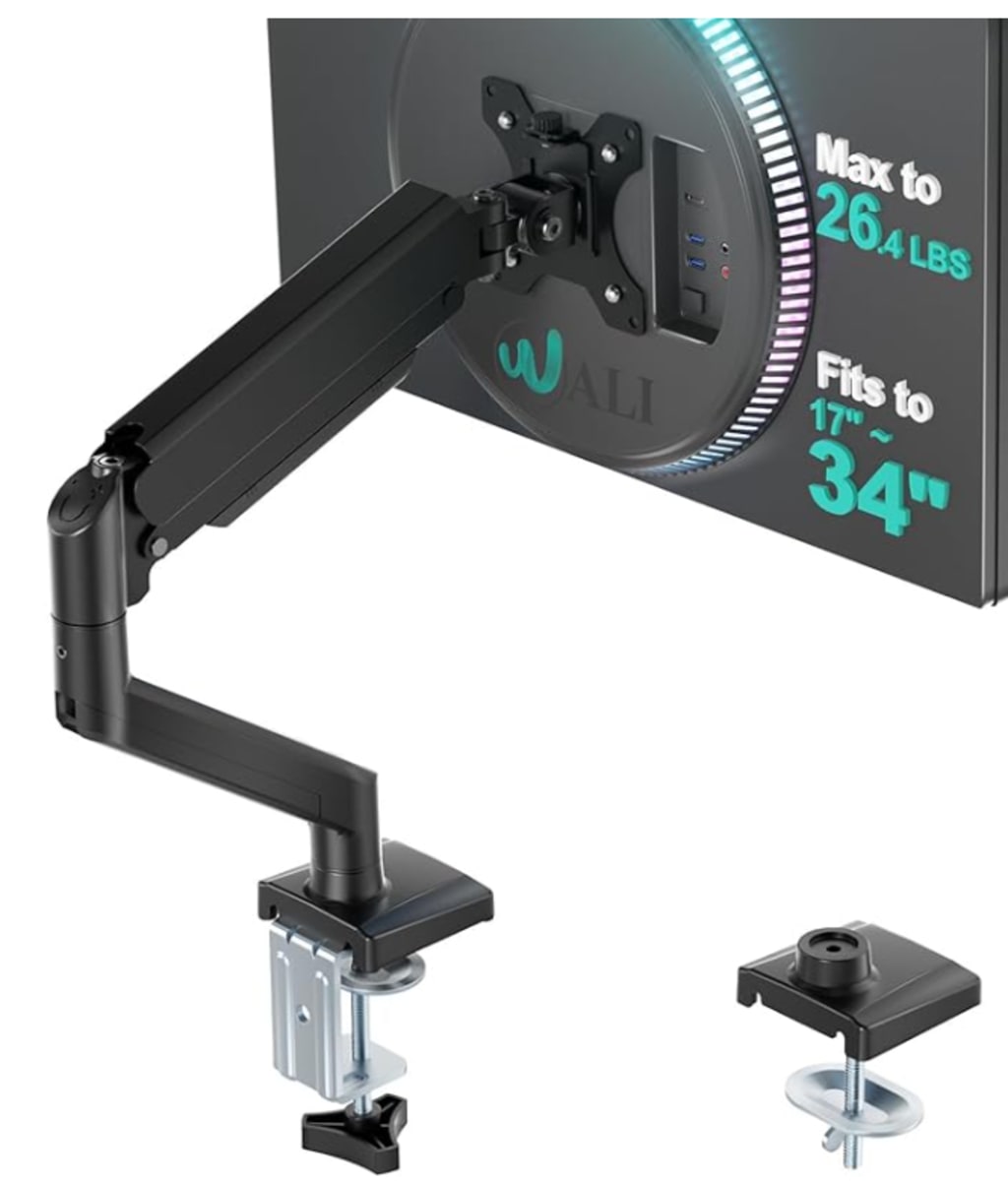
Why an Adjustable Monitor Arm Is One of the Smartest Upgrades for a Remote Workspace
Remote work has changed how we think about productivity, comfort, and long-term health. What started as a temporary solution for many people has now become a permanent way of working. As a result, the importance of a well-designed home office is no longer optional — it’s essential.
One of the most underrated upgrades for a remote workspace is an adjustable monitor arm. At first glance, it may seem like a small or unnecessary addition, but its impact on comfort, posture, and efficiency is significant.
Most remote workers place their monitors directly on the desk, often too low or too far away. This forces the neck to tilt downward and the shoulders to round forward. Over time, these small posture issues can lead to chronic neck pain, shoulder stiffness, headaches, and eye strain. An adjustable monitor arm solves this problem by allowing the screen to be positioned exactly at eye level and at a comfortable viewing distance.
Proper screen height encourages a neutral posture, where the head stays aligned with the spine and the shoulders remain relaxed. This reduces tension and fatigue, especially during long workdays filled with meetings, emails, and focused tasks.
Another major advantage of using a monitor arm is improved desk space. Home offices are often limited in size, and desk clutter can quickly become overwhelming. By lifting the monitor off the desk surface, a monitor arm frees up valuable space underneath. This extra room can be used for notebooks, keyboards, or simply to keep the workspace clean and minimal.
A clutter-free desk has psychological benefits as well. When your environment feels organized, your mind tends to feel the same way. Many remote workers report improved focus and productivity after simplifying their workspace.
Flexibility is another key benefit. Adjustable monitor arms allow users to tilt, swivel, rotate, and extend their screens with ease. This is particularly useful for people who alternate between tasks throughout the day. For example, switching from typing to reading, collaborating on video calls, or reviewing documents in portrait mode becomes effortless.
This flexibility also supports different working styles. Some people prefer sitting for long periods, while others alternate between sitting and standing. A monitor arm adapts to both without requiring constant rearrangement of the desk.
From an ergonomic perspective, a monitor arm is a long-term investment in health. Poor posture doesn’t just cause short-term discomfort — it can lead to repetitive strain injuries and chronic musculoskeletal issues over time. Supporting your body with an adjustable setup helps prevent these problems before they start.
Installation is typically simple, and most monitor arms are compatible with standard desks and monitors. Once installed, adjustments are intuitive and quick, making it easy to refine your setup as your needs evolve.
In the broader context of remote work, small improvements can have a big impact. While laptops and monitors are essential tools, accessories that enhance how those tools are used often make the biggest difference. A monitor arm may not seem exciting, but its effect on daily comfort, posture, and efficiency is undeniable.
Remote work is about sustainability — not just getting through today, but being able to work comfortably and productively for years to come. An adjustable monitor arm supports that goal by creating a healthier, more adaptable workspace.
If you spend hours in front of a screen every day, your setup should work with your body, not against it. An adjustable monitor arm is a simple upgrade that delivers long-lasting benefits, making it one of the smartest additions to any remote work environment.
About the Creator
Keep reading
More stories from Bahati Mulishi and writers in Lifehack and other communities.
🌙 Why an Adjustable LED Desk Lamp Is a Must-Have for Remote Work Productivity
Remote work has changed the way we use our homes. Bedrooms become offices, dining tables turn into workstations, and long hours in front of a screen are now normal. While most people focus on laptops, keyboards, and chairs, one essential tool is often overlooked: proper lighting. An adjustable LED desk lamp may seem like a small upgrade, but it can have a massive impact on productivity, comfort, and long-term eye health.
By Bahati Mulishia day ago in Lifehack
Brickell vs. The Valley: Why Tech Founders Are Choosing Florida in 2026
I remember the first time I walked through Brickell City Centre in early 2026. For a moment, I had to remind myself I wasn't in downtown San Francisco or Manhattan. The air was different—thick with salt and a peculiar, high-octane energy that you only feel in a place that knows it’s on the rise.
By Mary L. Rodriquez5 days ago in Lifehack
Carrying Sound Through Tulsa
A piano carries more than sound. It carries time. Even when silent, it holds the imprint of hands that once rested on its keys, of rooms that shaped its voice, and of moments that unfolded quietly around it. In Tulsa, a city where music has long been woven into daily life, moving a piano feels less like relocating an object and more like guiding a piece of lived experience into a new chapter.
By House Doctorabout 8 hours ago in Lifehack
The Light Turns
It's Tuesday 7:13 a.m. A cold and clear November morning awaits Ray on his morning commute. Ray rubs his hands together in the front seat of his Subaru. He turns the air temperature up, but keeps the air on low until the air warms up. He looks at the backup camera screen and reverses the Subaru out of his driveway onto Trimble Road.
By John R. Godwin5 days ago in Fiction


Comments
There are no comments for this story
Be the first to respond and start the conversation.