
How to Unlock Samsung Phone Pattern Lock Without Factory Reset
how to unlock samsung phone pattern lock without factory reset

In today's world, mobile phones are an essential part of our lives. We use them to communicate with our friends and family, take pictures, listen to music, and much more. However, it can be frustrating when you forget the pattern lock on your Samsung phone and are unable to access it. Many people believe that the only way to unlock a Samsung phone pattern lock is to do a factory reset, which will erase all your data. But, fortunately, there are other ways to unlock your phone pattern lock without losing your data. In this article, we will discuss some of the methods you can use to unlock your Samsung phone pattern lock without a factory reset.
Method 1: Using Google Account
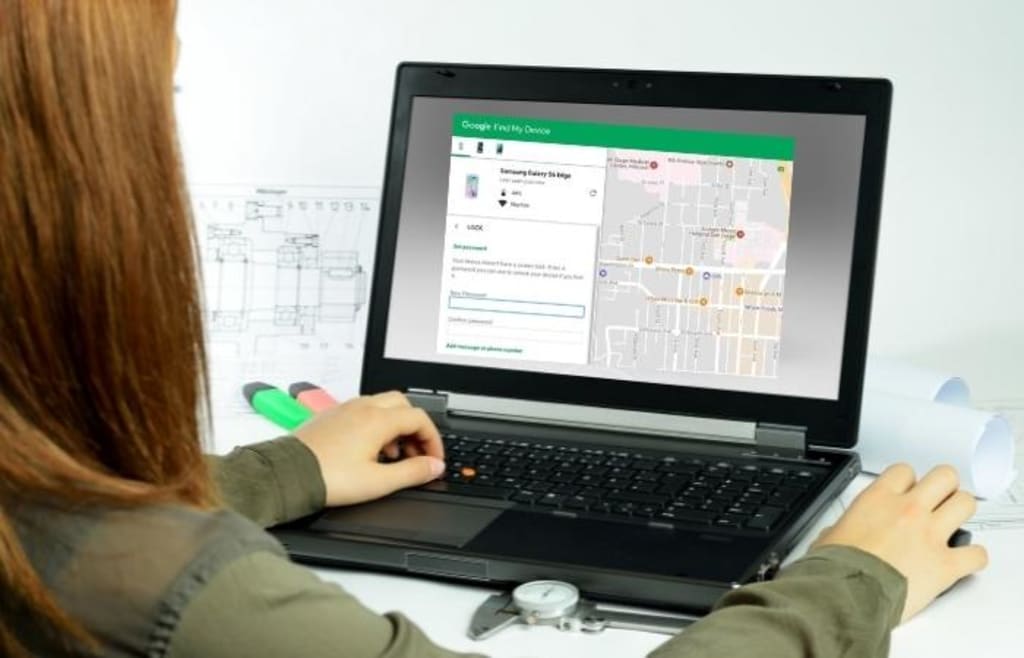
One of the easiest ways to unlock your Samsung phone pattern lock without a factory reset is by using your Google account. This method will only work if you have enabled the "Find My Device" feature on your Samsung phone. Here are the steps you need to follow:
- Go to the Google Find My Device website and log in using your Google account credentials.
- Select your Samsung phone from the list of devices.
- Click on the "Lock" button, and you will be prompted to set a new password for your phone.
- Enter a new password and click on the "Lock" button.
- Once you have set a new password, you can use it to unlock your Samsung phone pattern lock.
Method 2: Using Samsung Find My Mobile
If you have a Samsung account, you can use the Samsung Find My Mobile feature to unlock your phone pattern lock without a factory reset. This method will only work if you have enabled the "Remote controls" feature on your Samsung phone. Here are the steps you need to follow:
- Go to the Samsung Find My Mobile website and log in using your Samsung account credentials.
- Select your Samsung phone from the list of devices.
- Click on the "Unlock" button, and you will be prompted to enter your Samsung account password.
- Enter your Samsung account password, and your Samsung phone will be unlocked.
Method 3: Using ADB (Android Debug Bridge)
If the above two methods do not work, you can use ADB to unlock your Samsung phone pattern lock without a factory reset. ADB is a command-line tool that allows you to communicate with your Android device. Here are the steps you need to follow:
- Install ADB on your computer.
- Connect your Samsung phone to your computer using a USB cable.
- Open a command prompt on your computer and navigate to the folder where you installed ADB.
- Type the following command: adb shell rm /data/system/gesture.key
- Disconnect your Samsung phone from your computer, and you should now be able to unlock your phone pattern lock.
Method 4: Using Samsung's Service Center
If none of the above methods work, you can take your Samsung phone to a Samsung service center. The technicians at the service center will be able to unlock your phone pattern lock without a factory reset. However, this method may be costly, and you will have to provide proof of ownership of the phone.
Conclusion
Forgetting the pattern lock on your Samsung phone can be a frustrating experience. However, you do not have to do a factory reset and lose all your data. In this article, we have discussed several methods that you can use to unlock your Samsung phone pattern lock without a factory reset. Using your Google account or Samsung Find My Mobile are both easy and convenient options that do not require any technical knowledge. If these methods do not work, you can use ADB or take your phone to a Samsung service center.
Remember to always keep a backup of your important data to avoid losing it in case you need to do a factory reset. It is also essential to keep your phone updated with the latest security patches and to use a strong, unique pattern or password to protect your data.
Frequently Asked Questions (FAQs)
Can I use these methods to unlock any Samsung phone?
Yes, you can use these methods to unlock any Samsung phone that has a pattern lock.
Will I lose my data if I use these methods?
No, you will not lose your data if you use the methods mentioned in this article.
What if I don't have a Google or Samsung account?
You can create a new account on their respective websites to use these methods.
What if I forget my Google or Samsung account password?
You can reset your password using the "forgot password" option on their respective websites.
Are these methods safe to use?
Yes, these methods are safe to use and do not harm your phone or data.
About the Creator
How To Unlock
Unlocking is one of our favorite things to do, and we have a lot of experience in this area. Our blog provides tips on how to unlock your device without damaging it.
Keep reading
More stories from How To Unlock and writers in Lifehack and other communities.
How to Unlock Pin Lock on Motorola Without Data Reset
If you have forgotten your PIN lock on your Motorola phone, don't worry. You don't have to erase all your data and start from scratch. There are some simple and easy ways to unlock your phone without data reset. In this article, we will discuss some effective methods that can help you to unlock your Motorola phone without losing your important data.
By How To Unlock 3 years ago in Lifehack
Absolutely 100% Free Stuff With No Shipping Costs
In a world where everything seems to come with a price tag—including “free” offers that sneak in unexpected shipping fees—it can feel impossible to get truly free items. But with the right strategies, resources, and platforms, it is completely possible to score legitimate, 100% free stuff with no shipping costs or hidden charges. Whether you're looking to save money, reduce waste, or simply love the thrill of discovering freebies, this guide will walk you through the best ways to find authentic no-cost items online and in your local community.
By Master Binza day ago in Lifehack
Complete Guide to Wi-Fi Password Recovery & Protection
Understanding Wi-Fi Security Forgetting your Wi-Fi password is a common frustration in our connected world. This comprehensive guide explores legitimate methods to recover lost Wi-Fi credentials while emphasizing network security best practices. Whether you're a homeowner locked out of your network or an IT professional assisting users, this article provides ethical solutions while reinforcing the importance of protecting wireless networks from unauthorized access.
By Alexander Hoffmannabout 8 hours ago in Lifehack
Center Stage with Paul Stewart
*** I'm keen to republish the interviews I did for my series with Vocal creators. It's been a few years and I thought it might be nice to revisit these wonderful conversations. I'll be releasing them one at a time for a few weeks/months.
By Heather Hublerabout 10 hours ago in Interview



Comments
There are no comments for this story
Be the first to respond and start the conversation.