
How to Download and Convert Apple Music to MP3
Convert Apple songs to MP3

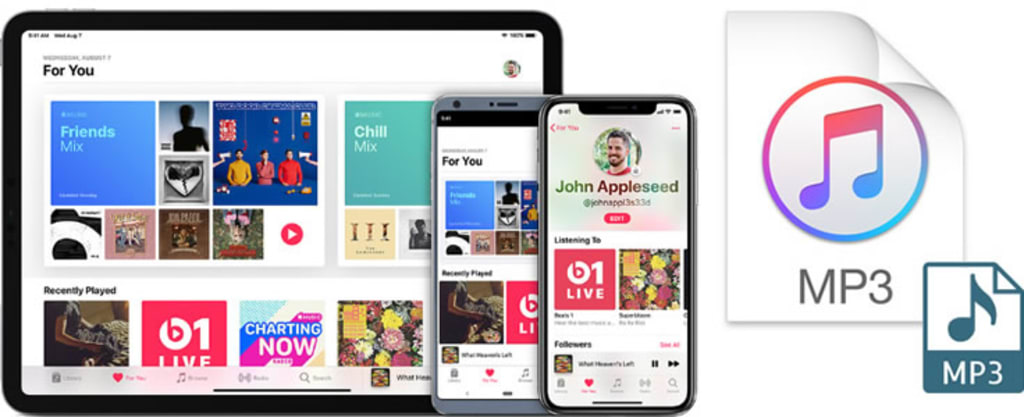
Apple Music is, without a doubt, one of the best streaming media for Apple customers. However, as compared to other streaming media, Apple Music has more restrictions. iTunes or Apple devices with a network connection are the only ways to listen to music. Apple Music is not available to people who do not have an Apple system or iTunes. Meanwhile, Apple Song cannot be downloaded for offline listening due to music protection. As a result, if you want to listen to Apple Music on your MP3 player, Android phone, or other devices, you'll have a significant problem.
Don't worry! Here is the best tutorial you can find showing you how to download and convert Apple Music to MP3! With the MP3 copies of Apple Music, you can enjoy your tracks on whatever devices you want, and you don't have to worry about the expiring subscription to Apple Music anymore!
Best Tool: TuneCable Apple Music to MP3 Converter
As a subscriber of Apple Music, you can stream music offline in the app. However, the songs in Apple Music/iTunes library are encrypted in the M4P format, so you can't transfer and use them any where else - like if you want to import Apple Music to an MP3 player for your convenience, you won't have an official way to do that. How can we resolve the issue?
TuneCable Apple Music to MP3 Converter aims to help users download MP3 files from Apple Music. But it is more than that - it supports converting Apple Music/iTunes M4P to AAC/WAV/AIFF/ALAC/FLAC formats. The program can keep the pristine audio quality in the MP3 copy of Apple Music, enabling users enjoy the same pleasure as they were using the Apple Music app. With TuneCable, Apple Music/iTunes M4P can be decoded and saved on the computer local permanently for offline listening and using!
TuneCable provides with both Windows and Mac version, you can know more features from: Windows Version / Mac Version
Step 1 Launch TuneCable Apple Music to MP3 Converter
Please download and install TuneCable Apple Music to MP3 Converter on your computer in advance. iTunes is also needed in this method, please make sure you have installed latest iTunes and log in with your Apple account.

Step 2 Customize the Output Apple Music Format as MP3
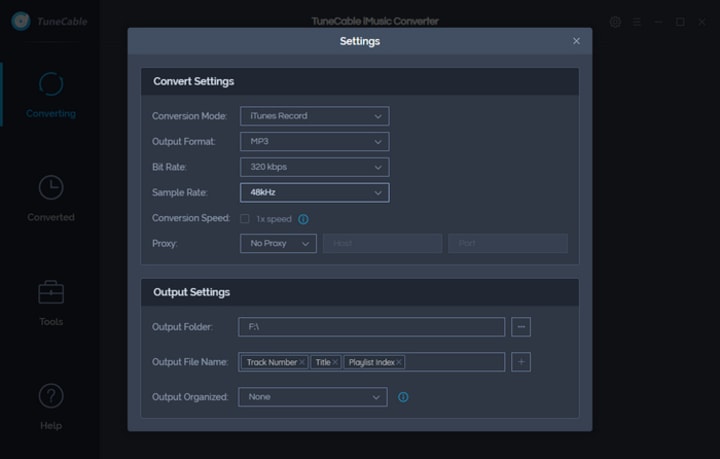
Tap settings(Settings) icon from menu bar to set up the output format of Apple Music. Choose 'MP3' in Output Format, TuneCable also supports converting Apple Music to AAC, FLAC, WAV, ALAC and AIFF. You can customize Conversion Mode, Output Quality, Output Path and other parameters if you need. Close the window directly to apply the settings.
Output Format: MP3, AAC, WAV, FLAC, AIFF, ALAC
Conversion Mode: Intelligent Mode, iTunes Record, YouTube Download
Output Quality: 128kbps, 192kbps, 256kbps, 320kbps
Output Folder: You can choose to change it or not
Output Name: {Track Number}, {Title}, {Artist}, {Album}, {Playlist Index}, {Year}
Output Organized: None, Artist, Album, Artist/Album, Album/Artist
Step 3 Select Apple Music Tracks to Convert
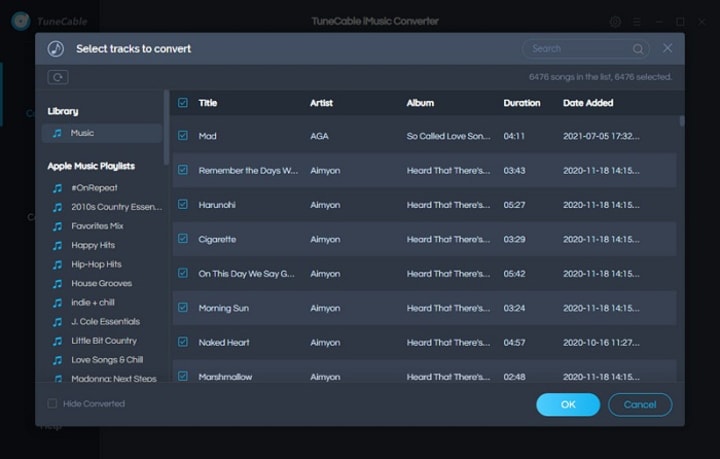
Now click '+ Add' to select your desired Apple Music songs from iTunes. Then tap 'OK' to confirm your selection.
Step 4 Start to Download and Convert Apple Music
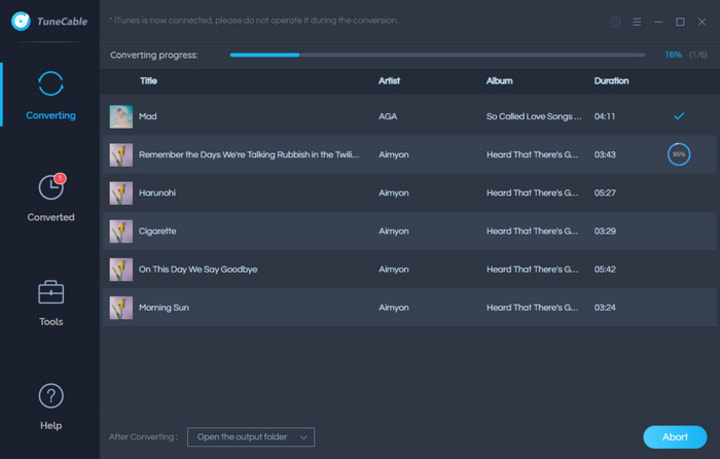
To select more tracks, you can click the '+ Add' button to add more Apple Music songs to convert. If you don't want some of them, just simply click the '×' icon behind each song. After selection, click 'Convert' to download and convert the selected Apple Music.
Step 5 View Converted Apple Music History
All converted Apple Music songs will show in 'Converted' module after conversion. You can play these songs in TuneCable directly. The program will remain all ID3 tags information of each song.
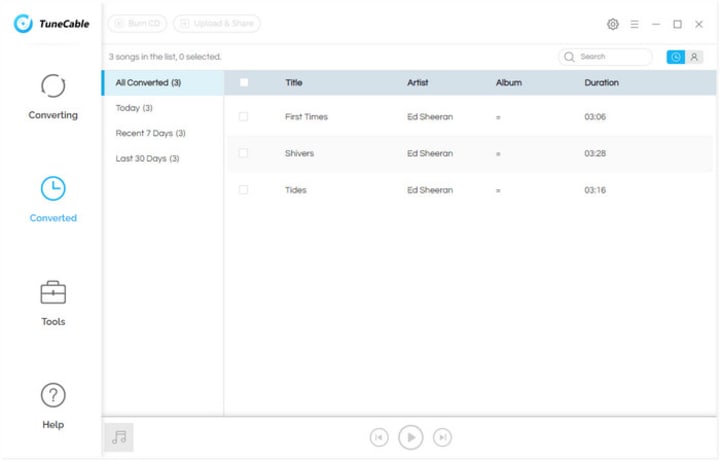
Notice: For trial users, TuneCable can only convert the first 3 minutes of each song. To enjoy the complete Apple Music tracks for offline listening, please buy the full version → Windows / Mac.
Step 6 Check the Apple Music MP3 Files
To check out local Apple Music files, please click on open folder icon to open the output folder directly. Now, these downloaded Apple Music files are all in MP3 formats. With these MP3 Apple Music files, you can import and save them on different devices for listening!
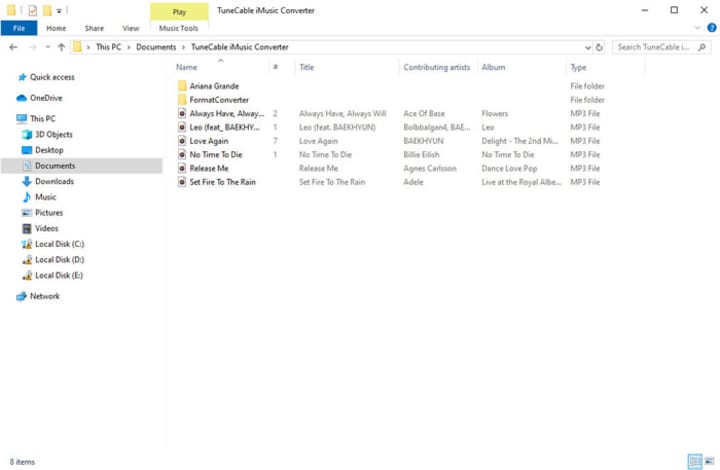
Summary: That's it! Downloading Apple Music to the MP3 format can be so easy with the help of TuneCable Apple Music Converter. There is no need to worry about your expired subscription or unavailable device. Now start to download and convert Apple Music for local storage!
About the Creator
Kitchen Renovation Material Trends (2026 Report)
The 2026 kitchen is a study in deliberate, thoughtful evolution. Homeowners and designers are moving away from the stark minimalism and cold, sterile palettes that have dominated recent years. In their place, a new design language is emerging—one that speaks to our collective desire for warmth, tranquility, and a deeper connection to craftsmanship. This year, the kitchen is not just a place to cook; it is the hearth of the home, a multi-functional sanctuary designed for living, working, and gathering. The trends shaping this transformation are rich with texture, grounded in nature, and seamlessly integrated with invisible technology. This report delves into the definitive material trends of 2026, exploring how surfaces, colors, and finishes are being reimagined to create spaces that are both visually stunning and profoundly personal.
By Flooring Tips3 days ago in Lifehack



Comments
There are no comments for this story
Be the first to respond and start the conversation.