
How to Create a Cap Mockup for Free
How to Create a Cap Mockup for Free Using Mockey
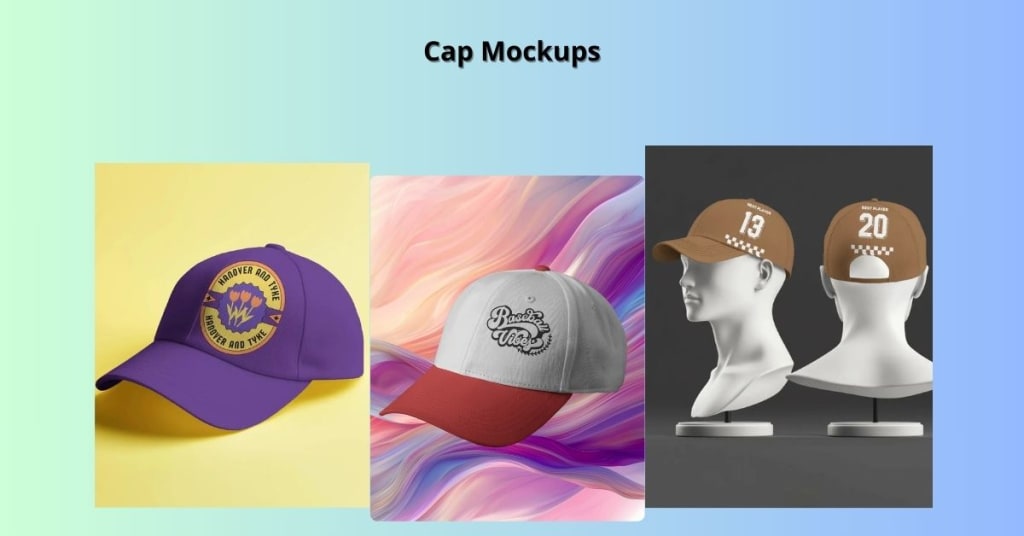
Have you ever wanted to see how your logo or design would look on a cap before actually producing it? Whether you're a designer, entrepreneur, or just someone with a creative idea, creating a cap mockup is a great way to visualize your design in a real-world setting. The best part? You can do it for free, without any design skills, using Mockey.ai.
In this guide, we'll walk you through the process of creating a professional-looking cap mockup using Mockey, step by step.
What Is a Cap Mockup?
A cap mockup is a digital representation of how your design—be it a logo, artwork, or text—would appear on a cap. It's like a sneak peek into the final product, allowing you to:
- Visualize your design on different cap styles.
- Present ideas to clients or stakeholders.
- Promote products on websites or social media.
- Test variations before finalizing the design.
Mockups are essential tools in the design and marketing world, helping bridge the gap between concept and reality.
Why Use Mockey for Cap Mockups?
Mockey.ai is a free online mockup generator that's perfect for creating cap mockups. Here's why:
- No design skills needed: User-friendly interface suitable for beginners.
- Free to use: Create and download mockups without any cost.
- No software installation: Everything runs in your web browser.
- High-quality templates: Access to a variety of cap styles and settings.
- Fast and efficient: Generate mockups in just a few minutes.
Step-by-Step Guide to Creating a Cap Mockup with Mockey

Follow these simple steps to create your cap mockup:
1. Visit Mockey.ai
Open your web browser and go to Mockey.ai. You'll find a clean, easy-to-navigate homepage.
2. Navigate to the Cap Section
On the top navigation bar, hover over Mockups, then select Accessories > Cap. This will take you to the cap mockup templates.
3. Choose a Cap Template
Browse through the available cap templates. You'll find various styles like baseball caps, trucker hats, and more, set in different environments. Click on the one that best fits your vision.
4. Upload Your Design
Click on the Upload Design button. Select your logo or artwork file (preferably in PNG or JPG format) from your device. The design will appear on the cap in the mockup.
5. Customize Your Mockup
Adjust the size and position of your design to fit the cap perfectly. Some templates may offer additional customization options like changing cap colors or backgrounds.
6. Download Your Mockup
Once you're satisfied with the mockup, click on the Download button. You can download the image in high resolution for free, without any watermarks.
Tips for Creating Cap Mockups
- Use High-Quality Designs: Ensure your logo or artwork is clear and high-resolution for the best results.
- Keep It Simple: Avoid overcrowding the cap with too many elements; simplicity often leads to better aesthetics.
- Consider the Cap Color: Choose a cap color that complements your design for better visibility and appeal.
- Experiment with Different Templates: Try various cap styles and settings to see which one showcases your design best.
Use Cases for Cap Mockups
Cap mockups are versatile and can be used in various scenarios:
- Product Listings: Showcase your cap designs on e-commerce platforms.
- Marketing Materials: Use mockups in brochures, social media posts, or advertisements.
- Client Presentations: Present design concepts to clients in a realistic format.
- Portfolio Development: Add mockups to your design portfolio to demonstrate your work.
Conclusion
Creating a cap mockup doesn't have to be complicated or expensive. With Mockey.ai, you can effortlessly bring your cap designs to life, visualize them in real-world settings, and share them with others—all for free.
Whether you're launching a new product, presenting to a client, or simply exploring your creativity, cap mockups are invaluable tools in your design toolkit. So why wait? Head over to Mockey.ai and start creating your cap mockups today!
Also Read:
About the Creator
Keep reading
More stories from Backlink Wizard and writers in Lifehack and other communities.
How to Create a Unique Sticker Mockup
If you’ve designed a sticker for your brand, product, or small business, you probably want to show it off in the best way possible. But instead of just sharing a flat image, wouldn’t it be great if you could display your sticker on a real product—like a laptop, bottle, or packaging?
By Backlink Wizard10 months ago in Art
Winterthorne
Winterthorne stood alone at the edge of the park. The beautiful snow that had surrounded him was all trampled now, from the feet of all of the children who had built him. He missed the sparkly clean snow blanket, but he was happy that so many children had come out to make him.
By Laura DePace7 days ago in Fiction



Comments
There are no comments for this story
Be the first to respond and start the conversation.