
How to Analyze Social Media Competitors with Semrush
Open the Keyword Magic Tool

**This post is sponsored by Semrush. When you purchase through links in this article, we may earn an affiliate commission from Semrush.**
In the crowded world of social media, copying what works is often smarter than starting from scratch. Whether you're running a startup, building a personal brand, or growing a small business, studying your competitors is one of the fastest ways to improve your own performance.
That’s where Semrush’s Social Media Toolkit comes in. It gives you the power to track competitors, audit content, and benchmark performance, all in one dashboard—no spreadsheets or guesswork required. You can use this for any keyword research.
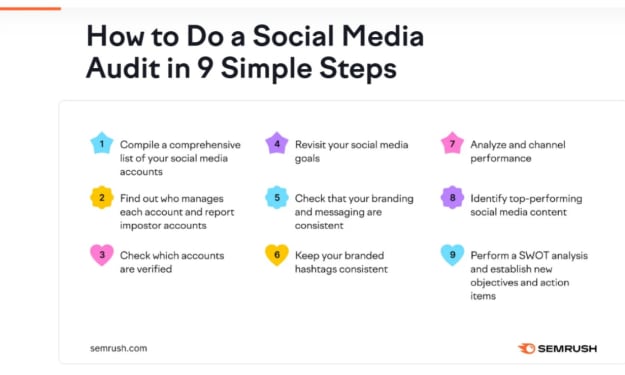
If you're new to social media competitor analysis, this guide will show you how to use Semrush to learn from others, improve your strategy, and grow faster.
Target Keywords:
social media competitor analysis, beginner social media audit, semrush social toolkit
Why Social Media Audits Matter
Before we jump into the how-to, it’s important to understand the value of analyzing competitors on social:
- You spot high-performing content formats and hashtags
- You uncover posting frequency and timing strategies
- You learn which platforms are delivering the most engagement
- You identify gaps or opportunities in your niche
Doing this manually takes hours. But with Semrush, it takes minutes.
Step 1: Benchmark Competitor Performance

Start by adding your competitors inside the Social Media Tracker tool. This tool is very usefull for every SEO expert.You can track up to 20 competitors at a time across major platforms like Facebook, Instagram, X (formerly Twitter), LinkedIn, Pinterest, and YouTube.
Once added, Semrush shows you a side-by-side overview of key performance metrics:
- Total followers and growth trends
- Average engagement rate
- Post volume and frequency
- Top-performing content per platform
You can sort and compare by date range, network, or post type to see exactly what’s working in your niche.
Step 2: Copy Proven Post Formats

Inside the Post Comparison Reports, you’ll find a goldmine of competitor content. For each brand, you can filter their most engaging posts and study:
- Caption structure
- Hashtag usage
- Image or video formats
- Time of day posted
This makes it easy to reverse-engineer top content and create your own variations that align with what audiences already respond to.
Tip: Pay close attention to recurring themes or post types—like “how-to carousels,” memes, or influencer collabs. If they’re working for others in your industry, they’ll likely work for you too.
Step 3: Spot the Best-Performing Hashtags
Semrush also tracks hashtags used by your competitors and ranks them by:
- Engagement rate
- Post frequency
- Platform effectiveness
This data helps you avoid random hashtag guessing. Instead, you’ll build a targeted list of hashtags that have already proven successful with similar audiences.
Pro Tip: Use these hashtags alongside your own branded or campaign-specific tags for maximum reach.
Step 4: Identify Content Gaps and Opportunities
With access to visual post feeds, you can quickly spot what types of content your competitors are not posting—and use that to your advantage.
For example, if most competitors post product photos but few share tutorials or customer stories, you’ve found a potential edge.
You can also track how frequently competitors post on each platform. If they’re ignoring Pinterest or LinkedIn while your audience is active there, it might be a channel worth investing in.
Beginner Checklist: Social Media Competitor Audit with Semrush
Here’s a quick checklist to guide your first audit:
- Add 3–5 close competitors in the Semrush Social Media Tracker
- Compare follower growth and engagement across platforms
- Filter and study their top 10 performing posts
- Note the most-used hashtags with high engagement
- Identify which post formats are used most (carousel, reel, single image)Look for gaps in content type or platform presence Build a swipe file of inspiration for your next 30-day content plan
Final Thoughts
You don’t have to guess your way through social media growth. With tools like Semrush’s Social Media Toolkit, you can analyze what’s working for your competitors and build a strategy based on real, measurable insights.
Whether you're an agency, creator, or small business owner, this is one of the fastest ways to improve your performance—without doubling your workload.
Ready to audit your competitors and level up your content? Explore the Social Media Toolkit inside Semrush today.
About the Creator
Bruce Lee and The God of War: Kuan Ti
It starts with love.. The Power to the God Of War and Wealth Walk into a Chinese restaurant (even in Oklahoma, USA), a Chinese police station, a kung fu martial arts studio or even a Chinese temple and you often see a red faced warrior holding a heavy quan-do (spear like weapon).
By WILD WAYNE : The Dragon King4 days ago in Chapters



Comments
There are no comments for this story
Be the first to respond and start the conversation.