
Google Pixel Quietly Adopts Samsung’s Navigation Button Layout in Android 16 Beta
The update gives Pixel users a familiar three-button option long associated with Samsung Galaxy phones.

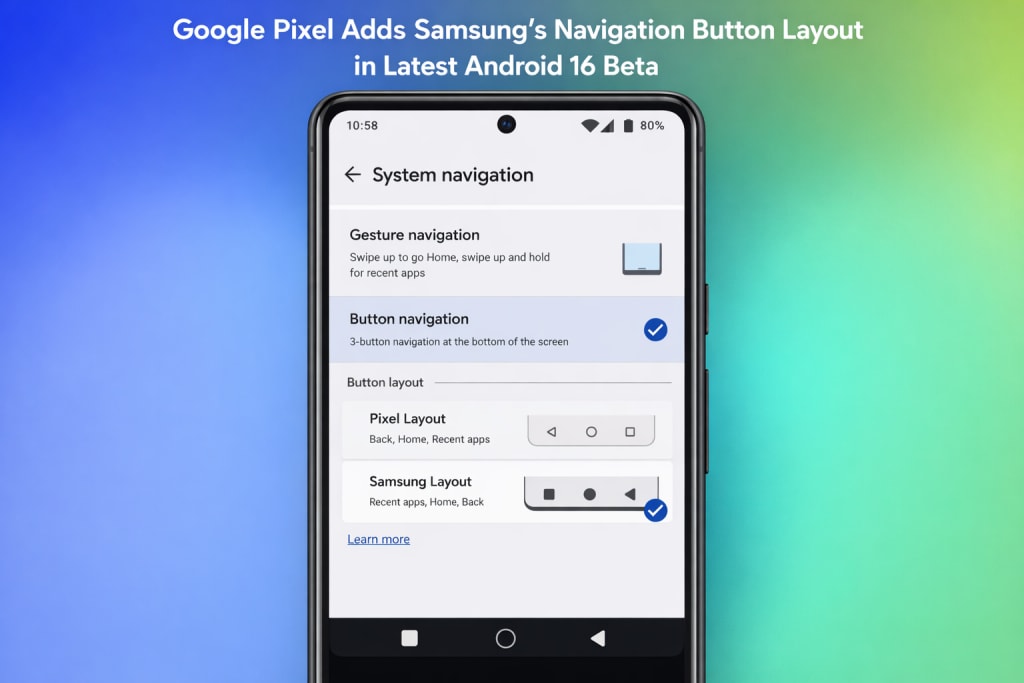
Google Pixel Quietly Adopts Samsung’s Navigation Button Layout in Android 16 Beta
In a move that suggests a small but crucial change in Android’s design philosophy, Google has extended support for Samsung’s familiar navigation button layout to Pixel phones running the current Android 16 beta. The adjustment, although easy to overlook, might greatly enhance the experience for people transferring from Samsung Galaxy handsets to Google Pixel phones.
In the latest Android 16 beta, Google has quietly introduced a change that many long-time Android users will immediately recognize. Pixel phones now offer a navigation button layout that mirrors the one used on Samsung Galaxy devices, a subtle update that makes switching between Android brands noticeably easier. While the tweak hasn’t been highlighted in official announcements, it reflects a growing emphasis on customization and user familiarity within Android 16, particularly for Google Pixel users who prefer traditional button navigation over gestures.
It’s not a headline feature, and Google hasn’t made a huge announcement—but for many Android users, it’s a long-awaited quality-of-life enhancement.
A Familiar Layout Finally Comes to Pixel
For years, stock Android has locked three-button navigation into a single order: Back, Home, and Recents. Samsung, however, switched that arrangement long ago, putting Recents on the left and Back on the right—a pattern millions of Galaxy users have learned via everyday usage.
With the newest Android 16 beta, Pixel owners can now pick the same Samsung-style button arrangement straight from system settings. No third-party applications. No accessibility hacks. Just a basic toggle.
For anybody going from a Galaxy phone to a Pixel, this update eliminates one of the most persistent friction points.
Why This Small Change Carries Real Weight
Navigation buttons may appear insignificant in an age dominated by gesture controls, but habits go deep. For many users—especially those who desire accuracy, accessibility, or consistency—three-button navigation remains vital.
Changing button location disturbs muscle memory. It slows users down. It produces modest but continual annoyance. By presenting Samsung’s layout as an option, Google is conceding that comfort matters more than enforcing defaults.
This isn’t about duplicating Samsung’s UI. It’s about respecting how people really use their phones.
A Wider Change in Google's Methodology
Pixel smartphones have always symbolized Google’s concept of “pure” Android—clean, opinionated, and very rigid. But subsequent Android updates hint such rigidity is eroding.
Instead of defining personalization as fragmentation, Google increasingly regards it as user choice. Adding Samsung-style navigation buttons fits perfectly into that trend. Gesture navigation remains the default, but alternative choices are no longer disregarded.
It’s a small move, but an important one.
Still a Beta Feature—for Now
At the time, this feature is restricted to Android 16 beta versions on compatible Pixel smartphones. There is always a chance that a beta feature will be changed or removed before the final release, just like with any other.
This However, concepts such as this—low risk, great usability, and generally requested—rarely go. If anything, they tend to become permanent after testing shows stability.
A larger distribution accompanying Android 16’s stable version now appears imminent.
What This Means for Pixel Users
If you currently utilize gesture navigation, nothing changes. But for consumers who depend on buttons—or who just converted from a Samsung phone—this change makes Pixel devices seem immediately more familiar.
More significantly, it shows a developing Android ecosystem—one that values real-world usability above strict design standards.
The Bigger Picture
This upgrade won’t dominate launch events or marketing activities. But it shows something deeper: Android is changing from a platform that teaches people how to engage into one that adapts to how they already do.
Google is not losing control by discreetly copying Samsung's successful navigation scheme; instead, it is improving the experience.
And that's exactly the kind of advancement that matters to a lot of people.
About the Creator
abualyaanart
I write thoughtful, experience-driven stories about technology, digital life, and how modern tools quietly shape the way we think, work, and live.
I believe good technology should support life
Abualyaanart
Keep reading
More stories from abualyaanart and writers in Lifehack and other communities.
My battery life immediately increased
I Turned Off These Two Hidden “Scanning” Settings and My Battery Life Improved Instantly. Battery drain is one of those things that slowly sneaks up on you. Your phone still displays a fair percentage in the morning, but by mid-afternoon you’re already shopping for a charger. No heavy gaming. No endless video streaming. Just average use—and yet the battery continues falling quicker than it should.
By abualyaanart19 days ago in Lifehack
Getting Serious About Comedy (Part I)
If I were asked to remark on my life and the childhood that paved some road leading me to this point, I would have to say something about all the funny people who surrounded me for the last 26,872 days (and counting). Somewhere along that road, I became a big fan of laughter and the comedy that spawns it – and, I mean not only my own laughter, but the laughter of others, some of which I have actually been responsible for inducing.
By John Oliver Smith6 days ago in Humor


Comments
There are no comments for this story
Be the first to respond and start the conversation.