
Edit GIFs Automatically with Intelligent Visual Tools for Fast and Easy Results
Discover how smart tools like DeepSwapper for GIF editing and other AI image tools can help you modify GIFs effortlessly. Save time with AI-powered visual editing.

Edit GIFs Automatically with Intelligent Visual Tools
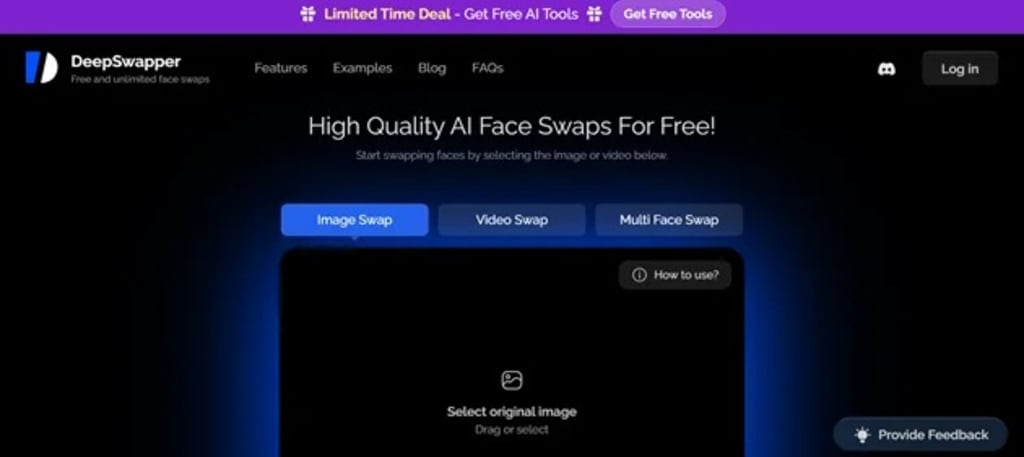
GIFs have become a major part of online communication, from memes and reactions to brand marketing and tutorials. But editing them manually has often been a hassle—especially for users without design experience. That’s why tools like DeepSwapper for GIF editing have gained popularity, offering intelligent, AI-powered solutions to quickly enhance and customize GIFs without the need for complex software or technical skills.
Whether you want to swap faces in a funny clip, create personalized reaction GIFs, or brand a looping video with your logo, smart visual tools now make it all possible. They remove the repetitive steps from the editing process and automate everything from object detection to animation adjustments. What once required multiple tools and hours of effort can now be done in minutes.
The Rising Need for Smart GIF Editing
In the past, editing a GIF meant using traditional software like Photoshop or online editors with limited features. Users had to break the animation into frames, edit each one individually, and recompile the sequence. It was not only time-consuming but also difficult for beginners.
Today, with the explosion of short-form content and visual storytelling on social media, the demand for quick and easy GIF customization has increased. Individuals and brands alike are looking for ways to stand out—and personalized, creative GIFs are a powerful medium to do that.
Intelligent visual tools solve this by bringing automation and AI into the editing workflow. With just a few clicks or prompts, users can now alter backgrounds, change facial expressions, insert custom overlays, or even generate new scenes.
How DeepSwapper for GIF Editing Works
The DeepSwapper for GIF editing tool utilizes deep learning and face-swapping technology to personalize GIF content in real time. Users simply upload a GIF and the face they want to insert, and the tool intelligently maps facial features onto the animation with impressive accuracy.
Here’s what sets it apart:
Automatic face detection: No need to mark facial points manually.
Smooth frame transitions: AI blends the new face across all GIF frames for seamless motion.
Realistic expressions: Captures facial emotions, angles, and movements for natural results.
User-friendly interface: No technical knowledge needed—just upload and swap.
This tool is perfect for content creators who want to create viral reaction GIFs, digital marketers who need unique branded content, or users just looking to have some fun with friends online.
Smarter Results with AI Image Tools
In the middle of the editing process, many creators also rely on AI image tools to enhance the overall visual quality of their content. These tools can upscale blurry frames, correct colors, remove unwanted elements, or even stylize a GIF to match a particular aesthetic.
AI image tools use advanced algorithms that learn from thousands of images to apply professional-level edits in seconds. They can identify subjects, separate backgrounds, and adjust visuals without manual input. This becomes especially helpful when preparing GIFs for commercial use or when high-quality presentation is important.
For example, after using DeepSwapper to personalize a GIF, a creator might use an AI tool to sharpen the frames, apply filters, or make the animation loop more smoothly. This workflow allows users to combine creative customization with high-end finishing—without needing a team of editors or designers.
Advantages of Using Intelligent Visual Tools for GIFs
Here are some clear benefits of adopting AI-powered visual tools for GIF editing:
Speed and automation: Save hours of editing by letting the AI handle repetitive tasks.
User-friendly experience: No need for advanced design software or skills.
High-quality output: Generate professional-looking GIFs suitable for personal or business use.
Creative freedom: Experiment with face swaps, backgrounds, and effects instantly.
Cross-platform content: Easily resize and optimize GIFs for use on Instagram, X (Twitter), websites, or messaging apps.
These tools are not only useful for content creators, but also for educators, marketers, and everyday users who want to enhance their visual communication quickly.
Use Cases Across Industries
AI-based GIF editing tools are making an impact across various sectors:
Entertainment: Meme creators and YouTubers generate funny, shareable GIFs at scale.
Marketing: Brands create product teasers or personalized promo loops using face swaps and branded overlays.
Education: Teachers and course creators use clean, animated GIFs to demonstrate concepts.
Customer Service: Companies add expressive, AI-enhanced GIFs to live chat or support messages.
Social Media: Influencers and creators use customized GIFs to interact more personally with followers.
From casual use to professional deployment, these tools offer flexibility for a wide range of needs.
Tips for Better GIF Creation with AI Tools
To get the most out of your AI-powered GIF editor, consider the following best practices:
Use high-quality source material: Clear images or video clips help produce better results.
Keep it short and expressive: Shorter GIFs loop better and maintain viewer interest.
Experiment with different faces or angles: Try a few variations to find the most natural-looking swap.
Enhance after editing: Use AI image tools to sharpen, color-correct, or filter your GIF.
Respect copyright and privacy: Always use content and faces you have permission to edit or share.
With a thoughtful approach, your GIFs can become powerful tools for engagement, expression, and storytelling.
What’s Ahead for AI GIF Editing
As artificial intelligence continues to advance, we can expect even more impressive features from GIF editing tools. Possible future developments include:
Voice-to-GIF generation: Turn audio clips into animated reactions.
3D face swapping in GIFs: Add depth and realism to animated loops.
Custom character creation: Generate a unique face or avatar for use across all your content.
Instant platform export: Share directly from the tool to WhatsApp, Discord, or TikTok.
These innovations will further streamline content creation and empower users to produce visually stunning GIFs on demand.
Final Thoughts
GIFs are a powerful form of visual communication—and with the help of tools like DeepSwapper for GIF editing, anyone can create dynamic, personalized, and professional-looking animations in minutes. Combined with the efficiency of AI image tools, the entire editing process becomes faster, smarter, and more accessible.
Whether you're looking to entertain, educate, or market a product, intelligent visual tools give you the creative edge to stand out. It’s no longer about learning complex software—it’s about letting technology work for you. The future of GIF creation is automated, and it's already here.
About the Creator
AIChief
AIChief is the #1 AI tools directory created exclusively for businesses, AI explorers, and curious minds alike! Each tool is manually tested and verified by our expert editors.
We’re here to keep you updated with latest news insights
Don't Miss The Fun Extras Offered by Your Favorite Companies
National retailers know the way to a customer’s heart is by giving them a little something extra. Many companies offer customers incentives such as free goodies, sample boxes, and workshops. The problem is that many of the offers aren’t widely advertised. Are you missing out on cool extras from your favorite companies?
By Criminal Matters3 days ago in Lifehack
“I Charged My Old Phone After 5 Years… And Found a Message That Was Never Meant for Me.”
Sometimes the past hides quietly in places we forget. For me, it was inside an old phone. Five years ago, I bought a new smartphone and threw my old one into a drawer. At that time, it felt useless. The battery was weak, the screen had scratches, and the phone was slow compared to modern devices.
By Muhammad Tanveer2 days ago in Lifehack


Comments
There are no comments for this story
Be the first to respond and start the conversation.