
Can You Perform a Laser Printer Repair Without Voiding the Warranty?
Repair your printer without risking the warranty.

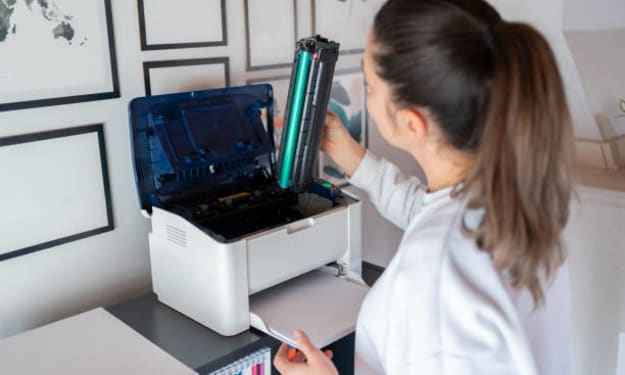
Laser printers are among the most durable and efficient machines found in homes and offices. They’re built to last—but that doesn’t mean they’re immune to issues. Whether it’s streaky prints, paper jams, or connectivity errors, at some point, you may find yourself needing a laser printer repair. But here comes the big question: Can you perform repairs yourself without kissing your warranty goodbye?
Understanding this isn’t just about cost—it’s about being informed. So let’s roll up our sleeves and unpack everything you need to know.
Understanding the Warranty Basics
Every printer manufacturer, be it Canon, Epson, or others, issues a warranty policy that outlines what is covered, for how long, and under what conditions. Most warranties cover manufacturing defects and failures due to normal use. However, they often draw a firm line at unauthorized repairs. Performing a laser printer repair on your own can easily cross that line if you're not careful.
Warranties typically become void if:
You disassemble the printer without authorization.
Non-certified parts are used during repairs.
Dmage occurs due to negligence or improper handling.
Before you tinker with anything, it’s crucial to understand what your specific warranty allows. Canon printer repair policies, for instance, differ subtly from those for Epson or HP printers.

When DIY Repairs Are Safe
Here's the kicker—not all repairs are equal in the eyes of your warranty.
Repairs that are generally safe include:
Replacing toner cartridges or paper trays.
Cleaning printer heads and rollers (with approved solutions).
Updating printer firmware and software.
Manufacturers often encourage users to handle minor maintenance tasks. They even provide support documentation or tutorials for basic laser printer repair procedures. In most cases, such routine maintenance won’t void your warranty.
Risks of Unauthorized Laser Printer Repair
While the internet offers hundreds of DIY tutorials, going rogue with internal components may cost you dearly. If your Canon printer repair involves opening up the machine to access internal sensors or boards, that could violate the warranty terms.
Likewise, Epson printer repair procedures can get dicey when it involves resetting internal counters or replacing logic boards—both tasks manufacturers typically reserve for certified technicians.
3D printer repair has its own set of caveats. Some manufacturers offer open-source hardware and welcome modifications, but others treat any tweak to the firmware or mechanics as a warranty breaker.
Manufacturer vs. Third-Party Repairs
Third-party repair services are a gray area. Some are certified by the printer's manufacturer, which keeps your warranty intact. Others aren’t. Always ask if the repair service is “authorized” by the brand. If you opt for a non-authorized shop to fix your 3D printer, Canon, or Epson printer, chances are the warranty is off the table.
You can often find a list of certified repair centers on the manufacturer’s website. Using one of these options gives you peace of mind while solving the issue professionally.
Tips to Avoid Warranty Conflicts
Want to repair your laser printer without stepping on warranty landmines? Here’s how:
Read the manual. Most printer issues can be resolved using built-in diagnostics and guided solutions.
Document everything. If something goes wrong and you need to file a claim, records of how the problem occurred and what you did can be valuable.
Use official parts. Whether it’s a Canon printer repair or an Epson model, stick with OEM (original equipment manufacturer) parts.
Call support first. Most tech support teams are surprisingly helpful. They can walk you through common problems or approve simple fixes.
What About Refurbished or Used Printers?
If you're using a second-hand or refurbished printer, tread carefully. Often, the warranty has already expired or is limited. In this case, a self-initiated laser printer repair may be the most economical option—just be aware of what you’re getting into.
Conclusion
So, can you perform a laser printer repair without voiding the warranty? The answer is: it depends. Minor fixes? Sure. Replacing a sensor board with a screwdriver in one hand and YouTube in the other? Maybe not. To stay on the safe side, always review your printer’s warranty, use official parts, and lean on certified repair services when things get too technical.
Understanding where your warranty draws the line empowers you to keep your printer—and your rights—intact. Because in the world of printing, knowledge isn’t just power—it’s protection.
FAQs
Can I clean my printer heads without voiding the warranty?
Yes, cleaning printer heads using manufacturer-approved methods is usually considered routine maintenance and is safe under warranty.
Does opening the printer automatically void the warranty?
Not necessarily. If you’re opening it just to access jammed paper or replace a cartridge, you’re generally fine. But internal disassembly? That’s risky.
Are third-party toner cartridges a warranty risk?
They can be. If a third-party cartridge causes damage, your warranty might not cover it. Stick to OEM if you want to be safe.
Is 3D printer repair treated differently?
It depends on the brand. Open-source 3D printer makers are more lenient, but proprietary systems like some from Canon or HP are stricter.
Can I replace a faulty tray or roller myself?
Yes, as long as the part is user-replaceable and you use OEM parts, your warranty should remain intact.
What should I do if my printer is still under warranty but malfunctioning?
Contact the manufacturer first. They may offer free repairs, replacements, or certified service referrals that won’t jeopardize your warranty.
About the Creator
Keep reading
More stories from Print Web Technology and writers in Lifehack and other communities.
Are Local Computer Printer Repair Services Better Than Manufacturer Support?
When your printer throws a tantrum—streaky prints, paper jams, or outright refusal to turn on—it’s tempting to wonder whether calling the manufacturer is your best bet. But here’s the kicker: you might have a local hero just around the corner. We're talking about local computer printer repair services. These neighborhood tech wizards often offer quicker, more affordable, and more personalized solutions than the printer giants. But are they always the smarter choice?
By Print Web Technology8 months ago in Humans
What to Expect From Mobile App Development Teams in Miami?
Miami’s tech ecosystem grew fast and unevenly. According to Statista, Florida’s digital economy expanded by over 17 percent between 2022 and 2025, pulling in agencies, freelancers, boutique firms, and offshore-linked teams at very different maturity levels.
By Mike Pichai3 days ago in Lifehack
The Guardian Geofence: Creating Dynamic Safe Zones for School, Sports, and Travel
The Guardian Geofence: Creating Dynamic Safe Zones Geofencing—creating virtual boundaries that trigger alerts—is one of the most powerful yet underutilized features of modern family safety. Moving beyond a single home alert, you can create a dynamic system of "safe zones" that automatically keeps you informed during daily routines and special trips.
By Olivia Martineza day ago in Lifehack



Comments
There are no comments for this story
Be the first to respond and start the conversation.