
Best Free Video Converters for PC and Mac 2025
Know different free Video Converters for PC and Mac operating systems.

In 2025, digital content is more diverse and difficult than ever. If you want to edit YouTube videos, post clips to social media, or just play a file on your favorite device, you need a reliable video converter. But how can you pick the finest one when there are so many? This is especially true if you don't want to spend any money.
You don't have to look anything up; we've done it all for you. This is a carefully picked list of the best free video converters for PCs and Macs in 2025. It lists the features, supported formats, and pros and disadvantages. These tools are useful for everyone, from professionals to people who just want to utilize them.
Why You Should Use Video Converter in 2025
Even if a lot of devices can play a lot of different formats, video transcoding is still necessary. This is why:
- Works on more than one platform: Some devices can only play certain types of files, such as AVI, MOV, and MP4.
- How easy it is to edit: Convert files to formats that are easier to work with, such ProRes or DNxHD.
- Size optimization: Make files smaller so they are easier to upload and keep.
- Keep the quality: Change the format without sacrificing sound or picture quality.
- Batch processing lets you convert more than one file at a time, which speeds up your work.
The Best Free Video Converters for 2025
These are the finest options because they are all free, have great features, are fast, and are easy to use.
1. HandBrake is available for Windows, Mac, and Linux.
People who use computers, professionals, and people who want to help open source software. HandBrake is still one of the greatest free video converters in 2025. It can handle a lot of various things. It works with practically all video formats and is easy to use for both new and expert users.
Key Features:
- Pre-set gadgets like Apple, Android, PlayStation, and others support MKV, MP4, and WebM.
- It is free and open source and supports GPU acceleration (hardware decoding was better in the 2025 update).
Drawbacks:
- People who are new to the site need to learn a little bit.
- At first, the UI can appear like too much.
2. Shutter Encoder (for Windows, macOS, and Linux)
People have been using Shutter Encoder a lot more in the previous few years. It is built on FFmpeg and offers broad capabilities for not just converting files, but also compressing, editing, and extracting them.
Key Features:
- Works with VP9, H.264/H.265, ProRes, and more
- Changing the bitrate, trimming audio and video, and changing the resolution
- Changing subtitles and audio tracks
- Encoding for TV and movie standards
Disadvantages:
- The UI can look out of date.
- It will not preset high-quality for delivery settings for Netflix, Instagram, and YouTube
- A little more technical than simple tools
3. VLC Media Player (for Windows, macOS, and Linux)
A lot of people don't know that VLC is more than just a media player; it also has a fairly powerful video transcoding tool.
Key Features:
- Change to MP4, AVI, MOV, and other formats
- Get the audio out Basic cutting and compression
- No advertisements, no watermarks
Disadvantages:
- It doesn't have advanced capabilities like batch encoding or GPU acceleration.
- Limited controls for codecs and filters
4. FFmpeg (for Windows, macOS, and Linux)
Many of the tools on this list use FFmpeg as their engine. It can convert, stream, record, and edit almost any video or audio file from the command line.
Key Features:
- Changes all kinds of files, even odd ones like MXF and MTS, to MP4.
- Automation and scripting for batch jobs
- Fast performance using hardware acceleration
Disadvantages:
By default, there is no graphical user interface, and it can be hard for people who aren't tech-savvy to learn.
5. Best Video Converter for PC
The Free Audio and Video Converter Softaken makes it simple for both technical and non-technical people to change video files into MP4, AVI, MOV, MKV, WMV, FLV, M4V, and other formats. Also, users who want a single solution that can convert both audio and video files and has a simple interface. This software can easily change video files into audio formats like MP3, WAV, OGG, FLAC, AAC, AIFF, and other audio formats as well. Users can download this Video Converter on Windows PC with all version including Windows 11, 10, 8.1, 8, 7, XP, and Vista OS. This software offer a free trial.
Features of Video Converter for PC:
- It works with a lot of different video and audio formats, like MP4, AVI, MOV, MP3, WAV, and more.
- Lets you change video files into audio files (for example, turn MP4 into MP3).
- Keeps the original quality during the conversion
- Support for batch processing
- Easy to use drag-and-drop features
Pros:
- Easy-to-use UI for both new and casual users
- Lightweight and quick to process
- No adverts or hard-to-use settings
- Great for rapid audio extractions
How to Change Video Files on PC?
Get the software from https://www.softaken.com/audio-video-converter and install it.

Start the software on your computer running Windows.
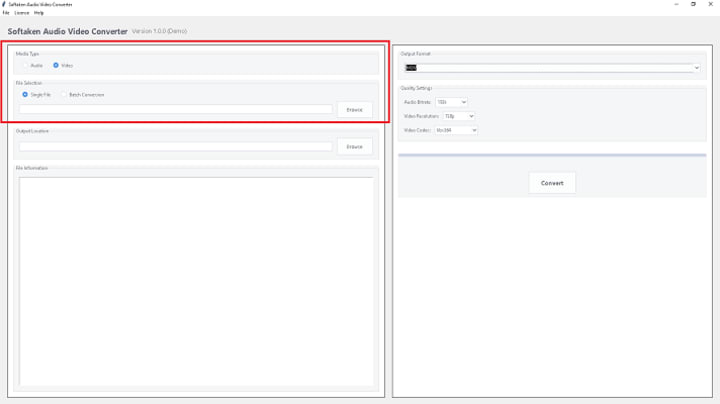
To import video or audio files, click "Add File(s)" or "Add Folder."
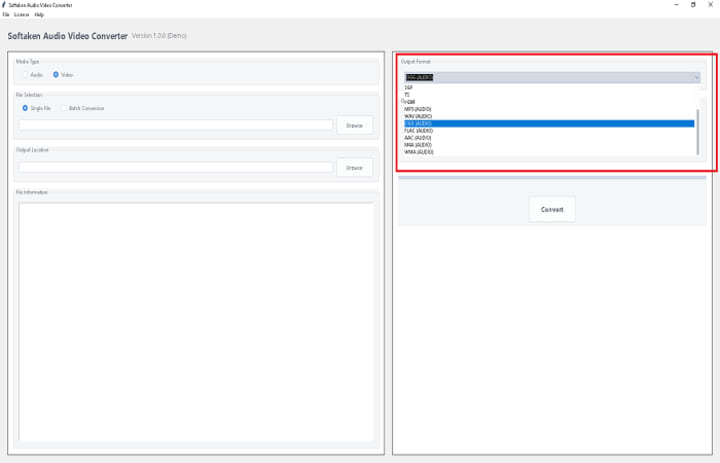
Choose Output Format: Pick the audio or video format you want (such MP4 or MP3).

Set Output Folder: Pick a place to save the files that have been changed.
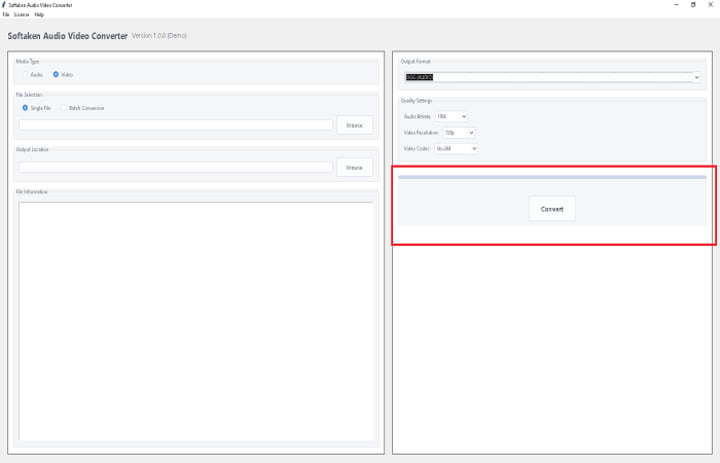
To start the conversion, click "Convert Now."
How to Pick the Best Video Converter
Here are the most important things to think about while picking a video converter in 2025:
- Format Support: Check to see if the converter can handle the formats you need.
- Speed: GPU acceleration can make a major impact if you work with massive files.
- Usability: Are you a novice or an expert? Pick a tool that you are comfortable with.
- Quality Retention: Find tools that have high-quality presets or that don't lose any data when you convert.
- Extras: Some converters let you modify, compress, or download files.
Honorable Mentions
- CloudConvert (Web-Based) is a great way to change small files online without having to install any software.
- Softaken Video Converter is a sleek, easy-to-use interface for Windows.
- iDealshare VideoGo Free is light, has no watermark, and is quick.
Conclusion:
As video content becomes more popular on all devices, it's more crucial than ever to have a competent video converter. The tools above work best, whether you're attempting to make a film iPhone-compatible or compress gigabytes of 4K material. And they don't cost a thing. In 2025, there will be the best free video converter for you, whether you are a techie who likes FFmpeg's command line or a casual user who wants a simple drag-and-drop interface.
About the Creator
Keep reading
More stories from Robert Thoms and writers in Lifehack and other communities.
Step-by-Step Guide to Change Video to OGG Audio Format.
People that work with multimedia, such content makers, podcasters, developers, and others, often need to change video files into audio files. OGG is a free, open-source, and high-quality alternative to MP3 among the many audio formats that are available. It has a lot of support and does a great job of compressing files without losing too much sound quality.
By Robert Thoms6 months ago in Lifehack
I Upgraded My Phone for Speed
When I upgraded my phone last year, speed was the main reason. Faster processor, smoother animations, quicker app launches—all the usual promises. On paper, it was a clear step forward. And technically, it was. Everything moved faster.
By abualyaanartabout 18 hours ago in Lifehack


Comments
There are no comments for this story
Be the first to respond and start the conversation.