
6 Quick Ways to Reduce Your Business' Print Costs
Discover How To Reduce Printing Costs In The Office

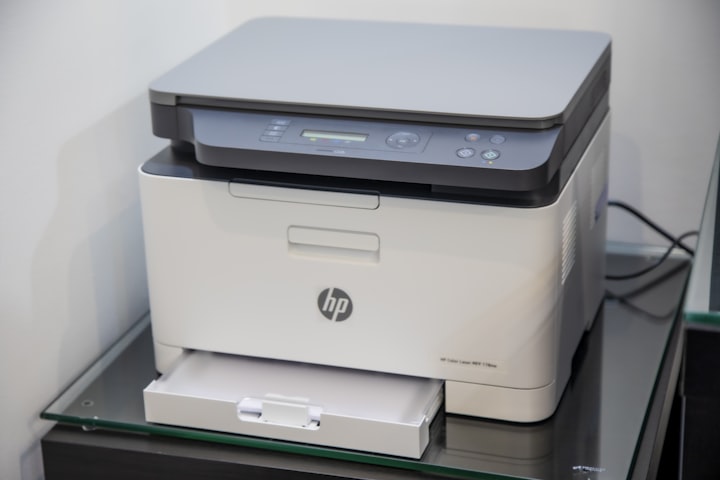
Nowadays, it is more important than ever to be mindful of how much your business spends on printing. You can quickly reduce your business' print costs with a few simple changes without sacrificing quality or productivity. Nonetheless, tackling business printing costs can be daunting if you don't know where to start.
Here are six quick ways to reduce your business' print costs.
1. Digitize Your Documents
As any business owner knows, the cost of printing can quickly add up. Between paper, ink, and printer maintenance, the expenses can start to stack up. One way to help reduce print costs is to digitize documentation. This means converting documents into digital formats that can be viewed and edited on computers and other devices.
For instance, instead of using handouts, you can opt to use PDFs or a powerful Powerpoint Presentation and then email it to your team or customers. Not only will this save you money on printing, but it will also help you reduce your business's environmental impact.
Digitization has several benefits. First, it reduces the need for paper and ink. Second, digitized documents are easier to store and share, meaning you'll save on physical storage space. Finally, digitized documents can be password-protected and encrypted for extra security. Overall, digitization is a great way to reduce business print costs.
2. Save by Using Double-Sided Printing and Avoiding Color Printing
Another way to reduce business print costs is to use double-sided printing. This means printing on both sides of the paper, which can help you save money and resources. Ink, paper, and toner can be expensive, so using both sides of the page is a great way to reduce business print costs.
In addition to double-sided printing, you should also avoid color printing whenever possible. Color ink is more expensive than black and white ink, so printing in grayscale can help you save money. Of course, there are times when color printing is necessary, but if you can print in black and white, it will be more cost-effective.
Mono printing is not only more affordable, but it can also help your business save on resources. Nonetheless, there are ways to save if you need to print in color. For example, you can use draft mode or choose a cheaper paper stock.
3. Have an Optimized Printing Environment
Print environment assessment can help business owners identify ways to optimize and save on their printing costs. Businesses that don't have an optimized printing environment are often surprised by how much they can save by making a few simple changes.
An optimized printing environment starts with the right printer. Depending on your business's needs, you may need a laser printer, an inkjet printer, or a multifunction printer. Once you have the correct type of printer, you can create 'print neighbourhoods' to help optimize your business's print environment.
4. Print Less
One of the simplest ways to reduce business print costs is to print less. This may seem like an obvious solution, but it's often overlooked. If your business doesn't need to print something, don't do it.
You can save on paper, ink, and toner by printing less. You can also reduce your business's environmental impact and declutter your office space. When it comes to business printing, less is often more.
5. Make It a Company Culture
Making its culture with a mission to reduce business print costs can be very effective. It all starts with setting an example from the top down and getting everyone on board.
New employee onboarding should include cost-cutting strategies, and team members should be encouraged to think about ways to reduce business print costs. You can create friendly competitions, offer rewards, and implement other creative ideas to get everyone on board.
6. Use a Managed Print Service
A managed print service (MPS) is a comprehensive solution for reducing a business's print costs. MPS providers assess a business's printing needs and then design, implement, and manage a customized printing solution that can lower print costs by up to 40%.
In addition to reducing the cost of printing, MPS can also help businesses to be more efficient and productive by streamlining their printing processes. MPS providers typically offer various services, including printer fleet management, toner and ink optimization, and print infrastructure optimization. By working with an MPS provider, businesses can save money on printing costs and become more efficient and productive.
About the Creator
Keep reading
More stories from Tina Bizan and writers in Lifehack and other communities.
How to Fulfill Your Fantasy With a Custom Home
Many dream of a custom home, built with all their dream features like a home theater or gym. While it’s true that buying a home is a big part of the American Dream, building a custom home to your exact specification elevates the experience to another level. But before you begin the process, you have decisions to make. This article sets out to provide a pathway for you to realize your dream of a perfect home.
By Tina Bizan5 years ago in Lifehack
How Big Game Hunting in Namibia Supports Wildlife Conservation
Namibia is widely recognized as one of Africa’s greatest wildlife conservation success stories. Unlike many countries where wildlife populations have declined, Namibia has seen steady growth in key species such as elephant, black rhino, lion, and plains game. A major reason behind this success is the country’s carefully regulated big game hunting namibia model, which directly supports conservation, habitat protection, and rural livelihoods.
By Aru Game Lodges 2 days ago in Lifehack
How to Build a Home Gym You’ll Actually Use (Not One That Collects Dust)
Building a home gym sounds simple: buy some equipment, set it up, and train whenever you want. In reality, many home gyms end up unused after the initial excitement fades. The problem usually isn’t motivation or discipline—it’s design.
By Enrique Navarro3 days ago in Lifehack



Comments
There are no comments for this story
Be the first to respond and start the conversation.