
Why You Need a Password Manager: The Ultimate Guide to Securing Your Digital Life
Why You Need a Password Manager
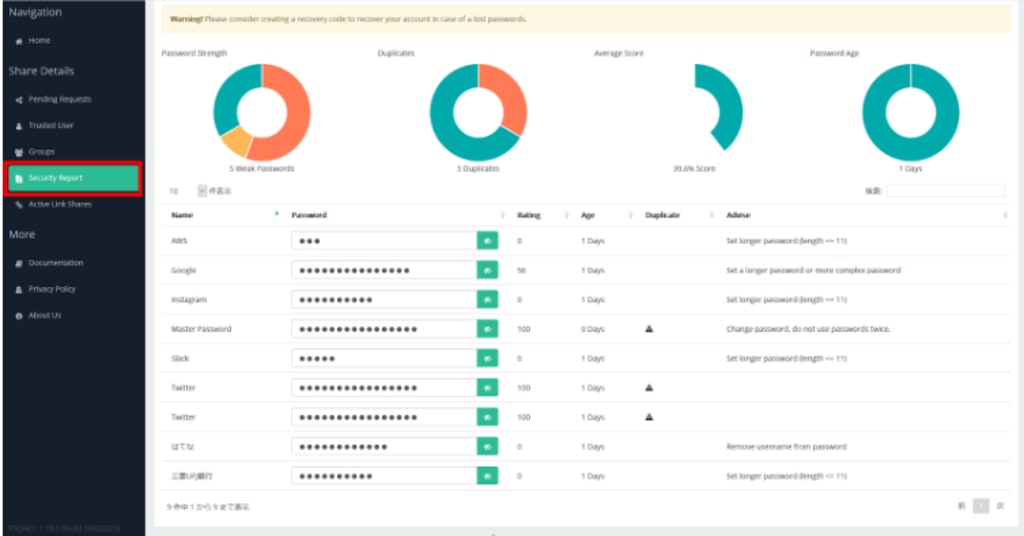
In today’s digital age, passwords are the keys to our online lives. From social media accounts to online banking, we rely on passwords to protect our sensitive information. However, with the increasing number of online accounts we manage, it’s becoming nearly impossible to create and remember strong, unique passwords for each one. This is where a password manager comes in. A password manager is an essential tool for anyone looking to enhance their online security and simplify their digital life. In this article, we’ll explore what a password manager is, why you need one, and how to choose the best one for your needs.
What Is a Password Manager?password manager
A password manager is a software application designed to store and manage your passwords securely. Instead of memorizing dozens of complex passwords or resorting to insecure practices like reusing the same password across multiple accounts, a password manager generates, stores, and autofills strong, unique passwords for each of your online accounts.
Most password managers encrypt your data using advanced encryption algorithms, ensuring that your passwords are protected from hackers and unauthorized access. They also often come with additional features like secure password sharing, two-factor authentication (2FA), and dark web monitoring.
The Importance of Using a Password Manager
1. Enhanced Security
The primary reason to use a password manager is to improve your online security. Weak or reused passwords are one of the most common ways hackers gain access to accounts. A password manager helps you create strong, unique passwords for every account, significantly reducing the risk of a data breach.
2. Convenience
Remembering multiple complex passwords can be a daunting task. A password manager eliminates this burden by storing all your passwords in one secure location. With just one master password, you can access all your credentials effortlessly.
3. Protection Against Phishing
Password managers can help protect you from phishing attacks. Since they autofill passwords only on legitimate websites, they won’t enter your credentials on fake or malicious sites designed to steal your information.
4. Cross-Device Syncing
Most password managers offer cross-device syncing, allowing you to access your passwords on your smartphone, tablet, or computer. This ensures that your credentials are always at your fingertips, no matter which device you’re using.
5. Secure Password Sharing
Password managers often include features for securely sharing passwords with family members, colleagues, or friends. This is especially useful for shared accounts, such as streaming services or team collaboration tools.
How Does a Password Manager Work?
A password manager operates by storing your passwords in an encrypted database, often referred to as a "vault." Here’s a step-by-step breakdown of how it works:
Create a Master Password: When you set up a password manager, you’ll create a master password. This is the only password you’ll need to remember, as it grants access to your entire password vault.
Store Your Passwords: You can either manually enter your existing passwords or use the password manager’s browser extension or app to automatically save new passwords as you create them.
Generate Strong Passwords: When creating new accounts, the password manager can generate strong, random passwords for you. These passwords are typically a combination of letters, numbers, and special characters.
Autofill Credentials: When you visit a website or app, the password manager will autofill your login credentials, saving you time and effort.
Sync Across Devices: Your password vault is synced across all your devices, ensuring that you always have access to your passwords.
Additional Features: Many password managers offer extra features like secure notes, credit card storage, and dark web monitoring to further enhance your security.
Benefits of Using a Password Manager
1. Stronger Passwords
A password manager encourages the use of strong, unique passwords for every account. This significantly reduces the risk of your accounts being compromised.
2. Time-Saving
With autofill capabilities, a password manager saves you time by eliminating the need to manually enter passwords. This is especially helpful for accounts with complex login requirements.
3. Improved Productivity
For businesses, password managers can improve productivity by streamlining access to shared accounts and reducing the time spent resetting forgotten passwords.
4. Peace of Mind
Knowing that your passwords are securely stored and protected can give you peace of mind, allowing you to focus on more important tasks.
5. Compliance with Security Best Practices
Using a password manager helps you comply with security best practices, such as avoiding password reuse and enabling two-factor authentication.
Choosing the Right Password Manager
With so many password managers available, it can be challenging to choose the right one. Here are some factors to consider when selecting a password manager:
1. Security Features
Look for a password manager that uses strong encryption, such as AES-256, and offers additional security features like two-factor authentication and biometric login.
2. Ease of Use
A good password manager should be intuitive and easy to use. Look for one with a user-friendly interface and seamless integration with your devices and browsers.
3. Cross-Platform Compatibility
Ensure that the password manager is compatible with all your devices and operating systems, including Windows, macOS, iOS, and Android.
4. Password Sharing
If you need to share passwords with others, choose a password manager that offers secure sharing options.
5. Price
Password managers range from free to premium. While free options may be sufficient for basic needs, premium versions often offer advanced features like dark web monitoring and priority customer support.
6. Customer Support
Choose a password manager with reliable customer support, including tutorials, FAQs, and responsive help desks.
7. Reputation
Research the password manager’s reputation by reading reviews and checking for any history of security breaches.
Popular Password Managers to Consider
Here are some of the most popular password managers available today:
LastPass: Known for its user-friendly interface and robust security features, LastPass offers both free and premium plans.
Dashlane: Dashlane is praised for its sleek design, dark web monitoring, and VPN service.
1Password: 1Password is a favorite among businesses and individuals for its strong security and family sharing options.
Bitwarden: As an open-source password manager, Bitwarden is highly customizable and offers a free plan with unlimited devices.
Keeper: Keeper is known for its advanced security features, including biometric login and secure file storage.
Tips for Using a Password Manager Effectively
Create a Strong Master Password: Your master password is the key to your password vault, so make sure it’s strong and unique.
Enable Two-Factor Authentication: Adding an extra layer of security to your password manager can further protect your data.
Regularly Update Your Passwords: Use your password manager to periodically update your passwords, especially for critical accounts.
Backup Your Vault: Some password managers allow you to export your password vault. Keep a secure backup in case of emergencies.
Use Secure Notes: Take advantage of secure notes to store sensitive information like PINs, security questions, and Wi-Fi passwords.
Conclusion
In a world where cyber threats are constantly evolving, a password manager is no longer a luxury—it’s a necessity. By using a password manager, you can protect your online accounts, simplify your digital life, and stay one step ahead of hackers. Whether you’re an individual looking to secure your personal accounts or a business aiming to enhance team productivity, a password manager is an invaluable tool.
Take the first step toward better online security today by choosing a password manager that meets your needs. Your digital life will thank you.
About the Creator
Technology In Performance Monitoring
Introduction Technology plays a vital role in performance monitoring within healthcare and behavioral health organizations. Digital tools enable providers to track clinical outcomes, operational efficiency, and financial performance in real time. Implementing technology for monitoring enhances decision-making, reduces manual errors, and ensures accountability across teams. From electronic health records (EHRs) to data analytics platforms, technology supports continuous quality improvement and regulatory compliance. By leveraging modern tools, organizations can measure key performance indicators accurately, identify trends, and implement changes that improve patient care and operational efficiency.
By Abdul Mueed3 days ago in Journal
Two Grumpy Old Men Solve the Problem
Marty and Steve were two grumpy old men who lived together. They had known each other for years. Marty had been a bachelor all his life. Steve said it was because no one could stand to ever live with. Marty’s standard reply was “Well, you are, so what sort of a moron does that make you!”
By Calvin London4 days ago in Humor



Comments
There are no comments for this story
Be the first to respond and start the conversation.