
What You Need to Know About Custom Content Management Software Costs
Cost to Build Content Management Software


If you clicked on this article, then I guess you are someone who is tired of the limited flexibility, security, or integration facilities of prebuilt CMS and wants to build custom content management software but is confused about development costs. If that is the case, then you are at the right place. In this article, we are going to discuss everything about the development cost of CMS.
We will brief you about the factors that affect development cost, discuss some hidden cost and we will also guide you on how you can reduce the overall development cost by following some minor tips. In short This article walks you through everything you need to know about CMS development cost.
Key Factors That Affects Custom Content Management Software Development Costs
In planning a custom CMS, you should be aware of what determines the cost. For different business requirements some factors might differ but the following are some important cost drivers that you should keep in mind while framing the budget.
1. Project Scope and Features
The total cost mainly hinges on how many features and tools you need. A CMS that has basic content creation tools will cost much less than one that includes sophisticated SEO, multi-language support, custom workflows, analytics dashboards, and publishing automation.
- More features = more development time and complexity.
- Enterprise-level features can significantly enhance the cost.
2. Roles and User Permissions
Custom content management software solutions generally use role-based access control (RBAC) for content reviewers, admins, editors, and authors. To establish secure and flexible access rules for every group of users, a significant amount of backend development is necessary which is a major factor for cost.
- Complex permission levels require additional planning and coding, which increases cost.
3. UI/UX Design
Your CMS should be simple for internal teams to use and reflect your brand. Custom UI/UX design improves usability, reduces training time, and makes content more efficient, but adds design hours and testing effort as well as cost.
- Responsive design across devices costs, but facilitates adoption.
- The more sophisticated and specific the interface, the greater the investment needed.
4. Third-Party Integrations
Connecting your CMS to CRMs (e.g., Salesforce), analytics platforms (e.g., GA4), payment gateways, or marketing software involves developing and testing APIs. Each system needs to communicate securely and safely.
- The number of integrations directly influences development time and cost.
- Other APIs can demand paid licenses or more advanced technical skill levels.
5. Scalability Requirements
Growth planning means creating a content management software that will be capable of managing more content, users, and traffic. This includes structuring systems that scale readily, optimizing the database, and utilizing cloud storage services.
- Scalability prevents future rebuilds but increases up-front investment.
- Appropriate for businesses expecting a high surge in users or content.
6. Security & Compliance
A secure CMS is a must, particularly for companies in healthcare, finance, or e-commerce. Encryption, user authentication, audit trails, and regulatory compliance (e.g., GDPR, HIPAA) require meticulous planning.
- Compliance testing and secure coding require additional time which can add cost of development.
- Security needs vary by industry and data sensitivity, so cost can be very for different industries.
7. Technology Stack
The programming languages, frameworks, and tools utilized influence the price. New or uncommon technologies (such as headless CMS, JAMstack, and microservices) might require highly skilled software developers.
- Popular stacks such as React and Node.js can balance good performance with cost.
- Legacy system integrations or proprietary technology can increase costs.
8. Moving Content
If you are upgrading from an existing CMS, importing legacy content (articles, images, files) into the new setup entails reformatting, restructuring, and validation. It is more time-consuming if content is unstructured or incompatible.
- Manual mapping and testing may be needed for large datasets.
- Make sure your existing content isn't lost or compromised at launch.
9. Testing & Quality Assurance (QA)
Testing diligently ensures your CMS functions properly across various browsers, devices, and users. Quality Assurance also discovers user flow issues, integrations, or performance issues early.
- Manual testing and automated testing take time, but reduce risks in the future.
- The more roles and features, the longer the QA process will be.
Estimated Cost Table for Custom CMS
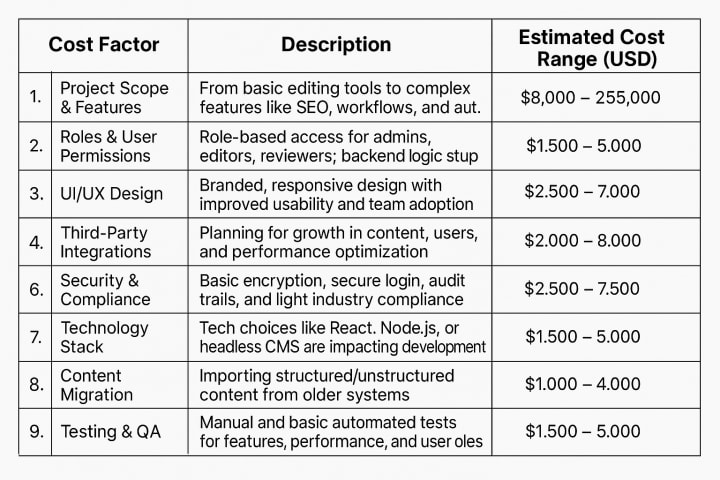
- Basic CMS: $15,000 – $25,000
- Mid-Tier CMS : $30,000 – $50,000
- Feature-Rich CMS : $55,000 – $80,000
Hidden Costs to Watch Out For
Even when there is a clear budget, businesses normally encounter hidden costs while or after creating content management software. You should know them , so that you can plan budget more effectively and avoid surprises.
1. Technical Support and Maintenance
After launch, your CMS needs regular upgrades, bug fixing, and technical support. Maintenance costs are in the form of periodic fees and are often underestimated in planning.
- Most businesses plan 15–20% of the initial build cost annually.
- This includes software patching and minor feature enhancements.
2. Internal Team Training
Your in-house team will need time and guidance to adjust to the new CMS. Face-to-face classes, documentation, or video instruction – training isn't free and needs to be factored in.
- Custom CMS platforms usually require custom training modules.
- Decreases long-term support queries and user errors.
3. Hosting and Infrastructure
Unless your CMS is entirely cloud-native or SaaS-based, you’ll need reliable hosting. Cloud hosting (AWS, Azure, GCP) or dedicated servers come with monthly fees depending on traffic and storage.
- Pricing increases with performance, storage, and uptime SLAs.
- It may also involve setup and configuration fees upfront.
4. License Fees for Tools or APIs
If your CMS allows third-party integration (i.e., AI content creators, SEO analyzers, advanced analytics), you may have to incur license or subscription charges.
- Several tools require a fee per user, usage volume, or data volume.
- Check the usage costs of the API during planning periods.
5. Data Backup and Recovery Plans
A reliable CMS must feature auto-data backup and disaster recovery strategies. Adding such systems comes at a setup and long-term cost--but keeps your business safe from content loss.
- Cloud backups, redundancy, and recovery testing are time-consuming.
- Essential to reducing risk when there's a system failure.
So now you know about the basic factors and some hidden cost of developing a content management software, but before you start planning for budget let’s have a look at some tips that will help you to reduce development cost.
How to Keep CMS Development Costs Low and Stay On Budget
If you plan smartly, then it can assist you in creating a robust CMS without burning a hole in your pocket. Here's how to keep costs under control without compromising on excellent results:
1. Prioritize Features by Business Need
Instead of building all features at once, focus on must-haves for launch and delay nice-to-haves. Phased development saves budget and avoids scope creep.
- Use the MVP (Minimum Viable Product) strategy to establish value.
- Iterate on feature addition based on user feedback.
2. Utilize Open-Source Frameworks or CMS Engines
Platforms like Laravel, Node.js, or even open-source CMS bases like Strapi or Directus can reduce development time and cost. They simplify the need to build everything from scratch.
- Open-source options are flexible and well-supported.
- Ensure to review security and customization constraints.
3. Choose the Perfect Development Partner
If you partner with an experienced custom software development company ,you can in the long run. Because they can avoid costly mistakes, build faster, and suggest cost-saving fixes.
- Ask for clear documentation, timelines, and fixed prices.
- A trusted partner can eliminate technical debt.
4. Automate Where Possible
Automate testing, content approval, and backups to reduce manual effort and long-term staffing needs. While setup is costly, it is cost-saving in the long run.
- Automate routine publishing or moderation work.
- Invest once, reap forever.
5. Build for Scalability, but Don't Overengineer
Create a system that can scale, but don't over-engineer for traffic or use cases you won't see for a while. Begin lean, and scale infrastructure only when required.
- Cloud services enable you to scale resources on demand.
- Don't commit to expensive architecture day one.
If you build a custom content management software now then it can be worth it in the long term. And stop worrying about the cost because if you follow provided tips and do it with strategic planning then you can save cost and get you CMS in the budget. If you’re ready to build a CMS tailored to your business, take the time to plan it properly and if necessity consult with experts to guide your path.
About the Creator
Kiran Moda
Passionate Techwriter: I love to empower business leaders with technological innovations. Let's explore the technical world, from software development to AI.
Keep reading
More stories from Kiran Moda and writers in Journal and other communities.
How Much Does Custom Software Development Cost in 2025?
Software development is still one of the major expenditures for start-ups, small businesses, and even for large companies to keep up with a fast digital economy in 2025. From cloud and mobile applications to workflow automation and AI-based tools, companies want to develop digital products to enhance productivity and innovation. When any business makes the decision to build new software, one of the primary questions business leaders would like to know is: How much does software development cost?
By Kiran Moda11 months ago in Futurism
From Beginner to Pro: Master Freelancing From Home
The Complete Guide to Working as a Freelancer From Home 2026 Working alone from your house has become more than just extra work - it now serves as real employment for countless individuals across the globe. If you’re studying, raising kids at home, or simply wishing to leave behind office hours, doing freelance jobs brings room to move freely, choose your path, even grow what you earn without preset limits.
By Abdul Lateef7 days ago in Journal



Comments
There are no comments for this story
Be the first to respond and start the conversation.