
The Best Prepress Solutions For Publishing and Printing
Find out the secrets to perfect print publishing with prepress solutions. Save time, reduce costs, and ensure high-quality results for your print projects.


The print industry has experienced a steady 4% growth due to the rise of e-publishing and advancements in prepress services. As the landscape of print media evolves, it's important for prepress professionals—whether seasoned veterans or newcomers—to stay informed about the latest trends and technologies. Achieving excellent print-ready files that function well across various platforms is necessary.
This blog post offers valuable prepress solutions and expert tips designed to help you create perfect print publishing files. We'll cover key aspects of artwork correction to ensure your final documents are error-free before printing. Make use of these prepress workflow solutions solutions to meet the changing demands of the publishing industry.
Top Prepress Solutions Welcomed by Industry Leaders
The prepress and premedia processes require continuous refinement and precision, as each file can present challenges. It’s important to verify that all settings align with client requirements, adhere to size guidelines, ensure proper font usage, and confirm color accuracy against print standards.
Achieving 100% accuracy in these areas is important for delivering high-quality results while avoiding unexpected costs for you and your client. Based on extensive experience in the digital prepress industry, a prepress service provider suggests the following solutions to address aspects of artwork correction, ensuring your final files are ready for printing.
Image Quality Optimization
Selecting images with the correct resolution is required to ensure exceptional print quality. Prepress operators often err by using images at 72 dpi, which fails to deliver the necessary clarity and color fidelity in print. The suggested resolution for optimal results is between 250 and 300 dpi. To maintain resolution integrity, it is essential to avoid resizing images by more than 20% of their original size.
By implementing these practices, you can boost the brand image by improving the quality of your printed materials and preventing preflight errors.
Color Mode Standardization
For successful printing and publishing, employing the correct color mode is essential. Industry professionals typically utilize the CMYK (cyan, magenta, yellow, and black) color mode for print projects, whereas some are increasingly adopting an RGB (red, green, blue) workflow for its vibrant display on screens.
However, since most printers require images in CMYK format for accurate reproduction, providing files in the appropriate format is vital. You can either submit CMYK files directly or provide RGB files for conversion, ensuring you understand the end usage requirements for effective color mode standardization.
CMYK Simulation in RGB Workflows
Professionals can use Adobe software to simulate CMYK color profiles to ensure exact color reproduction when transitioning from RGB to CMYK. By properly configuring color settings in Adobe Bridge, you can preemptively visualize how RGB images will appear in print.
Access the View menu, select Proof Setup, and select Custom to specify the output device. Enabling Simulate Paper Color will allow for an accurate representation of printed colors, facilitating adjustments before finalizing the project.
Monitor Calibration
Effective color representation in printed materials hinges on properly calibrating your monitor. If your monitor is not accurately color-corrected, even the most diligent efforts in managing CMYK or RGB workflows could be rendered ineffective. Regular calibration is essential to ensure that colors appear as intended—such as vibrant yellows rather than dull shades—ideally once a month.
It can be achieved through manual adjustments or color correction software and hardware. Those demanding advanced calibration offer reliable solutions for maintaining color accuracy, ensuring your images consistently reflect true colors.
Proofreading for Quality Assurance
Before sending a manuscript to print, thorough proofreading and copyediting are essential steps that cannot be overlooked. Prepress operators must focus on these processes during typesetting, as they are just as important as the layout design. Hiring professional typesetting services ensures that experienced specialists conduct the proofreading, catching any errors that may have slipped through.
Even if the content has been previously proofread, a second review by a professional can identify issues like misplaced text blocks or hidden content behind images. This keen attention to detail guarantees that the final print-ready file is polished and error-free.
Preflight Checks for Print Readiness
Once your project file is prepared for printing, conducting a preflight check is crucial to ensure everything is in order. This final review can be done manually or with the help of software like FlightCheck. The preflight technique helps identify issues such as incorrect colors, image resolution problems, font discrepancies, and transparency errors.
By performing these checks, prepress service experts help you save both time and money, ensuring that your project is ready for a smooth printing process.
Precise Definition of Trim and Bleed Marks
Defining trim and bleed marks is a critical step in the printing process. Trim marks, also known as crop marks, indicate where the paper should be cut after printing, while the bleed area symbolizes the extra space around your document that will not appear in the final output.
It’s essential to include a bleed area—typically around 3mm—to account for any shifts that may occur during printing, which could otherwise ruin your images. Properly defining these areas helps avoid excessive costs and delays, ensuring your project is printed exactly as intended.
Prepress File Optimization for Seamless Printing
Optimizing all files before sending your document to the printer is essential to ensure the printing process goes smoothly. Start by creating a high-resolution PDF of your final file and a hard copy for reference. Ensure that your source file includes all necessary fonts, and send each image used in the document separately, even if they are embedded.
Further, check for any specific requirements from your printer to guarantee everything is in order. This preparation as a part of digital prepress workflow solutions will help facilitate a successful experience.
Final High-Resolution PDF for Professional Printing
When exporting your document to PDF format, avoiding relying on the default settings in Adobe InDesign or Adobe Illustrator is important. Instead, customize these settings to ensure that the final PDF meets the high-resolution standards most printers require.
Understanding the specific needs of your printer is crucial, as different printers may have varying specifications for the final document. By taking the time to adjust these settings, you can ensure that your printed materials look their best and meet professional standards.
Seek Professional Help in Prepress Solutions for Continued Success!
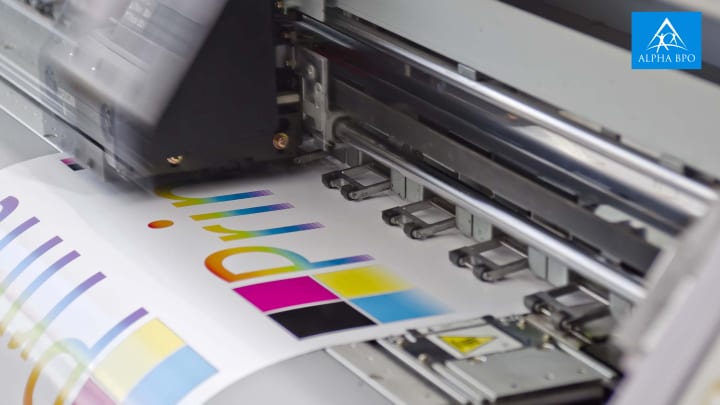
The premedia and prepress industry is continuously evolving, and staying ahead of these transformations is essential for anyone involved in digital prepress, printing, or publishing.
To succeed in this dynamic environment, it is crucial to keep up-to-date of the latest innovations and improve your skills regularly. Implementing the prepress solutions outlined in this blog can minimize extreme costs, save valuable time, and ensure your files are print-ready and flawless.
If managing these tasks seems overwhelming, consider partnering with a prepress service provider who understands your specific needs and industry nuances. Such partnership can save you time and resources while delivering exceptional results that boost your prepress printing projects to new heights.
About the Creator
Alpha BPO
Alpha BPO offers IT solutions, business solutions, and outsourcing solutions to small, medium and large scale enterprises and organizations in the USA.
Visit our website: https://www.alphabpo.com/
Why are insurance operations ready for AI and what smart teams are doing differently?
Insurance operations are ready for AI because the work has outgrown the systems meant to support it. Agencies, MGAs, and carriers are handling higher policy volumes, complex documentation, and rising regulatory demands, while clients expect speed and accuracy as standard. This pressure is structural, not temporary.
By Fusion Business Solution P Limited7 days ago in Journal




Comments
There are no comments for this story
Be the first to respond and start the conversation.