
Still Emailing Files? Advanced Transfer or Breach
Stop risking data leaks via email. Discover advanced file transfer: secure, automated, auditable. Move beyond attachments for real protection.


Still Emailing Files? That’s a Data Breach Waiting to Happen — Go Advanced or Go Home
You may assume emailing files is no big deal — everybody does it. However, that same process can be asking an expensive data breach into your company. Where data is gold, emailing confidential reports, contracts, or customer information as attachment is like giving the keys to your safe to a stranger.
Key Points:
- They are the chief vector for data breaches as well as human errors.
- Advanced file transfer (AFT/MFT) provides encryption, automation, governance, and auditability.
- Moving to AFT hardens security stance, increases compliance, and minimizes risk.
Imagine: a spammer mistakenly cc’s the wrong person, or a cyber thief hacks into one inbox and pulls out months’ worth of attachments. That’s not hypothetical — that happens all the time. In 2025, the average data breach cost was $4.44 million. And over 60% of all breaches incorporate a human factor.
Why Email-Based File Sharing Is a Data Breach Magnet
Here’s why email is a ticking time bomb in your communications stack:
- Unsecured transit and storage – Email attachments often travel through multiple intermediary servers that may not be encrypted end-to-end.
- Human error risk – One mistyped email or an auto-complete mistake can expose confidential files.
- Weak/downloadable credentials – Many users reuse passwords or don’t enable multi-factor authentication (MFA).
- No activity visibility – Once you send a file, you lose control. You can’t see who opened it, forwarded it, or stored it elsewhere.
Example: A law firm sends a PDF of a draft contract to a client. The client forwards it internally, but one of those internal recipients accidentally replies all with their comments. The chain now exposes sensitive terms to individuals you never intended.
An advanced file transfer solution automates how you share data, removing the risks and delays of manual emailing. It ensures files reach the right people instantly and securely — no lost attachments or version confusion.
The Hidden Costs of Email-Based File Sharing
Even beyond security, emailing files carries hidden burdens:

An expert website development company can build a custom, advanced file transfer platform designed for security, speed, and scalability. With features like end-to-end encryption, cloud automation, and data compliance, professional developers create reliable, user-friendly platforms that protect data and boost productivity.
What Is Advanced File Transfer (AFT / MFT)?
Advanced File Transfer (AFT), often implemented via Managed File Transfer (MFT), is a method of securely moving files across systems, people, and organizations — with control, visibility, and automation baked in.
Unlike sending attachments, AFT platforms typically provide:
- End-to-end encryption
- Role-based access controls
- Audit logs & reporting
- Workflow automation
- Retry logic and error handling
- API integration & connectors
According to IBM, MFT “offers advanced capabilities … support for multiple platforms, mobile devices, applications … and full visibility of transfers.” Kiteworks also outlines modern MFT feature checklists: end-to-end encryption, access controls, MFA, automation, audit logs, real-time alerts, and scalability.
Example: Company A needs to send a 20 GB nightly backup from its data center to a partner’s cloud. Rather than emailing or using a file-share, they schedule it in an MFT solution that automatically encrypts the data, retries on failure, and alerts IT if any block fails.
As your data needs grow, an advanced file transfer platform easily scales to manage larger and more complex file movements. Whether it’s transferring files across cloud systems or global teams, it ensures secure, seamless, and lightning-fast data exchange.
How Advanced File Transfer Solves Security Challenges
Let’s map common risks from emailing to how AFT fixes them:
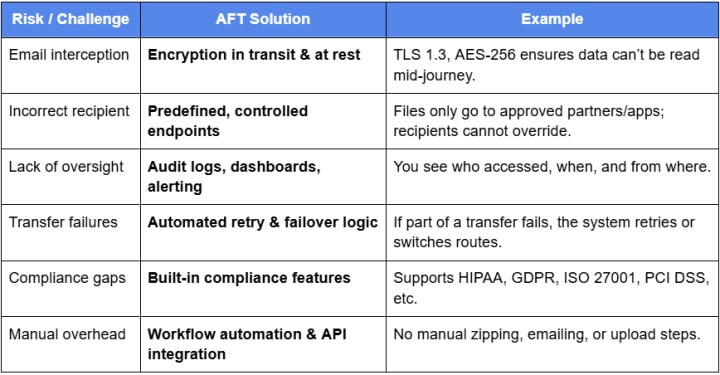
For example, Globalscape’s EFT platform offers secure protocols, audit and reporting, encryption, and monitoring to ensure compliance and safe data exchange.
By automating manual sharing processes, an advanced file transfer platform removes the common mistakes that lead to lost or misdirected files. It guarantees files are sent to the correct recipients safely — improving accuracy and saving valuable time.
Key Features That Make AFT Platforms Unbeatable
When selecting an advanced file transfer solution, look for these must-have features:
- End-to-end encryption & secure protocols (TLS, SFTP, FTPS, PGP)
- Role-based access and user authentication (MFA, single sign-on)
- Audit logs & full visibility — who did what and when
- Workflow automation & scheduling — event triggers, folder watchers, API calls
- Retry logic/error handling/failover
- Scalability / high throughput / parallel transfers
- Integration & connectors (AWS S3, Azure Blob, databases, ERP systems)
- Data loss prevention (DLP) / content inspection
- Partner portals / secure drop zones / managed user access
- Real-time monitoring, alerts, and dashboards
Using an advanced file transfer platform shows clients and partners that you prioritize security and professionalism. It enhances your brand’s credibility, builds long-term trust, and positions your business as a reliable data-handling partner in today’s digital world.
Conclusion:
Advanced file transfer is not just a technical upgrade — it’s a strategic move. It gives you control, visibility, compliance, and peace of mind. Whether you’re in finance, health, supply chain, or tech, embracing AFT protects what matters: your clients, your reputation, your bottom line.
FAQs (Feature-Snippet Style)
1. Why is emailing files risky?
Email attachments can be intercepted, misaddressed, or accessed with stolen credentials. Many email paths lack end-to-end encryption and have no auditability.
2. What is advanced file transfer (AFT)?
AFT (often via Managed File Transfer, MFT) is a secure, automated, auditable method to move files between endpoints, systems, and organizations.
3. How does AFT differ from FTP or sending via email?
Unlike FTP or email, AFT adds encryption, role-based access, logs, automation, error handling, and integration with enterprise systems.
4. What features should I look for in an AFT platform?
Look for encryption, MFA, audit logs, workflow automation, retry/failover, scalability, API connectors, and real-time alerts.
5. Can AFT help me meet compliance (HIPAA, GDPR, PCI)?
Yes — many AFT platforms offer built-in compliance features like encryption, logging, role access, and audit trails to satisfy regulatory demands.
6. How hard is it to transition from email to AFT?
It’s manageable. Start by auditing workflows, pilot one process, integrate systems, train users, then expand gradually.
7. Will AFT slow down file transfers?
No—in most cases, AFT platforms optimize throughput with parallel transfers, compression, and efficient protocols; they can even outperform traditional methods.
8. Who should use advanced file transfer?
Any organization exchanging sensitive, regulated, or large files—banks, healthcare, manufacturers, governments, SaaS—should consider AFT.
About the Creator
Theo's Blogs
Passionate about SEO and Software Development, I help businesses grow with cutting-edge web, mobile, and AI solutions. Working at TechVerdi.
Keep reading
More stories from Theo's Blogs and writers in Journal and other communities.
Top 10 Features Mobile App Development Firms Deliver
Mobile apps are no longer a luxury—they’re a necessity. In 2025, businesses across industries depend on apps to connect with customers, streamline operations, and stay competitive. But simply having an app isn’t enough. The real difference lies in how well the app performs, scales, and engages users.
By Theo's Blogs6 months ago in Journal
Trickle Them Down, But Not Out
The thing about smart people is that they should know better, but alas, intelligence is not the same as wisdom. Not only do the mistakes of experts too short on vision—when they are not corrected—have the potential to do great and far-reaching damage, but they also undermine public confidence in the very notion of expertise. This is particularly so when expertise is wielded in defence of the rich and powerful as a cudgel against those laid low. As an academic, this lack of faith in “so-called experts” is painful to see as it plays out in the spread of dis-/misinformation, conspiracy theories, and anti-intellectualism writ large. But it is also an understandable impulse given the catastrophic failure of an economic ideology pushed by certain economic experts. Supply-side economics has shaped a broken system for the last half-century and has arguably done more to undermine the fabric of the American Dream than any policy framework of the past century.
By Cory Wright-Maley7 days ago in Humans


Comments
There are no comments for this story
Be the first to respond and start the conversation.