
Radiology Department Workflow Optimization
Optimizing Radiology Workflow with Cloud Technologies and Integrated Imaging Solutions

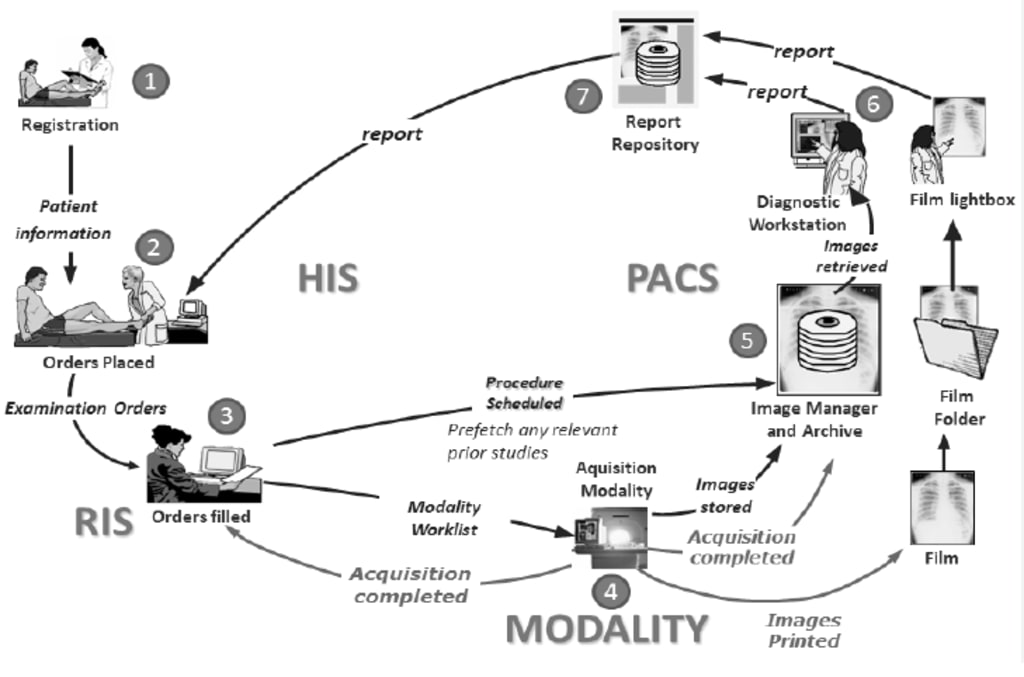
Radiology plays a critical role in modern healthcare, acting as the diagnostic backbone of clinical decision-making. From identifying fractures and infections to detecting cancers and vascular diseases, radiological imaging provides vital insights that shape patient care. But behind each X-ray, CT scan, or MRI lies a complex, multi-step process known as the radiology workflow.
The radiology workflow encompasses every step from when a physician requests an imaging study to the time the final report is reviewed and acted upon. Historically, this process has been riddled with delays, manual interventions, and inefficiencies. However, the digital revolution, particularly the advent of Cloud PACS, Cloud RIS, and automation tools, is transforming the radiology landscape.
Let's explore the intricate workflow in radiology departments, the challenges of traditional systems, and how technology—especially cloud-based solutions—is revolutionizing efficiency and accuracy in diagnostic imaging.
Understanding Radiology Workflow
Radiology workflow refers to the series of interconnected tasks and systems that enable the smooth delivery of imaging services. These tasks can be broadly categorized into several stages:
1. Patient Registration and Scheduling
- Entry of patient demographics and insurance details
- Scheduling imaging appointments via RIS or hospital information systems
2. Order Management
- Physician places imaging orders, often linked to electronic health records (EHR)
- Orders routed to radiology for review and protocoling
3. Imaging Acquisition
- Technologist prepares the patient and captures images using appropriate modalities
- Ensuring correct positioning, protocols, and safety checks
4. Image Storage and Access
- Images stored in PACS
- Access granted to radiologists and referring clinicians
5. Image Interpretation
- Radiologist analyzes the images using diagnostic workstations
- Dictation or structured reporting used to generate findings
6. Report Distribution
- Final reports sent to referring physicians via RIS/EHR integrations
7. Archiving and Follow-up
- Images and reports archived for legal and clinical review
- Follow-up imaging scheduled if necessary
These components must work harmoniously to ensure timely, accurate, and efficient radiological services. Any bottleneck can delay diagnoses and adversely affect patient outcomes.
Challenges in Traditional Radiology Workflows
Traditional radiology departments often struggle with inefficiencies that stem from outdated systems and fragmented communication. Common challenges include:
- Manual Data Entry: Paper-based or unintegrated digital systems require redundant input, increasing the risk of errors and administrative fatigue.
- Delayed Image Access: Without digital PACS, images might need to be physically transported or accessed from specific machines.
- Slow Report Turnaround: Lack of structured reporting tools and voice recognition slows the generation and delivery of radiology reports.
- Limited Collaboration: Physical separation and non-interoperable systems prevent seamless communication between radiologists and referring physicians.
- Storage and Retrieval Issues: On-premise storage solutions are space-intensive, costly, and vulnerable to disasters.
- Compliance Risks: Without proper tracking, audits, and archiving, institutions risk non-compliance with regulations like HIPAA.
These issues can severely impact both diagnostic accuracy and workflow efficiency, leading to clinician frustration and suboptimal patient care.
Radiology Information System (RIS) and Its Role
The Radiology Information System (RIS) is a core digital solution designed to streamline the administrative and operational aspects of radiology services. RIS works in tandem with PACS and EHRs to create a cohesive, integrated ecosystem.
Key functions of RIS include:
Patient Scheduling: Automatically slots patients for imaging based on modality availability and technician schedules.
- Order Tracking: Monitors every imaging order, ensuring it’s protocolled, scheduled, and completed.
- Workflow Management: Coordinates tasks among technologists, radiologists, and administrative staff.
- Reporting Tools: Allows radiologists to create, edit, and finalize structured or voice-dictated reports.
- Billing Integration: Automates charge capture and communicates with billing systems for reimbursements.
With RIS, departments can minimize clerical errors, improve resource utilization, and accelerate patient throughput. It also provides crucial data for quality assurance and operational analytics.
Picture Archiving and Communication System (PACS)
PACS is the technological backbone of image storage and access. It eliminates the need for physical films and enables instant access to imaging data across departments and facilities.
Core functions of PACS include:
Image Storage: Digitally stores radiographic images in standardized formats like DICOM
- Retrieval and Distribution: Ensures that authorized users can access images from any location
- Image Review Tools: Offers functionalities like zoom, 3D reconstruction, and side-by-side comparisons
- Integration: Works seamlessly with RIS and EHRs for efficient data sharing
PACS has dramatically improved diagnostic speed and accuracy by enabling radiologists to access prior images and reports, compare findings, and generate comprehensive diagnostic insights.
Shift to Cloud: Cloud PACS and Cloud RIS
Cloud-based RIS-PACS solutions are reshaping radiology by offering flexible, scalable, and cost-effective alternatives to on-premise systems.
Benefits of Cloud PACS and Cloud RIS:
- Remote Accessibility: Clinicians can access imaging data anytime, anywhere
- Reduced Infrastructure Costs: No need for expensive servers or storage rooms
- Enhanced Collaboration: Enables multi-disciplinary teams to work in tandem from different locations
- Data Security: Advanced encryption and redundancy measures ensure data integrity and compliance
- Scalability: Easily adapts to growing data volumes and user needs
Healthcare institutions adopting cloud-based PACS and RIS often report faster turnaround times, improved staff productivity, and reduced IT overhead. These platforms also facilitate tele-radiology and second-opinion consultations, expanding care access.
Radiology Workflow Automation

Automation is the next frontier in radiology, aiming to eliminate repetitive tasks and enhance decision-making.
Key aspects of radiology workflow automation include:
- AI-Driven Image Analysis: Algorithms assist in detecting anomalies like tumors, bleeds, or fractures
- Automated Reporting: AI and NLP tools generate preliminary reports for radiologist review
- Task Orchestration: Systems automatically assign tasks based on workload, urgency, and expertise
- Smart Notifications: Instant alerts for critical findings to expedite care delivery
By automating routine processes, radiologists can focus more on complex cases, leading to improved patient outcomes and job satisfaction. Automation also reduces burnout and ensures consistency across departments.
Integrating RIS, PACS, and Automation for Seamless Workflow
To unlock the full potential of digital radiology, seamless integration between RIS, PACS, EHR, and automation tools is essential. This unified ecosystem ensures:
- End-to-End Visibility: From order placement to report delivery, every step is tracked and documented
- Data Synchronization: Real-time updates across systems prevent discrepancies
- Streamlined Communication: Clinicians and radiologists collaborate effortlessly
- Faster Decision-Making: Immediate access to complete imaging records speeds up diagnoses
Integration also supports predictive analytics and population health management by providing rich datasets for research and policy planning.
Case Studies and Success Stories
Hospitals and imaging centers that have embraced cloud PACS and RIS platforms have witnessed remarkable transformations. For example:
- A rural hospital in Canada reduced report turnaround time by 45% after switching to Cloud RIS.
- A multi-site imaging center in India improved collaboration by integrating AI-based workflow tools, resulting in a 30% increase in diagnostic throughput.
- A teaching hospital in the U.S. implemented full automation across RIS and PACS, enabling residents to spend more time learning and less on administrative tasks.
These success stories highlight the tangible benefits of digital transformation in radiology workflows.
Future Trends in Radiology Workflow Management
As technology continues to evolve, several trends are poised to redefine radiology workflow:
- Artificial Intelligence: Real-time triaging, anomaly detection, and predictive insights
- Cloud-First Strategies: Increased reliance on cloud-native systems for agility and cost-efficiency
- Interoperability Standards: Enhanced data exchange through HL7, FHIR, and DICOMweb
- Remote Collaboration: Virtual workstations and tele-reporting becoming standard
- Sustainable Infrastructure: Eco-friendly data centers and resource-optimized networks
The convergence of AI, cloud computing, and automation promises a smarter, more resilient radiology department ready for the demands of modern healthcare.
Radiologists Opinion
The workflow in a radiology department is a complex, multi-layered process that requires precise coordination between people, systems, and technologies. Traditional workflows, while foundational, are no longer sufficient to meet the growing demands of patient care and operational efficiency.
With the integration of RIS, PACS, and cutting-edge technologies like cloud computing and automation, radiology departments can overcome bottlenecks, reduce diagnostic delays, and provide high-quality imaging services with greater consistency.
Investing in workflow modernization is no longer optional—it's a strategic imperative for healthcare institutions committed to excellence.
About the Creator
Dr Shukla
This is Dr Shukla, Call me Shukla, Passionate about sharing insight on radiology in human and veterinary.
How Is the Boom in Urban Construction Activities Driving Growth in the Copper Pipes and Tubes Market?
Rising Demand from the HVAC Industry Driving Market Expansion The market for copper pipes and tubes globally is growing at a rapid pace, with the main driver being the increasing HVAC demand. Copper has become the go, to material for HVAC systems because of its very good thermal conductivity, solid mechanical strength, and outstanding resistance to corrosive environments. These qualities of copper make it suitable for the most demanding uses such as heat exchangers, condensers, evaporators, and refrigerant lines where heat transfer efficiency and durability are very important.
By Frank Morgan2 days ago in Journal


Comments
There are no comments for this story
Be the first to respond and start the conversation.