
Mastering Network Interception in Cypress: A Detailed Guide
Unlock the power of network interception in Cypress with this detailed guide. Learn to stub, mock, and manipulate requests for more effective end-to-end testing.


In today’s highly competitive landscape of software testing, efficient handling of network requests is the key to ensuring seamless functionality of web applications. The modern end-to-end testing framework Cypress provides strong features for intercepting and testing network requests, so it’s a game-changer for test automation.
This blog delves into the world of network interception with Cypress. From the basics of API request handling to advanced stubbing techniques and validation of responses, this guide runs through everything. It illustrates how Cypress equips testers with the ability to simulate edge cases, debug complex interactions, and easily obtain higher test coverage. By the end of this post, you’ll have a comprehensive understanding of how to incorporate network interception into your Cypress test automation strategy, enhancing both test reliability and efficiency.
This blog is tailored for testers and developers looking to elevate their automation skills, offering step-by-step instructions, practical examples, and insights into best practices for network testing.
What is Network Request Interception?
Network request interception in the context of automation testing refers to the process of monitoring, modifying, or completely stubbing HTTP requests and responses between the client and server during a test session. This functionality is pivotal for testing scenarios that depend on APIs or web services, ensuring that the application handles all possible conditions like successful responses, server errors, and delayed responses.
For instance:
Intercepting an API call for fetching user data and simulating a response with dummy data can validate how the application handles different scenarios without reliance on backend availability.
Testing an edge case where the server sends a 500 error allows validation of fallback mechanisms or error messages in the UI.
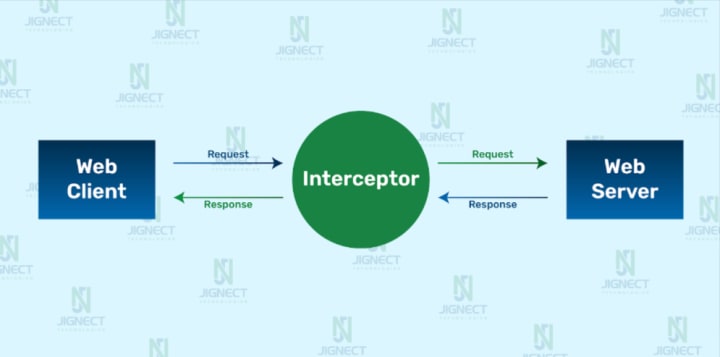
Why is Network Interception Crucial in Automation Testing?
- Isolate Application Behaviour: Test frontend logic without relying on live backend servers, which might be unstable or unavailable. Simulate Edge Cases: Easily simulate scenarios like slow network responses, server errors, or unexpected payloads.
- Improve Test Reliability: Reduce flakiness by controlling external dependencies, making tests more stable and repeatable.
- Validate API Contracts: Ensure the application sends the correct requests and processes responses as expected.
- Debugging Made Easy: Intercept requests and responses to gain visibility into what the application is communicating with the server.
Benefits of Using Cypress for API Interception
Cypress simplifies network interception with its powerful cy.intercept command, offering several advantages over traditional testing tools:
Ease of Use: Cypress provides a declarative and readable syntax for intercepting and modifying network requests.

Example: In the code above, any GET request to /api/users is intercepted, and Cypress serves a predefined JSON response from the users.json fixture file.
Real-Time Debugging: Cypress’s built-in test runner shows intercepted requests and their details in real time, allowing for quick validation and troubleshooting.
No Middleware Required: Unlike some tools that require a proxy server or middleware, Cypress integrates natively, saving setup time.
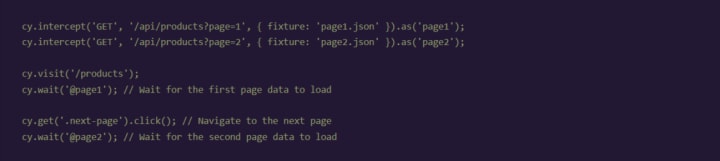
Simulating Complex Scenarios: With cy.intercept, you can mock API responses dynamically to test complex workflows like pagination or authentication.
Example – Simulating Pagination:
Comprehensive Assertions: Cypress allows assertions on requests, payloads, headers, and responses.
Example – Validating Request Payload:

Simplified Test Maintenance: With features like fixtures and aliases, you can organise test data and intercepts effectively for reuse across multiple tests.
By using network request interception with Cypress, you gain full control over your application’s external dependencies, enabling robust and comprehensive automation tests that validate both UI and API layers. It’s an essential skill for modern test automation practitioners.
The Basics of cy.intercept in Cypress
Introduction to cy.intercept command
cy.intercept is a Cypress command that allows you to intercept and modify HTTP requests and responses. It replaced the now-deprecated cy.route command in Cypress 6.0, offering enhanced functionality and better control over network traffic during tests.
This powerful feature can:
- Monitor outgoing and incoming HTTP requests.
- Stub and mock responses.
- Validate payloads, headers, and response structures.
- Simulate edge cases such as timeouts, server errors, or invalid data.
Click on this link to read more about it:
https://jignect.tech/mastering-network-interception-in-cypress-a-detailed-guide/
About the Creator
Jignect Technologies
At JigNect Technologies, we believe that software testing is an art, a science, and a passion. Our team of experts combines years of experience, cutting-edge technology.
Keep reading
More stories from Jignect Technologies and writers in Journal and other communities.
Reporting with Playwright: Make Your Test Results Shine
The key to test automation is ensuring that tests work well and provide helpful information. Test automation reports let teams check how their tests are performing, spot issues quickly, and make good choices for better results. Playwright, a powerful tool for browser automation, comes with several built-in reporters that help organize and clearly show the results of automated tests.
By Jignect Technologiesabout a year ago in Journal


Comments
There are no comments for this story
Be the first to respond and start the conversation.