
iOS 18 vs. iOS 17: My Honest Personal Experience After One Month of Daily Use
A Real-User Review: What Changed, What Improved, and What Still Needs Work

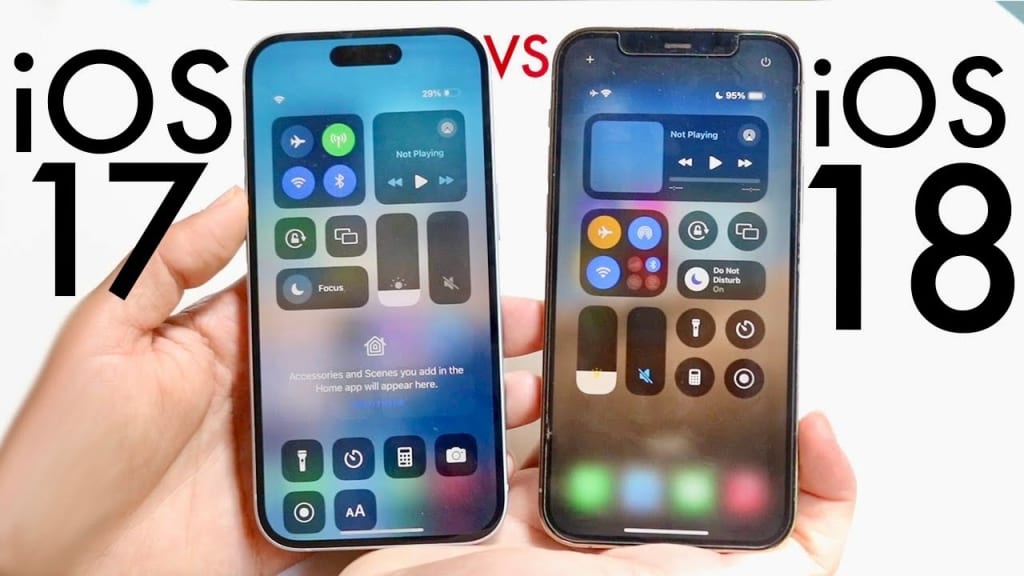
When iOS 18 officially launched, I promised myself I wouldn’t update immediately. Every year, new iOS versions arrive with exciting features—but also with bugs, battery drain, and unexpected frustrations. I was perfectly comfortable on iOS 17. It was stable, familiar, and predictable.
But after seeing friends customize their Home Screens, rave about Apple Intelligence, and brag about sending high-quality photos to Android users (finally!), curiosity won. I upgraded my iPhone 15 Pro Max to iOS 18, and after one month of daily use, here’s my honest, real-world experience.
This is not a technical benchmark review—this is exactly what it felt like switching from iOS 17 to iOS 18.
1. First Impressions: A Fresh Feel Without Losing the iOS Identity
Right after the update, iOS 18 felt familiar yet refreshing. It still “looks like iOS,” but there were noticeable changes:
The redesigned Control Center felt cleaner
The Home Screen suddenly felt free instead of locked
Animations were smoother, especially when opening apps
Siri’s voice sounded more natural
My first reaction was:
“Finally, Apple is letting us customize things without jailbreaking.”
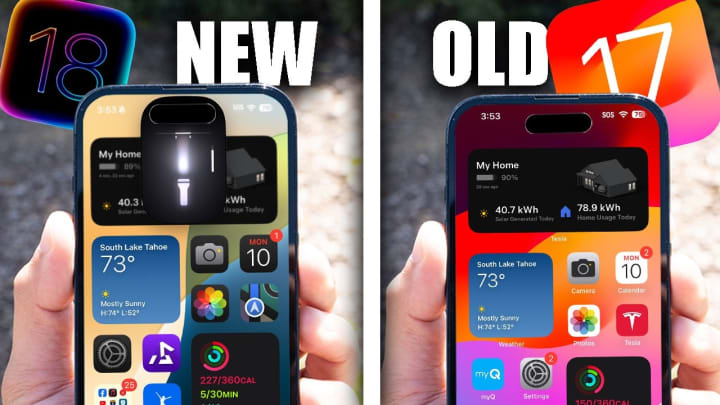
I immediately spent 30 minutes rearranging my Home Screen—something I rarely do. In iOS 17, the grid always felt too restrictive. In iOS 18, I could place icons anywhere, resize them, even adjust color tones. It felt like I had a new phone without actually buying one.
2. Messaging Upgrades: The RCS Moment That Changed Everything
I message a lot of Android users. On iOS 17, it was honestly annoying—blurry videos, low-quality images, basic group chats.
When I tested RCS messaging on iOS 18, the difference hit me immediately:
Photos were clearer
Videos didn’t turn into pixelated disasters
Typing indicators finally showed up
Group chats felt less chaotic
For the first time ever, messaging between iPhone and Android felt… normal.
The ability to schedule messages also changed my routine. I set birthday texts, reminders for colleagues, good-morning messages—things I always forgot to send at the right time. It sounds small, but it genuinely improved my daily workflow.
3. Apple Intelligence: Surprisingly Useful, Not Just a Marketing Term
Going into iOS 18, I was skeptical about AI. I assumed it would be another overhyped tool. But after one month, I can confidently say: Apple Intelligence is the biggest upgrade since the original Siri.
Here’s how I use it personally:
Rewrite & summarize text
I write emails early in the morning when my brain is half asleep. The AI “rewrite” feature polished them instantly—formal, friendly, concise, depending on what I choose. It saved me time and embarrassment.
Image Playground
I didn’t expect to use this, but it’s actually fun. I create quick visuals for work messages, birthday images, or playful icons to send to friends. It feels like Apple’s version of a lightweight AI art tool—simple but charming.
Siri with context
Siri in iOS 17 felt robotic and limited.
Siri in iOS 18 feels… actually helpful.
It understands references like:
“Find the article I was reading yesterday.”
“Summarize this message.”
“Show me photos from last Christmas.”
Not perfect, but definitely smarter.
4. The New Photos App: A Change I Didn’t Know I Needed
At first, I didn’t like the redesigned Photos app. It felt too different—almost overwhelming. But after a week of use, it clicked.
Collections automatically group my pets, trips, events
Screenshots are automatically tucked away
Scrolling feels smoother
Memories are smarter and more relevant
It genuinely helps me find old moments faster.
iOS 17’s Photos app suddenly feels outdated when I go back to older devices.
5. Performance: Surprisingly Smooth, With a Few Rough Edges
Here’s where things get interesting.
The good:
App launches are slightly faster
Animations feel more fluid
Scrolling is smoother
Dynamic Island reacts quicker
The not-so-good:
During the first week:
My phone felt warmer
Battery drained faster
A few apps crashed randomly
But after updating to 18.1, most issues improved significantly. Now, performance is more stable than iOS 17 on my device—but I still notice slightly shorter battery life on heavy days.
6. Privacy: I Love the New App Locking Feature
This might be my favorite “simple but powerful” upgrade.
In iOS 18, I can lock certain apps with Face ID—Photos, Notes, and even third-party apps. I don’t lend my phone often, but when I do, this gives me peace of mind.
The new “hidden apps” space is also a discreet touch.
7. Control Center: More Useful Than I Expected
The new multi-page Control Center feels like a mini command hub.
I added:
Shazam
Notes
Calculator
Screen recording
Home controls
Switching pages feels smooth, and customizing layouts makes everyday tasks quicker. It’s one of those features you can’t live without once you get used to it.
Final Verdict: Is iOS 18 Worth It? My Honest Conclusion
After one month using iOS 18 daily, here’s my personal conclusion:
If you enjoy customization, better messaging, and AI-powered productivity—iOS 18 feels like a real upgrade.
It breathes new life into the iPhone experience. My phone feels more personal, more helpful, and more capable.
However…
If you use an older device or value battery life more than new features, you may notice some early rough edges. iOS 17 was extremely stable, and iOS 18 still feels like it’s evolving.
For me personally?
I’m not going back to iOS 17.
The customization, RCS messaging, smarter Photos app, and Apple Intelligence genuinely improved my daily workflow. Even with minor quirks, the overall experience feels more modern and more fun.
About the Creator
The Evolution of Aerospace Connectors From Analog to Digital
The aerospace industry has undergone a remarkable transformation over the past few decades, driven by a relentless pursuit of efficiency, reliability, and innovation. One of the unsung heroes of this revolution is the humble aerospace connector a component so small yet essential to the safe and seamless operation of modern aircraft. From the early days of aviation to today’s digital, highly automated aircraft, aerospace connectors have evolved significantly. Let’s take a journey through this evolution, exploring how they’ve progressed from analog simplicity to the sophisticated digital systems that power today’s aircraft.
By Beckett Dowhan5 days ago in Journal
Wild Card Weekend Recap: What Happens Now?
I think I figured out why I love Wild Card Weekend so much. It's because it's the first playoff anything of the calendar year. The NFL season starts in the fall, and once upon a time, the champion was crowned either on or slightly before New Year's. The evolution of the NFL schedule has resulted in the playoffs starting just into the New Year, and currently, the final week of the season falls on the first weekend of the New Year, with Wild Card Weekend coming a week after that. So yes, chronologically, the NFL's Wild Card Weekend serves as the first playoff anything of the calendar year.
By Clyde E. Dawkins7 days ago in Unbalanced



Comments
There are no comments for this story
Be the first to respond and start the conversation.