
How to Translate Somali Documents to English with TransWord.AI
Somali to English with TransWord.AI
Introduction
Translating Somali documents—whether legal certificates, medical records, or handwritten notes—requires precision, cultural awareness, and the right tools. For businesses, immigrants, or humanitarian workers, errors in translation can lead to misunderstandings, legal complications, or delays. Enter TransWord.AI , an AI-powered platform that simplifies Somali-to-English translation with advanced image and voice features.
In this guide, we’ll walk you through translating Somali documents step-by-step using TransWord.AI, with tips to customize translations for your audience and context.
Why TransWord.AI Stands Out
Before diving into the steps, here’s why TransWord.AI is ideal for Somali-to-English document translation:
Image-to-Text Translation: Extract and translate text from scanned documents, photos, or handwritten notes.
Voice Translation: Convert Somali audio files (e.g., interviews, speeches) into English text or speech.
Customization: Adjust translations for tone (formal, casual), audience (children, professionals), and context (legal, medical).
Privacy-First: Data is deleted after translation, critical for sensitive documents.
Step-by-Step Guide to Translating Somali Documents
1. Prepare Your Document
For Image Translation:
Scan or photograph your document (e.g., birth certificate, medical form) in good lighting.
Supported formats: JPG, PNG, WEBP (max 20 MB).
Tip: Use a PDF scanner app for handwritten notes to reduce blur.
For Voice Translation:
Record or upload audio files (MP3, WAV, M4A) up to 25 MB.
2. Upload to TransWord.AI
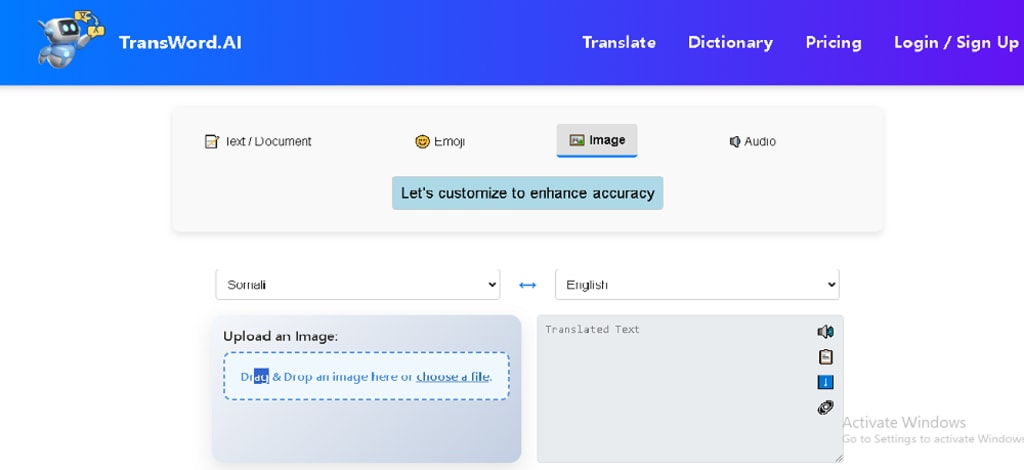
Visit TransWord.AI and select “Image Translator” or “Voice Translator.”
Drag and drop your file or click “Browse” to upload.
3. Customize Your Translation
TransWord.AI lets you tailor translations to your needs:
Choose Text Type: Select “Legal,” “Medical,” or “General” to align with your document’s context.
Set Flexibility:
Low: Literal translation (ideal for legal terms).
High: Creative adaptation (useful for idiomatic phrases).
Target Audience:
“Children” simplifies language.
“Professionals” uses formal terminology.
Special Instructions:
Specify names, cultural terms, or gender (e.g., “Translate ‘Aabo’ as ‘Father’”).
4. Process and Review
Click “Translate”—processing takes 10-30 seconds depending on file size.
Use the “Improve” tool to refine awkward phrasing or clarify ambiguous terms.
For long documents, click “Summarize” to condense key points.
5. Download or Share
Text Output: Copy the translated text or download it as a .txt or .doc file.
Audio Output (voice translation only): Convert translated text into natural English speech using 9 AI voices. Download as an MP3.
Real-World Use Cases
Legal Certificates: Translate Somali birth certificates for visa applications.
Tip: Use “Legal” text type and “Low” flexibility for accuracy.
Medical Forms: Convert patient records for international clinics.
Customize the audience to “Medical Professionals” for technical terms.
Handwritten Notes: Decipher personal letters or historical documents.
Enable “Handwriting Mode” in settings for better OCR accuracy.
FAQs
Q: Can TransWord.AI handle Somali dialects like Maay or Benaadir?
A: Yes, but specify the dialect in “Special Instructions” for best results.
Q: Is it safe for confidential documents?
A: Yes—TransWord.AI deletes data post-translation and doesn’t store history.
Q: How accurate is it compared to human translators?
A: It’s 90%+ accurate for standard texts, but combined with human review for legal/medical critical docs.
Final Tips
Use the “Improve” tool liberally to polish translations.
For complex documents, split them into smaller sections to stay under free tier limits.
Explore TransWord.AI’s “Speech-to-Speech” feature for multilingual podcasts or interviews.
About the Creator
Keep reading
More stories from writers in Journal and other communities.


Comments
There are no comments for this story
Be the first to respond and start the conversation.